
Produkt ponadview
The Clarion JM-Carry On is a portable speaker designed for versatile audio playback. It features a wired microphone input, multi-color light effects, and an in-built battery for on-the-go use. Its compact and portable design allows for easy transport and setup in various environments.

Image: Clarion JM-Carry On Portable Bluetooth Speaker shown with its wired microphone.
Wideo: Ponadview of the Clarion Portable Bluetooth Speaker, highlighting its features and audio performance.
Zawartość opakowania
Proszę zaznaczyć pole dotyczące następujących elementów:
- Clarion JM-Carry On Portable Bluetooth Speaker
- Mikrofon przewodowy
- Kabel ładujący
Konfiguracja początkowa
- Ładowanie głośnika: Connect the provided charging cable to the speaker's charging port and a suitable power source. The LED indicator will show charging status. Ensure the speaker is fully charged before first use for optimal battery life.
- Włączanie/wyłączanie: Locate the power switch on the speaker. Slide it to the 'ON' position to power on the device. Slide it to 'OFF' to power off.
- Parowanie Bluetooth:
- Włącz głośnik. Automatycznie przejdzie on w tryb parowania Bluetooth, co będzie sygnalizowane migającą diodą LED.
- Na smartfonie lub tablecie włącz Bluetooth i wyszukaj dostępne urządzenia.
- Select "Clarion JM-Carry On" from the list. A confirmation tone will sound upon successful pairing.
- Connecting Wired Microphone: Insert the wired microphone's plug into the designated microphone input jack on the speaker.
Przewodnik po operacjach
- Wybór trybu: Use the 'Mode' button to switch between Bluetooth (BT), FM Radio, USB, and AUX input modes.
- Tryb Bluetooth: Once paired, audio from your connected device will play through the speaker. Use your device or the speaker's controls for volume and track navigation.
- Tryb radia FM: In FM mode, press and hold the 'Play/Pause' button to auto-scan and save available radio stations. Use the 'Next/Previous' buttons to navigate through saved stations.
- Tryb USB/AUX: Insert a USB drive into the USB port for MP3 playback or connect an external audio device via the AUX input using a 3.5mm audio cable.
- TWS (True Wireless Stereo) Functionality: To connect two JM-Carry On speakers for stereo sound, ensure both speakers are in Bluetooth mode and not connected to any device. Press and hold the TWS button on one speaker until you hear a pairing tone. The two speakers will connect, and then you can pair your device to the primary speaker.
- Kontrola dźwięku: Adjust the master volume using the main rotary knob. Separate controls may be available for microphone volume and echo effects.
- Efekty świetlne LED: The speaker features multi-color LED light effects. Use the dedicated 'Light' button to cycle through different light modes or turn them off.
Pielęgnacja i konserwacja
- Czyszczenie: Do czyszczenia obudowy głośnika należy używać miękkiej, suchej ściereczki. Nie należy używać środków czyszczących o właściwościach ściernych ani rozpuszczalników.
- Składowanie: Przechowuj głośnik w chłodnym, suchym miejscu, z dala od bezpośredniego światła słonecznego i ekstremalnych temperatur.
- Pielęgnacja baterii: Aby przedłużyć żywotność baterii, unikaj częstego całkowitego rozładowywania. Ładuj głośnik regularnie, nawet jeśli nie jest używany przez dłuższy czas.
- Wodoodporność: Ten głośnik nie jest wodoodporny. Unikaj narażenia na działanie wody i wysokiej wilgotności.
Podręcznik rozwiązywania problemów
| Problem | Rozwiązanie |
|---|---|
| Głośnik nie włącza się. | Upewnij się, że akumulator jest naładowany. Podłącz kabel ładujący i spróbuj ponownie. Sprawdź położenie włącznika zasilania. |
| Brak dźwięku z głośnika. | Check the volume level on both the speaker and the connected device. Ensure the correct input mode (BT, AUX, USB) is selected. |
| Parowanie Bluetooth nie powiodło się. | Ensure the speaker is in pairing mode. Turn off and on Bluetooth on your device. Move the device closer to the speaker. Disconnect from other Bluetooth devices. |
| Mikrofon nie działa. | Ensure the microphone is securely plugged into the correct jack. Check the microphone volume control on the speaker. |
| Odbiór radia FM jest słaby. | Adjust the speaker's position. Extend any external antenna if available. |
Dane techniczne
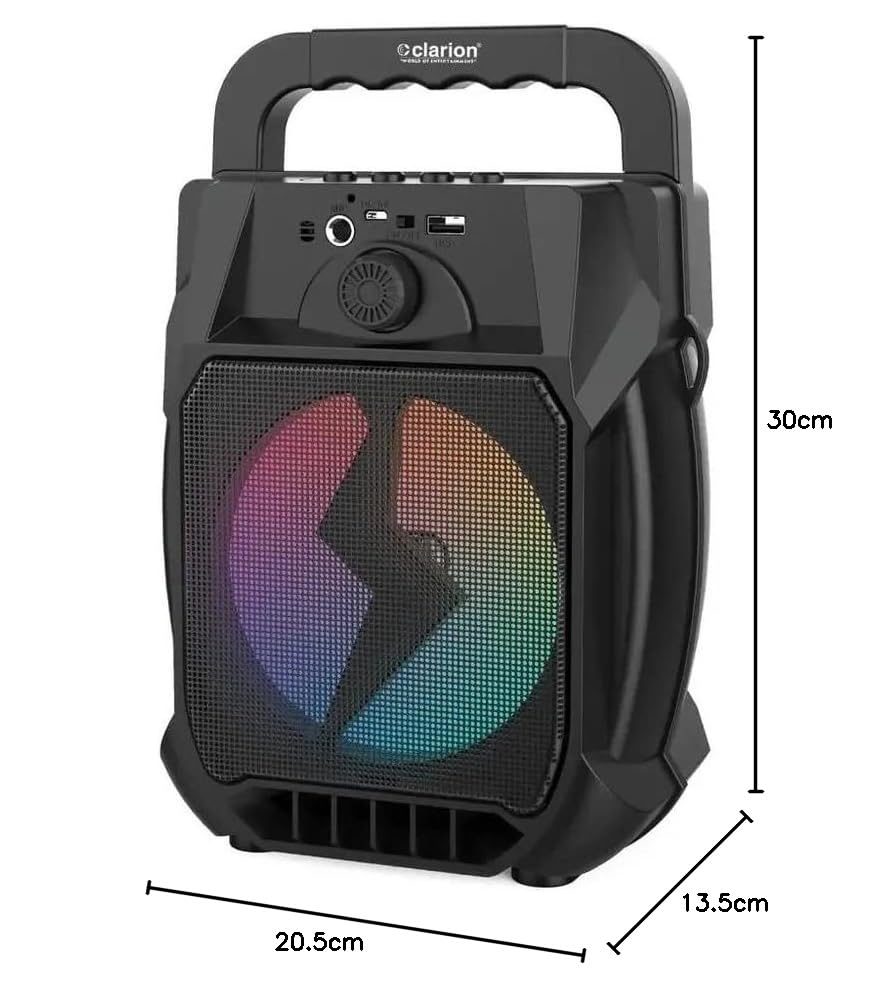
Image: Clarion JM-Carry On Portable Bluetooth Speaker with its dimensions indicated.
- Marka: Clarion (Generic)
- Nazwa modelu: JM-Carry On
- Maksymalna moc wyjściowa głośnika: 20 W RMS
- Technologia łączności: Pomocniczy, Bluetooth, USB
- Tryb wyjścia audio: Stereofoniczny
- Typ montażu: Stały podłogowe
- Typ głośnika: Satelita
- Cechy produktu: Built-In Microphone, Radio, Subwoofer, Multi-color Light Effect, Sound Controller
- Metoda sterowania: Dotykać
- Woofer Driver Diameter: 6.5 cali
- Średnia żywotność baterii: 3-4 godziny
- Pojemność baterii: 1.2 Amp Godziny (3.7 V)
- Wymiary przedmiotu (gł. x szer. x wys.): 13.5 x 20.5 x 30 centymetrów
- Zgodne urządzenia: Smartfon, Tablet
- Źródło zasilania: Zasilany bateryjnie
Gwarancja i obsługa klienta
This Clarion JM-Carry On Portable Bluetooth Speaker comes with a 1-letnia gwarancja on the speaker unit from the date of purchase. Please retain your purchase receipt as proof of warranty.
For any technical assistance, troubleshooting, or warranty claims, please contact Clarion Computers customer support. Refer to your purchase documentation for specific contact details or visit the official Clarion Computers webwitryna z informacjami pomocniczymi.
Note: The warranty typically covers manufacturing defects and does not cover damage caused by misuse, accidents, unauthorized modifications, or normal wear and tear.