
1. Wprowadzenie
This manual provides essential information for the proper setup, operation, and maintenance of your X8+ Ultra Smartwatch. Please read it thoroughly before using the device to ensure optimal performance and longevity.
2. Zawartość opakowania
Sprawdź, czy w przesyłce znajdują się wszystkie elementy:
- X8+ Ultra Smartwatch (1 unit)
- Wireless Charger Cable (1 unit)
- Instrukcja obsługi (1 szt.)
- Oryginalne pudełko detaliczne (1 sztuka)

Image: The X8+ Ultra Smartwatch, its wireless charging cable, and the instruction manual are displayed alongside the product packaging.
3. Specyfikacje
| Funkcja | Szczegół |
|---|---|
| Rozmiar ekranu | 2.08 cali |
| Rozdzielczość ekranu | 240*296-TFT |
| Odporność na wodę | IP67 (odporność na wodę i kurz) |
| Aplikacja towarzysząca | Wearfit Pro |
| Wymagania systemowe | Android 5.0+ / iOS 10.0+ |
| Główny Chip | HS6621-PG |
| Pamięć | 128MB |
| Wersja Bluetooth | 5.2 (AB5376A2) |
| Pojemność baterii | 300mAh |
| Metoda ładowania | Kabel do ładowarki bezprzewodowej |
| Technologia łączności | USB, Bluetooth |
| GPS | Brak wbudowanego GPS-u |
| Wymiary produktu | 5 x 5 x 2 cm; 100 gramów |
4. Konfiguracja
4.1 Ładowanie smartwatcha
Before initial use, fully charge your smartwatch. Connect the wireless charger cable to a USB power adapter (not included) and place the smartwatch on the charging pad. The watch screen will indicate charging status.
4.2 Installing the Wearfit Pro App
- Scan the QR code provided in the manual or on the watch packaging, or search for "Wearfit Pro" in your smartphone's app store (Google Play Store for Android, Apple App Store for iOS).
- Pobierz i zainstaluj aplikację.
- Otwórz aplikację i postępuj zgodnie z instrukcjami wyświetlanymi na ekranie, aby utworzyć konto lub się zalogować.
4.3 Parowanie ze smartfonem
- Upewnij się, że Bluetooth jest włączony w Twoim smartfonie.
- Open the Wearfit Pro app.
- Navigate to the device section within the app and select "Add Device" or a similar option.
- The app will search for available devices. Select "X8+ Ultra" from the list.
- Potwierdź prośbę o sparowanie na smartfonie i smartwatchu.
5. Instrukcja obsługi
5.1 Podstawowa nawigacja
- Ekran dotykowy: Przesuwaj w lewo, w prawo, w górę lub w dół, aby poruszać się po menu i funkcjach. Dotknij, aby wybrać.
- Przycisk boczny: Naciśnij, aby wrócić do ekranu głównego lub wybudzić urządzenie. Naciśnij i przytrzymaj, aby wyświetlić opcje zasilania.
- Cyfrowa korona: Rotate to scroll through lists or zoom in/out. Press to access the app menu.
- Zawsze włączony wyświetlacz: The screen can be configured to show time and basic information continuously.
- Podnieś, aby się obudzić: Unieś nadgarstek, aby ekran włączył się automatycznie.
Połączenia Bluetooth 5.2
Once paired, you can make and receive calls directly from your smartwatch.
- Odbieranie połączeń: Swipe to answer incoming calls.
- Wybieranie: Access the dialer or contacts list on the watch to initiate calls.
- Zapisy rozmów: Syncs with your phone's call history.

Image: The smartwatch screen shows a contact list on the left and an incoming call notification on the right, demonstrating Bluetooth calling functionality.
5.3 Powiadomienia
Receive message and app notifications directly on your watch.
- Wiadomość push: New notifications appear as pop-up windows. Swipe to dismiss or click to view bliższe dane.
- Powiadomienia aplikacji: Supports notifications from apps like WeChat, Facebook, WhatsApp.

Image: The smartwatch screen shows a list of incoming messages from various applications.
5.4 Asystent głosowy AI
Utilize the integrated AI voice assistant for hands-free operations.
- Aktywacja: Wake the assistant using a designated wake word or button press.
- Polecenia: Use voice commands for tasks such as setting alarms, making calls, playing music, or checking messages.
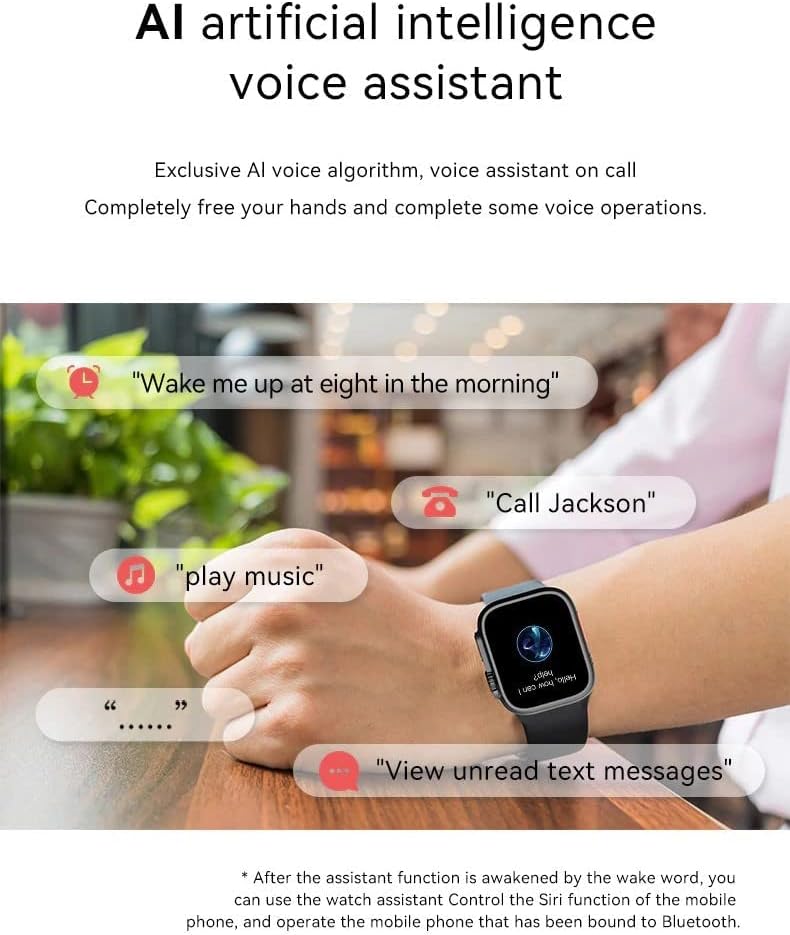
Image: A person wearing the smartwatch is shown with speech bubbles indicating various voice commands for the AI assistant.
5.5 Odtwarzanie muzyki
Steruj odtwarzaniem muzyki na podłączonym smartfonie.
- Zdalne sterowanie: Play, pause, skip tracks, and adjust volume directly from the watch.
- Uninterrupted Music: Listen to music via your watch while exercising or on the go.

Image: The smartwatch screen shows music playback controls, with a smartphone displaying a music player interface in the foreground.
5.6 Remote Video Control
Control short video applications on your smartphone.
- Funkcjonalność: Switch videos and 'like' content remotely.

Image: The smartwatch displays a remote control interface for short videos, positioned next to a smartphone playing a video.
5.7 Tarcze zegarka
Customize your smartwatch with various watch faces.
- Wybór: Choose from a variety of pre-installed watch faces or download more via the Wearfit Pro app.

Image: The X8+ Ultra Smartwatch is shown with several different watch face designs surrounding it, highlighting customization options.
6. Monitorowanie stanu zdrowia
Smartwatch oferuje różne funkcje monitorowania stanu zdrowia:
- Monitor pracy serca: Mierzy tętno w ciągu dnia.
- Tlen we krwi (SpO2): Szacuje poziom saturacji krwi tlenem.
- Ciśnienie krwi: Provides an estimate of blood pressure.
- EKG: Electrocardiogram function for heart health monitoring.
- Monitor snu: Monitoruje wzorce i jakość snu.
- Temperatura ciała: Monitoruje temperaturę ciała.
- Trening oddechowy: Ćwiczenia oddechowe wspomagające relaksację.
- Przypomnienia dotyczące zdrowia: Includes sedentary reminders, drink water reminders, medication reminders, exercise reminders, and reading reminders.

Image: The smartwatch screen displays various health metrics, including heart rate, temperature, and daily steps count.
7. Tryby sportowe
Track your physical activity with various sports modes:
- Codzienna aktywność: Rejestruje kroki, spalone kalorie i przebyty dystans.
- Sporty halowe: Running, cycling, sit-ups, push-ups, free movement.
- Sporty na świeżym powietrzu: Walking, mountaineering, and other outdoor activities.
8. Inne funkcje
- Kontrola dostępu NFC: Use your watch for NFC access (check compatibility with your system).
- Kalkulator: Podstawowe funkcje kalkulatora.
- Przypomnienie o pogodzie: Podaje aktualne informacje pogodowe.
- Budzik: Ustaw alarmy i przypomnienia.
- Stoper: Funkcja pomiaru czasu.
- Znajdź mój zegarek: Locate your watch if misplaced (via the app).
- Zdalne sterowanie kamerą: Shake the watch to take photos on your phone.
- Zawody sportowe: Includes simple game functions.
- Obsługa wielu języków: Supports Simplified Chinese, English, Persian, Arabic, French, German, Spanish, Portuguese, Russian, Thai, Polish, Italian, Traditional Chinese, Japanese, Czech, Turkish, Greek, Latin, Vietnamese, Danish.
9. Rozwiązywanie Problemów
9.1 Zegarek się nie włącza
Upewnij się, że zegarek jest w pełni naładowany. Jeśli nadal się nie włącza, spróbuj podłączyć go do ładowarki na co najmniej 30 minut.
9.2 Nie można sparować z telefonem
- Sprawdź, czy Bluetooth jest włączony w telefonie i zegarku.
- Upewnij się, że zegarek znajduje się w zasięgu Bluetooth Twojego telefonu.
- Uruchom ponownie telefon i smartwatch.
- Clear the Bluetooth cache on your phone or forget the device in Bluetooth settings, then try pairing again.
- Ensure the Wearfit Pro app has necessary permissions.
9.3 Niedokładne dane dotyczące zdrowia
For best results, ensure the watch is worn snugly on your wrist. Avoid excessive movement during measurements. Note that the health monitoring features are for reference only and should not be used for medical diagnosis.
9.4 Powiadomienia nieotrzymane
- Check if the watch is properly connected to the Wearfit Pro app.
- Ensure notification permissions are granted to the Wearfit Pro app in your phone's settings.
- Verify that app notifications are enabled within the Wearfit Pro app settings for specific applications.
10. Konserwacja
- Czyszczenie: Regularnie czyść zegarek i pasek miękką, suchą ściereczką. W razie potrzeby użyj lekko zwilżonej ściereczki.amp ściereczką i dokładnie osuszyć.
- Wodoodporność: The watch is IP67 water and dust resistant. This means it can withstand splashes and brief immersion. Avoid hot water, steam, or prolonged submersion. Do not press buttons underwater.
- Ładowanie: Use only the provided wireless charger cable. Avoid using damaged cables or chargers.
- Składowanie: Przechowuj zegarek w chłodnym i suchym miejscu, gdy nie jest używany.
- Unikaj substancji chemicznych: Do not expose the watch to harsh chemicals, detergents, or solvents, as these can damage the materials.
11. Gwarancja i wsparcie
Aby uzyskać informacje o gwarancji i obsłudze klienta, zapoznaj się z dokumentacją dołączoną do produktu lub skontaktuj się ze sprzedawcą. Zachowaj dowód zakupu na wypadek roszczeń gwarancyjnych.