
1. Wprowadzenie
Thank you for choosing the XTRONS TIX125L 10.1-inch Android 12 Car Stereo. This advanced multimedia system features an Octa-core processor, 8GB RAM, 128GB ROM, built-in GPS, Wi-Fi, 4G connectivity, Apple CarPlay, Android Auto, and a Digital Sound Processor (DSP). Its rotatable QLED display offers a versatile and intuitive user experience. This manual provides essential information for installation, operation, maintenance, and troubleshooting to ensure optimal performance and user satisfaction.
2. Informacje dotyczące bezpieczeństwa
- Zalecana profesjonalna instalacja: Ze względu na złożoność układów elektrycznych w samochodach, zaleca się zlecenie montażu profesjonalnemu instalatorowi, aby zapobiec uszkodzeniu urządzenia lub pojazdu.
- Zasilanie: Upewnij się, że urządzenie jest podłączone do źródła zasilania 12 V DC z ujemnym biegunem uziemienia. Nieprawidłowa głośnośćtagmoże spowodować uszkodzenie.
- Okablowanie: Follow all wiring diagrams carefully. Improper wiring can lead to malfunctions, electrical shorts, or fire.
- Bezpieczeństwo jazdy: Nie używaj urządzenia w sposób rozpraszający Cię podczas jazdy. Zawsze priorytetowo traktuj bezpieczeństwo na drodze.
- Temperatura: Unikaj wystawiania urządzenia na działanie ekstremalnych temperatur lub bezpośredniego światła słonecznego przez dłuższy czas.
- Wilgoć: Utrzymuj urządzenie w suchym miejscu. Narażenie na wilgoć może spowodować uszkodzenie.
- Wentylacja: Aby zapobiec przegrzaniu, należy zapewnić odpowiednią wentylację wokół urządzenia.
3. Zawartość opakowania
Proszę sprawdzić zawartość przesyłki na poniższej liście:
- XTRONS TIX125L Main Head Unit
- Wiązka przewodów zasilających
- RCA Output/Input Cables
- Antena GPS
- Kable USB (x2)
- Antena 4G LTE
- Mounting Brackets (x2 pairs)
- Śruby
- Mikrofon zewnętrzny
- Instrukcja obsługi (ten dokument)

Rysunek 3.1: Dołączone akcesoria i jednostka główna.
4. Konfiguracja i instalacja
This section provides general guidelines for installing your XTRONS TIX125L car stereo. For specific vehicle models, additional adapters or professional assistance may be required.
4.1 Czynności przed instalacją
- Odłącz akumulator: Przed rozpoczęciem jazdy należy odłączyć ujemny zacisk akumulatora pojazdu, aby zapobiec zwarciu elektrycznemu.
- Usuń starą jednostkę: Ostrożnie wyjmij istniejące radio samochodowe z deski rozdzielczej.
- Sprawdź okablowanie: Identify the vehicle's wiring harness. You may need a vehicle-specific adapter harness (not included) to connect to the XTRONS unit.
4.2 połączeń przewodów
- Uprząż mocy: Connect the provided power wiring harness to the unit and then to your vehicle's wiring. Ensure all connections (power, ground, ACC, illumination) are correct.
- Antena GPS: Podłącz antenę GPS i zamontuj ją w miejscu z wolnym dostępem do światła. view nieba (np. na desce rozdzielczej lub pod przednią szybą).
- 4G LTE Antenna: Connect the 4G LTE antenna for cellular data connectivity.
- Antena Wi-Fi: The unit has a built-in Wi-Fi module. Ensure no obstructions block its signal.
- Kable USB: Route the USB cables to an accessible location (e.g., glove compartment) for connecting USB drives or smartphones.
- Mikrofon zewnętrzny: Connect the external microphone for improved call quality during Bluetooth hands-free operation. Position it near the driver.
- Kable RCA: Podłącz kable RCA do urządzeń zewnętrznych ampwzmacniacze, subwoofery lub dodatkowe wejścia/wyjścia wideo w razie potrzeby.
- Opcjonalne połączenia: Connect optional accessories such as a rear-view camera, DVR camera, DAB+ box, or TPMS kit according to their respective manuals.
4.3 Montaż urządzenia
- Zabezpiecz jednostkę główną: Use the provided mounting brackets and screws to secure the main unit into the dashboard opening.
- Dostosuj wyświetlacz: The 10.1-inch display is rotatable and adjustable. Position it for optimal viewkąt nachylenia i dostępność.
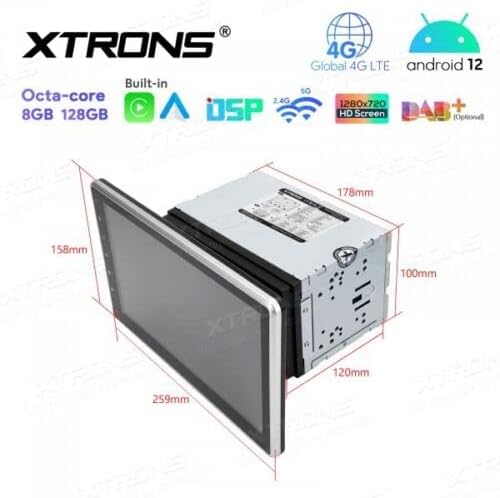
Figure 4.1: Unit dimensions for installation planning.
4.4 Po instalacji
- Podłącz ponownie akumulator: Podłącz ponownie zacisk ujemny akumulatora pojazdu.
- Pierwsze włączenie: Turn on the vehicle ignition and power on the stereo.
- Funkcje testowe: Verify all functions, including audio, radio, GPS, Bluetooth, and touchscreen responsiveness.
5. Instrukcja obsługi
This section details the operation of the XTRONS TIX125L car stereo's various features.
5.1 Podstawowa obsługa
- Włączanie/wyłączanie: Naciśnij i przytrzymaj przycisk zasilania (zazwyczaj na panelu przednim), aby włączyć lub wyłączyć urządzenie. Krótkie naciśnięcie zazwyczaj wycisza/włącza dźwięk.
- Interfejs ekranu dotykowego: Navigate the Android 12 interface by tapping, swiping, and pinching on the capacitive touchscreen.
- Regulacja głośności: Dostosuj głośność za pomocą przycisków fizycznych lub elementów sterujących na ekranie.
- Ekran główny: The main screen provides access to frequently used applications and widgets.

Figure 5.1: Main user interface with navigation and media playback.
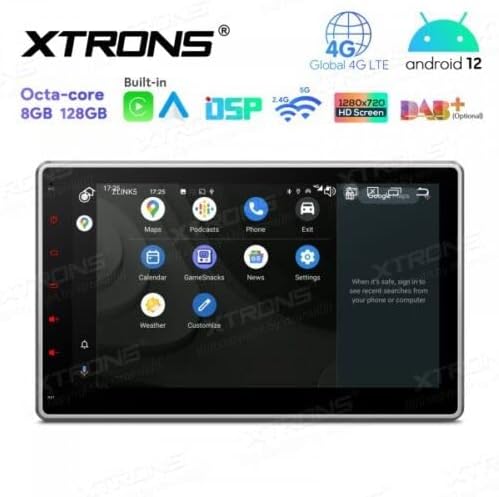
Figure 5.2: Android app drawer with various applications.
5.2 Nawigacja GPS
The unit comes with a built-in GPS module. You can use pre-installed navigation apps or download others from the Google Play Store.
- Antena GPS: Upewnij się, że antena GPS jest prawidłowo podłączona i ma czysty zasięg. view nieba w celu dokładnego określenia pozycji.
- Aktualizacje mapy: Keep your navigation maps updated for the best routing experience.
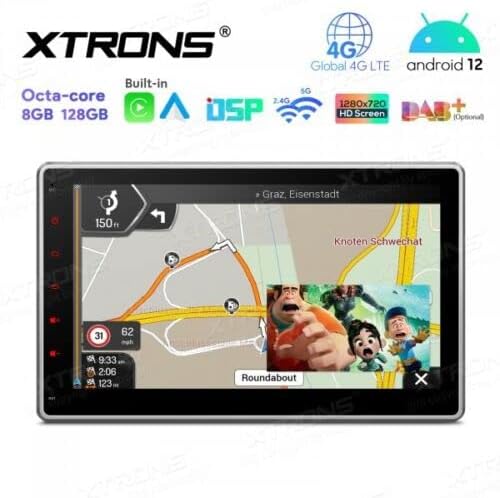
Figure 5.3: Navigation interface with split-screen functionality.
5.3 Bluetooth 5.0
Podłącz swój smartfon przez Bluetooth, aby wykonywać połączenia w trybie głośnomówiącym i przesyłać strumieniowo muzykę.
- Łączenie w pary: Go to Bluetooth settings on the unit and your phone. Szukaj available devices and select the XTRONS unit to pair.
- Rozmowy bez użycia rąk: Make and receive calls directly from the unit's screen. Use the external microphone for clear voice transmission.
- Strumieniowe przesyłanie dźwięku: Odtwarzaj muzykę z telefonu przez głośniki samochodowego radia.
5.4 Łączność Wi-Fi i 4G
Access the internet and online services using Wi-Fi or a 4G SIM card.
- Wi-Fi: Connect to a Wi-Fi hotspot (e.g., from your phone or home network) via the Wi-Fi settings.
- 4G LTE: Insert a compatible 4G SIM card into the designated slot (if available) and connect the 4G antenna for mobile data access.
5.5 Apple CarPlay / Android Auto
Integrate your smartphone for a safer and smarter driving experience.
- Połączenie: Connect your iPhone or Android phone via USB or wirelessly (if supported by your phone and the unit's software).
- Cechy: Access navigation, music, messages, and other compatible apps directly on the stereo display.

Figure 5.4: Apple CarPlay / Android Auto interface.
5.6 Cyfrowy procesor dźwięku (DSP)
Dostosuj swoje wrażenia dźwiękowe dzięki wbudowanemu procesorowi DSP.
- Korektor: Adjust frequency bands to fine-tune the sound output to your preference.
- Efekty dźwiękowe: Poznaj różne ustawienia dźwięku i efekty.
5.7 Kopiowanie ekranu
Display your smartphone's screen directly on the car stereo.
- Połączenie: Follow the instructions within the Screen Mirroring app on the unit to connect your phone (usually via Wi-Fi or USB).
5.8 Odtwarzanie USB/SD
Odtwarzaj media files from USB drives or SD cards.
- Porty USB: Connect USB flash drives (up to 128GB) to the provided USB ports.
- Gniazdo karty SD: Insert an SD card (up to 64GB) into the designated slot.
- Odtwarzacz multimedialny: Use the built-in media player app to browse and play audio or video files.
5.9 Radio (FM/AM, DAB+)
Słuchaj swoich ulubionych stacji radiowych.
- FM/AM: Use the radio app to scan for stations, save presets, and switch between FM and AM bands.
- DAB+ (nadawanie dźwięku cyfrowego): This feature requires an optional DAB+ receiver box (not included). Once connected, you can enjoy higher quality digital radio broadcasts.
5.10 Elementy sterujące na kierownicy
Control the stereo using your vehicle's steering wheel buttons.
- Konfiguracja: This feature typically requires a vehicle-specific CAN-Bus adapter (not included) and configuration within the unit's settings.
5.11 Rear Camera and DVR Input
Enhance driving safety with optional camera systems.
- Kamera tylna: Connect an optional rear-view camera. The display will automatically switch to the camera view gdy pojazd jest na biegu wstecznym.
- DVR Camera: Connect an optional DVR (Digital Video Recorder) camera to record your driving.
5.12 Wsparcie TPMS
Monitor your tire pressure with an optional TPMS (Tire Pressure Monitoring System) kit.
- Połączenie: This feature requires an optional TPMS kit (not included). Once connected, tire pressure data will be displayed on the unit.
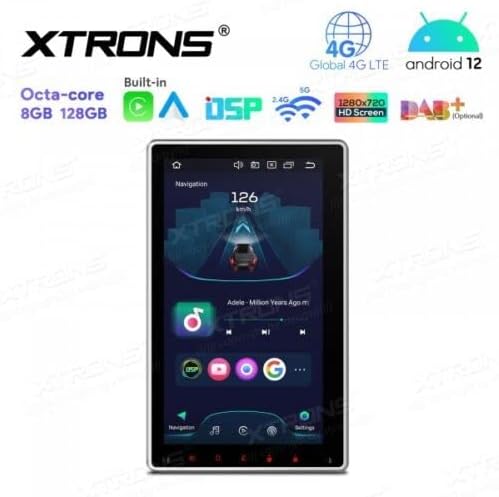
Figure 5.5: Vertical screen orientation for navigation.
6. Konserwacja
Właściwa konserwacja zapewnia długowieczność i optymalną pracę radia samochodowego.
- Czyszczenie ekranu: Delikatnie przetrzyj ekran dotykowy miękką, niepozostawiającą włókien ściereczką. W przypadku uporczywych plam delikatnie przetrzyj.ampPrzetrzyj ściereczkę wodą lub środkiem do czyszczenia ekranów. Unikaj silnych środków chemicznych.
- Ogólne sprzątanie: Keep the unit and surrounding area free from dust and debris.
- Aktualizacje oprogramowania: Okresowo sprawdzaj oficjalne informacje XTRONS website for available software or firmware updates to improve performance and add new features. Follow update instructions carefully.
7. Rozwiązywanie Problemów
If you encounter issues with your XTRONS TIX125L, refer to the following common problems and solutions.
| Problem | Możliwa przyczyna | Rozwiązanie |
|---|---|---|
| Urządzenie nie włącza się. | Brak podłączenia do prądu, przepalony bezpiecznik, nieprawidłowe okablowanie. | Check power wiring, vehicle fuse box, and the unit's fuse. Ensure battery is connected. |
| Brak dźwięku. | Volume muted, incorrect audio source, speaker wiring issues. | Check volume level, ensure correct audio source is selected. Verify speaker connections. |
| Poor GPS signal or no signal. | GPS antenna not connected, antenna obstructed, faulty antenna. | Ensure GPS antenna is securely connected and mounted in a clear location. Replace antenna if necessary. |
| Problemy z połączeniem Bluetooth. | Urządzenie nie jest w trybie parowania, występują zakłócenia, proces parowania jest nieprawidłowy. | Upewnij się, że oba urządzenia są w trybie parowania. Usuń poprzednie parowania i spróbuj ponownie. Zbliż się do urządzenia. |
| Ekran dotykowy nie reaguje. | Software glitch, screen dirty, hardware issue. | Restart the unit. Clean the screen. If problem persists, contact support. |
| Apps crash or freeze. | Insufficient memory, software bug, incompatible app. | Close background apps. Clear app cache. Update software if available. Uninstall and reinstall problematic apps. |
If the problem persists after trying these solutions, please contact XTRONS customer support for further assistance.
8. Specyfikacje
Below are the technical specifications for the XTRONS TIX125L car stereo:
- Marka: XTRONY
- Model: TIX125L
- Rozmiar ekranu: 10.1 cali
- Typ wyświetlacza: QLED, Capacitive Touchscreen, LED
- System operacyjny: Android 12
- Edytor: Ośmiordzeniowy
- BARAN: 8 GB
- ROM: 128GB (Expandable via USB/SD)
- Łączność: Bluetooth 5.0, USB, Wi-Fi, 4G LTE (SIM card reader included)
- Nawigacja: Built-in GPS (Supports various map types)
- Cechy szczególne: Apple CarPlay, Android Auto, Digital Sound Processor (DSP), Screen Mirroring, Rotatable Display, Equalizer
- Obsługiwana pamięć masowa: USB (up to 128GB), SD (up to 64GB)
- Metoda sterowania: Ekran dotykowy
- Typ montażu: W desce rozdzielczej
- Kompatybilny typ pojazdu: Motorcycle (Note: Product description states 'Motocicletta', but typically these units are for cars. Please verify compatibility with your specific vehicle.)
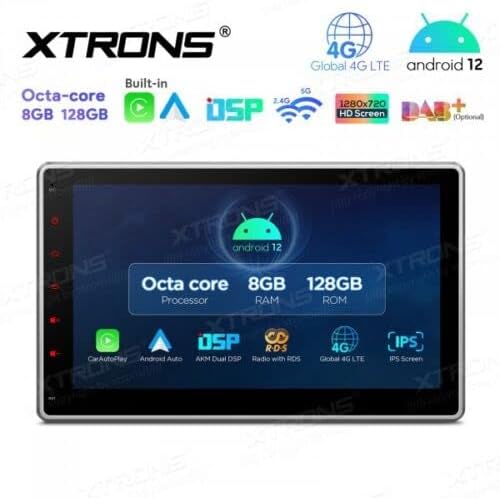
Rysunek 8.1: Główne cechy i specyfikacjeview.
9. Gwarancja i wsparcie
For warranty information, please refer to the warranty card included with your product or visit the official XTRONS website. If you require technical assistance, have questions about installation, or need troubleshooting beyond what is covered in this manual, please contact XTRONS customer support. Have your product model number (TIX125L) and purchase details ready when contacting support.
XTRONS Official Webstrona: www.xtrons.com (Please verify the exact support contact details on their webteren.)