
1. Wprowadzenie
Thank you for choosing the DELTACO Gaming PM80 Wireless Optical Gaming Mouse. This manual provides essential information for setting up, operating, and maintaining your new gaming mouse. Please read these instructions carefully before use to ensure optimal performance and longevity of your device.
2. Zawartość opakowania
- DELTACO Gaming PM80 Wireless Optical Gaming Mouse
- Bezprzewodowy odbiornik USB
- Kabel ładujący USB
- Instrukcja obsługi
3. Koniec produktuview
The DELTACO Gaming PM80 is a high-performance wireless optical gaming mouse designed for precision and comfort. It features 7 programmable buttons, adjustable DPI up to 4800, and customizable illumination. The mouse is rechargeable, ensuring uninterrupted gaming sessions.
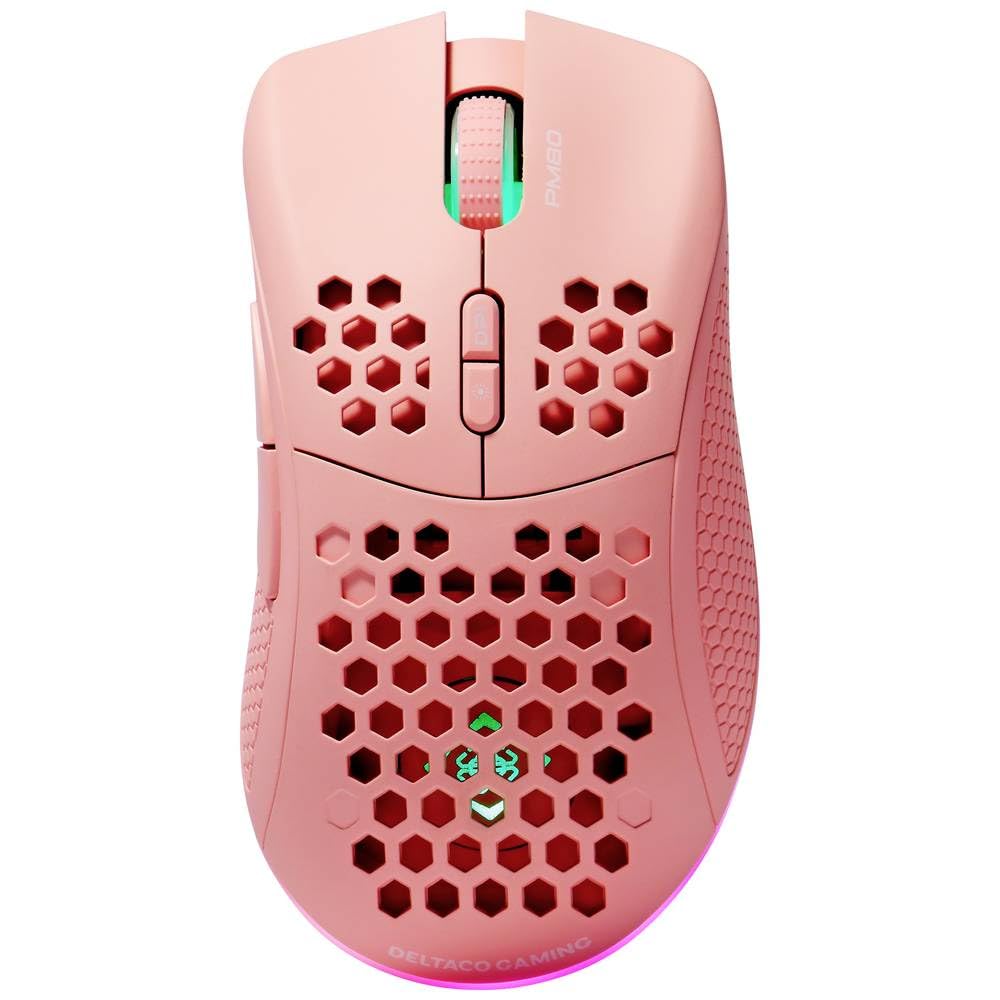
Image: DELTACO Gaming PM80 Wireless Optical Gaming Mouse. This image displays the mouse from a top-down perspective, highlighting its ergonomic design, the central scroll wheel, and the arrangement of its seven buttons.
Funkcje przycisków:
- Lewy przycisk myszy: Standardowa funkcja kliknięcia podstawowego.
- Przycisk prawego przycisku myszy: Standardowa funkcja dodatkowego kliknięcia.
- Kółko przewijania: Przewija w górę/w dół i działa jak środkowy przycisk.
- Przycisk cyklu DPI: Changes the mouse's sensitivity (DPI).
- Przycisk do przodu: Nawiguje do przodu w web przeglądarki lub file odkrywcy.
- Przycisk Wstecz: Porusza się wstecz web przeglądarki lub file odkrywcy.
- Illumination Mode Button: Cycles through different lighting effects or turns illumination on/off.
4. Konfiguracja
4.1. Ładowanie myszy
- Connect the small end of the USB charging cable to the charging port on the front of the mouse.
- Connect the larger end of the USB charging cable to an available USB port on your computer or a USB wall adapter.
- The mouse's illumination will indicate charging status (e.g., breathing effect, specific color). A full charge typically takes 2-3 hours.
- Once fully charged, the illumination may change or turn off. Disconnect the charging cable.
4.2. Podłączanie bezprzewodowego odbiornika USB
- Znajdź odbiornik bezprzewodowy USB, zwykle przechowywany w schowku na spodzie myszy.
- Wyjmij odbiornik z gniazda, w którym go umieszczono.
- Podłącz odbiornik bezprzewodowy USB do wolnego portu USB w komputerze.
- Twój komputer powinien automatycznie wykryć i zainstalować niezbędne sterowniki. Może to potrwać chwilę.
4.3. Włączanie/wyłączanie zasilania
- Znajdź wyłącznik zasilania na spodzie myszy.
- Slide the switch to the 'ON' position to power on the mouse. The illumination will light up.
- To conserve battery life, slide the switch to the 'OFF' position when the mouse is not in use for extended periods.
5. Instrukcja obsługi
5.1. Podstawowe użytkowanie
Once connected and powered on, the mouse is ready for use. Move the mouse on a flat surface to control the cursor on your screen. Use the left and right click buttons for primary and secondary actions, and the scroll wheel for navigation.
5.2. Regulacja DPI
The DPI (Dots Per Inch) setting determines the sensitivity of your mouse. The DELTACO Gaming PM80 offers multiple DPI levels up to 4800 DPI. To adjust the DPI:
- Naciśnij Przycisk cyklu DPI (typically located behind the scroll wheel).
- Each press will cycle through the available DPI settings. The mouse's illumination may change color or flash to indicate the current DPI level.
- Select the DPI setting that best suits your preference for gaming or general use.
5.3. Sterowanie oświetleniem
The DELTACO Gaming PM80 features customizable illumination. To change the lighting effects:
- Naciśnij Illumination Mode Button (patrz Informacje o produkcieview dla lokalizacji).
- Each press will cycle through different lighting modes, such as static colors, breathing effects, or off.
6. Konserwacja
6.1. Czyszczenie
- Ensure the mouse is powered off before cleaning.
- Do czyszczenia powierzchni myszy należy używać miękkiej, suchej i niepozostawiającej włókien ściereczki.
- W przypadku uporczywych zabrudzeń, delikatnieampPrzetrzyj szmatkę wodą lub delikatnym, nieściernym środkiem czyszczącym. Unikaj nadmiernej wilgoci.
- Nie należy używać silnych środków chemicznych, rozpuszczalników ani materiałów ściernych, gdyż mogą one uszkodzić powierzchnię myszy.
- Wyczyść okolice kółka przewijania i przycisków za pomocą wacika bawełnianego lub sprężonego powietrza.
6.2. Przechowywanie
When not in use for extended periods, store the mouse in a cool, dry place away from direct sunlight and extreme temperatures. Ensure the power switch is in the 'OFF' position to preserve battery life.
7. Rozwiązywanie Problemów
- Mysz nie odpowiada:
- Upewnij się, że mysz jest włączona.
- Sprawdź, czy odbiornik bezprzewodowy USB jest prawidłowo podłączony do działającego portu USB.
- Verify the mouse battery is charged. Connect the charging cable and try again.
- Spróbuj podłączyć odbiornik do innego portu USB.
- Uruchom ponownie komputer.
- Opóźnienie lub przerywane połączenie:
- Ensure the mouse is within close proximity to the USB receiver (ideally within 10 meters).
- Unikaj umieszczania odbiornika w pobliżu innych urządzeń bezprzewodowych lub źródeł zakłóceń (np. routerów Wi-Fi, telefonów bezprzewodowych).
- Sprawdź, czy mysz jest w pełni naładowana.
- Ruch kursora jest nieregularny lub niedokładny:
- Wyczyść czujnik optyczny znajdujący się na spodzie myszy miękką, suchą ściereczką.
- Upewnij się, że używasz myszy na odpowiedniej powierzchni (np. podkładce pod mysz). Unikaj powierzchni silnie odbijających światło lub przezroczystych.
- Jeśli kursor porusza się zbyt szybko, zmień ustawienie DPI na niższą czułość.
- Oświetlenie nie działa:
- Upewnij się, że mysz jest włączona.
- Press the Illumination Mode Button to cycle through modes, ensuring it's not set to 'off'.
- Check battery level; low battery might disable illumination.
8. Specyfikacje
| Funkcja | Szczegół |
|---|---|
| Marka | GRY DELTACO |
| Numer modelu | GAM-120-P |
| Łączność | Bezprzewodowy (odbiornik USB) |
| Typ czujnika | Optyczny |
| DPI | Do 4800 DPI (regulowana) |
| Liczba przycisków | 7 |
| Orientacja dłoni | Prawidłowy |
| Oświetlenie | Tak |
| Możliwość ładowania | Tak |
| Wymagane baterie | No (Internal Rechargeable) |
9. Gwarancja i wsparcie
For warranty information and technical support, please refer to the warranty card included with your product or visit the official DELTACO Gaming webZachowaj dowód zakupu na wypadek roszczeń gwarancyjnych.