
United LED24HS82A11
Instrukcja obsługi telewizora UNITED LED24HS82A11 24-calowy telewizor HD Ready Smart z systemem Android
Model: LED24HS82A11
Wstęp
This user manual provides comprehensive instructions for the setup, operation, maintenance, and troubleshooting of your UNITED LED24HS82A11 24-inch HD Ready Smart Android TV. Please read this manual thoroughly before using your television to ensure proper and safe operation.
The UNITED LED24HS82A11 is a versatile 24-inch HD Ready Smart TV powered by Android 11, offering a wide range of entertainment options. It features pre-installed applications, built-in Chromecast and Airplay for seamless content streaming, and full internet connectivity via Wi-Fi and Ethernet. It also supports DVB/T2/S2/C, MPEG-4, and HEVC Main 10 for various broadcasting standards.
Informacje dotyczące bezpieczeństwa
Aby zapobiec pożarowi, porażeniu prądem elektrycznym lub obrażeniom ciała, należy zawsze przestrzegać następujących środków ostrożności:
- Nie wystawiaj telewizora na działanie deszczu ani wilgoci.
- Nie blokuj otworów wentylacyjnych.
- Upewnij się, że przewód zasilający nie jest przyciśnięty ani nie nadepnięty.
- Odłączaj telewizor od zasilania podczas burzy z piorunami lub jeśli nie używasz go przez dłuższy czas.
- Wszelkie prace serwisowe należy powierzać wykwalifikowanemu personelowi.
Organizować coś
1. Rozpakowanie i instalacja stojaka
Carefully remove the TV and all accessories from the packaging. Place the TV face down on a soft, clean surface to prevent screen damage.
Attach the two stand feet to the bottom of the TV using the provided screws. Ensure they are securely fastened.

Rysunek 1: Strona view of the UNITED LED24HS82A11 TV, illustrating its slim profile and potential port locations.
2. Podłączanie kabli
- Moc: Podłącz przewód zasilający do gniazda zasilania telewizora, a następnie do gniazdka ściennego.
- Antena/kabel: Connect your antenna or cable TV coaxial cable to the "RF In" port.
- Urządzenia HDMI: Connect external devices like Blu-ray players, game consoles, or set-top boxes to the HDMI ports.
- Ethernet (opcjonalnie): For a wired internet connection, connect an Ethernet cable from your router to the TV's LAN port.
3. Kreator konfiguracji początkowej
Once powered on, the TV will guide you through the initial setup process. Follow the on-screen prompts to:
- Wybierz preferowany język.
- Połącz się z siecią Wi-Fi (jeśli nie używasz Ethernetu).
- Sign in with your Google account (optional, but recommended for full Smart TV features).
- Wyszukaj dostępne kanały telewizyjne (antena/kabel).
Operacyjny
Pilot zdalnego sterowaniaview
Familiarize yourself with the buttons on the remote control for easy navigation and control of your TV's functions.
Podstawowe funkcje telewizora
- Włączanie/wyłączanie: Naciśnij przycisk zasilania na pilocie lub telewizorze.
- Regulacja głośności: Użyj przycisków zwiększania/zmniejszania głośności.
- Wybór kanału: Użyj przycisków zmiany kanału w górę/w dół lub klawiatury numerycznej.
- Źródło sygnału wejściowego: Press the "Source" or "Input" button to switch between HDMI, TV, and other inputs.
Funkcje Smart TV (Android 11)
Your TV runs on Android 11, providing access to a vast ecosystem of apps and services.

Figure 2: The UNITED LED24HS82A11 TV showcasing its Android TV home screen, featuring popular streaming applications like YouTube, Prime Video, and Netflix.
- Ekran główny: Navigate the home screen to access pre-installed apps (Netflix, YouTube, Prime Video), recommended content, and settings.
- Sklep Google Play: Pobierz dodatkowe aplikacje, gry i treści ze sklepu Google Play.
- Wbudowany Chromecast: Cast content directly from your compatible smartphone, tablet, or computer to the TV. Look for the Cast icon in supported apps.
- Emisja: For Apple devices, use Airplay to stream videos, photos, and music from your iPhone, iPad, or Mac to the TV.
- Łączność z Internetem:
- Wi-Fi: Go to Settings > Network & Internet to connect to your wireless network.
- Ethernet: If an Ethernet cable is connected, the TV will automatically use the wired connection.
Konserwacja
Czyszczenie telewizora
- Zawsze odłączaj telewizor od zasilania przed czyszczeniem.
- Delikatnie przetrzyj ekran miękką, niepozostawiającą włókien ściereczką. W przypadku uporczywych zabrudzeń,ampDelikatnie przetrzyj ściereczkę wodą lub specjalnym środkiem do czyszczenia ekranów przeznaczonym do urządzeń elektronicznych.
- Wytrzyj telewizor casinCzyścić miękką, suchą ściereczką. Unikać stosowania środków czyszczących o działaniu ściernym i rozpuszczalników.
Aktualizacje oprogramowania
Your TV may receive software updates to improve performance and add new features. You can check for updates via Settings > Device Preferences > About > System update.
Rozwiązywanie problemów
Jeśli masz problemy z telewizorem, zapoznaj się z poniższymi typowymi problemami i ich rozwiązaniami:
| Problem | Możliwa przyczyna / rozwiązanie |
|---|---|
| Brak zasilania | Sprawdź, czy przewód zasilający jest prawidłowo podłączony do telewizora i gniazdka ściennego. Spróbuj użyć innego gniazdka. |
| Brak obrazu / Brak dźwięku | Ensure the correct input source is selected (e.g., HDMI 1, TV). Check cable connections. For TV channels, perform a channel scan. |
| Nie można połączyć się z siecią Wi-Fi | Zweryfikuj hasło Wi-Fi. Uruchom ponownie router i telewizor. Upewnij się, że telewizor znajduje się w zasięgu sygnału Wi-Fi. |
| Pilot nie działa | Sprawdź i wymień baterie. Upewnij się, że między pilotem a czujnikiem podczerwieni telewizora nie ma żadnych przeszkód. |
| Aplikacje się nie ładują / powolna wydajność | Check your internet connection speed. Clear app cache (Settings > Apps > [App Name] > Clear cache). Restart the TV. |
Specyfikacje
Below are the technical specifications for the UNITED LED24HS82A11 TV:
| Funkcja | Specyfikacja |
|---|---|
| Marka | Zjednoczony |
| Numer modelu | LED24HS82A11 |
| Rozmiar ekranu | 24 cali |
| Technologia wyświetlania | PROWADZONY |
| Rezolucja | 768p (1366 x 768 pikseli) |
| Częstotliwość odświeżania | 60 Hz |
| System operacyjny | Android 11 |
| Łączność | Wi-Fi, Ethernet, HDMI, RF, USB |
| Cechy specjalne | Flat Screen, Chromecast Built-in, Airplay, Pre-installed Apps (Netflix, YouTube, Prime Video) |
| Proporcje obrazu | 16:9 |
| Wymiary produktu (dł. x szer. x wys.) | 12D x 60.5W x 43.2H centymetrów |
| Zawarte komponenty | 1 mini AV adapter cable, 1 remote control with 2 AAA 1.5V batteries |
| Klasa efektywności energetycznej | F |
| Pobór mocy (SDR) | 21.0 W |
| Zużycie energii (HDR) | 21.0 W |
| Zużycie energii (tryb gotowości) | 0.3 W |

Figure 3: The energy efficiency label for the UNITED LED24HS82A11 TV, indicating an 'F' energy class rating and 21 kWh per 1000 hours of operation.
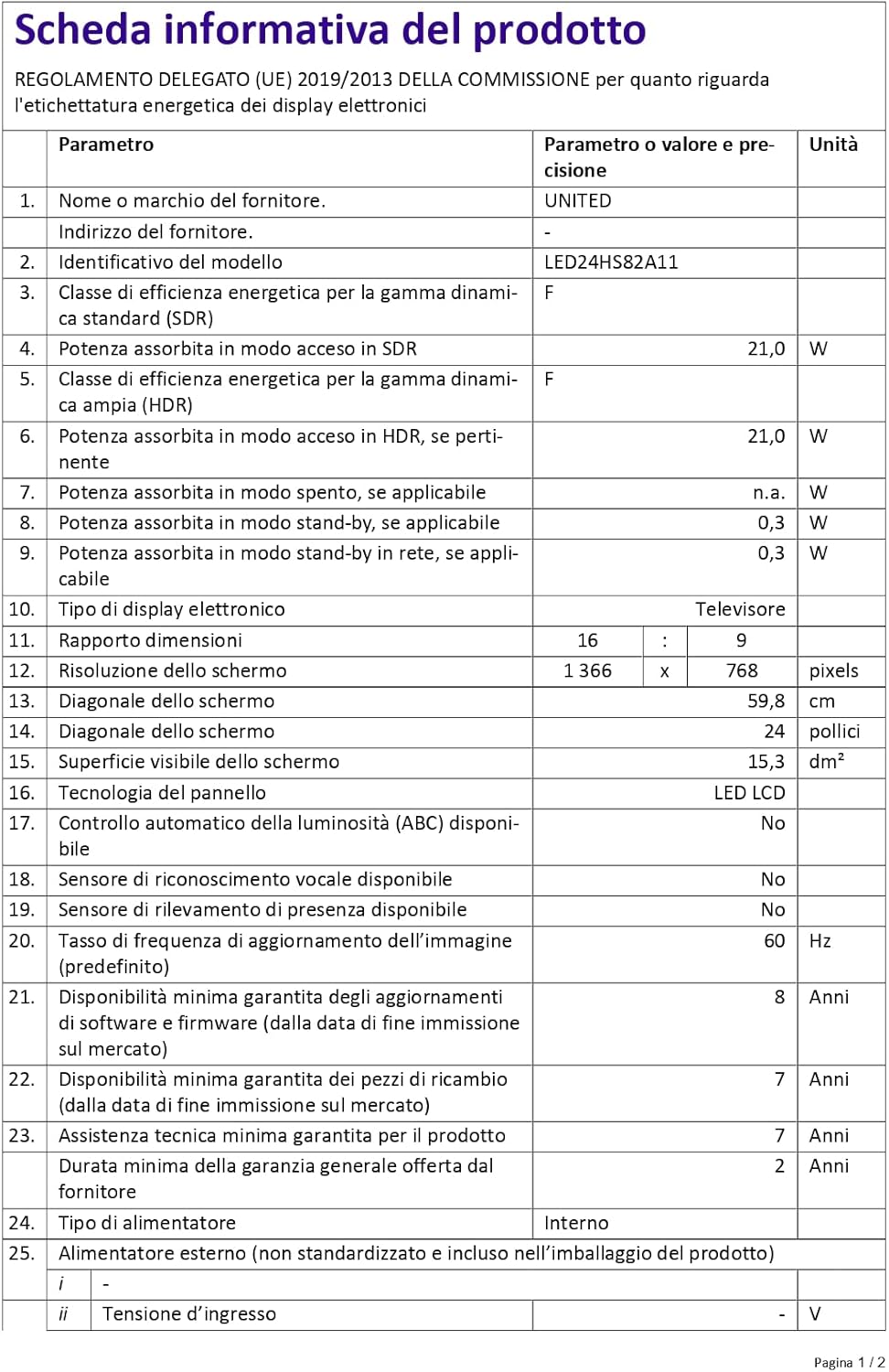
Figure 4: A detailed product information sheet for the UNITED LED24HS82A11 TV, providing comprehensive technical specifications and compliance details.
Więcej szczegółowych informacji znajdziesz w oficjalnej bazie danych EPREL: https://eprel.ec.europa.eu/qr/1087921
Gwarancja i wsparcie
Your UNITED LED24HS82A11 TV comes with the following support and warranty provisions:
- Minimum General Warranty: 2 lat
- Technical Assistance Availability: 7 lat
- Gwarancja aktualizacji oprogramowania do: 8 Years from market placement date
- Dostępność części zamiennych: 7 Years from market placement date
For technical support or warranty claims, please contact your retailer or the manufacturer's authorized service center. Keep your proof of purchase for warranty validation.
Ask a question about this manual
Ask about setup, troubleshooting, compatibility, parts, safety, or missing instructions. Manuals+ will review the question and use this page’s manual context to help answer it.