
1. Wprowadzenie
This manual provides comprehensive instructions for the installation, operation, and maintenance of the YEEHUNG 12.3" Android 13 Car Multimedia System. This system is specifically designed for Mercedes-Benz 2012-2015 ML GL Class W166 X166 vehicles equipped with the NTG4.5 OEM host system. Please read this manual thoroughly before installation and use to ensure proper functionality and to avoid potential issues.

Figure 1.1: YEEHUNG 12.3" Android 13 Car Multimedia Screen
2. Koniec produktuview
The YEEHUNG 12.3" Android 13 Car Multimedia System offers an enhanced in-car entertainment and navigation experience. It features a blue anti-glare HD screen with a resolution of 1920x720, powered by an 11 nm Qualcomm Snapdragon 662 8-core high-speed processor, 8GB RAM, and 128GB internal memory. The system supports wired and wireless CarPlay, Android Auto, and wireless mirror link functions.
Główne cechy:
- Wyświetlacz: 12.3-inch Blue Anti-Glare HD Screen (1920x720 resolution), multi-point capacitive touch, IPS panel, 178° ultra-wide viewkąt.
- Edytor: Qualcomm Snapdragon 662 8-core (4x A73 2.0GHz + 4x A53 1.8GHz).
- Pamięć: 8GB RAM (LPDDR4X) + 128GB Storage (eMMC 5.1).
- System operacyjny: Android 13.
- Łączność: Built-in Wi-Fi, USB ports, Bluetooth 5.0.
- Integracja: Supports wired and wireless CarPlay, Android Auto, and wireless Mirror Link.
- Zachowanie oryginalnego systemu samochodowego: Retains original car knob and steering wheel controls, original radio, amplifier, tył view camera, and reverse trajectory.
- Funkcje dodatkowe: Supports split screen, Google Play, online voice control, and multiple languages.

Figure 2.1: Anti-Glare Screen Features

Figure 2.2: Snapdragon 662 Processor Details
3. Zgodność
This multimedia system is compatible with the following Mercedes-Benz models and OEM host systems:
- Modele pojazdów: Mercedes-Benz ML300, ML320, ML350, ML400, ML500, ML550 (2012-2015)
- Modele pojazdów: Mercedes-Benz GL350, GL400, GL500, GL550 (2012-2015)
- Numery podwozia: W166, X166
- OEM Host System: NTG4.5
Ważny: If your car's model year is not within the indicated range, please verify compatibility by providing a photo of your OEM host system to the seller. Ensure your vehicle has the NTG4.5 system. You can identify your NTG version by referring to the user interface and host panel of your original car.
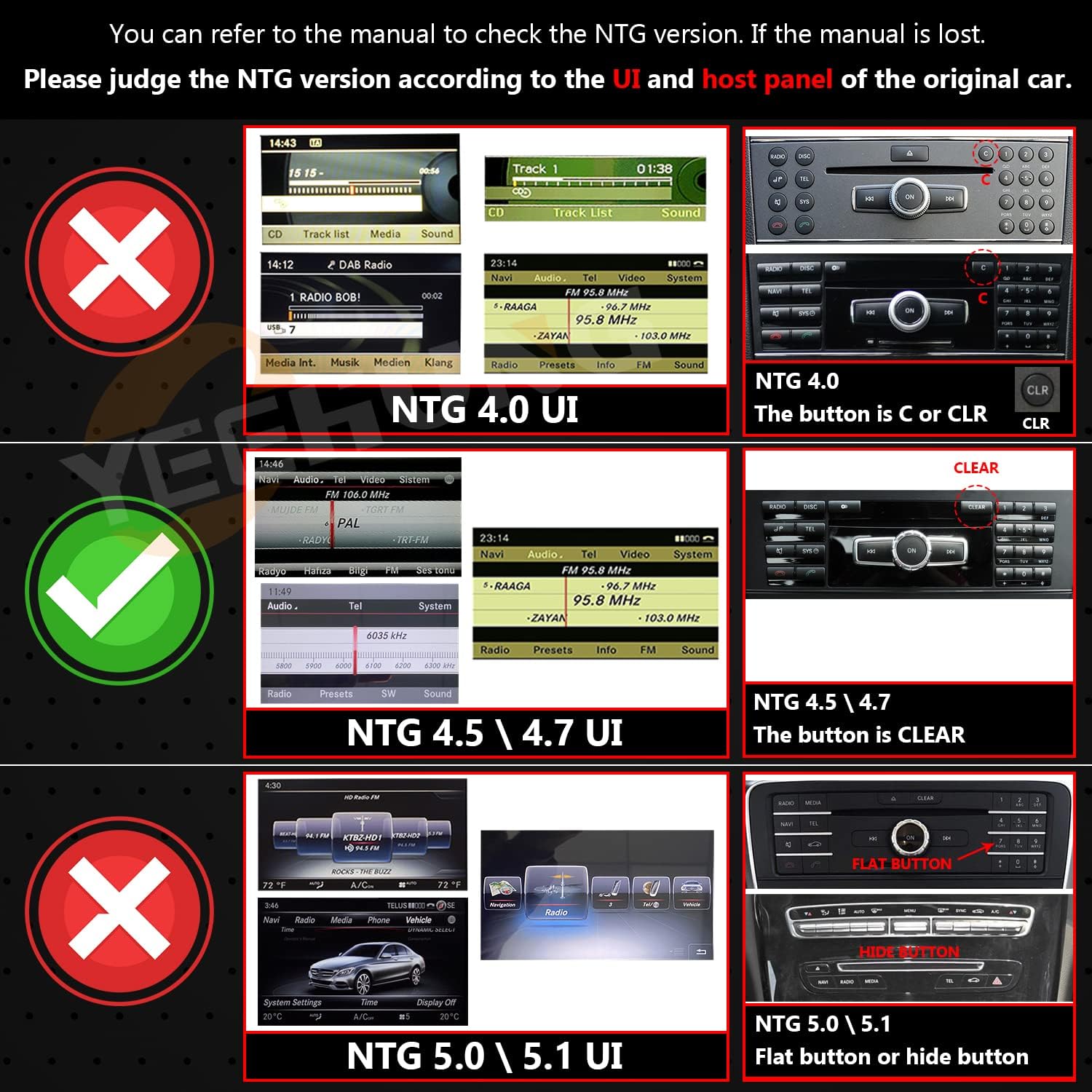
Figure 3.1: NTG Version Identification Guide
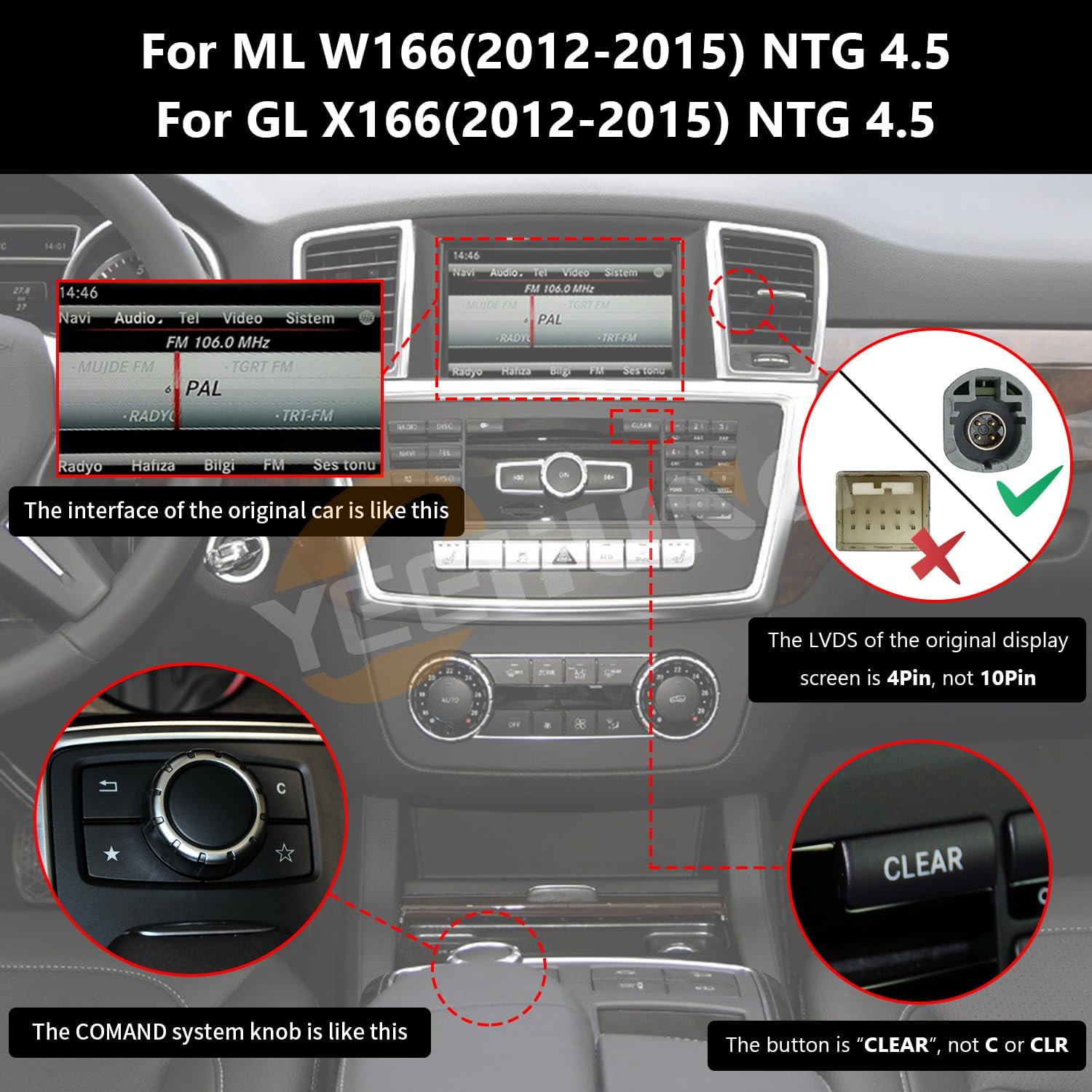
Figure 3.2: NTG 4.5 System Visual Confirmation
4. Co znajduje się w pudełku
Po rozpakowaniu należy sprawdzić, czy znajdują się w nim wszystkie poniższe elementy:
- 1 x 12.3" Multimedia Panel
- 1 x Podstawa
- 1 x wiązka przewodów ISO
- Kabel 1 x RCA
- 1 x Speaker (Optional)
- 1 antena 4G
- 1 x antena GPS
- 1 x Mikrofon
- 1 x AMI Decoder
- 1 x Instrukcja instalacji
- 1 x Instrukcja obsługi
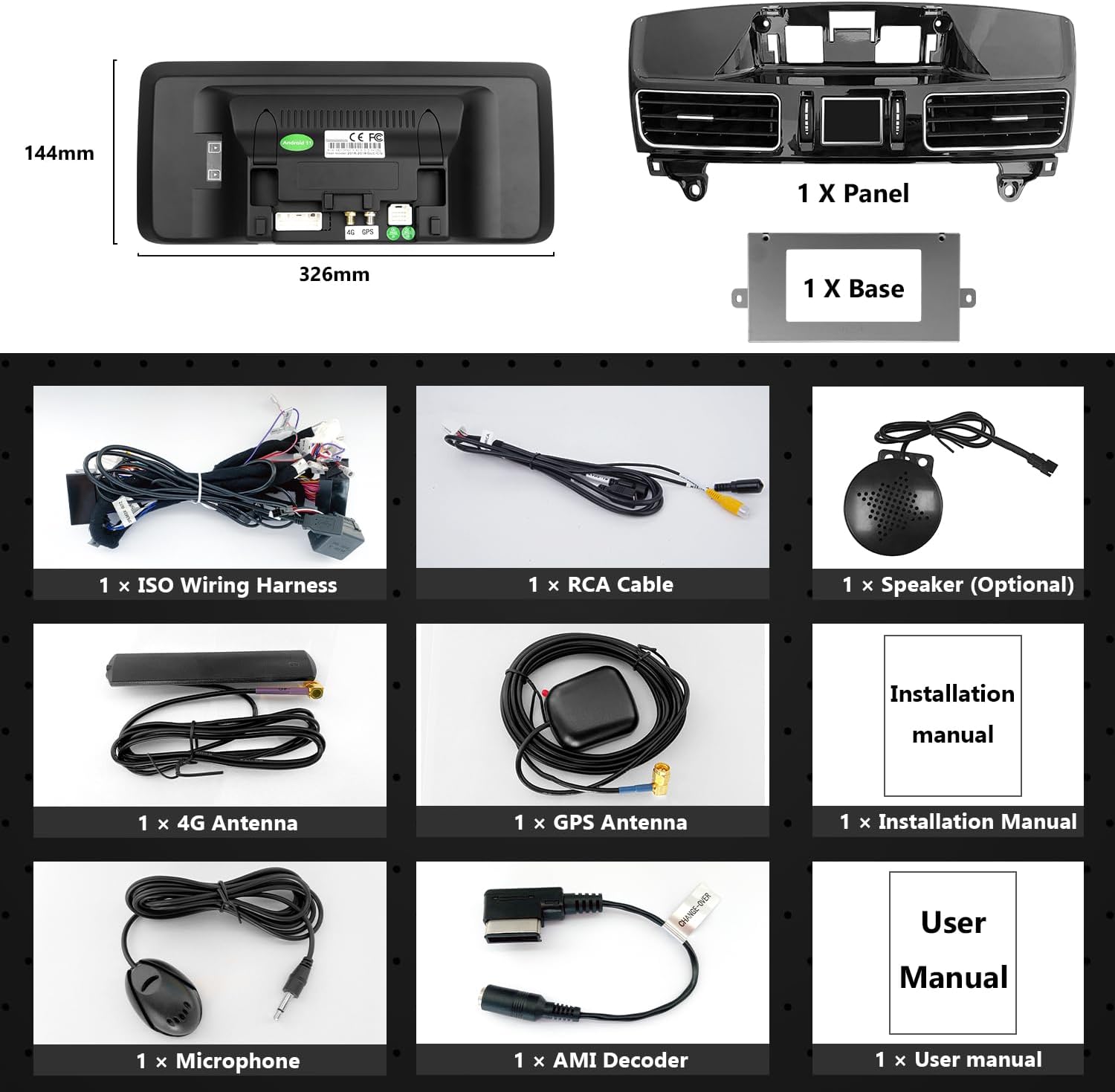
Rysunek 4.1: Zawartość opakowania
5. Instrukcja instalacji
Professional installation is recommended. Ensure the vehicle's power is disconnected before beginning installation. This system is designed for 'no injury installation', meaning no need to damage original vehicle wires.
5.1 Precautionary Note on AUX Audio
If your NTG4.5 system does not have an AUX menu, you must activate the AUX menu for the Android system's sound to function. You will need to connect the audio output from the new system to your car's AUX input. This can be done via an AMI cable or by using the Audio out on the ISO cable to interface with the car's AUX jack, depending on your car's interface type.

Figure 5.1: Audio Out to AMI Connection

Figure 5.2: Audio Out to AUX IN Connection
5.2 Okablowanie i połączenia
Carefully connect all wiring harnesses as per the provided installation manual. Ensure all connections are secure. The system is designed to integrate with your existing vehicle wiring without modification.

Figure 5.3: Wiring Connection Example
5.3 AUX Activation and Automatic Switching (NTG 4.5/4.7)
For NTG4.5 and NTG4.7 systems with original car AUX function, follow these steps to set up automatic AUX switching:
- On the original car interface, navigate to the AUDIO menu. Set the position of the AUDIO icon to '2'.
- Within the AUDIO menu, locate the AUX icon and set its position to '8'.
- Access the Factory Settings of the Android device.
- Under 'AUX Switching Modes', select 'Automatic' or 'Other' as appropriate for your vehicle.
- Ensure 'AUX Activate' is checked in the settings.
- Verify the 'CAN Protocol' is set to 'BC_Protocol_type_4.5'.
- Confirm 'Car Display' settings are appropriate for NTG4.0/NTG4.5 (e.g., 800x480 or 400x240 depending on original screen resolution).

Figure 5.4: Automatic AUX Switching Setup

Figure 5.5: AUX Activate Setting

Figure 5.6: CAN Protocol Setting

Figure 5.7: Car Display Setting
5.4 Kontrola po instalacji
After completing the cable and device installation, re-route all original cables to their proper positions. Before restoring covers and panels, turn on the Android device and thoroughly test all functions to ensure they are operating normally.
6. Instrukcja obsługi
The YEEHUNG multimedia system integrates seamlessly with your vehicle's existing controls while offering advanced Android functionality.
6.1 Podstawowa nawigacja i interfejs
The 12.3-inch touchscreen allows for intuitive navigation through the Android interface. Swipe, tap, and use multi-touch gestures to control applications and settings. The system also supports online voice control functions when connected to a network.

Rysunek 6.1: Interfejs CarPlay

Rysunek 6.2: Interfejs Android Auto

Rysunek 6.3: Odtwarzanie wideo
6.2 CarPlay i Android Auto
The system supports both wired and wireless CarPlay and Android Auto. Connect your smartphone to access navigation, music, messages, and other compatible apps directly on the car's display. The wireless mirror link function also allows mirroring your phone's screen.

Rysunek 6.4: Funkcjonalność CarPlay i Android Auto
6.3 Retained OEM Functions
The YEEHUNG system is designed to retain all original car functions. You can continue to use your original car knob (COMAND knob), steering wheel controls, original car radio, amplifier, and factory rear view camera with reverse trajectory. The system supports dual system switching (NTG 4.5) allowing access to both the original car system and the Android system.
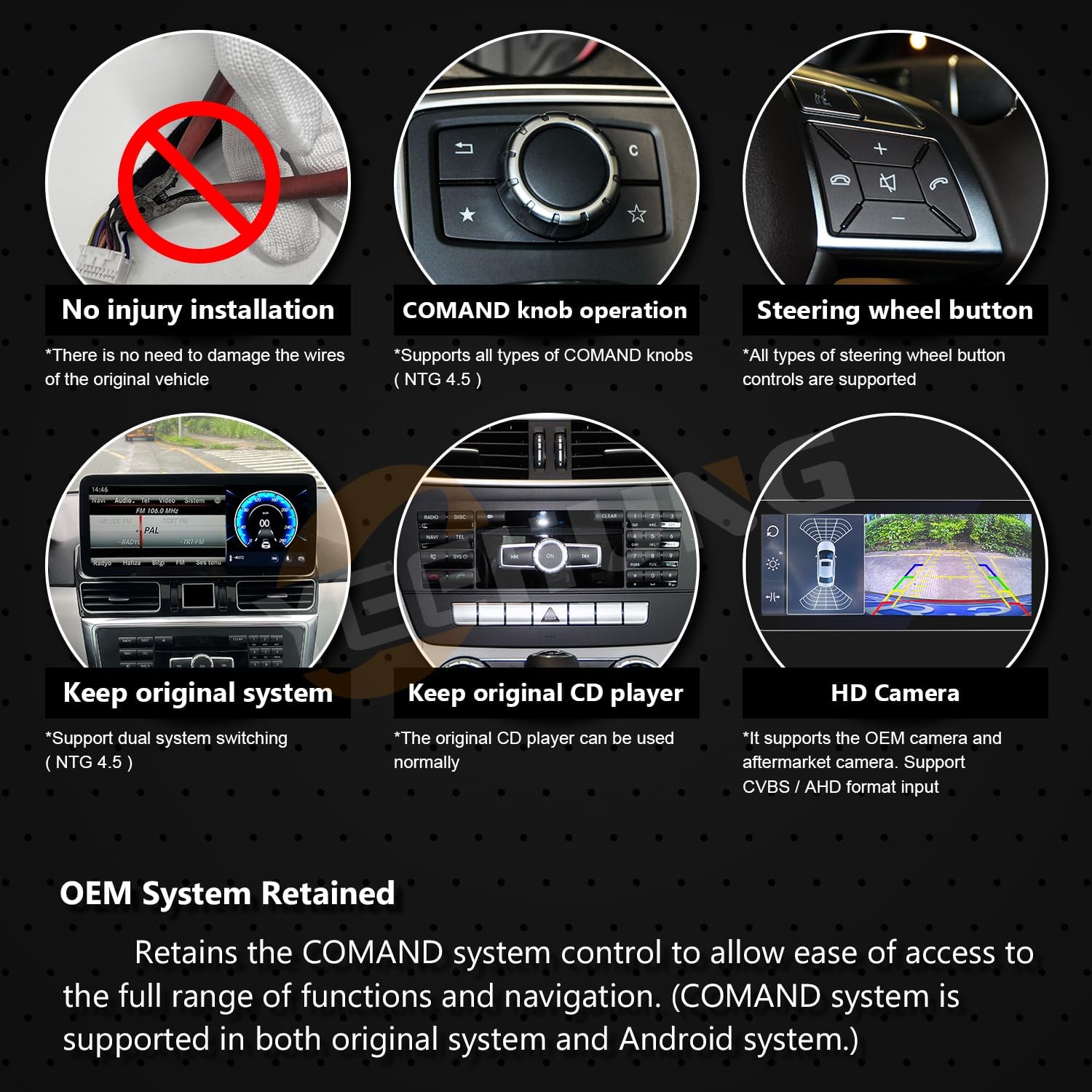
Figure 6.5: Retained OEM System Features
7. Specyfikacje
| Funkcja | Specyfikacja |
|---|---|
| Waga przedmiotu | 7.28 funta |
| Wymiary produktu | 12.83 x 11.02 x 7.48 cala |
| Numer modelu przedmiotu | YH-7115 |
| Rozmiar wyświetlacza | 12.3 cali |
| Rozdzielczość wyświetlacza | 1920x720 |
| Gniazdo karty pamięci | SD |
| Polecenie głosowe | Ekran dotykowy |
| Marka | YEEHUNG |
| Typ serwisu pojazdu | Samochód |
| Funkcja specjalna | Bluetooth, ekran dotykowy |
| Technologia łączności | Bluetooth, USB, Wi-Fi, Wireless |
| Typ mapy | Ameryka Północna |
| Tryb wyjścia audio | Stereofoniczny |
| Typ montażu | Montaż na desce rozdzielczej |
8. Rozwiązywanie Problemów
8.1 No Sound from Android System
Objaw: The Android system is powered on and displays correctly, but there is no audio output.
Rozwiązanie: This typically indicates that the AUX menu in your original NTG4.5 system is not activated or the audio output from the Android unit is not correctly connected to the car's AUX input. Refer to Section 5.1 and 5.3 for detailed instructions on activating AUX and setting up the audio connection.
8.2 System Not Responding / Freezing
Rozwiązanie: Try restarting the device by turning off the car's ignition and waiting for a few minutes before restarting. If the issue persists, check all power connections. A factory reset might be necessary as a last resort (consult the separate installation manual for factory reset procedures).
8.3 Problemy z łącznością (Bluetooth/Wi-Fi)
Rozwiązanie: Ensure the antennas (4G and GPS) are correctly installed and secured. Check the system settings for Bluetooth and Wi-Fi to ensure they are enabled. If connecting to a phone, ensure the phone's Bluetooth/Wi-Fi is also on and discoverable.
9. Konserwacja
The YEEHUNG 12.3" Android 13 Car Multimedia System requires minimal maintenance. Follow these guidelines to ensure longevity and optimal performance:
- Czyszczenie: Do czyszczenia ekranu należy używać miękkiej, niepozostawiającej włókien ściereczki. W przypadku uporczywych plam, należy delikatnie przetrzećampPrzetrzyj ściereczkę wodą lub środkiem do czyszczenia ekranów. Unikaj silnych środków chemicznych i materiałów ściernych.
- Aktualizacje oprogramowania: Periodically check for software updates through the system's settings menu to ensure you have the latest features and security patches.
- Warunki środowiskowe: Avoid exposing the device to extreme temperatures or direct sunlight for prolonged periods, as this can affect performance and lifespan.
- Integralność kabla: Ensure all cables remain securely connected and are not pinched or damaged.
10. Gwarancja i wsparcie
10.1 Informacje o gwarancji
- W ciągu 1 miesiąca: Free returns according to Amazon rules. Contact Amazon Buyer Services for return procedures.
- W ciągu 12 miesięcy: Free warranty service for non-human damage. The customer is responsible for shipping costs within the U.S. for product return and repair.
- Po 1 roku: Repair service is available. In addition to U.S. postage, customers will be responsible for the cost of replacement parts and labor.
10.2 Obsługa klienta
If you encounter any problems or have questions regarding your YEEHUNG multimedia system, please contact our customer support team. Clearly describe your issue to facilitate a quick resolution. We aim to reply within 24 hours.
For general inquiries or to verify compatibility, you may also refer to the YEEHUNG Store on Amazon.