
Wstęp
This manual provides detailed instructions for the installation, operation, and maintenance of your THINKWARE X700 Dual Dash Cam. Please read this manual thoroughly before using the product to ensure proper functionality and to prevent damage.
Zawartość opakowania
Sprawdź, czy w opakowaniu znajdują się wszystkie elementy:
- Front X700 Dash Cam
- Kamera tylna
- Karta MicroSD 32 GB
- Ładowarka samochodowa 12V
- Kabel do stałego okablowania
- Mocowanie do przedniej szyby
- Kabel kamery tylnej
- Szybki przewodnik
Produkt ponadview
The THINKWARE X700 is a dual dash cam system designed to record both front and rear views of your vehicle in Full HD 1080p resolution. It features a 2.7-inch LCD touchscreen for easy control and playback, a G-Sensor for incident detection, and night vision capabilities for clear recordings in low light.

Rysunek 1: Przód view of the THINKWARE X700 Dash Cam, showing the main lens and "FHD RECORDER" label.

Rysunek 2: Kątowy view of the THINKWARE X700 Dash Cam, highlighting the power (PWR) and MicroSD card slots on the side.
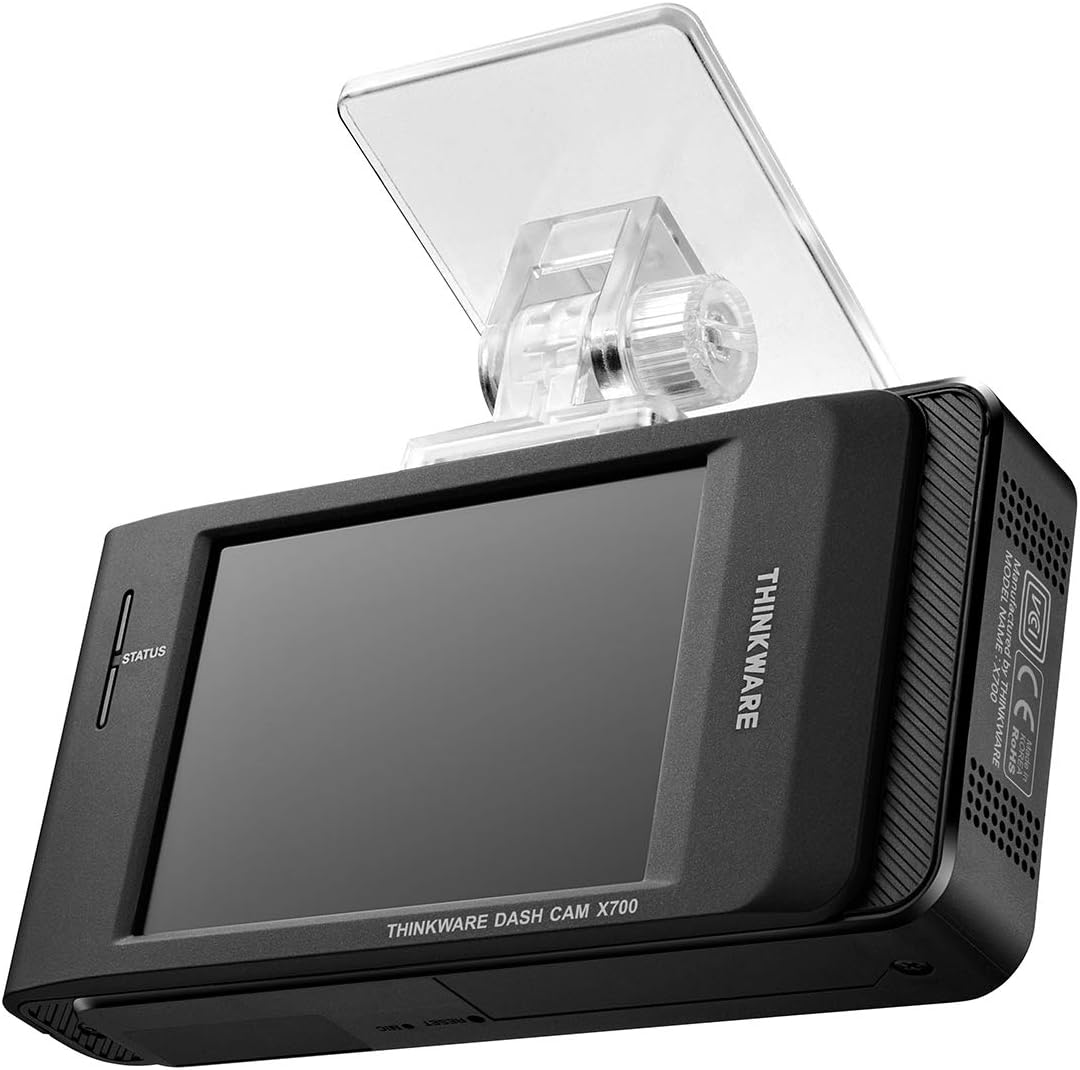
Rysunek 3: Tył view of the THINKWARE X700 Dash Cam, displaying the LCD screen and the attached windshield mount.
Organizować coś
1. Wkładanie karty MicroSD
- Sprawdź, czy kamera samochodowa jest wyłączona.
- Znajdź gniazdo karty MicroSD z boku jednostki głównej.
- Insert the provided 32GB MicroSD card into the slot until it clicks into place.
- Aby wyjąć kartę, delikatnie wciśnij ją, aż wysunie się.
2. Montaż przedniej kamery samochodowej
- Wyczyść obszar przedniej szyby, na którym zostanie zamontowana kamera samochodowa.
- Attach the windshield mount to the main dash cam unit.
- Zdejmij folię ochronną z podkładki samoprzylepnej na uchwycie.
- Press the mount firmly onto the windshield, ensuring the camera has a clear view of the road and does not obstruct the driver's vision.
- W razie potrzeby dostosuj kąt kamery.

Rysunek 4: The THINKWARE X700 Dash Cam installed on the windshield, positioned to capture the road ahead.
3. Podłączanie tylnej kamery
- Zamontuj tylną kamerę na tylnej szybie, aby zapewnić wyraźny obraz. view.
- Connect the rear camera cable to the rear camera and route the cable neatly to the front dash cam.
- Plug the other end of the rear camera cable into the designated port on the main X700 unit.
4. Podłączenie zasilania
Choose one of the following power options:
- Ładowarka samochodowa 12 V: Connect the 12V car charger to your vehicle's cigarette lighter socket and the other end to the dash cam's power input. The camera will power on and off with your vehicle's ignition.
- Kabel przyłączeniowy (dla trybu parkowania): For continuous recording in Parking Mode, connect the hardwiring cable to your vehicle's fuse box according to the instructions provided with the hardwiring kit (sold separately or included in some packages). Professional installation is recommended for hardwiring.
Obsługa kamery na deskę rozdzielczą
1. Włączanie/wyłączanie zasilania
- The dash cam automatically powers on when connected to power and the vehicle ignition is on.
- It powers off automatically when the ignition is turned off (unless hardwired for Parking Mode).
- To manually power off, disconnect the power cable.
2. Tryby nagrywania
- Ciągłe nagrywanie: Records continuously while driving. Older files are overwritten by newer ones when the MicroSD card is full.
- Rejestrowanie incydentów: Automatically records and saves footage when an impact is detected by the G-Sensor. These files są chronione przed nadpisaniem.
- Nagrywanie ręczne: Press the manual record button to save a segment of footage ręcznie.
- Tryb parkowania (opcjonalnie): If hardwired, the dash cam can record events while the vehicle is parked, including motion detection and impact detection.

Rysunek 5: The X700's LCD screen displaying recording status and menu options.
3. Using the LCD Touchscreen
The 2.7-inch LCD touchscreen allows you to:
- View żyćtage from the front and rear cameras.
- Odtwarzaj nagrane filmy.
- Access and adjust camera settings (e.g., resolution, G-Sensor sensitivity, time zone).
- Sformatuj kartę MicroSD.
4. Viewnagrywanie nagranego dźwiękutage
- Na kamerze samochodowej: Use the touchscreen to navigate to the playback menu and select desired videos.
- Na komputerze: Remove the MicroSD card from the dash cam and insert it into a computer's card reader. Use the THINKWARE PC Viewer software (available for download from the THINKWARE website) for optimal viewing and analysis of footage, including GPS data (if applicable).
Konserwacja
1. Zarządzanie kartami MicroSD
- Formatowanie: Regularly format the MicroSD card (at least once a month) using the dash cam's menu or the THINKWARE PC Viewer to ensure optimal performance and prevent recording errors.
- Wymiana: MicroSD cards have a limited lifespan. Replace the card if you experience frequent recording errors or data corruption. Use high-endurance MicroSD cards designed for dash cam use.
2. Czyszczenie kamery samochodowej
- Use a soft, dry cloth to clean the camera lens and the LCD screen.
- Do not use chemical cleaners or abrasive materials, as they may damage the surfaces.
3. Aktualizacje oprogramowania sprzętowego
Periodically check the official THINKWARE website for firmware updates. Updating the firmware can improve performance, add new features, and resolve potential issues. Follow the instructions provided on the website for firmware update procedures.
Rozwiązywanie problemów
| Problem | Możliwa przyczyna | Rozwiązanie |
|---|---|---|
| Kamera samochodowa nie włącza się. | Brak zasilania, uszkodzony kabel, problem z gniazdkiem zasilania w pojeździe. | Check power cable connection. Test the 12V car charger in another vehicle or outlet. Ensure vehicle ignition is on. |
| Błędy nagrywania lub uszkodzenia files. | MicroSD card error; card needs formatting; card lifespan expired. | Format the MicroSD card. Try a different, high-endurance MicroSD card. |
| Słaba jakość wideo. | Soczewka brudna; na soczewce nadal znajduje się folia ochronna; nieprawidłowe ustawienia. | Wyczyść obiektyw aparatu. Upewnij się, że folia ochronna została zdjęta. Sprawdź ustawienia rozdzielczości wideo. |
| G-Sensor not detecting incidents or too sensitive. | Incorrect G-Sensor sensitivity setting. | Dostosuj czułość czujnika G w menu ustawień kamery samochodowej. |
| Rear camera not recording. | Loose connection; faulty cable or camera. | Check the rear camera cable connection to both the rear and front units. |
Specyfikacje
| Funkcja | Szczegół |
|---|---|
| Nazwa modelu | X700 |
| Rozdzielczość przechwytywania wideo | 1080p Full HD (Front and Rear) |
| Pole View | 142 stopnia |
| Szybkość klatek | 30 klatek na sekundę |
| Cechy specjalne | Automatic Incident Detection, Night Vision, G-Sensor |
| Rozmiar ekranu | 2.7 cali |
| Typ wyświetlacza | LCD |
| Metoda kontroli | Dotykać |
| Typ pamięci flash | MicroSD (32GB included) |
| Typ montażu | Mocowanie do przedniej szyby |
| Wymiary produktu | Wymiary 10 x 5.4 x 2.9 cm |
| Waga | 610 gramów |
Gwarancja i wsparcie
THINKWARE products are covered by a limited warranty. For specific warranty terms and conditions, please refer to the warranty card included in your package or visit the official THINKWARE webstrona.
For technical support, frequently asked questions, and driver/firmware downloads, please visit the official THINKWARE support page: