
Wstęp
Dziękujemy za zakupasing the Andoer D2 Handheld RGB LED Video Light Wand. This manual provides detailed instructions for the safe and effective use of your new light wand. Please read this manual thoroughly before operation and retain it for future reference.
Informacje dotyczące bezpieczeństwa
- Nie wystawiaj urządzenia na działanie wody ani wysokiej wilgotności.
- Unikaj bezpośredniego kontaktu oczu ze źródłem światła.
- Nie rozmontowuj ani nie modyfikuj urządzenia. Naprawy powinny być wykonywane wyłącznie przez autoryzowany personel.
- Przechowywać w miejscu niedostępnym dla dzieci.
- Należy używać wyłącznie dołączonego lub certyfikowanego kabla ładującego.
- Nie należy używać urządzenia w otoczeniu, w którym znajdują się łatwopalne gazy lub ciecze.
Zawartość opakowania
Proszę sprawdzić zawartość opakowania po otwarciu. Jeśli brakuje któregokolwiek elementu lub jest on uszkodzony, prosimy o kontakt ze sprzedawcą.
- Andoer D2 Handheld RGB LED Video Light Wand
- Kabel do ładowania USB typu C.
- Instrukcja obsługi (ten dokument)
Produkt ponadview
Familiarize yourself with the components and controls of the Andoer D2 light wand.
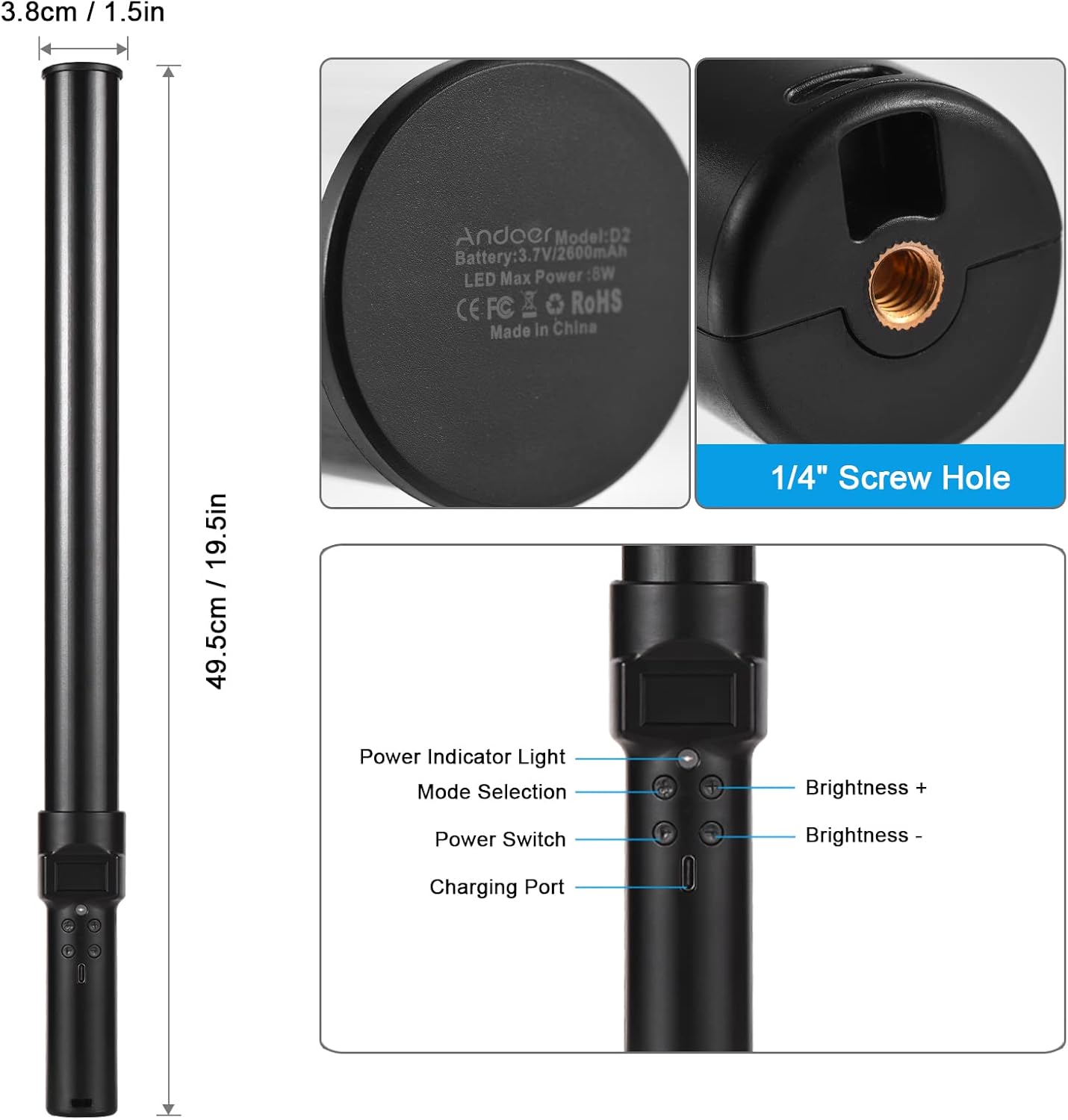
Obraz: Nadview of the Andoer D2 light wand, showing its dimensions (approximately 49.5cm / 19.5in long and 3.8cm / 1.5in diameter) and control panel. The control panel includes a Power Indicator Light, Mode Selection button, Power Switch, Brightness + button, Brightness - button, and a Charging Port.
Funkcje panelu sterowania:
- Przycisk zasilania: Turns the light wand on or off.
- Wybór trybu: Cycles through different lighting modes (e.g., CCT mode, RGB color effects).
- Jasność +: Zwiększa jasność światła.
- Jasność -: Zmniejsza jasność światła.
- Wskaźnik zasilania: Shows the power status and charging status.
- Port ładowania (typ C): Służy do ładowania wewnętrznego akumulatora.
Organizować coś
Opłata początkowa:
Before first use, fully charge the light wand. Connect the provided USB Type-C cable to the charging port on the device and the other end to a USB power adapter (not included) or a computer USB port. The power indicator light will show charging status.

Obraz: Zbliżenie view of the Type-C charging port, indicating where to connect the charging cable.

Obraz: The Andoer D2 light wand shown alongside its USB Type-C charging cable, illustrating the charging setup.
Opcje montażu:
The Andoer D2 light wand can be used handheld for flexible lighting or mounted for stable positioning. It features a standard 1/4-inch screw hole at the bottom.

Obraz: Szczegółowy view of the 1/4-inch screw hole located at the base of the light wand, demonstrating how it can be attached to a light stand or tripod for stable use. Note that the light stand/tripod is sold separately.
- Użycie przenośne: Simply hold the light wand to direct light as needed.
- Montaż na statywie/podstawie oświetleniowej: Screw the 1/4-inch thread at the bottom of the light wand onto a compatible tripod or light stand. Ensure it is securely fastened before use.
Instrukcja obsługi
Włączanie/wyłączanie:
Naciśnij i przytrzymaj Wyłącznik zasilania przycisk, aby włączyć lub wyłączyć różdżkę świetlną.
Regulacja jasności:
The light wand offers 12 levels of adjustable brightness. Use the Jasność + button to increase brightness and the Jasność - przycisk, aby go zmniejszyć.

Obraz: Illustration of the 12 levels of adjustable brightness, demonstrating the range from dim to bright light output.
Regulacja temperatury barwowej (tryb CCT):
In CCT mode, you can adjust the color temperature between 2500K (warm light), 5500K (neutral/daylight), and 8500K (cold light). Press the Wybór trybu button to cycle to CCT mode, then use the Jasność + I Jasność - buttons to adjust the color temperature.

Obraz: Visual representation of the adjustable color temperatures, ranging from warm (2500K) to neutral (5500K) to cool (8500K) light.
Activating Colorful Light Effects (RGB Mode):
The light wand features 7 colorful light effects: red, green, blue, orange, purple, light blue, and red & blue flash. Press the Wybór trybu button to cycle through these RGB effects. Brightness can still be adjusted in these modes using the Jasność + I Jasność - pikolak.
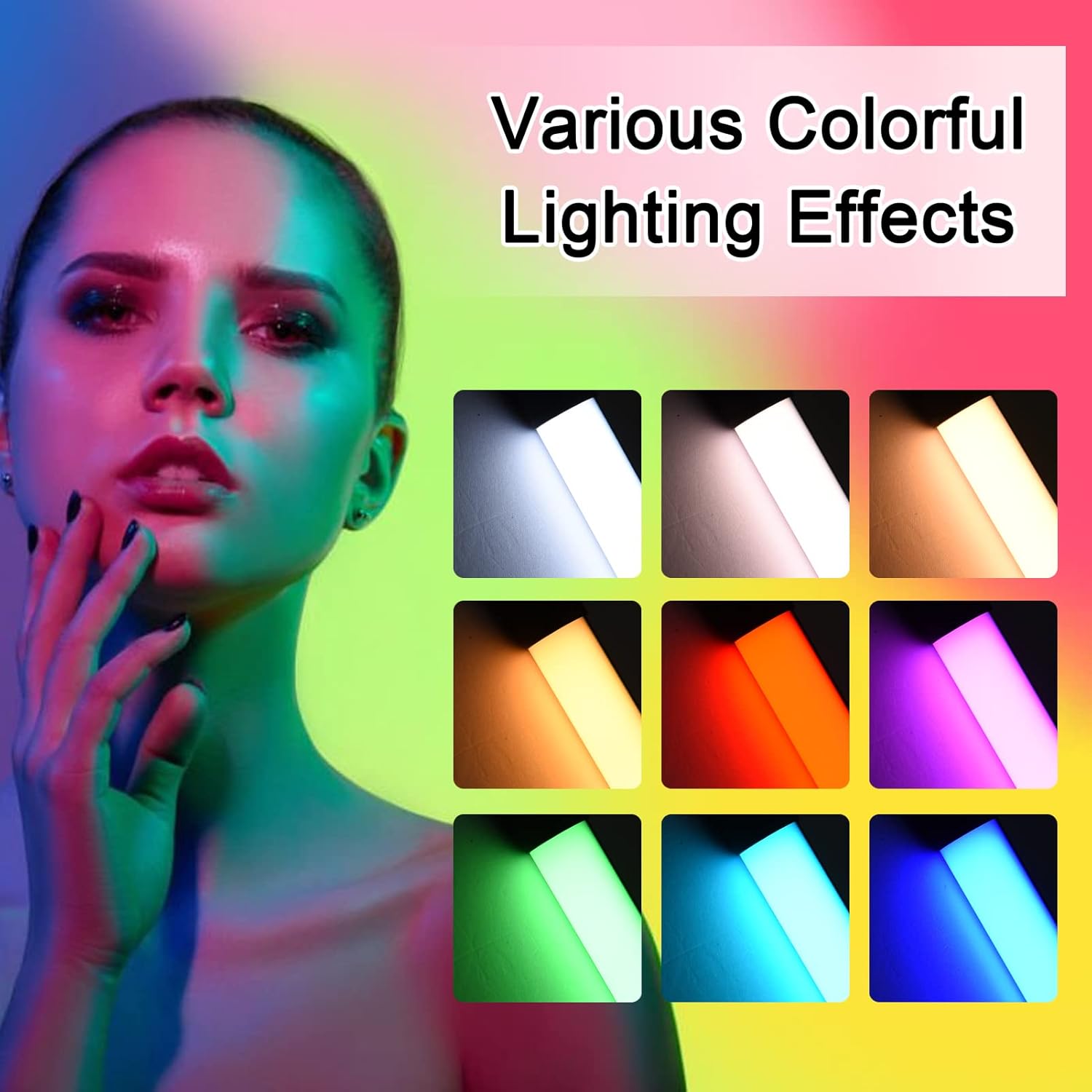
Obraz: A visual guide to the 7 colorful light effects available, showcasing the vibrant range of colors the light wand can produce.
Ładowanie
The Andoer D2 light wand has a built-in 2600mAh rechargeable lithium battery. When the battery is low, the power indicator light will signal. To charge:
- Connect the small end of the USB Type-C charging cable to the charging port on the light wand.
- Connect the standard USB end of the cable to a USB power source (e.g., wall adapter, power bank, computer USB port).
- The power indicator light will illuminate or change color to indicate charging. It will change again or turn off when fully charged.
A full charge provides approximately 2.5 hours of continuous use at maximum brightness.
Konserwacja
- Clean the light wand with a soft, dry cloth. Do not use abrasive cleaners or solvents.
- Przechowywać urządzenie w chłodnym i suchym miejscu, z dala od bezpośredniego światła słonecznego i ekstremalnych temperatur.
- If not used for extended periods, charge the battery every 3 months to maintain battery health.
Rozwiązywanie problemów
| Problem | Możliwa przyczyna | Rozwiązanie |
|---|---|---|
| Światło się nie włącza. | Bateria jest rozładowana. | Charge the light wand using the provided USB Type-C cable. |
| Światło jest słabe lub migocze. | Niski poziom naładowania baterii. | Naładuj urządzenie. |
| Cannot change color or mode. | Incorrect button press or temporary software glitch. | Ensure you are pressing the Mode Selection button. Try turning the device off and on again. |
| Urządzenie się nie ładuje. | Faulty cable, power adapter, or charging port. | Try a different USB Type-C cable or power adapter. Ensure the cable is fully inserted. |
Specyfikacje
| Funkcja | Szczegół |
|---|---|
| Model | D2 (SJI3033515989406YA) |
| Marka | Andoer |
| Temperatura barwowa | 2500K / 5500K / 8500K (regulowane) |
| Poziomy jasności | 12 poziomy |
| Kolorowe efekty świetlne | 7 effects (Red, Green, Blue, Orange, Purple, Light Blue, Red & Blue Flash) |
| Pojemność baterii | Bateria litowa 2600mAh |
| Port ładowania | USB typu C |
| Czas pracy baterii (maksymalna jasność) | Około 2.5 godzin |
| Montowanie | 1/4-inch screw hole |
| Wymiary | Approx. 49.5cm (19.5in) length, 3.8cm (1.5in) diameter |
Gwarancja i wsparcie
Andoer products are designed and manufactured to the highest quality standards. For warranty information or technical support, please refer to the warranty card included with your purchase or visit the official Andoer webStrona. Zachowaj dowód zakupu na wypadek roszczeń gwarancyjnych.
Oficjalny Andoer Webstrona: Sklep Andoer na Amazon