
1. Koniec produktuview
The YiBiChin AN-MR21GC is a universal magic remote control designed for various 2021 LG Smart TV models. It features magic pointer and intelligent voice control functions, allowing for quick and intuitive navigation and command execution. This remote enhances your TV viewing experience with convenient access to features and content.
1.1 Zgodność
This remote control is compatible with the following 2021 LG TV series:
- LG OLED TVs: G1, C1, A1 series
- LG Mini-LED QNED TVs: QNED99, QNED90 series
- LG NanoCell TVs: NANO99, NANO90, NANO85, NANO80, NANO75 series
- LG UHD TVs: UP80, UP75 series
Note: This remote control does not feature NFC functionality.

Rysunek 1: Przód, bok i tył views of the YiBiChin AN-MR21GC Magic Remote.

Figure 2: The remote control highlighting its universal compatibility with 2021 LG Smart TVs.
2. Konfiguracja
2.1 Instalacja baterii
The remote control requires two AA batteries (not included) for operation. Follow these steps to install them:
- Znajdź pokrywę komory baterii z tyłu pilota.
- Aby otworzyć komorę, przesuń pokrywę w dół.
- Włóż dwie baterie AA, upewniając się, że bieguny dodatni (+) i ujemny (-) są prawidłowo ustawione względem wskaźników wewnątrz komory.
- Przesuń pokrywę komory baterii z powrotem na miejsce, aż zatrzaśnie się pewnie.

Figure 3: Correct installation of AA batteries into the remote control.
2.2 Metoda parowania
To enable the magic pointer and voice functions, the remote control must be paired with your LG Smart TV. Ensure your TV is connected to a WiFi network for these functions to work correctly. If you are replacing an original remote, it is recommended to disconnect it and remove its batteries before pairing the new remote, as only one smart remote can be paired at a TV at a time.
Follow these steps to pair your remote:
- Manually turn on your LG Smart TV using the power button on the TV itself.
- Point the YiBiChin AN-MR21GC remote control directly towards your TV from a close distance.
- Naciśnij i przytrzymaj Scroll Wheel (OK button) on the remote control for a few seconds until the pairing process is complete. A confirmation message should appear on your TV screen.
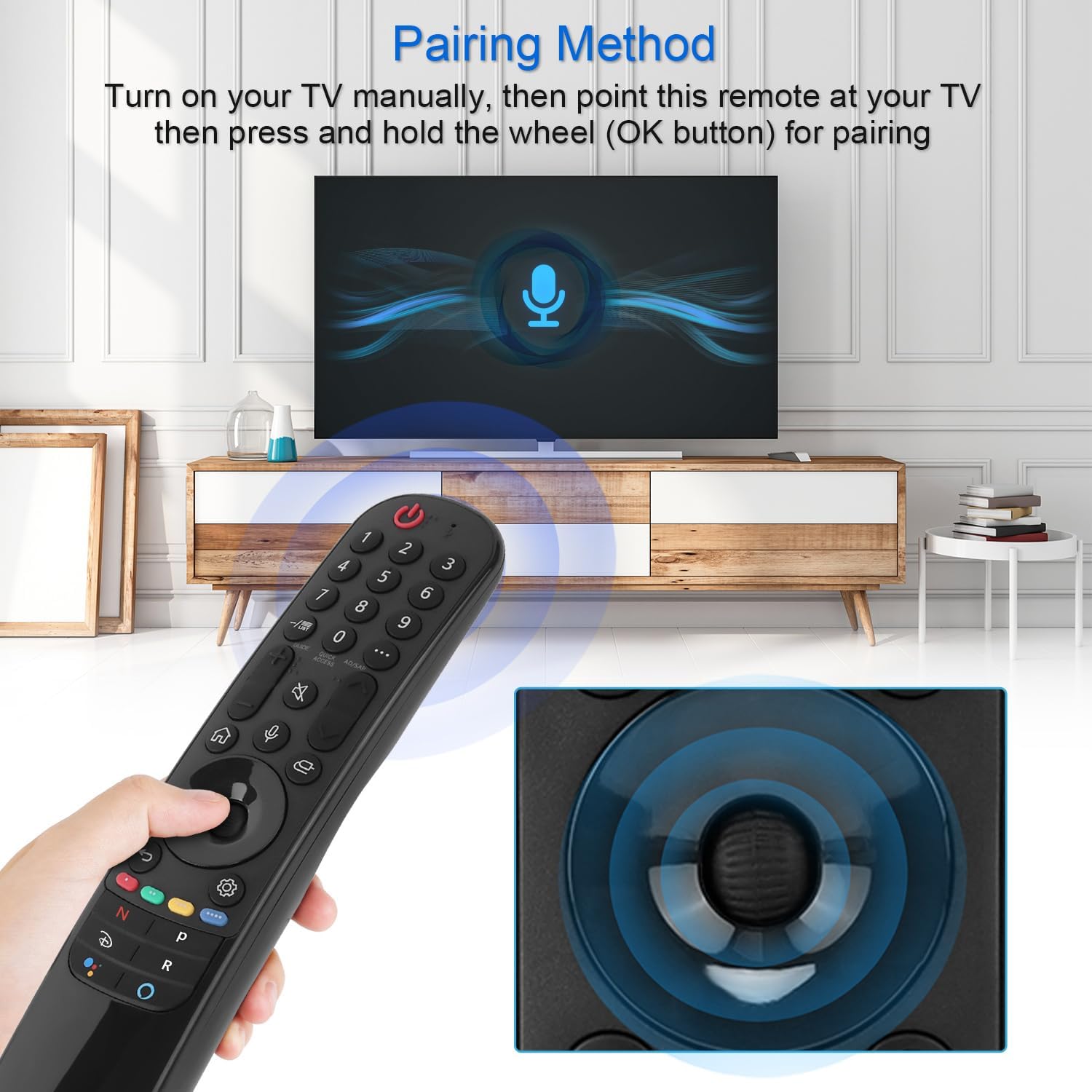
Figure 4: Demonstrating the pairing process by holding the OK button while pointing at the TV.
3. Instrukcja obsługi
The YiBiChin AN-MR21GC remote control offers multiple ways to interact with your LG Smart TV, including traditional button presses, a magic pointer, and voice commands.
3.1 Podstawowe funkcje
- Przycisk zasilania: Włącza lub wyłącza telewizor.
- Przyciski numeryczne (0-9): Bezpośredni wybór kanałów.
- Zwiększanie/zmniejszanie głośności: Regulacja głośności telewizora.
- Kanał w górę/w dół: Zmienia kanały telewizyjne.
- Przycisk wyciszenia: Wycisza lub wyłącza wyciszenie dźwięku telewizora.
- Przycisk Home: Accesses the TV's main smart interface.
- Przycisk Wstecz: Powrót do poprzedniego ekranu lub menu.
3.2 Magic Pointer Function
Once paired, the remote acts as a pointer, allowing you to move a cursor on the TV screen by simply moving the remote in the air. This provides an intuitive way to select items, scroll through menus, and interact with applications.
3.3 Sterowanie głosowe
Naciśnij Przycisk mikrofonu to activate voice control. Speak clearly into the remote to issue commands, search for content, or control smart home devices connected to your TV. Voice commands allow for rapid access to desired programs and videos, with a response time of approximately 0.2 seconds.
3.4 Przyciski szybkiego dostępu
The remote includes dedicated shortcut buttons for popular streaming services, providing instant access to your favorite entertainment platforms.
3.5 Kontrola na duże odległości
The remote utilizes stable infrared and Bluetooth signals, offering a control distance of up to 33 feet (10 meters), ensuring reliable operation from various positions within your room.

Figure 5: The remote's effective operating range and quick response time.
4. Konserwacja
4.1 Wymiana baterii
When the remote control's performance degrades (e.g., unresponsive buttons, weak signal), it is likely time to replace the batteries. Follow the battery installation steps in Section 2.1 to replace the two AA batteries.
4.2 Czyszczenie
Do czyszczenia pilota należy używać miękkiej, suchej ściereczki. W przypadku uporczywych zabrudzeń należy delikatnie przetrzećampPrzetrzyj ściereczkę wodą lub delikatnym, nieściernym środkiem czyszczącym. Unikaj stosowania silnych środków chemicznych i nadmiernej wilgoci, ponieważ może to uszkodzić elektronikę pilota.
5. Rozwiązywanie Problemów
5.1 Pilot nie odpowiada
- Sprawdź baterie: Ensure batteries are correctly installed and not depleted. Replace them if necessary.
- Ponowne sparowanie pilota: If the remote becomes unresponsive, try re-pairing it with your TV by following the steps in Section 2.2.
- Przeszkody: Upewnij się, że nie ma żadnych przeszkód między pilotem a odbiornikiem podczerwieni telewizora.
5.2 Pointer or Voice Function Not Working
- Połączenie WiFi: Verify that your LG Smart TV is connected to a stable WiFi network. The pointer and voice functions rely on this connection.
- Ponowne sparowanie pilota: Re-pairing the remote (Section 2.2) can often resolve issues with these advanced functions.
- Original Remote Interference: Ensure no other smart remote is actively paired with the TV, or that the original remote's batteries have been removed.
6. Specyfikacje
| Marka | YiBiChin |
| Nazwa modelu | AN-MR21GC |
| Kompatybilne urządzenia | 2021 LG Smart TVs (OLED, QNED, NanoCell, UHD series) |
| Technologia łączności | Wi-Fi, Infrared, Bluetooth |
| Typ kontrolera | Voice Control, Pointer |
| Źródło zasilania | Zasilany bateryjnie |
| Typ baterii | 2 x AA (brak w zestawie) |
| Maksymalny zasięg | 10 metrów (33 stóp) |
| Czas reakcji | 0.2 seconds (for voice commands) |
| Wymiary (dł. x szer. x wys.) | 19.2 x 5.7 x 3.1 cm (7.6 x 2.2 x 1.2 cala) |
| Waga przedmiotu | 110 g (3.88 uncji) |
| Kolor | Czarny |

Figure 6: Product dimensions of the remote control.
7. Gwarancja i wsparcie
YiBiChin is committed to providing quality replacement remote controls and excellent customer service. While specific warranty details are not provided in this manual, we offer dedicated support for our products.
7.1 Obsługa klienta
If you have any questions, encounter issues, or require assistance with your YiBiChin AN-MR21GC Magic Remote, please do not hesitate to contact our customer support team. We aim to respond to all inquiries within 24 hours.
For support, please refer to the contact information provided with your purchase or visit the official YiBiChin store page on Amazon.
Thank you for choosing YiBiChin.