
DOOGEE S99
Instrukcja obsługi wytrzymałego smartfona DOOGEE S99
Model: S99
1. Wprowadzenie
The DOOGEE S99 is a rugged smartphone designed for durability and high performance. It features advanced camera capabilities, a powerful processor, and a long-lasting battery, making it suitable for various demanding environments and daily use. This manual provides essential information for setting up, operating, maintaining, and troubleshooting your device.

Przód i tył view of the DOOGEE S99 Rugged Smartphone, highlighting its robust design and camera module.
2. Rozpoczęcie pracy
2.1 Zawartość opakowania
Verify that all items are present in your DOOGEE S99 package:
- Smartfon DOOGEE S99
- Kabel ładujący (USB-C na USB-C)
- Zasilacz
- Narzędzie do wyjmowania karty SIM
- Instrukcja obsługi (ten dokument)
2.2 Instalacja karty SIM i pamięci masowej
The DOOGEE S99 supports dual 4G SIM cards and expandable storage via a TF card.
- Znajdź tackę na kartę SIM znajdującą się z boku urządzenia.
- Włóż narzędzie do wyjmowania karty SIM do małego otworu obok tacki i delikatnie naciskaj, aż tacka wyskoczy.
- Umieść kartę Nano-SIM i/lub kartę TF w przeznaczonych do tego gniazdach na tacce, zwracając uwagę na prawidłową orientację.
- Ostrożnie wsuń tackę z powrotem do urządzenia, aż zatrzaśnie się na swoim miejscu.

The SIM card tray supports two Nano-SIM cards and one TF (microSD) card for expanded storage up to 1TB.
2.3 Pierwsze włączenie i konfiguracja
To power on your device, press and hold the Power button located on the side until the DOOGEE logo appears. Follow the on-screen prompts to complete the initial setup, including language selection, Wi-Fi connection, and Google account setup.
2.4 Ładowanie urządzenia
Before first use, it is recommended to fully charge the device. The DOOGEE S99 supports 33W fast charging and 15W wireless charging.
- Ładowanie przewodowe: Connect the USB-C cable to the phone's charging port and the other end to the power adapter. Plug the adapter into a wall outlet.
- Ładowanie bezprzewodowe: Place the phone on a compatible 15W wireless charging pad. Ensure the phone is centered on the pad for optimal charging.

The DOOGEE S99 features a 6000mAh battery with support for 33W fast charging, allowing for quick power replenishment.

The phone supports both 33W super fast charging via USB-C and 15W wireless charging.
3. Główne funkcje i obsługa
3.1 Wyświetlacz
The DOOGEE S99 features a large 6.3-inch FHD+ Waterdrop Screen with a resolution of 1080x2340 pixels and a 18:9 aspect ratio. It offers 409 PPI pixel density and 480 nits brightness for clear and vibrant visuals. The display is protected by Corning Gorilla Glass for enhanced durability.

Detailed specifications of the 6.3-inch FHD+ display, including resolution, pixel density, brightness, and aspect ratio.

The 6.3-inch FHD+ display provides a brilliant visual experience with robust protection.
3.2 System kamer
The DOOGEE S99 is equipped with a versatile triple camera system on the rear and a high-resolution front camera.
- Główny aparat AI 108 MP: Capture stunning, high-resolution photos with the flagship-grade 108MP main sensor, featuring F/1.89 aperture, 90° FOV, and two rear flashes.
- Kamera noktowizyjna 64 MP: The advanced 64MP night vision camera, supported by two infrared lights, allows for vivid image and video capture in extremely low-light conditions, with a visual range of up to 20 meters.
- Przedni aparat 32 MP: Do wysokiej jakości selfie i połączeń wideo.
- 16MP Ultra Wide Angle & Macro Camera: Expand your photographic possibilities with wide-angle shots and detailed close-ups.

Nadview of the DOOGEE S99's camera capabilities, including the 108MP main, 32MP front, and 16MP ultra-wide cameras.

The 64MP Dark Ultra Clear IR Night Vision camera with F/1.89 aperture, 80° FOV, and two infrared lights for clear night imaging.
Official product video demonstrating the 64MP Night Vision camera capabilities of the DOOGEE S99 Rugged Smartphone.
3.3 Wydajność
The DOOGEE S99 is powered by the MediaTek Helio G96 Octa-core processor (2.05 GHz CPU speed) and ARM Mali G57 GPU, ensuring smooth performance for demanding applications and multitasking. It comes with 15GB of RAM (8GB physical + 7GB extended) and 128GB of internal storage, expandable up to 1TB with a TF card.

The DOOGEE S99 offers 15GB RAM (8GB+7GB Extended) and 128GB ROM, powered by the Helio G96 Octa-Core processor for efficient performance.

The MediaTek Helio G96 Octa-Core processor provides robust performance for the device.
3.4 Trwałość
The DOOGEE S99 is built to withstand harsh conditions, meeting several industry standards for ruggedness:
- Wodoodporność IP68: Można zanurzyć w wodzie na głębokość do 1.5 metra na 30 minut.
- Pyłoszczelność IP69K: Provides complete protection against dust ingress and high-pressure, high-temperature water jets.
- MIL-STD-810H: Complies with military standard for resistance to drops, shocks, and extreme temperatures.

The DOOGEE S99 is designed to be tough, with IP68, MIL-STD-810H, and IP69K ratings for water, drop, and dust resistance.
3.5 Łączność
Urządzenie oferuje wszechstronne opcje łączności:
- Dual 4G SIM: Supports two 4G SIM cards simultaneously for flexible network usage.
- Wi-Fi: Supports 2.4 GHz and 5 GHz Wi-Fi bands.
- NFC: Do płatności zbliżeniowych i szybkiego parowania z innymi urządzeniami obsługującymi NFC.
- GPS: Zintegrowany GPS do nawigacji i usług lokalizacyjnych.

The phone supports dual 4G SIM cards and dual-band Wi-Fi for reliable connectivity.
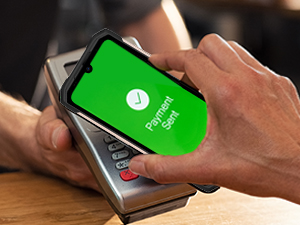
The DOOGEE S99 supports NFC for convenient mobile payments.
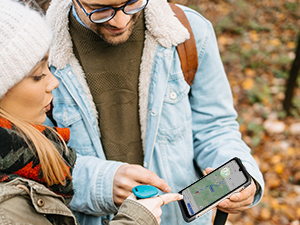
Integrated GPS allows for accurate navigation and location tracking.
3.6 Operating System & User Interface
The DOOGEE S99 runs on Android 12.0, providing a user-friendly interface and access to a wide range of applications through the Google Play Store. The system offers various customization options and security features.
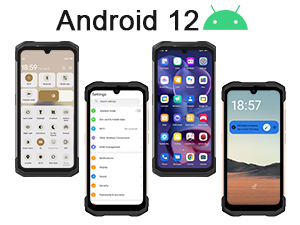
The DOOGEE S99 operates on Android 12, offering a modern and intuitive user experience.
3.7 Integrated Tools
The DOOGEE S99 includes a suite of practical tools for outdoor and professional use:
- Kompas
- Flesz
- Zawieszanie zdjęć
- Gradienter
- Miernik wzrostu
- Lupa
- Kątomierz
- Pion Bob
- Warning (SOS)

The DOOGEE S99 comes with a pre-installed toolbox featuring useful utilities for various situations.
4. Konserwacja i pielęgnacja
To ensure the longevity and optimal performance of your DOOGEE S99, follow these maintenance guidelines:
- Czyszczenie: Użyj miękkiego, damp cloth to clean the device. Avoid harsh chemicals or abrasive materials. Ensure the charging port cap is securely closed before cleaning with water.
- Temperatura: Unikaj wystawiania telefonu na działanie ekstremalnych temperatur (bardzo wysokich lub bardzo niskich) przez dłuższy czas.
- Składowanie: Jeśli urządzenie nie będzie używane przez dłuższy czas, należy je przechowywać w chłodnym i suchym miejscu.
- Aktualizacje oprogramowania: Regularnie sprawdzaj dostępność aktualizacji systemu i instaluj je, aby mieć pewność, że na Twoim urządzeniu znajdują się najnowsze poprawki zabezpieczeń i udoskonalenia wydajności.
- Ochrona portu: Always ensure the charging port cap is properly sealed to maintain water and dust resistance.
5. Rozwiązywanie Problemów
W tej sekcji opisano typowe problemy, jakie mogą wystąpić w urządzeniu DOOGEE S99.
| Problem | Możliwa przyczyna | Rozwiązanie |
|---|---|---|
| Urządzenie nie włącza się | Niski poziom baterii; Awaria systemu | Ładuj urządzenie przez co najmniej 10 minut. Naciśnij i przytrzymaj przycisk zasilania przez 10–15 sekund, aby wymusić ponowne uruchomienie. |
| Słaby sygnał sieci | Weak signal area; SIM card issue | Move to an area with better signal. Reinsert the SIM card. Check with your carrier for network status. |
| Kamera nie działa | App conflict; Software glitch | Restart the phone. Clear cache/data of the camera app (Settings > Apps > Camera > Storage). Check for system updates. |
| Bateria szybko się rozładowuje | Background apps; High brightness; Network usage | Close unused apps. Reduce screen brightness. Disable Wi-Fi/Bluetooth when not in use. Check battery usage in Settings. |
| Phone is slow/lagging | Too many apps; Low storage | Close background apps. Free up storage space. Restart the device. |
6. Specyfikacje
Detailed technical specifications for the DOOGEE S99 Rugged Smartphone:
| Funkcja | Specyfikacja |
|---|---|
| Nazwa modelu | DOOGEE S99 smartphone |
| System operacyjny | Android 12.0 |
| Procesor | MediaTek Helio G96 Octa-core (2.05 GHz) |
| BARAN | 15 GB (8 GB pamięci fizycznej + 7 GB pamięci rozszerzonej) |
| Pamięć wewnętrzna | 128 GB |
| Możliwość rozbudowy pamięci masowej | Do 1 TB przez kartę TF |
| Rozmiar ekranu | 6.3 cali |
| Rezolucja | 1080 x 2340 (FHD+) |
| Główna kamera | 108 MP AI Triple Camera |
| Kamera Night Vision | 64 MP IR Night Vision |
| Przednia kamera | 32 MP |
| Pojemność baterii | 6000 mAh |
| Ładowanie | Szybkie ładowanie 33 W, ładowanie bezprzewodowe 15 W |
| Oceny trwałości | IP68, IP69K, MIL-STD-810H |
| Łączność | Dual 4G SIM, Wi-Fi (2.4/5 GHz), NFC, GPS |
| Waga | 11.1 uncji (315 grama) |
| Wymiary | 7.64 x 4.13 x 3.31 cala |
7. Gwarancja i pomoc techniczna
Your DOOGEE S99 Rugged Smartphone comes with a standard manufacturer's warranty. For specific warranty terms and conditions, please refer to the warranty card included in your product packaging or visit the official DOOGEE webstrona.
For technical support, troubleshooting assistance, or service inquiries, please contact DOOGEE customer support through their official channels. You can typically find contact information on the DOOGEE website or within the device's 'About Phone' settings.
Powiązane dokumentyS99


Ask a question about this manual
Ask about setup, troubleshooting, compatibility, parts, safety, or missing instructions. Manuals+ will review the question and use this page’s manual context to help answer it.