
Wstęp
Thank you for choosing the Refasy Electronic ATM Piggy Bank. This device is designed to help children learn about saving money in an interactive and secure way. Please read this manual carefully before use to ensure proper operation and longevity of the product.

Image: The Refasy Electronic ATM Piggy Bank in light purple, demonstrating the automatic bill feeder.
Informacje dotyczące bezpieczeństwa
- Produkt zalecany jest dla dzieci w wieku od 3 lat.
- Aby uniknąć ryzyka zadławienia, trzymaj małe części poza zasięgiem małych dzieci.
- Nie mieszaj starych i nowych baterii. Nie mieszaj baterii alkalicznych, standardowych (węglowo-cynkowych) ani akumulatorowych (niklowo-kadmowych).
- Upewnij się, że baterie zostały włożone z zachowaniem prawidłowej polaryzacji.
- Jeśli produkt nie będzie używany przez dłuższy czas, należy wyjąć baterie.
Organizować coś
1. Instalacja baterii
- Locate the battery compartment on the bottom of the bank.
- Za pomocą śrubokręta otwórz pokrywę komory baterii.
- Włóż 3 baterie AA 1.5 V (nie ma ich w zestawie), zwracając uwagę na prawidłową polaryzację (+/-).
- Załóż pokrywę komory baterii i zabezpiecz ją śrubą.

Image: Step-by-step guide for battery installation and basic operation.
2. Initial Password and Changing Password
- Domyślne hasło to 0000.
- To open the bank with the default password: Enter 0000, the green light will turn on. Turn the knob clockwise to open the door.
- Aby zmienić hasło:
- With the door open, press and hold the '*' (star) button. The red and green lights will flash.
- Enter your new 4-digit password within 15 seconds.
- Press the '#' (pound) button to confirm. The lights will stop flashing.
- Close the door. Your new password is now set.
Image: Visual instructions for changing the bank's password.
3. Sound Mode Selection
- Inside the bank door, locate the small switch.
- Slide the switch to select between 'BEEPS SOUND' mode (for simple beeps) or 'VOICE MODE' (for voice prompts when entering digits).
Image: Location of the sound mode switch inside the bank's door.
Instrukcja obsługi
1. Depositing Money
- Paper Money: Insert paper money into the slot on the front of the bank. The bank will automatically roll the money inside. Ensure bills are straightened before insertion to prevent jamming.
- Monety: Drop coins into the coin slot located on the top of the bank.

Image: The two distinct slots for depositing paper money and coins.
2. Opening the Bank
- Enter your 4-digit password. The green light will illuminate.
- Turn the knob clockwise to open the bank door.
3. Official Product Video: Funny ATM Piggy Bank
Video: This video demonstrates the automatic bill feeding feature and the password-protected opening mechanism of the Refasy Electronic ATM Piggy Bank.
4. Przedview Video: This is such a cute gift for kids!
Wideo: Krótki wstępview showcasing the Refasy Electronic ATM Piggy Bank's appeal as a gift for children, highlighting its interactive features.
Konserwacja
- Clean the exterior of the bank with a soft, dry cloth. Do not use abrasive cleaners or immerse in water.
- Replace batteries when the sound becomes faint or the automatic money feeder slows down.
Rozwiązywanie problemów
| Problem | Rozwiązanie |
|---|---|
| Bank does not open after entering password. | Ensure the correct 4-digit password is entered. If forgotten, remove batteries for 15 minutes to reset to default (0000). |
| Paper money jams or does not feed automatically. | Ensure paper money is straightened before insertion. Avoid inserting old or excessively soft paper. A card can be used to gently slide left and right on the banknote roll to clear minor obstructions. |
| Brak dźwięku lub dźwięk słaby. | Replace the AA batteries. Check the sound mode switch inside the door. |
Specyfikacje
- Tworzywo: Tworzywo ABS
- Wymiary: 5.91 x 6.3 x 4.33 cala
- Moc: 3 baterie AA 1.5 V (brak w zestawie)
- Domyślne hasło: 0000 (changeable)
- Pojemność: Approximately 600 coins or 100 paper bills
- Zalecany wiek: 3 lata i więcej
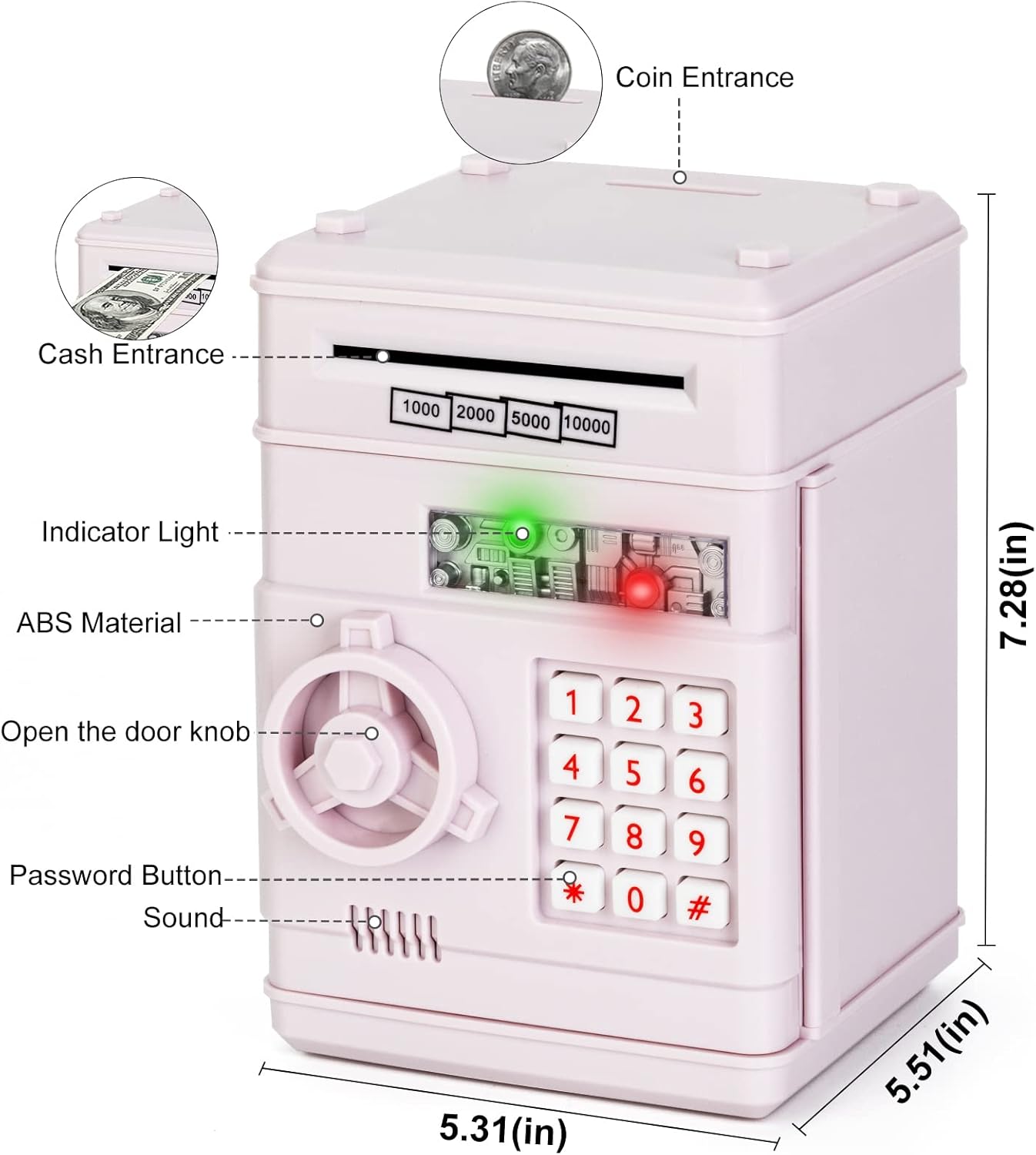
Image: Detailed diagram highlighting key features and dimensions of the bank.
Gwarancja i wsparcie
For any questions, concerns, or support regarding your Refasy Electronic ATM Piggy Bank, please contact the manufacturer directly through the retailer's customer service portal or the official Refasy webStrona. Zachowaj paragon zakupu w celach gwarancyjnych.