
Nexxt Solutions Built-in Battery 2PK
Instrukcja obsługi kamery bezpieczeństwa bezprzewodowej Nextxt
Model: Built-in Battery 2PK
1. Koniec produktuview
The Nexxt Wireless Security Camera offers a robust solution for both indoor and outdoor surveillance. Designed for ease of use and versatility, these cameras provide high-definition video, motion detection, two-way audio, and night vision capabilities, all powered by a built-in rechargeable battery for wire-free operation.
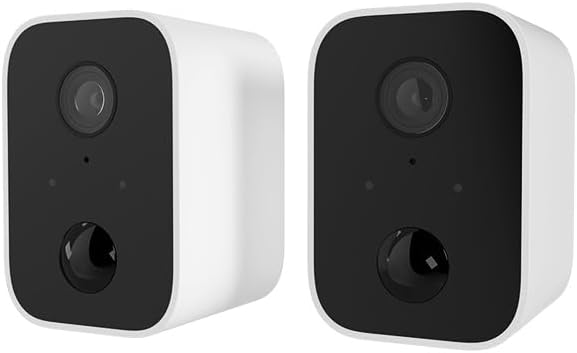
Image: Two Nexxt Wireless Security Cameras, showcasing their compact, white design with black camera faces.
Główne cechy:
- 1080P HD Live Video: Crystal clear real-time video and playback.
- Wbudowana bateria: Wire-free design for flexible placement and continued operation during power outagt.j.
- Odporność na warunki atmosferyczne IP65: Durable construction suitable for outdoor use in various weather conditions.
- Detekcja ruchu: Sends instant notifications to your smartphone upon detecting movement up to 26ft away.
- Dwukierunkowy dźwięk: Communicate directly through the camera using the built-in speaker and microphone.
- Widzenie nocne: Equipped with IR LEDs for clear vision in low-light or dark conditions.
- Przechowywanie lokalne i w chmurze: Supports micro-SD card (not included) for local storage and optional cloud storage (subscription required).
- Integracja inteligentnego domu: Kompatybilny z Amazon Alexa i Google Assistant umożliwiającymi sterowanie głosowe.

Image: A single Nexxt security camera surrounded by icons representing its features: Full 1080P HD, Motion detection, Two-way communication, Night vision, Voice activated, IP65 weatherproof, Micro-microSD™ slot, Wall mount bracket included, and Cloud ready.
2. Zawartość opakowania
Prosimy o sprawdzenie, czy wszystkie przedmioty znajdują się w opakowaniu i są w dobrym stanie po jego otwarciu. Jeśli któregokolwiek z nich brakuje lub jest uszkodzony, prosimy o kontakt z obsługą klienta.
- 2 x Nexxt Wireless Security Cameras
- 2 x wsporniki montażowe
- 2 x kable do ładowania USB
- 1 x Skrócona instrukcja obsługi
- Śruby montażowe i kotwy ścienne

Image: The retail packaging for the Nexxt Smart Wi-Fi battery camera 2-pack, showing the cameras and key features on the box.
3. Przewodnik konfiguracji
3.1 Ładowanie kamery
Before initial use, fully charge both cameras. Connect the provided USB charging cable to the camera's charging port and a standard USB power adapter (not included). The charging indicator light will show the charging status.
3.2 Downloading the Nexxt App
Szukaj "Nexxt Home" in the Apple App Store or Google Play Store and download the application. Create an account or log in if you already have one.
3.3 Parowanie kamery
- Open the Nexxt Home app and tap the "+" icon to add a new device.
- Select "Security Camera" from the device list.
- Follow the on-screen instructions to put the camera into pairing mode (usually involves pressing a reset button until an indicator light flashes).
- Podłącz swój smartfon do sieci Wi-Fi 2.4 GHz. Uwaga: sieci 5GHz nie są obsługiwane.
- The app will display a QR code. Hold your camera approximately 6-8 inches (15-20 cm) in front of your phone's screen until you hear a prompt from the camera.
- Once paired, the camera will connect to your Wi-Fi network, and you can name your device within the app.
3.4 Montaż kamery
The Nexxt Wireless Security Camera can be easily mounted indoors or outdoors. Choose a location that provides the desired viewpod odpowiednim kątem i znajduje się w zasięgu Twojej sieci Wi-Fi.

Image: A Nexxt security camera mounted on an exterior wall, demonstrating its weatherproof design and easy installation.
- Identify a suitable mounting surface.
- Użyj dołączonego uchwytu montażowego jako szablonu do zaznaczenia miejsc wywiercenia otworów.
- W przypadku montażu w płycie gipsowo-kartonowej lub murze wywierć otwory wstępne i włóż kołki rozporowe.
- Przymocuj uchwyt montażowy do powierzchni za pomocą dołączonych śrub.
- Zamontuj kamerę w uchwycie montażowym i dostosuj kąt według potrzeb.

Image: A Nexxt security camera detached from its mounting bracket, showing the connection point for easy installation and removal.
4. Działanie
4.1 Na żywo View
Open the Nexxt Home app and select your camera from the device list to access the live video feed. You can view foo w czasie rzeczywistymtage z dowolnego miejsca z dostępem do Internetu.
4.2 Wykrywanie ruchu
The camera's motion sensors detect movement up to 26 feet away. When motion is detected, the camera will record a short clip and send a notification to your smartphone. You can adjust motion sensitivity and set detection zones within the app settings.

Image: A dog and a child playing in a yard, with a 'Motion detection' icon overlay, illustrating the camera's ability to detect activity.
4.3 Dźwięk dwukierunkowy
Aby skorzystać z dwukierunkowego dźwięku, dotknij ikony mikrofonu w transmisji na żywo. view interface of the app. You can then speak through your phone, and your voice will be projected through the camera's speaker. Release the icon to listen.
4.4 Widzenie nocne
Kamera automatycznie przełącza się na tryb widzenia nocnego w warunkach słabego oświetlenia, zapewniając wyraźny czarno-biały obraz wideo.tage. This feature ensures continuous surveillance 24/7.
4.5 Opcje przechowywania
- Karta Micro-SD: Insert a micro-SD card (up to 128GB, not included) into the camera's slot for local storage of recordings.
- Przechowywanie w chmurze: Nexxt offers optional cloud storage plans for secure, off-site storage of your video recordings. Refer to the Nexxt Home app for subscription details.
4.6 Sterowanie głosowe
Integrate your Nexxt camera with Amazon Alexa or Google Assistant for convenient voice control. Follow the instructions in the Nexxt Home app to link your account with your preferred smart home platform. You can then use voice commands to view transmisje na żywo na kompatybilnych inteligentnych wyświetlaczach.
5. Konserwacja
5.1 Zarządzanie baterią
To maximize battery life, ensure the camera is fully charged before deployment. The Nexxt Home app will notify you when the battery level is low. Regular charging is recommended, especially for cameras in high-traffic areas with frequent motion detection.
5.2 Czyszczenie aparatu
Periodically clean the camera lens and housing with a soft, dry cloth to ensure clear image quality. Avoid using harsh chemicals or abrasive materials that could damage the camera.
5.3 aktualizacji oprogramowania sprzętowego
Nexxt Solutions may release firmware updates to improve performance, add new features, or address security vulnerabilities. The Nexxt Home app will notify you of available updates. It is recommended to keep your camera's firmware up to date for optimal performance and security.
6. Rozwiązywanie Problemów
| Problem | Możliwa przyczyna | Rozwiązanie |
|---|---|---|
| Kamera się nie włącza | Niski poziom naładowania baterii; przycisk zasilania nie został prawidłowo naciśnięty | Naładuj kamerę do pełna; naciśnij i przytrzymaj przycisk zasilania przez kilka sekund. |
| Nie można połączyć się z siecią Wi-Fi | Incorrect Wi-Fi password; Camera too far from router; Only 2.4GHz supported | Verify password; Move camera closer to router; Ensure you are connecting to a 2.4GHz network. |
| Wykrywanie ruchu nie działa | Czułość jest zbyt niska; strefa wykrywania nie została ustawiona; powiadomienia aplikacji są wyłączone | Adjust sensitivity in app; Configure detection zones; Enable notifications for Nexxt Home app. |
| Two-way audio not clear | Poor network connection; Obstruction near microphone/speaker | Check Wi-Fi signal strength; Ensure no obstructions; Reduce background noise. |
| Night vision is blurry | Dirty lens; IR LEDs obstructed | Clean the camera lens; Ensure nothing is blocking the IR LEDs. |
7. Specyfikacje techniczne
| Funkcja | Specyfikacja |
|---|---|
| Nazwa modelu | Battery (Built-in Battery 2PK) |
| Rozdzielczość przechwytywania wideo | Rozdzielczość 1080p HD |
| Zastosowanie wewnątrz/na zewnątrz | Na zewnątrz, Wewnątrz |
| Źródło zasilania | Zasilany bateryjnie |
| Protokół łączności | Wi-Fi (tylko 2.4 GHz) |
| Typ kontrolera | Amazon Alexa, Asystent Google |
| Typ montażu | Montaż ścienny |
| Międzynarodowa Ocena Ochrony | IP65 atmosferyczne |
| Tryb pracy | Dźwięk i ruch |
| Waga przedmiotu | 1.52 funta (za parę) |
| Wymiary opakowania | 11.69 x 6.5 x 2.56 cala |
| UPC | 798302057661 |
8. Gwarancja i wsparcie
8.1 Informacje o gwarancji
Nexxt Solutions products typically come with a 2-year warranty from the date of purchase, covering defects in materials and workmanship. Please retain your proof of purchase for warranty claims. The warranty does not cover damage caused by misuse, accidents, unauthorized modifications, or natural disasters.
8.2 Obsługa klienta
For technical assistance, troubleshooting, or warranty inquiries, please visit the official Nexxt Solutions website or contact their customer support team. You can often find FAQs, video tutorials, and contact information on their support pages.
Wsparcie online: www.nexxtsolutions.com/support
Please have your product model number (Built-in Battery 2PK) and purchase date ready when contacting support.
Ask a question about this manual
Ask about setup, troubleshooting, compatibility, parts, safety, or missing instructions. Manuals+ will review the question and use this page’s manual context to help answer it.