
Wstęp
Welcome to the user manual for your new VERTU iVERTU-81 5G smartphone. This guide provides essential information to help you set up, operate, maintain, and troubleshoot your device. Please read this manual thoroughly to ensure optimal performance and longevity of your smartphone.
Co jest w pudełku
Upon unboxing your VERTU iVERTU-81, please verify that all components are present:
- VERTU iVERTU-81 5G Smartphone
- Zasilacz
- USB-C Cable (not explicitly listed but implied for charging)
- SIM Ejector Tool (not explicitly listed but implied for SIM tray)
- Szybki przewodnik (nie wymieniony wprost, ale domyślny)
Jeśli brakuje jakichkolwiek elementów lub są one uszkodzone, prosimy o kontakt z obsługą klienta.
Organizować coś
1. Wkładanie kart SIM
The VERTU iVERTU-81 supports dual Nano SIM cards for 5G dual card dual standby functionality.
- Znajdź tackę na kartę SIM znajdującą się z boku telefonu.
- Włóż narzędzie do wyjmowania karty SIM do małego otworu obok tacki i delikatnie naciskaj, aż tacka wyskoczy.
- Place your Nano SIM cards into the designated slots on the tray, ensuring the gold contacts face down.
- Ostrożnie włóż tackę karty SIM z powrotem do telefonu, aż zatrzaśnie się na swoim miejscu.
2. Pierwsze włączenie i konfiguracja
- Press and hold the power button until the VERTU logo appears.
- Postępuj zgodnie z instrukcjami wyświetlanymi na ekranie, aby wybrać swój język, połączyć się z siecią Wi-Fi i skonfigurować konto Google.
- Configure security settings such as fingerprint, face unlock, or a PIN/pattern.
3. Ładowanie akumulatora
Before first use, it is recommended to fully charge your device. Use the provided power adapter and USB-C cable.
- Podłącz kabel USB-C do portu ładowania znajdującego się na dole telefonu.
- Podłącz drugi koniec kabla do zasilacza, a następnie podłącz zasilacz do gniazdka ściennego.
- The phone supports 55W fast charging. A full charge can be achieved rapidly.

Image: The VERTU iVERTU-81 smartphone connected to a charger, displaying a '55W Fast Charge' notification on its screen, indicating rapid battery replenishment.
Obsługa Twojego urządzenia
Wyświetlacz i nawigacja
The iVERTU-81 features a 6.67-inch OLED FHD+ display with a 120Hz high refresh rate, providing a clear and immersive viewing experience. The display is designed to adapt to blue light, caring for your eyes.
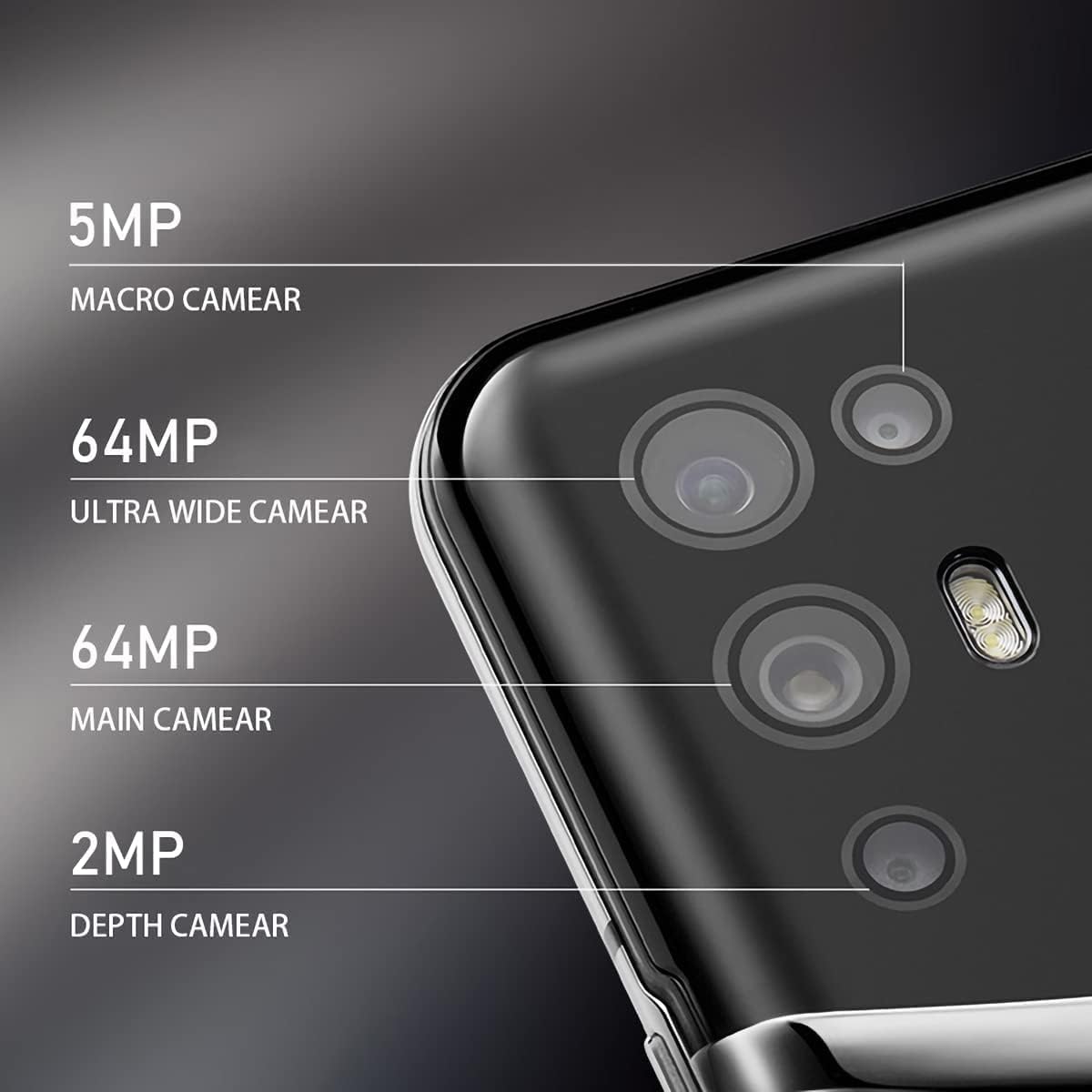
Image: The VERTU iVERTU-81 smartphone showcasing its 6.67-inch OLED display with vibrant colors, featuring a dancer and text highlighting '6.67" OLED Display' and '90hZ' (likely indicating refresh rate).
Wydajność
Powered by a Snapdragon 888 octa-core chip and 12GB RAM, the iVERTU-81 delivers powerful performance for a smooth gaming and multitasking experience.

Image: Two hands holding the VERTU iVERTU-81 smartphone, which displays a graphically intensive game, illustrating the device's 'Powerful Performance'.
Jakość dźwięku
Experience master sound quality with 3D audio technology and HiFi sound. The device also features exclusive ringtones compiled by the London Symphony Orchestra.

Image: The VERTU iVERTU-81 smartphone displaying an image of an orchestra, accompanied by text highlighting 'Master Sound Quality', '3D audio technology', 'HiFi sound quality', and 'London Symphony Orchestra compiled exclusive ringtones'.
Funkcje aparatu
The iVERTU-81 is equipped with a professional photography configuration, allowing you to capture high-quality images and videos.
System kamer tylnych
- Główny aparat 64 MP: Zdjęcia w wysokiej rozdzielczości.
- 64MP aparat ultraszerokokątny: For expansive landscape and group shots.
- Aparat makro 5MP: Do szczegółowych zdjęć zbliżeniowych.
- Aparat głębi 2 MP: For enhanced portrait mode with bokeh effects.
Przednia kamera
- Przedni aparat 16 MP: Do wyraźnych selfie i rozmów wideo.
Nagrywanie wideo
Support for 4K 60FPS high-definition video shooting with two-way anti-shake technology ensures smooth and stable video capture. Intelligent focus assists in sharp and clear recordings.

Obraz: szczegółowy view of the VERTU iVERTU-81's rear camera module, labeling its four lenses: 5MP Macro, 64MP Ultra Wide, 64MP Main, and 2MP Depth cameras.

Image: The VERTU iVERTU-81 smartphone displaying its camera interface, capturing a snowboarder in action, with text emphasizing 'Professional Photography' and support for '4K 60FPS HD video shooting, two-way anti-shake, intelligent focus'.
Konserwacja
To ensure the longevity and optimal performance of your VERTU iVERTU-81 smartphone, follow these maintenance guidelines:
- Czyszczenie: Do czyszczenia ekranu i obudowy telefonu używaj miękkiej, niepozostawiającej włókien ściereczki. Unikaj materiałów ściernych i silnych środków chemicznych.
- Aktualizacje oprogramowania: Regularly check for and install system updates to ensure your device has the latest security patches and features.
- Pielęgnacja baterii: Avoid extreme temperatures. Do not fully discharge the battery frequently. Use only the provided or certified charging accessories.
- Zarządzanie pamięcią masową: Okresowo usuwaj niepotrzebne files and apps to maintain optimal performance. The phone comes with 512GB ROM.
- Ochrona: Aby zabezpieczyć się przed uszkodzeniami fizycznymi, warto rozważyć użycie etui ochronnego i folii ochronnej na ekran.
Rozwiązywanie problemów
If you encounter issues with your VERTU iVERTU-81, refer to the following common troubleshooting steps:
Urządzenie nie włącza się
- Upewnij się, że bateria jest naładowana. Podłącz telefon do ładowarki na co najmniej 15 minut przed ponownym włączeniem.
- Naciśnij i przytrzymaj przycisk zasilania przez 10–15 sekund, aby wymusić ponowne uruchomienie.
Słaby sygnał sieciowy
- Sprawdź, czy karta SIM jest prawidłowo włożona.
- Przenieś się w miejsce, gdzie jest lepszy zasięg sieci.
- Uruchom ponownie telefon.
- Verify that your mobile data or 5G settings are correctly configured.
Aplikacje ulegają awarii lub zawieszają się
- Zamknij problematyczną aplikację i otwórz ją ponownie.
- Clear the app's cache and data in the phone's settings.
- Upewnij się, że aplikacja jest zaktualizowana do najnowszej wersji.
- Uruchom ponownie telefon.
Bateria szybko się rozładowuje
- Zmniejsz jasność ekranu i ustaw krótszy czas wygaszania ekranu.
- Disable unused features like Wi-Fi, Bluetooth, GPS, or 5G when not needed.
- Zidentyfikuj i zamknij energochłonne aplikacje działające w tle.
- Sprawdź dostępność aktualizacji systemu, ponieważ często obejmują one optymalizację baterii.

Image: The VERTU iVERTU-81 smartphone connected to a charger, displaying '4200mAh Long Battery Life' and '55W fast charge' text, emphasizing its battery capacity and quick charging capability.
Communication Encryption
The device features communication encryption for double protection of your data and privacy.

Image: A visual representation of a safe door, overlaid with various security-related terms such as 'encryption', 'firewalls', 'privacy', and 'information security', illustrating the concept of 'Communication Encryption Double Protection'.
Specyfikacje
| Funkcja | Specyfikacja |
|---|---|
| Nazwa modelu | iVERTU-81 |
| System operacyjny | Android |
| Edytor | Snapdragon 888 (Octa-core) |
| BARAN | 12 GB |
| Pojemność pamięci masowej | 512 GB |
| Rozmiar ekranu | 6.67 cali |
| Typ wyświetlacza | OLED |
| Rezolucja | 2400x1080 |
| Częstotliwość odświeżania | 120 Hz |
| Kamera tylna | 64MP Main + 64MP Ultra Wide + 5MP Macro + 2MP Depth |
| Przednia kamera | 16MP |
| Pojemność baterii | 4200 mlnamp Godziny |
| Ładowanie | 55W Szybkie ładowanie |
| Operator sieci bezprzewodowej | Odblokowany |
| Technologia komórkowa | 5G |
| Technologie łączności | Wi-Fi, GPS |
| Kolor | Calf Leather-Brown |
Gwarancja i wsparcie
For warranty information and customer support, please refer to the warranty card included with your product or visit the official VERTU webZachowaj dowód zakupu na wypadek roszczeń gwarancyjnych.
For technical assistance or service inquiries, please contact VERTU customer service through the channels provided on their official webstrona.