
Wstęp
This manual provides instructions for the proper setup, operation, and maintenance of your Comix C-2031 Desk Calculator. This calculator is designed for general arithmetic tasks in home, office, or school environments, featuring a large 12-digit LCD display and dual power sources.

Główne cechy
The Comix C-2031 Desk Calculator is equipped with several features designed for ease of use and reliability:
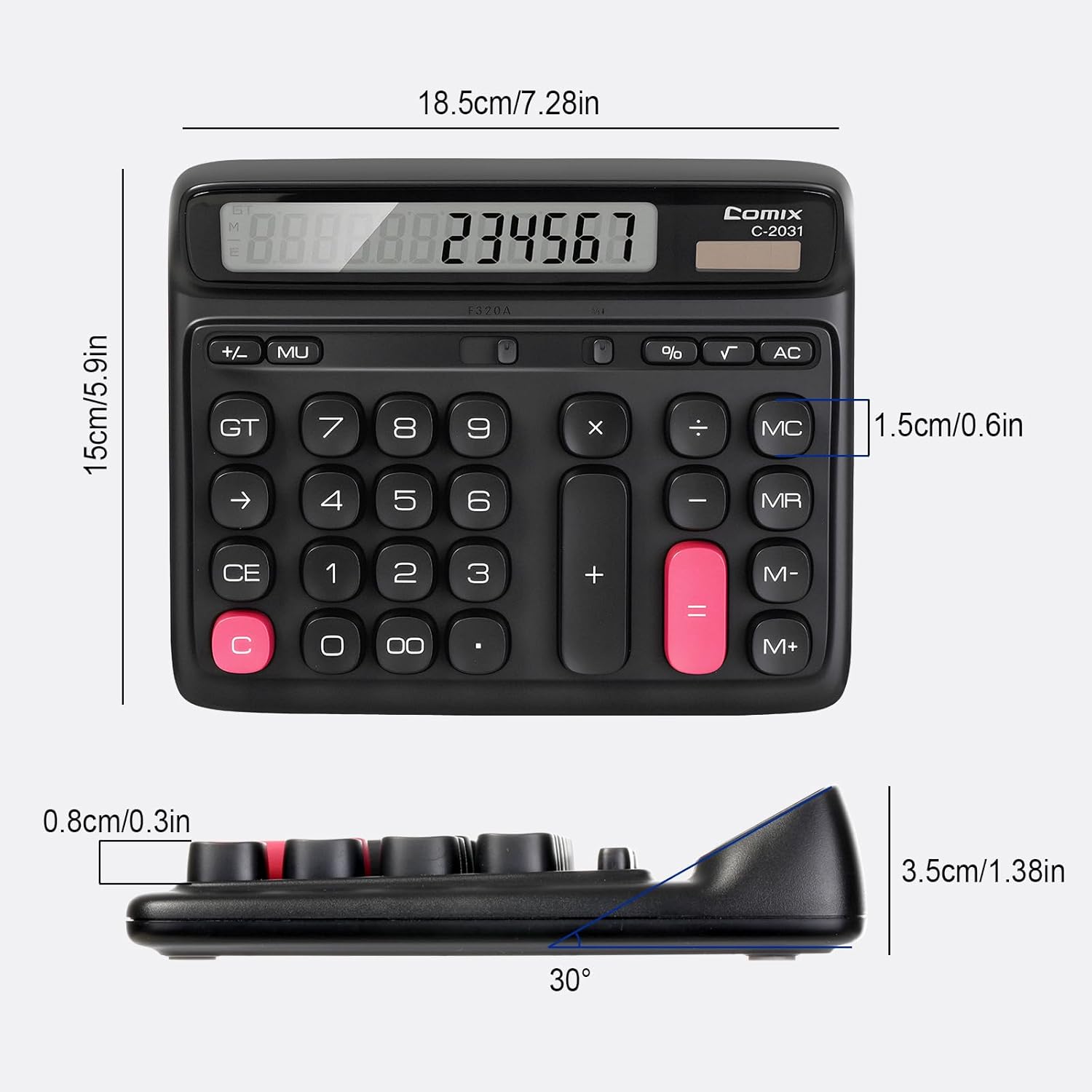
- 12-cyfrowy duży wyświetlacz LCD: Provides clear and accurate readings with a 30° tilt for comfortable viewing.
- Ergonomic Computer Key Design: Features round keys for comfortable touch and clear feedback, designed for efficient data entry.
- Podwójne źródło zasilania: Operates on solar energy in well-lit conditions and includes a 1 AA battery for consistent performance, especially in low light.
- Stopy antypoślizgowe: Equipped with four non-slip feet to ensure stability on your desk during use.
- Kompaktowy rozmiar: Measures 7.28 x 5.9 x 1.38 inches, fitting conveniently on any desk.

Organizować coś
Źródło zasilania
The Comix C-2031 calculator utilizes a dual power system, operating on both solar energy and a single AA battery. For optimal display clarity and consistent operation, especially in environments with varying light conditions, using the AA battery is recommended.
- Energia słoneczna: The calculator will automatically use solar power when sufficient light is available. Ensure the solar panel (located above the display) is exposed to light for operation without battery power.
- Montaż baterii:
- Znajdź komorę baterii z tyłu kalkulatora.
- Otwórz pokrywę komory baterii.
- Włóż jedną baterię AA, zwracając uwagę na prawidłową biegunowość (+/-).
- Dokładnie zamknij pokrywę komory baterii.

Instrukcja obsługi
Familiarize yourself with the calculator's key functions for efficient use.

Podstawowe operacje
- Wprowadzanie numeru: Aby wprowadzić cyfry, naciśnij klawisze numeryczne (0-9).
- Kropka dziesiętna: Press the "." key for decimal values.
- Dodawanie (+), odejmowanie (-), mnożenie (×), dzielenie (÷): Press the corresponding operator key after entering the first number, then enter the second number, and press "=" for the result.
- Równa się (=): Displays the result of a calculation.
Wyczyść funkcje
- C (Clear the Screen): Clears the current entry on the display without affecting memory or ongoing calculations.
- CE (Wyczyść wpis): Czyści ostatnią wprowadzoną liczbę lub operację.
- AC (Clear All): Clears all entries, operations, and memory content, resetting the calculator to its initial state.
- Klawisz Backspace (→): Usuwa ostatnią wprowadzoną cyfrę.
Funkcje pamięci
- M+ (Pamięć Plus): Adds the displayed number to the memory.
- M- (Pamięć Minus): Subtracts the displayed number from the memory.
- MR (przywołanie pamięci): Przywołuje wartość zapisaną w pamięci i wyświetla ją na wyświetlaczu.
- MC (kasowanie pamięci): Czyści zawartość pamięci.
Funkcje zaawansowane
- % (proctagmi): Używane do procentówtage obliczenia. Na przykładample, to calculate 10% of 200, enter 200 × 10 %, which will display 20.
- √ (pierwiastek kwadratowy): Oblicza pierwiastek kwadratowy wyświetlanej liczby.
- GT (suma całkowita): Kumuluje wyniki wszystkich obliczeń. Naciśnięcie GT wyświetla sumę całkowitą.
- MU (Mark-Up): Used for profit margin calculations.
Produkt ponadview Wideo
Konserwacja
- Czyszczenie: Wipe the calculator with a soft, dry cloth. Do not use liquid cleaners or abrasive materials.
- Wymiana baterii: If the display becomes dim or unresponsive, replace the AA battery in the compartment on the back of the unit. Ensure proper polarity.
- Składowanie: Przechowuj kalkulator w chłodnym, suchym miejscu, z dala od bezpośredniego światła słonecznego i ekstremalnych temperatur.
Rozwiązywanie problemów
| Problem | Możliwa przyczyna | Rozwiązanie |
|---|---|---|
| Wyświetlacz jest pusty lub przyciemniony. | Niewystarczające oświetlenie do zasilania energią słoneczną lub niski poziom naładowania akumulatora. | Move the calculator to a brighter area or replace the AA battery. |
| Klawisze nie reagują. | Tymczasowy błąd oprogramowania lub niski poziom zasilania. | Press the AC button to reset. If the issue persists, replace the battery. |
| Nieprawidłowe wyniki obliczeń. | Incorrect key sequence or function usage. | Review the operating instructions for the specific function. Press AC to clear all previous entries and start a new calculation. |
Specyfikacje
- Model: C-2031
- Wyświetlacz: 12-cyfrowy duży wyświetlacz LCD
- Źródło zasilania: Solar and 1 x AA Battery (included)
- Wymiary produktu: 7.28 x 5.9 x 1.38 cala (18.5 x 15 x 3.5 cm)
- Waga przedmiotu: 10.5 uncji (297.67 grama)
- Typ klucza: Ergonomic Computer Keys
- Cechy: 30° Tilt Display, Non-Slip Feet
Gwarancja i wsparcie
Comix products are manufactured with quality and reliability in mind. For any questions, technical support, or warranty inquiries, please refer to the contact information provided with your purchase or visit the official Comix webStrona. Zachowaj dowód zakupu na wypadek roszczeń gwarancyjnych.