
SONICAKE QAP-10
SONICA Amphonix Guitar Headphone AmpInstrukcja obsługi lifier
Model: QAP-10 | Brand: SONICAKE
Wstęp
The SONICAKE Amphonix QAP-10 is a portable, rechargeable plug-in headphone amplifier designed for electric guitars. It features multiple built-in effects, including clean, overdrive, distortion, modulation, delay, and reverb, allowing for versatile tone shaping. With Bluetooth audio and an auxiliary input, it provides a convenient solution for silent practice and jamming along with backing tracks.

Figure 1: SONICAKE Amphonix QAP-10 Guitar Headphone Ampżywsze
This image displays the compact, black SONICAKE Amphonix QAP-10 headphone amplifier with its 1/4-inch jack plugged in, showing the illuminated effect indicators.
Organizować coś
Ładowanie urządzenia
Ten Amphonix QAP-10 is USB-rechargeable and provides up to 5 hours of continuous operation on a full charge. Use the included USB charging cable to connect the device to a standard USB power source (e.g., computer USB port, USB wall adapter).
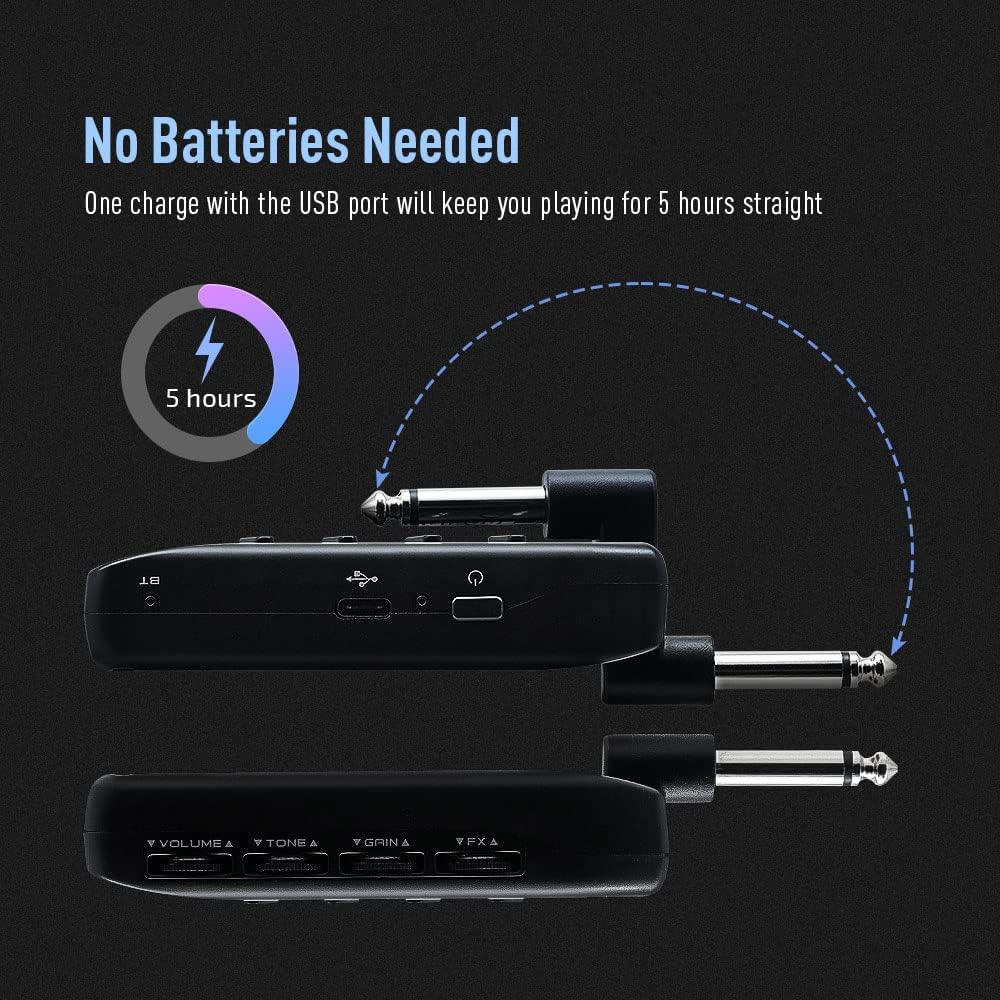
Rysunek 2: Ładowanie Amphonix QAP-10
This illustration shows the Amphonix QAP-10 being charged via a USB cable, highlighting its 5-hour battery life.
Connecting to Your Guitar and Headphones
- Plug the 1/4-inch jack of the Amphonix QAP-10 directly into your electric guitar's output jack.
- Connect your wired headphones to the headphone output jack on the Amphonix QAP-10.
- To use an external audio source, connect it to the AUX input jack.

Rysunek 3: Podłączanie Amphonix QAP-10
Na tym zdjęciu widać Amphonix QAP-10 connected to a guitar and headphones, illustrating the various input and output ports.
Parowanie Bluetooth
Ten Amphonix QAP-10 supports Bluetooth audio input for playing along with backing tracks. To pair:
- Włącz Amphonix QAP-10. The Bluetooth indicator light will flash.
- On your smartphone or computer, enable Bluetooth and search for available devices.
- Wybierać "Amphonix" from the list to pair. Once paired, the Bluetooth indicator light will become solid.
- Audio from your paired device will now play through your headphones along with your guitar signal.
Video 1: Sonicake Amphonix Bluetooth headphone guitar amplifier ponadview
This video demonstrates the features and connectivity of the Sonicake Amphonix, including its Bluetooth capabilities for playing along with music.
Obsługa Ampżywsze
Ten Amphonix QAP-10 features intuitive controls for adjusting your tone and effects.
Kontrola nadview

Rysunek 4: Amphonix QAP-10 Controls
This image highlights the four control dials (Volume, Tone, Gain, FX) and the effect module buttons on the Amphonix QAP-10.
- Tom: Dostosowuje ogólną głośność wyjściową słuchawek.
- Ton: Shapes the tonal characteristics, from darker to brighter sounds.
- Osiągać: Controls the amount of distortion or overdrive.
- efekty: Adjusts the intensity or parameter of the selected effect.
- AMP/MOD/DLY/RVB Buttons: Press these buttons to cycle through the different amplifier models and effect types within each module. The illuminated LEDs indicate the currently selected setting.
Amplifier and Effect Modules
Ten Amphonix QAP-10 features 6 AMP modules and 18 effects across Modulation (MOD), Delay (DLY), and Reverb (RVB) modules. These can be used simultaneously.
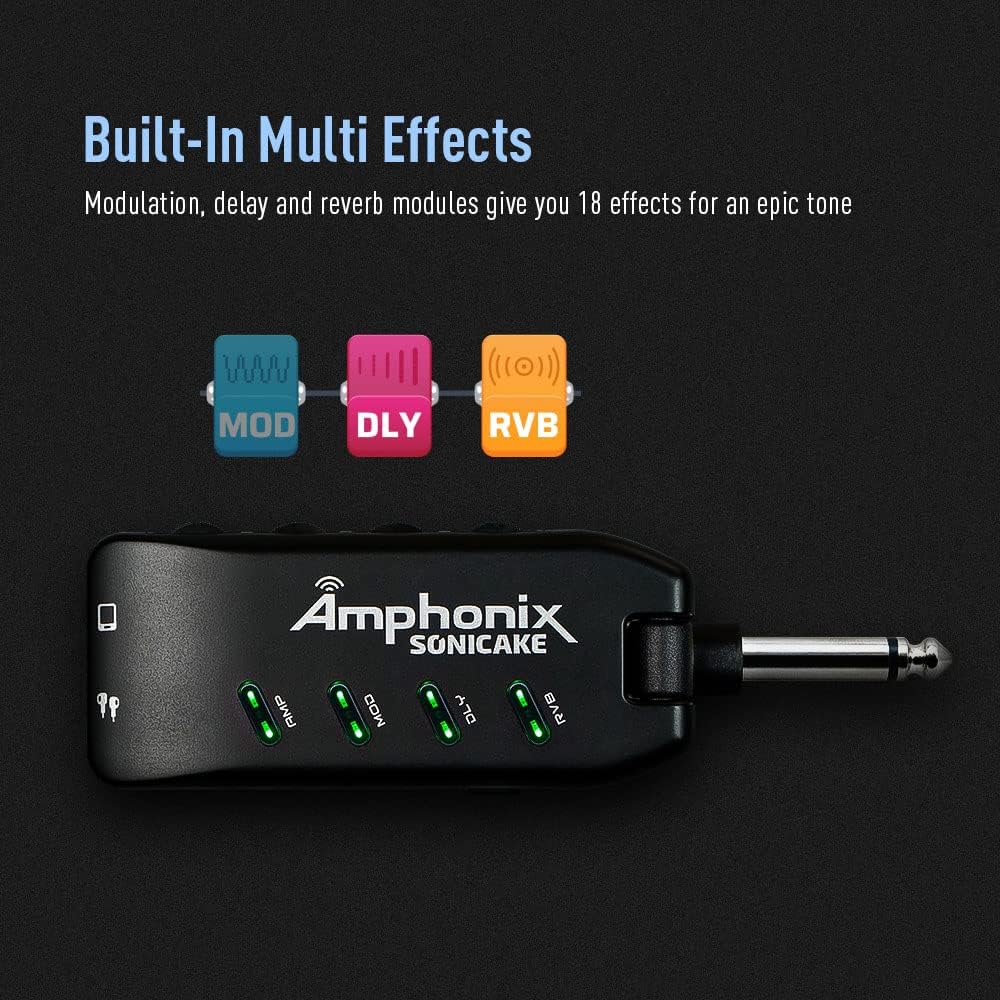
Figure 5: Effect Module Indicators
This image shows the illuminated AMP, MOD, DLY, and RVB indicators on the Amphonix QAP-10, signifying active effect modules.
| Moduł | Kolor | Nazwa | Description / Based On |
|---|---|---|---|
| AMP | Zielony | Wyczyść 1 | Fender Bassman* |
| Niebieski | Wyczyść 2 | Legendarny jazz Amp* | |
| Czerwony | Przester 1 | Orange Rockerverb 50* | |
| Cyjan | Przester 2 | Marshall JCM 800* | |
| Żółty | Zniekształcenie 1 | Mesa/Boogie Dual Rectifier* | |
| Różowy | Zniekształcenie 2 | ENGL Powerball II* | |
| MOD | Zielony | Chór | Produces a vintage chorus sound |
| Niebieski | Obrotowy | Produces a rotary speaker sound | |
| Czerwony | Tremolo | Wytwarza klasyczny optyczny dźwięk tremolo | |
| Cyjan | Wibrato | Produces a natural vibrato sound | |
| Żółty | Flanger | Tworzy klasyczne brzmienie flanger | |
| Różowy | Phaser | Tworzy jasne, ostre pHasinton g | |
| DLY | Zielony | Ciepłe Echo | Wytwarza ciepłą, vintage efekt opóźnienia dźwięczności analogowej |
| Niebieski | Czyste echo | Daje czysty, dokładny efekt opóźnienia | |
| Czerwony | Echo taśmy | Symuluje dźwięk echa z maszyny taśmowej | |
| Cyjan | Modowe echo | Tworzy czyste opóźnienie z efektem chorus | |
| Żółty | Ciemne echo | Daje gładki, łagodny efekt opóźnienia | |
| Różowy | klaps | Symuluje klasyczny dźwięk echa slapback | |
| RVB | Zielony | Studio | Symuluje akustykę studia |
| Niebieski | Pokój | Symuluje akustykę pomieszczenia | |
| Czerwony | Hala B | Symuluje akustykę sali z jaśniejszym zanikiem | |
| Cyjan | Hall D | Symuluje akustykę sali z ciemniejszym zanikiem | |
| Żółty | Kościół | Simulates the acoustics of a church | |
| Różowy | Płyta | Symuluje pogłos płytowy |
*Wymienione powyżej nazwy producentów i produktów są znakami towarowymi lub zarejestrowanymi znakami towarowymi ich właścicieli. Znaki towarowe zostały użyte wyłącznie w celu identyfikacji charakteru dźwiękowego produktów.
Video 2: Pocket Guitar Amplifier with Bluetooth Multi-Effects demonstration
This video showcases the various amplifier models and multi-effects available on the SONICAKE Amphonix, demonstrating their sonic capabilities.
Konserwacja
- Czyszczenie: Do czyszczenia zewnętrznej części urządzenia należy używać miękkiej, suchej ściereczki. Unikaj stosowania środków czyszczących o właściwościach ściernych i rozpuszczalników.
- Składowanie: Przechowuj Amphonix QAP-10 in a cool, dry place away from direct sunlight and extreme temperatures.
- Pielęgnacja baterii: To prolong battery life, avoid fully discharging the device frequently. Recharge it regularly, even if not in use for extended periods.
Rozwiązywanie problemów
| Problem | Możliwa przyczyna | Rozwiązanie |
|---|---|---|
| Brak dźwięku w słuchawkach. | Headphones not fully plugged in; low battery; incorrect volume setting; device not powered on. | Ensure headphones are securely connected. Charge the device. Increase the Volume knob. Press the power button to turn on. |
| Dźwięk jest zniekształcony lub niewyraźny. | Gain or Volume set too high; incorrect effect setting; low battery. | Reduce Gain or Volume. Adjust effect settings. Charge the device. |
| Problemy z parowaniem Bluetooth. | Device not in pairing mode; "Amphonix" not selected; interference. | Ensure the Bluetooth indicator is flashing. Re-scan for devices on your phone/computer. Move closer to the device. |
| No sound after turning on (requires gain adjustment). | Specific device behavior or setting. | As noted by some users, try slightly adjusting the Gain knob after powering on to activate the sound. |
| Constant buzzing/hissing sound. | Interference; high gain setting; faulty cable/headphones. | Try different headphones or cables. Reduce the Gain setting. Ensure no strong electromagnetic interference sources are nearby. |
Specyfikacje
| Funkcja | Szczegół |
|---|---|
| Marka | SONICA |
| Numer modelu | QAP-10 |
| Waga przedmiotu | 2.22 uncji |
| Wymiary produktu | 1.61 x 5.16 x 4.65 cala |
| Kraj pochodzenia | Chiny |
| Baterie | Wymagana 1 bateria litowo-polimerowa |
| Kolor | Czarny |
| Kompatybilne urządzenia | Gitara |
| Typ złącza | Wtyczka |
| Typ materiału | Metal |
| Moc wyjściowatage | 5 watów |
| Źródło zasilania | Zasilany bateryjnie |
Gwarancja i wsparcie
For detailed warranty information, please refer to the documentation included with your product or contact SONICAKE customer support directly. Protection plans may be available for purchase separately.
Dodatkowe zasoby wsparcia:
- Oficjalna instrukcja obsługi (PDF): Pobierz PDF
- Visit the SONICAKE Store: SONICAKE Amazon Store
Ask a question about this manual
Ask about setup, troubleshooting, compatibility, parts, safety, or missing instructions. Manuals+ will review the question and use this page’s manual context to help answer it.