
1. Wprowadzenie
This manual provides instructions for the setup, operation, and maintenance of your FightBox F1-UFB-UP5 All Buttons Leverless Arcade Game Controller. This controller is designed for use with various gaming platforms including PlayStation 5, PlayStation 4, PlayStation 3, PC, Xbox Series X, and Nintendo Switch.
2. Koniec produktuview
The FightBox F1-UFB-UP5 is a high-performance leverless arcade controller, featuring an all-button layout for precise input. It incorporates the Brook Universal Fighting Board (UFB) and UFB-UP5 for broad platform compatibility and low-latency performance. The controller is equipped with Sanwa buttons, known for their responsiveness and durability.

This image illustrates the FightBox F1-UFB-UP5 controller alongside its internal components, specifically highlighting the Brook Universal Fighting Board and the UFB-UP5 module, which enable multi-platform compatibility.

Od góry do dołu view of the FightBox F1-UFB-UP5 controller, showcasing its all-button layout with red and black Sanwa buttons and the 'FIGHTBOX' branding.
3. Konfiguracja
The FightBox F1-UFB-UP5 controller connects to your gaming platform via a standard USB cable. No additional drivers are typically required for console use, but PC users may need to ensure proper drivers are installed for optimal performance.
- Connect the USB cable from the controller to an available USB port on your gaming console (PlayStation 5, PlayStation 4, PlayStation 3, Xbox Series X, Nintendo Switch) or PC.
- The controller should be automatically recognized by most systems. For PC, if not automatically recognized, check your operating system's device manager for driver updates or visit the Brook webwitryna umożliwiająca pobranie konkretnych sterowników.
- Ensure the correct input mode is selected if your console requires it (refer to your console's documentation).
4. Instrukcja obsługi
The F1-UFB-UP5 features a leverless button layout, replacing the traditional joystick with directional buttons for precise movement inputs. The primary action buttons are arranged for intuitive gameplay.

This diagram illustrates the button assignments for the PlayStation versions of the FightBox F1-UFB-UP5 controller. It identifies the USB port, Touchpad, Share, R3, L3, Option, and Home buttons, along with the directional and action buttons.
- Przyciski kierunkowe: The four red buttons on the left side control movement (Up, Down, Left, Right).
- Przyciski akcji: The eight black buttons on the right side are for primary game actions.
- Przycisk opcji: Typically used for pausing games or accessing menus.
- Przycisk Home: Returns to the console's main menu or dashboard.
- Przycisk udostępniania: Used for sharing gameplay content (on PlayStation platforms).
- Panel dotykowy: Functions as a touchpad input (on PlayStation platforms).
- R3/L3 Buttons: These buttons correspond to pressing down the right and left analog sticks on a standard controller.
For specific button mappings on different platforms (Xbox, Nintendo Switch), the controller automatically adapts. Consult your game's control settings for customization options.
5. Konserwacja
Proper maintenance ensures the longevity and performance of your FightBox F1-UFB-UP5 controller.
- Czyszczenie: Use a soft, dry cloth to wipe down the surface of the controller. For stubborn marks, a slightly damp Można użyć ściereczki z łagodnym mydłem, a następnie wytrzeć do sucha. Unikać środków czyszczących o działaniu ściernym i rozpuszczalników.
- Składowanie: Przechowywać kontroler w chłodnym i suchym miejscu, z dala od bezpośredniego światła słonecznego i ekstremalnych temperatur.
- Pielęgnacja kabli: Avoid sharp bends or kinks in the USB cable. Disconnect by pulling the plug, not the cable itself.
- Pielęgnacja guzików: Do not apply excessive force to the buttons. If a button feels sticky, it may require professional cleaning or replacement.
6. Rozwiązywanie Problemów
If you encounter issues with your FightBox F1-UFB-UP5 controller, refer to the following common solutions.
- Kontroler nie został rozpoznany:
- Sprawdź, czy kabel USB jest prawidłowo podłączony do kontrolera i konsoli/komputera.
- Wypróbuj inny port USB.
- Uruchom ponownie konsolę lub komputer.
- For PC, check device manager for driver issues and update if necessary.
- Przyciski nie odpowiadają:
- Verify the controller is powered on and connected.
- Aby zidentyfikować problem, przetestuj przyciski w innej grze lub menu systemowym.
- If only specific buttons are affected, they may require cleaning or replacement.
- Opóźnienie wejściowe:
- Ensure you are using a direct USB connection, avoiding unpowered USB hubs.
- Sprawdź, czy na Twoim komputerze nie działają jakieś procesy, które mogą zużywać zasoby.
- Ensure your console's firmware and game software are up to date.
7. Specyfikacje
Detailed specifications for the FightBox F1-UFB-UP5 All Buttons Leverless Arcade Game Controller.
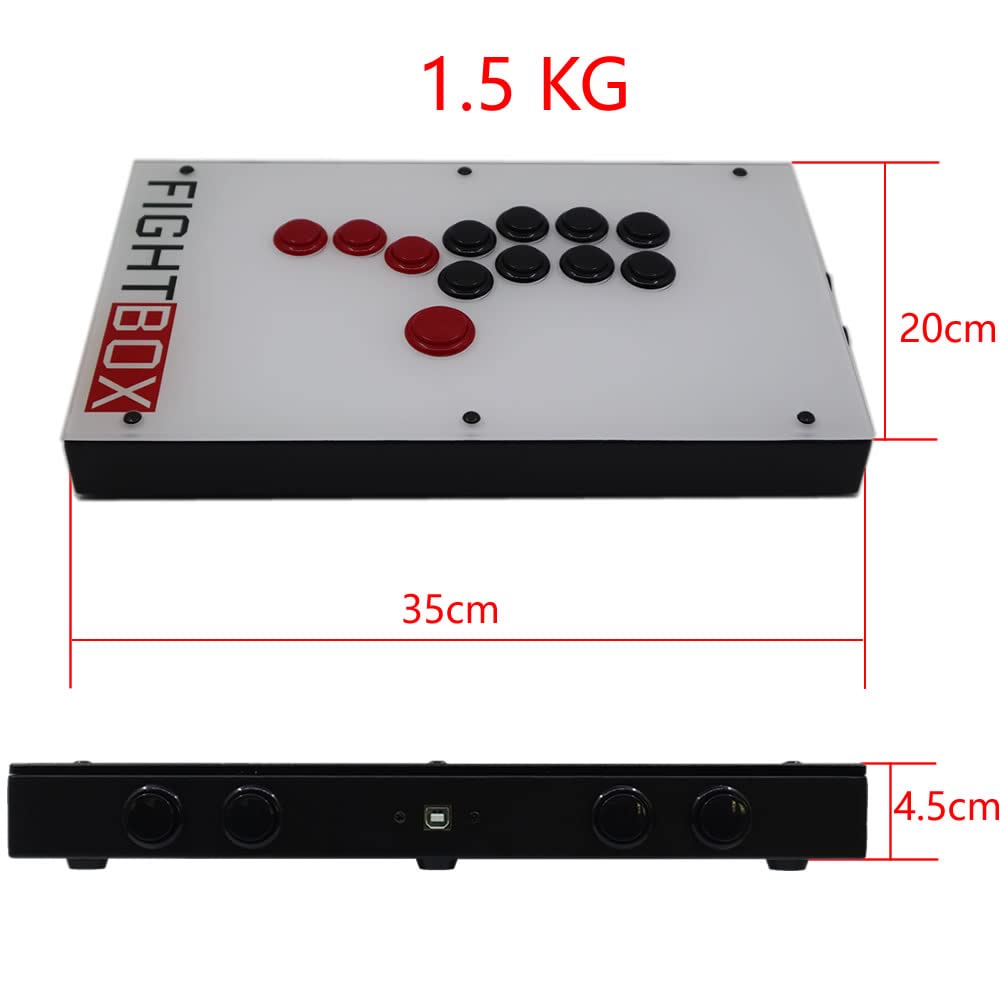
This image provides the physical dimensions of the FightBox F1-UFB-UP5 controller, showing a length of 35cm, width of 20cm, and height of 4.5cm, with a total weight of 1.5 kg.
| Funkcja | Szczegół |
|---|---|
| Model | F1-UFB-UP5 |
| Marka | FightBox |
| Łączność | USB |
| Typ kontrolera | Leverless Arcade Controller |
| Ilość przycisków | 12 |
| Cechy specjalne | Panel dotykowy |
| Kompatybilne urządzenia | PlayStation 5, PlayStation 4, PlayStation 3, PC, Xbox Series X, Nintendo Switch |
| Wymiary (dł. x szer. x wys.) | 15.75 x 9.84 x 3.94 cala (ok. 35 x 20 x 4.5 cm) |
| Waga | 1.5 kilograma |
| Zarząd wewnętrzny | Brook Universal Fighting Board (UFB) + UFB-UP5 |
| Pikolak | Sanwa |
| Kod UPC/GTIN | 635648885254 |
8. Gwarancja i wsparcie
For warranty information and technical support, please refer to the official FightBox webOdwiedź witrynę lub skontaktuj się ze sprzedawcą. Zachowaj paragon jako dowód zakupu.
Aby uzyskać dalszą pomoc, odwiedź stronę: FightBox Official Store