
1. Ważne informacje dotyczące bezpieczeństwa
Please read all safety instructions carefully before using this product. Failure to follow these instructions may result in injury or damage.
- Umieszczenie: Avoid placing the camera in unstable locations or within reach of children or pets.
- Moc: Use only the provided AC adapter and power cable. Disconnect power before moving the device.
- Środowisko: Keep the camera away from high humidity, dust, and extreme temperatures. This product is not waterproof.
- Konserwacja: Do not attempt to disassemble or repair the camera yourself. Contact customer support for any issues.

Image: General safety guidelines for camera usage.
2. Zawartość opakowania
Sprawdź, czy w pakiecie znajdują się wszystkie elementy:
- Galayou G2 Camera Unit
- Zasilacz sieciowy
- Kabel zasilający
- Zestaw montażowy (śruby, kotwy)
- Instrukcja obsługi w języku japońskim

Image: The Galayou G2 camera and a smartphone displaying its live feed.
3. Przewodnik konfiguracji
3.1 Konfiguracja początkowa
- Włączanie: Connect the camera to power using the provided AC adapter and cable. The indicator light will turn red.
- Pobieranie aplikacji: Download the dedicated 'blurams' app from the App Store (iOS) or Google Play Store (Android).
- Uprawnienia aplikacji: Ensure Bluetooth and Location permissions are enabled for the 'blurams' app in your smartphone settings.
- Zresetuj kamerę: Press and hold the reset button on the camera until you hear a beep sound. The indicator light will flash red and blue alternately, indicating it's ready for network connection.
- Dodaj urządzenie w aplikacji: Open the 'blurams' app, tap 'Add Device' or the '+' icon. Select your camera model (G2 or similar D1 model) and choose 'Wi-Fi connection via Bluetooth'.
- Połączenie Wi-Fi: Enter your 2.4GHz Wi-Fi network name and password. The camera only supports 2.4GHz Wi-Fi.
- Skan kodu QR: The app will display a QR code. Hold your smartphone in front of the camera lens to scan the QR code. You will hear a beep sound from the camera upon successful scan.
- Potwierdzenie połączenia: The camera will announce 'Connection successful' and then 'Connecting to network'. Once connected, the indicator light will turn solid blue.
3.2 Video Guide: Bluetooth Wi-Fi Connection
Video: This video demonstrates the Bluetooth-assisted Wi-Fi connection method for the D1 camera, which is similar to the G2 model. It shows the steps from app permissions to successful network connection.
3.3 Video Guide: Camera Setup Method
Video: This video provides a general guide on how to set up a Skyworth pet camera, which can be used as a reference for the Galayou G2's setup process.
4. Instrukcja obsługi
4.1 Na żywo View i sterowanie obrotem/pochyleniem
Once connected, you can access the live feed through the 'blurams' app. The camera offers a 355° horizontal rotation and 52° vertical rotation for comprehensive coverage.
- Panoramowanie/pochylanie: Użyj przycisków kierunkowych w aplikacji, aby zdalnie dostosować położenie kamery. viewkąt.
- Zoom cyfrowy: The camera supports 4x digital zoom to view bliższe dane.

Image: The camera's pan and tilt capabilities, offering a wide field of view.
4.2 Jakość wideo i widzenie nocne
The G2 camera features 2K high-resolution video (1440p) and a 3-megapixel CMOS sensor for clear images. It also provides advanced night vision capabilities.
- Rozdzielczość 2K: Ciesz się czystym i szczegółowym obrazem wideotage.
- Tryby widzenia nocnego: The camera supports three night vision modes: Smart Night Vision (auto-switches between color and black & white based on motion), Color Night Vision (always color), and Infrared Night Vision (always black & white).
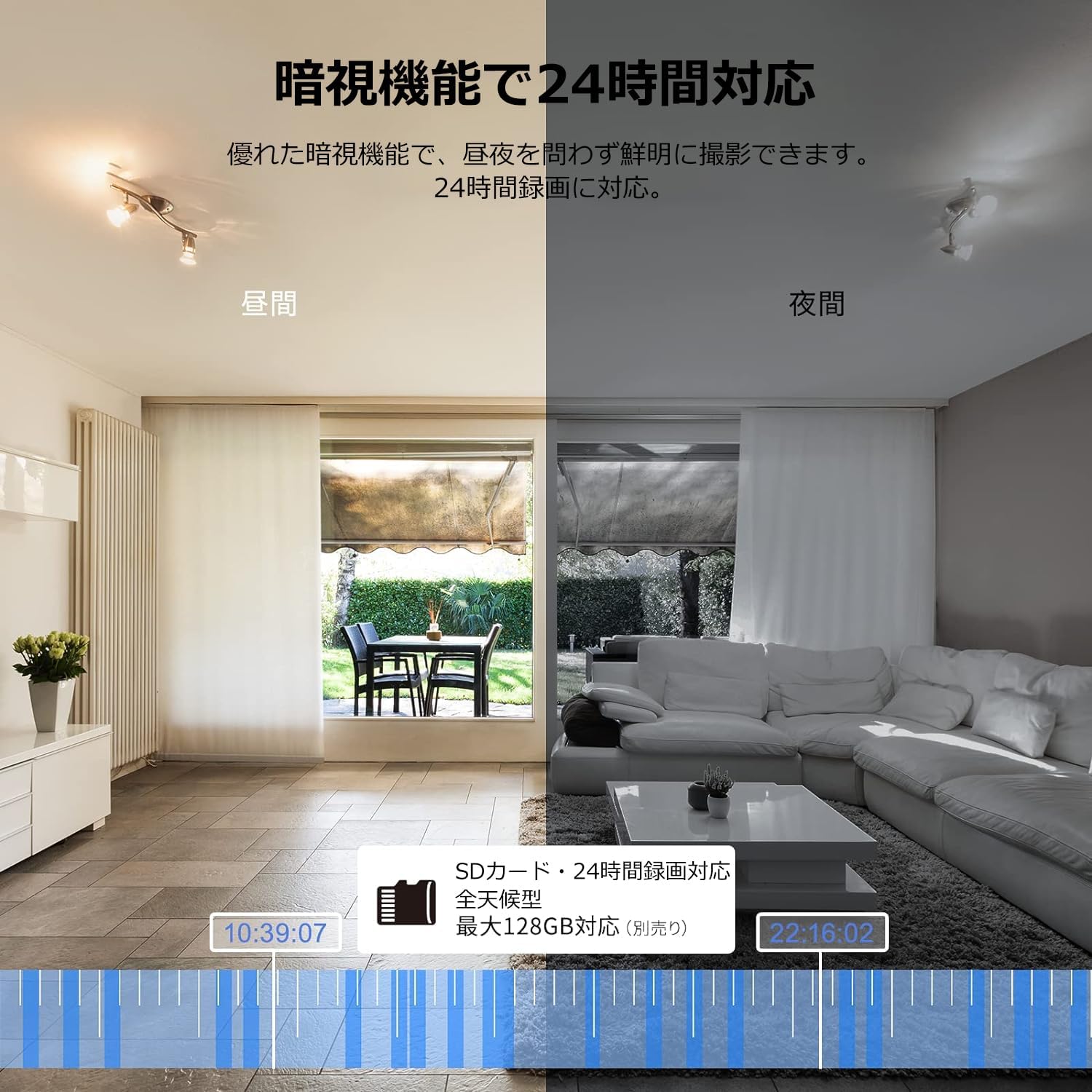
Image: Comparison of day and night vision, demonstrating the camera's ability to record clearly in low light.
4.3 Dźwięk dwukierunkowy
Equipped with a microphone and speaker, the camera allows for real-time two-way communication.
- Speak and Listen: Talk to family members or pets through the app, and hear their responses.
- Redukcja hałasu: The two-way audio features noise reduction for clearer sound.

Image: The camera's two-way audio feature, allowing interaction with pets.
4.4 Motion Detection & Automatic Tracking
The camera can detect motion and automatically track subjects within its field of view.
- Alerty ruchu: Otrzymuj natychmiastowe powiadomienia na swój smartfon po wykryciu ruchu.
- Automatyczne śledzenie: The camera will follow detected movement, keeping the subject in frame.
- Wykrywanie człowieka: Advanced AI can differentiate between humans and other moving objects, reducing false alarms.
- Funkcja alarmu: Trigger an alarm sound from the camera via the app to deter intruders.

Image: Motion detection and alarm features, showing alerts on a smartphone.
4.5 Rejestrowanie i przechowywanie
The camera supports both local and cloud storage options for continuous recording.
- Karta MicroSD: Supports up to 128GB microSD cards (sold separately) for 24-hour continuous recording with automatic overwriting.
- Przechowywanie w chmurze: Optional paid cloud storage service is available for extended recording and backup.
- Kompresja wideo: Utilizes H.264 and H.265 compression formats for efficient storage.


Images: MicroSD card recording and cloud storage options.
4.6 Tryb prywatności
Activate privacy mode to physically cover the camera lens, ensuring your privacy when needed.
- One-Tap Activation: Easily turn off the lens via the app.
- Physical Cover: The camera physically rotates its lens downwards, blocking the view.

Image: Privacy mode icon.
4.7 Integracja z Alexą
The Galayou G2 is Alexa-certified, allowing for voice control and viewing the camera feed on compatible Alexa devices.
- Polecenia głosowe: Użyj poleceń głosowych, aby view the camera feed on an Echo Show or other Alexa-enabled screen.

Image: Alexa integration with the Galayou G2 camera.
4.8 Multi-Camera Support & Sharing
The app supports adding multiple cameras and sharing access with family members.
- Wiele kamer: Monitor different areas of your home by adding several cameras to the app.
- Udostępnianie rodzinne: Share camera access with up to 4 family members simultaneously.

Image: Family sharing and multi-camera viewing.
4.9 Video Guide: Product Features
Video: This video showcases various features of a Skyworth pet camera, including its monitoring capabilities, which are comparable to the Galayou G2.
4.10 Video Guide: Blurams 300万画素 見守りカメラ
Video: This video highlights the features of a Blurams 3-megapixel monitoring camera, demonstrating functionalities similar to the Galayou G2.
4.11 Video Guide: JUFLSKY 300万画素 360°PTZ機 (Preview)
Wideo: Krótki wstępview pokaz wideoasing a 300-megapixel 360° PTZ camera, similar in functionality to the G2.
5. Rozwiązywanie Problemów
- Nie można połączyć się z Wi-Fi:
- Upewnij się, że Twoja sieć Wi-Fi obsługuje częstotliwość 2.4 GHz. Kamera nie obsługuje sieci 5 GHz.
- Sprawdź poprawność swojego hasła Wi-Fi.
- Przesuń kamerę bliżej routera Wi-Fi.
- Perform a factory reset on the camera and try the setup process again.
- No Live Feed:
- Sprawdź swoje połączenie internetowe.
- Ensure the camera is powered on and the indicator light is solid blue.
- Uruchom ponownie aplikację i/lub smartfon.
- Wykrywanie ruchu nie działa:
- Sprawdź, czy wykrywanie ruchu jest włączone w ustawieniach aplikacji.
- Dostosuj czułość wykrywania ruchu.
- Upewnij się, że nie ma żadnych przeszkód blokujących kamerę. view.
- Słaba jakość wideo:
- Check your internet speed. A stable connection is required for optimal streaming.
- Upewnij się, że obiektyw aparatu jest czysty.
- Adjust the video quality settings in the app (e.g., from SD to 2K).
6. Specyfikacje
| Funkcja | Specyfikacja |
|---|---|
| Nazwa modelu | G2 |
| Typ montażu | Tabletop and Ceiling Mount |
| Rozdzielczość przechwytywania wideo | 1440p (2K) |
| Kolor | Automatic Tracking Camera |
| Zawarte komponenty | Camera body, AC adapter, Japanese instruction manual, mounting set, power cable |
| Technologia komunikacji bezprzewodowej | Wi-Fi (tylko 2.4 GHz) |
| Efektywna rozdzielczość wideo | 2 Megapixels (300万画素) |
| Pole View | 95 stopnia |
| Zakres noktowizora | 7 metrów |
| Szybkość klatek | 15 klatek na sekundę |
| Tworzywo | Plastikowy |
| Wymiary produktu (dł. x szer. x wys.) | Wymiary 7.2 x 7.2 x 10.9 cm |
| Poziom wodoodporności | Nie wodoodporny |
| Źródło światła | Podczerwony |
| Zalecane zastosowanie | Bezpieczeństwo w pomieszczeniach |
| Do użytku wewnątrz/na zewnątrz | Wnętrz |
| Kompatybilne urządzenia | Smartfon, tablet, komputer stacjonarny, laptop |
| Źródło zasilania | Elektryczny przewodowy |
| Typ kontrolera | Aplikacja |
7. Gwarancja i wsparcie
The Galayou G2 camera comes with a manufacturer's warranty and customer support.
- Gwarancja: 1-year manufacturer's warranty.
- Wsparcie techniczne: For any issues or questions, please contact GALAYOU customer support through the app or visit the official GALAYOU store on Amazon.