
Wstęp
The mophie powerstation Go is a versatile portable device designed to provide power in various emergency situations. It functions as a car jump starter, a portable power bank for mobile devices, and a bright LED work light. This manual provides essential instructions for safe and effective use, maintenance, and troubleshooting of your powerstation Go.
Informacje dotyczące bezpieczeństwa
Przed użyciem produktu należy przeczytać wszystkie ostrzeżenia i instrukcje dotyczące bezpieczeństwa. Nieprzestrzeganie tych instrukcji może spowodować porażenie prądem, pożar lub poważne obrażenia.
- Do not expose the powerstation Go to moisture or extreme temperatures.
- Nie próbuj demontować ani modyfikować urządzenia.
- Przechowywać w miejscu niedostępnym dla dzieci.
- Ensure proper polarity when connecting jumper cables to a vehicle battery. Incorrect connection can cause damage or injury.
- Use only the provided jumper cables and charging accessories.
- Unikaj długotrwałej ekspozycji na bezpośrednie działanie promieni słonecznych.
- If the device becomes excessively hot, discontinue use immediately.
Zawartość opakowania
- mophie powerstation Go
- Mini Jumper Cables
- Kabel do ładowania (USB-C na USB-A)
- Instrukcja obsługi
Produkt ponadview
Familiarize yourself with the components of your mophie powerstation Go.


- Latarka LED: Located at one end, provides bright illumination.
- Światło robocze: Integrated into the body, offers broad area lighting.
- Przycisk zasilania: Activates the device and checks battery status.
- Wskaźnik poziomu naładowania baterii LED: Wyświetla pozostały poziom naładowania.
- Port wyjściowy USB-A: Do ładowania urządzeń mobilnych.
- Port kabla rozruchowego: Dedicated port for connecting the mini jumper cables.
- Port wejściowy USB-C: For recharging the powerstation Go.
Konfiguracja: Ładowanie początkowe
Before first use, fully charge your mophie powerstation Go.
- Connect the provided USB-C charging cable to the USB-C input port on the powerstation Go.
- Connect the other end of the charging cable to a compatible USB wall adapter (not included) or a powered USB port.
- The LED battery indicator lights will illuminate and flash, indicating the charging status. All four lights will be solid when fully charged.
- Czas ładowania może się różnić w zależności od źródła zasilania.
Instrukcja obsługi
1. Rozruch pojazdu za pomocą kabli rozruchowych
Ensure the powerstation Go is at least 50% charged before attempting to jump start a vehicle.
- Connect the mini jumper cables to the jumper cable port on the powerstation Go. Ensure a secure connection.
- Połącz czerwony clamp do dodatniego (+) bieguna rozładowanego akumulatora pojazdu.
- Połącz czarny clamp to a metal part of the vehicle's chassis (unpainted, non-moving part) or the negative (-) terminal of the battery, if accessible and safe.
- Once connected, the powerstation Go will automatically perform safety checks. Wait for the indicator light on the jumper cable connector to turn solid green.
- Start your vehicle. If it doesn't start immediately, wait 30 seconds and try again. Do not attempt more than three consecutive jump starts.
- Po uruchomieniu pojazdu natychmiast odłącz czarny przewód.amp, następnie czerwony clamp, and finally disconnect the jumper cables from the powerstation Go.
2. Ładowanie urządzeń mobilnych
Use the USB-A output port to charge your smartphone, tablet, or other USB-powered devices.

- Connect your device's USB charging cable to the USB-A output port on the powerstation Go.
- The powerstation Go will automatically begin charging your device. The LED battery indicator lights will show the remaining charge.
- Odłącz urządzenie po zakończeniu ładowania.
3. Using the LED Flashlight and Work Light
The powerstation Go features both a focused LED flashlight and a broad work light.
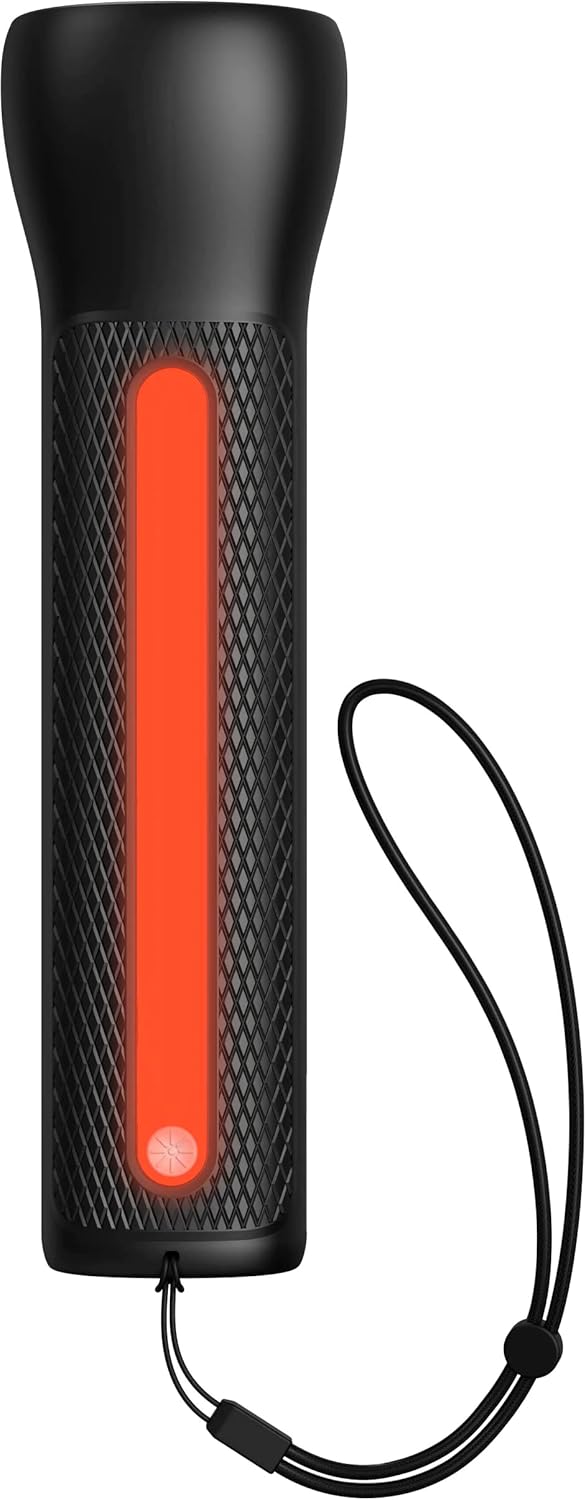

- To activate the LED Flashlight: Press and hold the power button for 2 seconds. Press again to cycle through modes (high, low, strobe, off).
- To activate the Work Light: Double-press the power button. Double-press again to cycle through modes (white, red, flashing red, off).
Konserwacja
- Czyszczenie: Przetrzyj urządzenie miękką, suchą ściereczką. Nie używaj silnych środków chemicznych ani materiałów ściernych.
- Składowanie: Store the powerstation Go in a cool, dry place away from direct sunlight. For optimal battery life, recharge the device every 3 months if not in regular use.
- Pielęgnacja baterii: The internal battery is not user-replaceable. Do not attempt to open the device.
Rozwiązywanie problemów
| Problem | Możliwa przyczyna | Rozwiązanie |
|---|---|---|
| Urządzenie się nie ładuje | Wadliwy kabel ładujący lub adapter; zatkany port. | Try a different USB-C cable and wall adapter. Ensure ports are clean and free of debris. |
| Vehicle not jump starting | Low powerstation Go charge; incorrect cable connection; severely dead battery. | Ensure powerstation Go is fully charged. Verify correct clamp polarity. Check vehicle battery for severe damage. Consult vehicle manual. |
| Mobile device not charging | Powerstation Go battery low; faulty USB cable; device incompatibility. | Recharge powerstation Go. Try a different USB cable. Ensure your device is compatible with standard USB charging. |
| Światła nie działają | Powerstation Go battery low; incorrect button press. | Recharge powerstation Go. Refer to "Using the LED Flashlight and Work Light" section for correct operation. |
Specyfikacje
- Marka: mops
- Numer modelu: mpsgrgd-FL36630
- Numer części producenta: 401107454
- Pojemność baterii: 9900 mAh (36.6 Wh)
- Tomtage: 12 Volts (for jump starting)
- Waga produktu: 1.07 kilograma
- Wymiary: 30.3 x 24.69 x 10.79 cm (opakowanie)
- Cechy szczególne: LED Indicator Lights, 450-lumen LED Flashlight, Spark-proof Jumper Cables
- Automotive Service Type: Ciężarówka, samochód
Gwarancja i wsparcie
For warranty information and customer support, please visit the official mophie webOdwiedź witrynę lub skontaktuj się z działem obsługi klienta. Zachowaj dowód zakupu na wypadek reklamacji.
Wsparcie online: www.mophie.com/support