
Bileeko BI-7monitorAV-02
Bileeko RV Backup Camera System User Manual
Model: BI-7monitorAV-02
1. Koniec produktuview & Zawartość Paczki
The Bileeko RV Backup Camera System provides enhanced visibility for safe maneuvering of your vehicle. This system includes a 7-inch LCD monitor and a waterproof rear view camera with night vision capabilities, designed for various vehicles such as cars, trailers, vans, jeeps, and SUVs.
Zawartość opakowania:
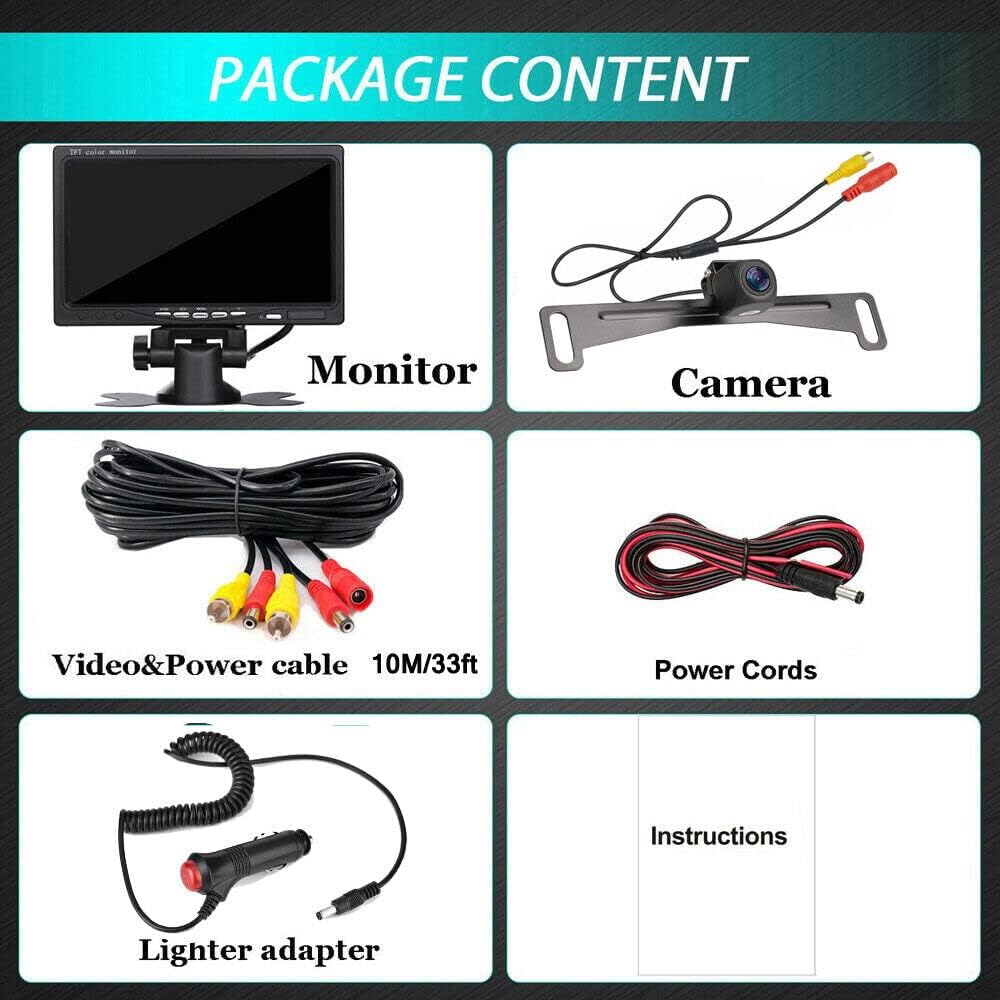
This image displays the complete package contents: the 7-inch LCD monitor, the backup camera, a lighter adapter with on/off switch, a 3.3ft power cable, and a 33ft 2-in-1 video power cable.

Kompleksowy view of the Bileeko RV Backup Camera System, showing the 7-inch monitor, the rear view camera, and the necessary wiring for installation.
- 1 x 7-calowy monitor LCD
- 1 x kamera cofania
- 1 x Lighter adapter with on/off
- 1 x Power Cable 3.3ft
- 1 x Video Power cable 33ft 2 In 1
Główne cechy:

This image highlights the amazing features of the system, such as 12V power supply, HD quality (1080x720 pixels), Color CMOS sensor, 800 TV lines, IP69 waterproof rating, RCA connector, guide lines, NTSC video system, and an ultra-wide 170-degree angle.

An illustration demonstrating the super wide-angle capability of the camera, featuring a 145-degree horizontal angle and a 170-degree diagonal angle, along with waterproof protection, HD quality, and distance guidelines.
- 7-inch HD color LCD monitor.
- IP68 waterproof camera with IR lights for enhanced night vision.
- Supports continuous viewing or reverse-only activation.
- Monitor has a removable pedestal with foam adhesive for flexible mounting.
- Additional cameras can be installed for monitoring multiple positions (front/side/back).
2. Konfiguracja i instalacja
The Bileeko RV Backup Camera System is designed for straightforward installation. Please follow the diagrams and instructions carefully.
Schemat instalacji:
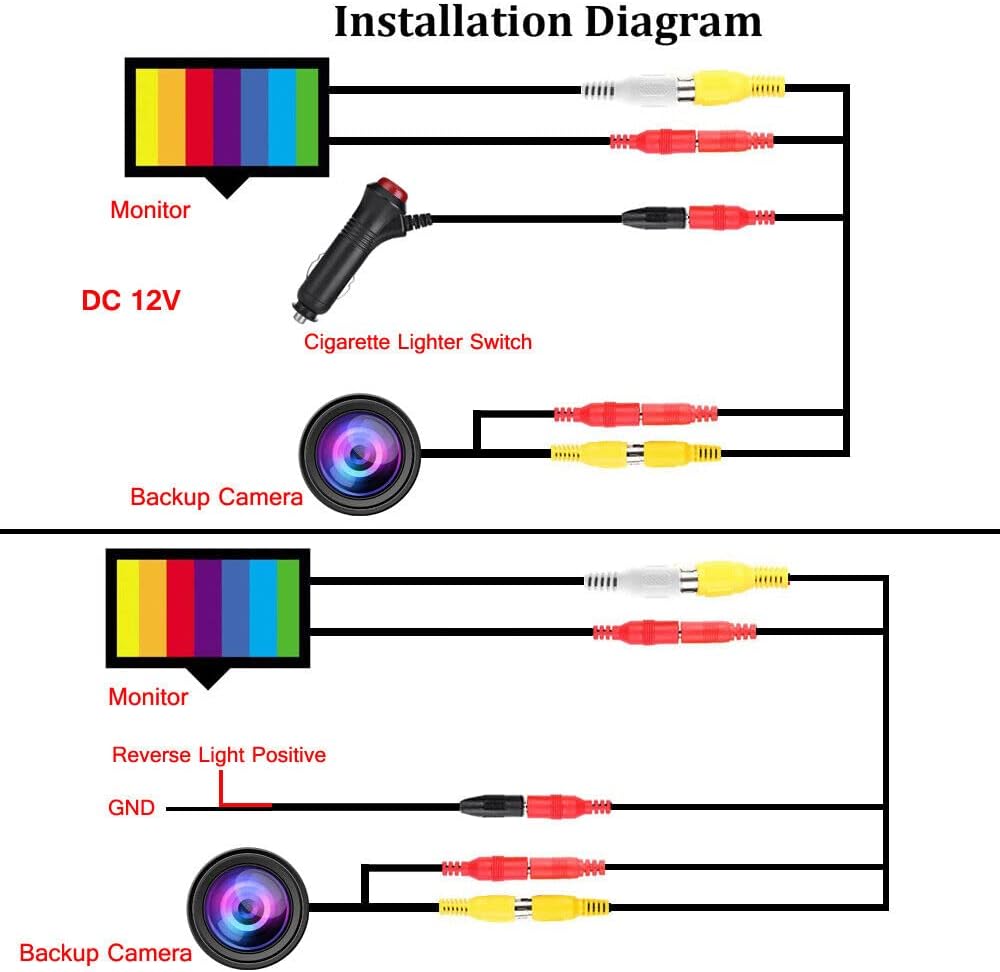
This diagram illustrates two primary wiring methods: one using the cigarette lighter switch for continuous power, and another connecting to the reverse light positive for activation only when the vehicle is in reverse gear.
Opcje okablowania:
- Ciągły Viewing: Connect the monitor and camera power to the included cigarette lighter adapter. This allows the system to be powered on continuously when the vehicle's accessory power is active.
- Reverse-Activated Viewing: Connect the camera's power wire to your vehicle's reverse light positive wire. This will activate the camera and monitor only when the vehicle is shifted into reverse. The monitor can be powered separately or also tied into the reverse light circuit.
Ensure all RCA connectors are securely fastened. The system is ideal for cars, trucks, SUVs, MPVs, or any vehicle where you need a reliable rear view.

A detailed diagram showing the wiring for continuous use, including connections for the monitor, lighter adapter, video wire, and camera, with V1 (2nd camera) and V2 (prioritized) inputs.
3. Instrukcja obsługi
Familiarize yourself with the monitor and remote controls for optimal use of your backup camera system.
Kontrola monitora:

This image labels the buttons on the 7-inch monitor and the corresponding functions on the remote control. Monitor buttons include AV1/AV2 push button, Screen Switch, Menu button, Volume-, Volume+, Power standby, and Infrared receiver. Remote control buttons include Power, Video (V1/V2 selecting), VOL+ (Increase), Menu (brightness, colors, contrast), Mode (selecting display results), and VOL- (Reduce).
- AV1/AV2 Push Button: Switches between video input sources (if multiple cameras are connected).
- Przełączanie ekranu: Toggles display modes or aspect ratios.
- Przycisk menu: Accesses the on-screen display (OSD) menu for settings like brightness, color, and contrast.
- Głośność +/-: Adjusts the volume (if audio input is available, though typically not for backup cameras).
- Power Standby: Puts the monitor into standby mode.
- Odbiornik podczerwieni: Do użytku z załączonym pilotem.
Funkcje pilota zdalnego sterowania:
- MOC: Switches the power supply on/off.
- VIDEO (V1/V2): Selects between video input V1 and V2.
- GŁOŚNOŚĆ+: Zwiększa głośność.
- MENU: Opens the menu for adjusting brightness, colors, and contrast.
- Sposób użycia: Selects different display results or viewtryby.
- TOM-: Reduces volume.
The camera features include HD quality, CMOS sensor, 170° wide angle, and IP68 waterproof rating. It also offers control for mirror image and guide lines.

This image details the backup camera's specifications: HD resolution, CMOS sensor, 170-degree viewing angle, and IP68 waterproof rating. It also shows options for controlling mirror image and guide lines.
4. Konserwacja
Proper maintenance ensures the longevity and optimal performance of your Bileeko RV Backup Camera System.
- Czyszczenie: Użyj miękkiego, damp cloth to clean the monitor screen and camera lens. Avoid abrasive cleaners or solvents.
- Pielęgnacja aparatu: The camera is IP68 waterproof, but avoid directing high-pressure water jets directly at it. Regularly check for any debris or mud obstructing the lens.
- Połączenia kablowe: Okresowo sprawdzaj wszystkie połączenia kablowe, aby mieć pewność, że są solidne i nie są skorodowane ani uszkodzone.
- Składowanie: Jeżeli system nie będzie używany przez dłuższy czas, należy przechowywać go w chłodnym, suchym miejscu, z dala od bezpośredniego światła słonecznego i ekstremalnych temperatur.
5. Rozwiązywanie Problemów
Jeśli napotkasz problemy z systemem, zapoznaj się z poniższymi typowymi problemami i rozwiązaniami:
| Problem | Możliwa przyczyna / rozwiązanie |
|---|---|
| Brak obrazu na monitorze |
|
| Rozmazany lub zniekształcony obraz |
|
| No Night Vision |
|
| Monitor się nie włącza |
|
If you experience any problems with installation or operation that are not covered here, please do not hesitate to contact customer support for assistance.
6. Specyfikacje
7 inch LCD Monitor:
- Normy: Meets FCC/CE/RoHS/UL/IP6X standards
- Wyświetlacz: Monitor LCD 7 calowy
- Pobór mocy: Ultra-low, to prevent overheating
- Format sygnału: PAL / NTSC (kompatybilny ze wszystkimi formatami sygnału)
- Znamionowa objętośćtage: 9V - 35V, 400mA-20A
- Technologia wyświetlania: LCD
- Typ instalacji: Montaż na desce rozdzielczej, montaż powierzchniowy
Tył View Kamera:
- Normy: Meets FCC/CE/RoHS/UL/IP6X standards
- Czujnik obrazu: 1/3" CMOS
- Stosunek sygnału do szumu: Better than 48db
- Wyjście wideo: RCA connector, 1.0vp-p, 75 Ohm
- Moc: 9V-14V DC, 400mA-20A
- Stopień wodoodporności: IP68
- Widzenie nocne: Wizja nocna IR
- Technologia czujnika optycznego: CMOS
- Rozdzielczość przechwytywania wideo: 750
- Viewkąt ing: 170 degrees (Ultra Wide Angle)
Ogólne specyfikacje systemu:
- Marka: Bileko
- Numer modelu: BI-7monitorAV-02
- Tomtage: 12 wolty
- Zgodne urządzenia: Monitor
- Typ złącza: RCA
7. Gwarancja i wsparcie
For any inquiries, technical support, or to purchase additional accessories such as longer RCA video cables (20ft/50ft/66ft), please contact Bileeko customer service. Refer to your product packaging or the retailer's webodwiedź witrynę, aby uzyskać szczegółowe informacje kontaktowe.
While specific warranty details are not provided in this manual, it is recommended to retain your proof of purchase for any warranty claims or support needs.
Ask a question about this manual
Ask about setup, troubleshooting, compatibility, parts, safety, or missing instructions. Manuals+ will review the question and use this page’s manual context to help answer it.