
1. Wprowadzenie
This manual provides essential information for the proper use and care of your ZdalaMit AH81-11699A Replacement Remote Control. This remote is designed as a direct replacement for specific Samsung Soundbar models, requiring no programming for immediate use.
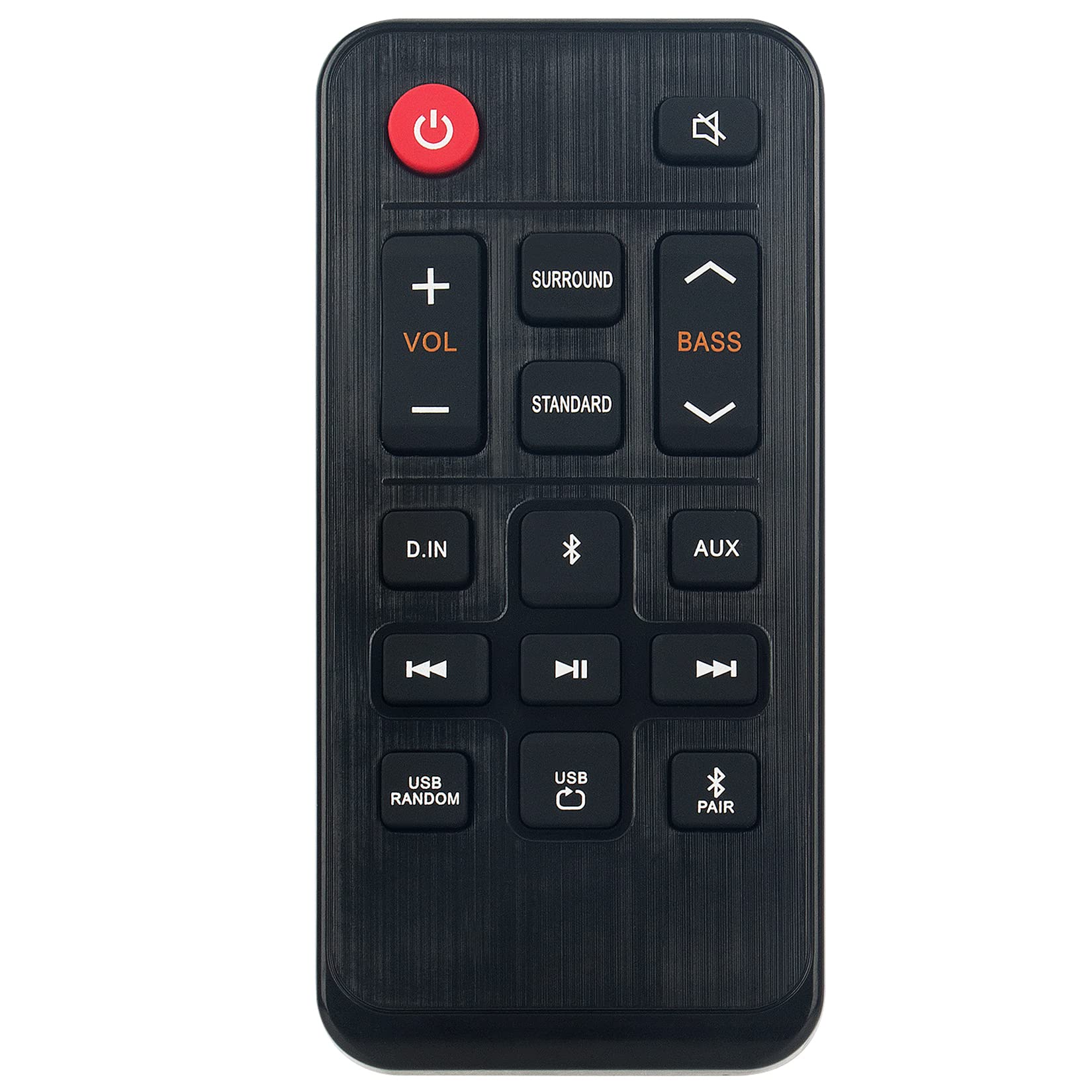
Obraz 1.1: The ZdalaMit AH81-11699A Replacement Remote Control. This image displays the front view of the black remote control, featuring various buttons for power, volume, mute, and other soundbar functions.
2. Zgodność
The AH81-11699A Replacement Remote Control is compatible with the following Samsung Soundbar models:
- HW-T400
- HW-T400/ZA
- HW-T400/XU
- HWT400
- HWT400/ZA
No programming is required for these models. Simply insert the battery, and the remote is ready for use.
3. Konfiguracja
To begin using your replacement remote control, follow these simple steps for battery installation:
- Zlokalizuj komorę baterii: On the back of the remote control, identify the battery compartment cover.
- Otwórz przedział: Gently slide or press the latch to open the battery compartment cover.
- Włóż baterię: Insert one CR2032 coin cell battery into the compartment. Ensure the positive (+) side of the battery is facing upwards, as indicated by the diagram inside the compartment.
- Zamknij komorę: Załóż pokrywę komory baterii i upewnij się, że jest dobrze zamocowana.
The remote control is now ready for operation. No additional pairing or programming is necessary for compatible Samsung Soundbar models.
4. Instrukcja obsługi
The AH81-11699A remote control features 18 buttons designed for intuitive control of your Samsung Soundbar. Point the remote directly at your soundbar for optimal performance.
- Przycisk zasilania: Naciśnij, aby włączyć lub wyłączyć soundbar.
- Zwiększanie/zmniejszanie głośności: Use the '+' and '-' buttons to adjust the soundbar's volume level.
- Przycisk wyciszenia: Press to temporarily silence the soundbar's audio. Press again to restore sound.
- Przycisk źródła: Cycle through available input sources (e.g., Bluetooth, Optical, HDMI).
- Przycisk trybu dźwięku: Change the sound effect mode (e.g., Standard, Surround, Game).
- Kontrola tonów niskich/wysokich: Adjust bass and treble levels (if supported by your soundbar model).
- Inne przyciski funkcyjne: Additional buttons may control specific soundbar features. Refer to your soundbar's original manual for detailed functionality.
Ensure there are no obstructions between the remote control and the soundbar's infrared receiver for proper signal transmission. The maximum effective range is approximately 33 feet (10 meters).
5. Konserwacja
Właściwa konserwacja zapewnia długowieczność i optymalną pracę pilota.
- Czyszczenie: Przetrzyj pilota miękką, suchą ściereczką. Nie używaj płynnych środków czyszczących, rozpuszczalników ani materiałów ściernych, ponieważ mogą one uszkodzić powierzchnię lub elementy wewnętrzne.
- Wymiana baterii: Replace the CR2032 battery when the remote's responsiveness decreases or it stops functioning. Always use a fresh, high-quality CR2032 alkaline battery.
- Składowanie: Przechowuj pilota w chłodnym i suchym miejscu, z dala od bezpośredniego światła słonecznego, ekstremalnych temperatur i wysokiej wilgotności.
- Unikaj kropli: Chroń pilota przed uderzeniami, gdyż upuszczenie go może uszkodzić wewnętrzne obwody.
6. Rozwiązywanie Problemów
Jeśli masz problemy z pilotem, zapoznaj się z poniższymi, typowymi rozwiązaniami:
| Problem | Możliwa przyczyna | Rozwiązanie |
|---|---|---|
| Pilot nie odpowiada. | Rozładowana lub nieprawidłowo zainstalowana bateria. | Replace the CR2032 battery, ensuring correct polarity (+ side up). |
| Pilot ma krótki zasięg lub reaguje przerywanie. | Weak battery; Obstruction between remote and soundbar; Remote not pointed correctly. | Replace battery. Remove any objects blocking the signal path. Ensure the remote is pointed directly at the soundbar's IR receiver. |
| Niektóre przyciski nie działają. | Button malfunction; Soundbar does not support the function. | Test other buttons. If only specific buttons fail, the remote may be faulty. Verify if your soundbar model supports the intended function. |
| Remote works but soundbar functions incorrectly. | Issue with the soundbar itself. | Refer to your Samsung Soundbar's original user manual for troubleshooting soundbar-specific issues. |
Jeśli powyższe kroki nie rozwiążą problemu, skontaktuj się z obsługą klienta.
7. Specyfikacje
- Nazwa modelu: AH81-11699A
- Marka: Zdala Mit
- Technologia łączności: Podczerwony
- Zgodne urządzenia: Samsung Soundbar (HW-T400 series)
- Typ baterii: 1 x CR2032 Coin Cell (Alkaline recommended)
- Maksymalny zasięg: Approximately 33 Feet (10 meters)
- Button Quantity: 18
- Rodzaj kontrolera: Sterowanie przyciskami
- Wymiary (dł. x szer. x wys.): 4.76" x 2.18" x 0.55" (12.09 cm x 5.54 cm x 1.40 cm)
- Kolor: Czarny
- Dodatek specjalny: Ergonomiczna konstrukcja
8. Gwarancja i wsparcie
This ZdalaMit AH81-11699A Replacement Remote Control comes with a 1-letnia gwarancja od daty zakupu, obejmując wady produkcyjne.
For warranty claims, technical assistance, or any other inquiries, please contact our customer support. We are available to assist you with any questions or concerns you may have regarding your product.
Contact information for support is typically provided at the point of purchase or on the product packaging.