
Wstęp
This manual provides detailed instructions for the safe and effective use of your MiLESEEY D5 70M-BT Laser Distance Meter. This device is designed for precise distance measurements up to 70 meters, featuring an electronic angle sensor, various measurement modes, and smartphone application connectivity for enhanced functionality.
Informacje dotyczące bezpieczeństwa
Przed użyciem urządzenia należy przeczytać i zrozumieć wszystkie instrukcje bezpieczeństwa. Nieprzestrzeganie tych instrukcji może skutkować narażeniem na promieniowanie laserowe, porażeniem prądem elektrycznym, pożarem lub poważnymi obrażeniami.
- Laser Class II Product: This device emits Class II laser radiation. Do not stare into the laser beam. Avoid direct eye exposure.
- Typ lasera: 635nm <1mW.
- Nie należy podejmować prób modyfikacji ani demontażu urządzenia. Naprawy powinny być wykonywane wyłącznie przez autoryzowany personel serwisowy.
- Przechowywać urządzenie w miejscu niedostępnym dla dzieci.
- Nie należy używać urządzenia w atmosferach wybuchowych ani w pobliżu łatwopalnych cieczy i gazów.
- Use only specified batteries (2 x 1.5V AAA alkaline batteries).
Zawartość opakowania
Sprawdź, czy w opakowaniu znajdują się wszystkie elementy:
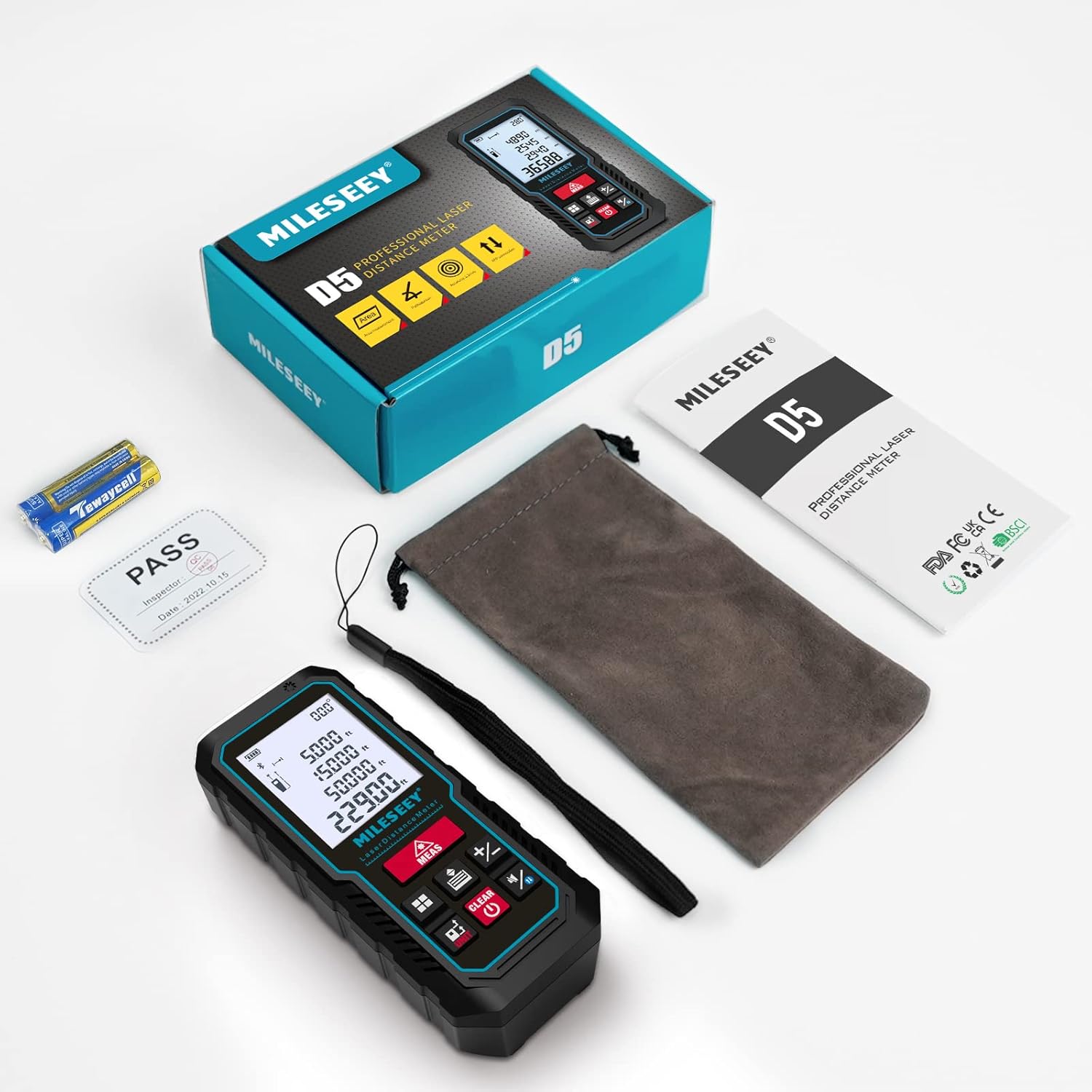
- 1 x MiLESEEY D5 Laser Distance Meter
- 2 baterie AAA 1.5 V
- 1 x Instrukcja obsługi
- 1 x Przenośne etui
- 1 x Pasek na rękę

Produkt ponadview
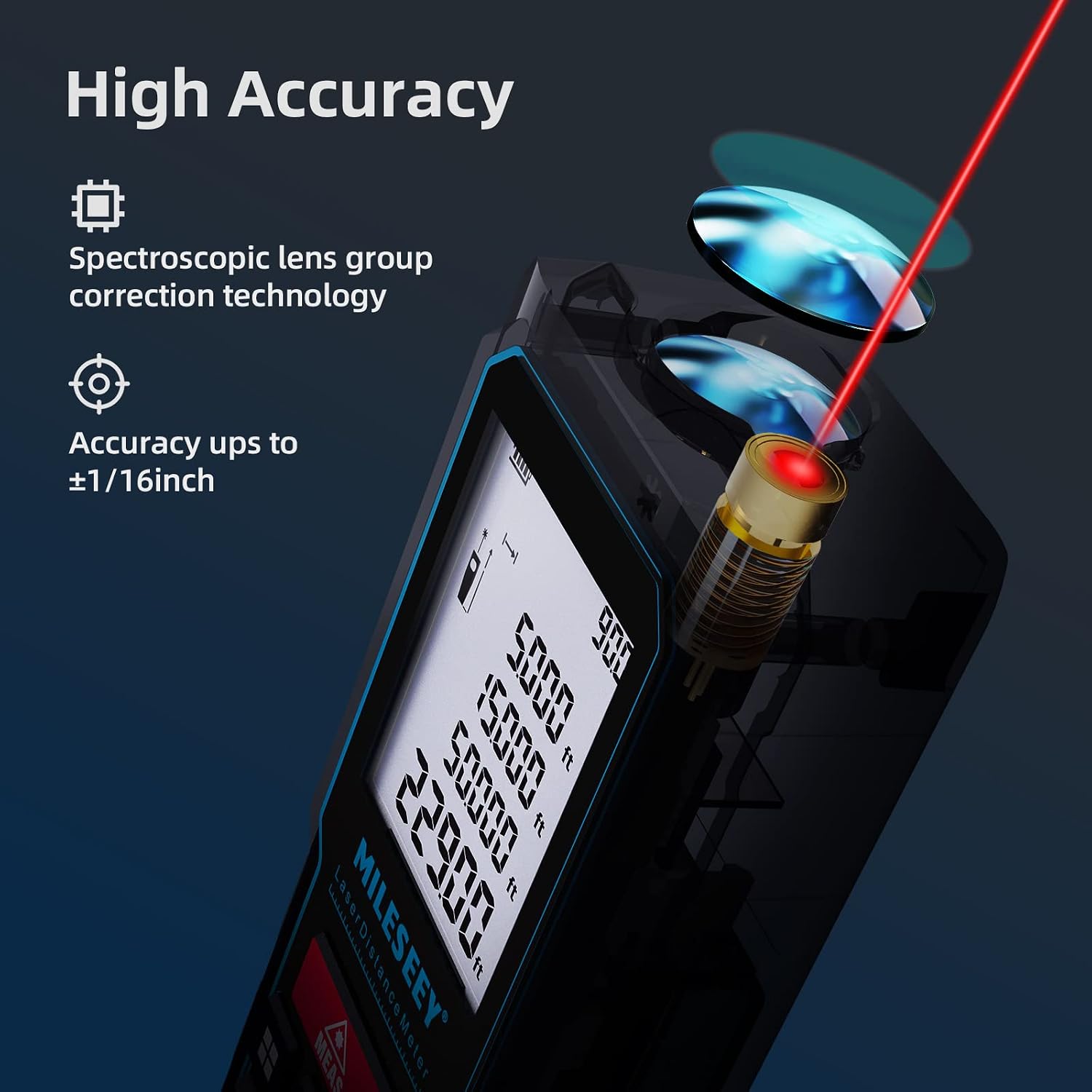
The MiLESEEY D5 70M-BT features a robust design with an easy-to-read LCD display and intuitive controls, offering high accuracy for various measurement tasks.
Kluczowe elementy obejmują:
- Nadajnik/odbiornik laserowy: Located at the top for accurate measurements.
- Wyświetlacz LCD: 2-inch screen with backlight for clear visibility of measurements and settings.
- Measurement Button (MEAS): Inicjuje pomiary.
- Przyciski funkcyjne: For selecting measurement modes (distance, area, volume, Pythagorean, etc.).
- Przycisk jednostki (UNIT): Zmienia jednostki miary (m/ft/in/ft+in).
- Przycisk punktu odniesienia: Switches between front and rear reference points for measurement.
- Clear/Off Button (CLEAR/OFF): Clears current measurement or powers off the device.
Organizować coś
Instalacja baterii
The device requires two 1.5V AAA alkaline batteries. Ensure correct polarity when inserting the batteries.
- Otwórz pokrywę komory baterii znajdującą się z tyłu urządzenia.
- Insert two AAA batteries, matching the positive (+) and negative (-) terminals as indicated.
- Dokładnie zamknij pokrywę komory baterii.
Włączanie/wyłączanie zasilania
- Aby włączyć, naciśnij POMIAR przycisk.
- Aby wyłączyć, naciśnij i przytrzymaj WYCZYŚĆ/WYŁĄCZ button for a few seconds, or the device will automatically shut off after 180 seconds of inactivity to conserve energy.
Instrukcja obsługi
Podstawowy pomiar odległości
W przypadku pojedynczego pomiaru odległości:
- Skieruj laser na cel.
- Naciśnij POMIAR button once. The measurement will be displayed on the screen within 0.5 seconds.

Zmiana jednostek i punktu odniesienia
The device supports multiple units and reference points.
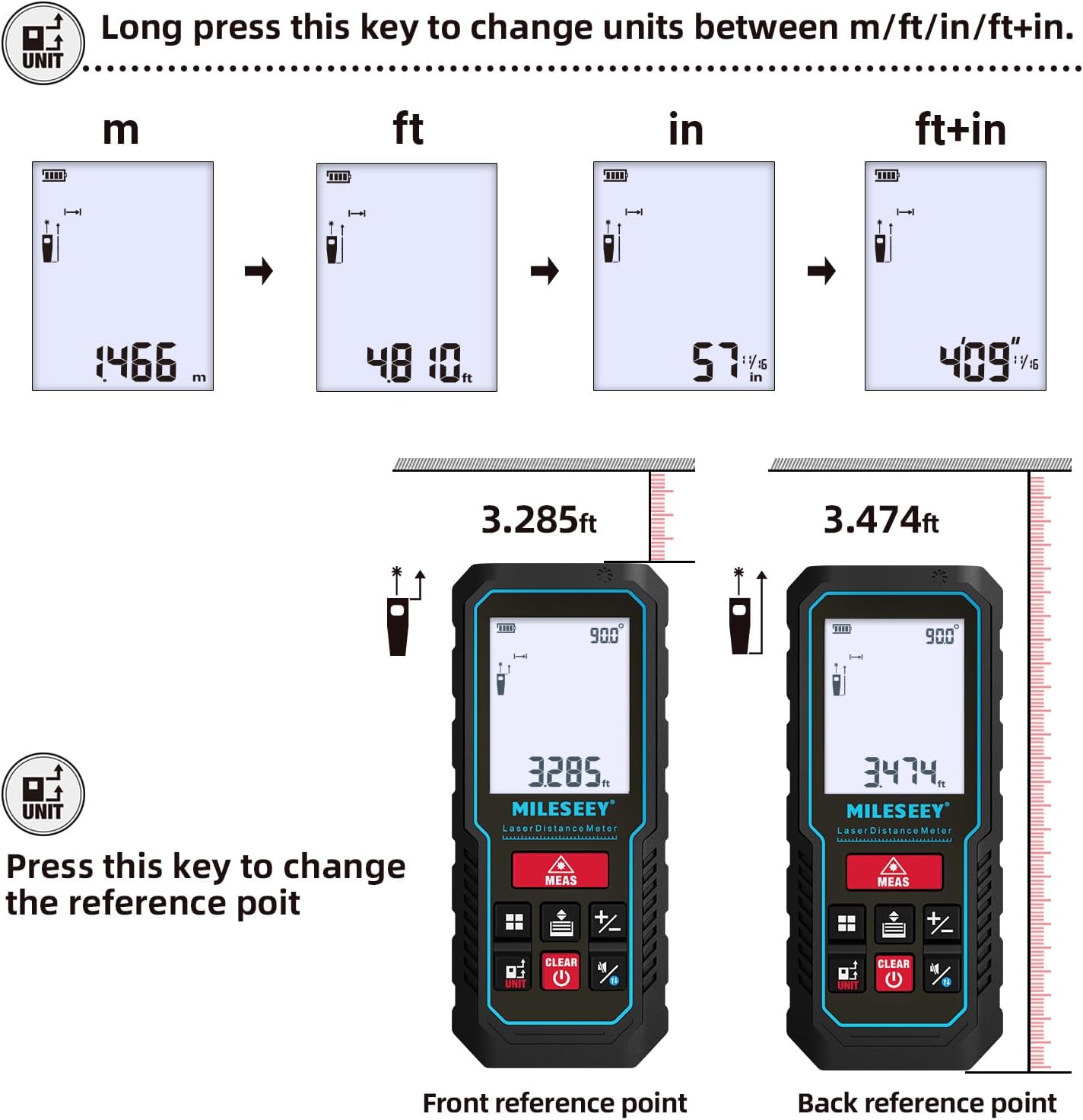
- Konwersja jednostek: Naciśnij i przytrzymaj JEDNOSTKA button to cycle through units: meters (m), feet (ft), inches (in), and feet + inches (ft+in).
- Punkt odniesienia: Naciśnij JEDNOSTKA button briefly to switch the measurement reference point between the front edge and the rear edge of the device.
Tryby pomiaru
The MiLESEEY D5 offers various measurement functions:
- Pomiar ciągły: For tracking distances as you move the device.
- Pomiar powierzchni: Oblicza pole powierzchni (długość x szerokość).
- Pomiar objętości: Oblicza objętość przestrzeni (długość x szerokość x wysokość).
- Pythagorean Method (2-point and 3-point): Indirect measurement for heights or distances where direct measurement is not possible.
- Dodawanie/Odejmowanie: Add or subtract measurements.
- Poziom automatyczny: Automatically calculates horizontal distance.
- Wysokość automatyczna: Automatically calculates vertical height.


Smartphone App Connectivity (Smart Life App)
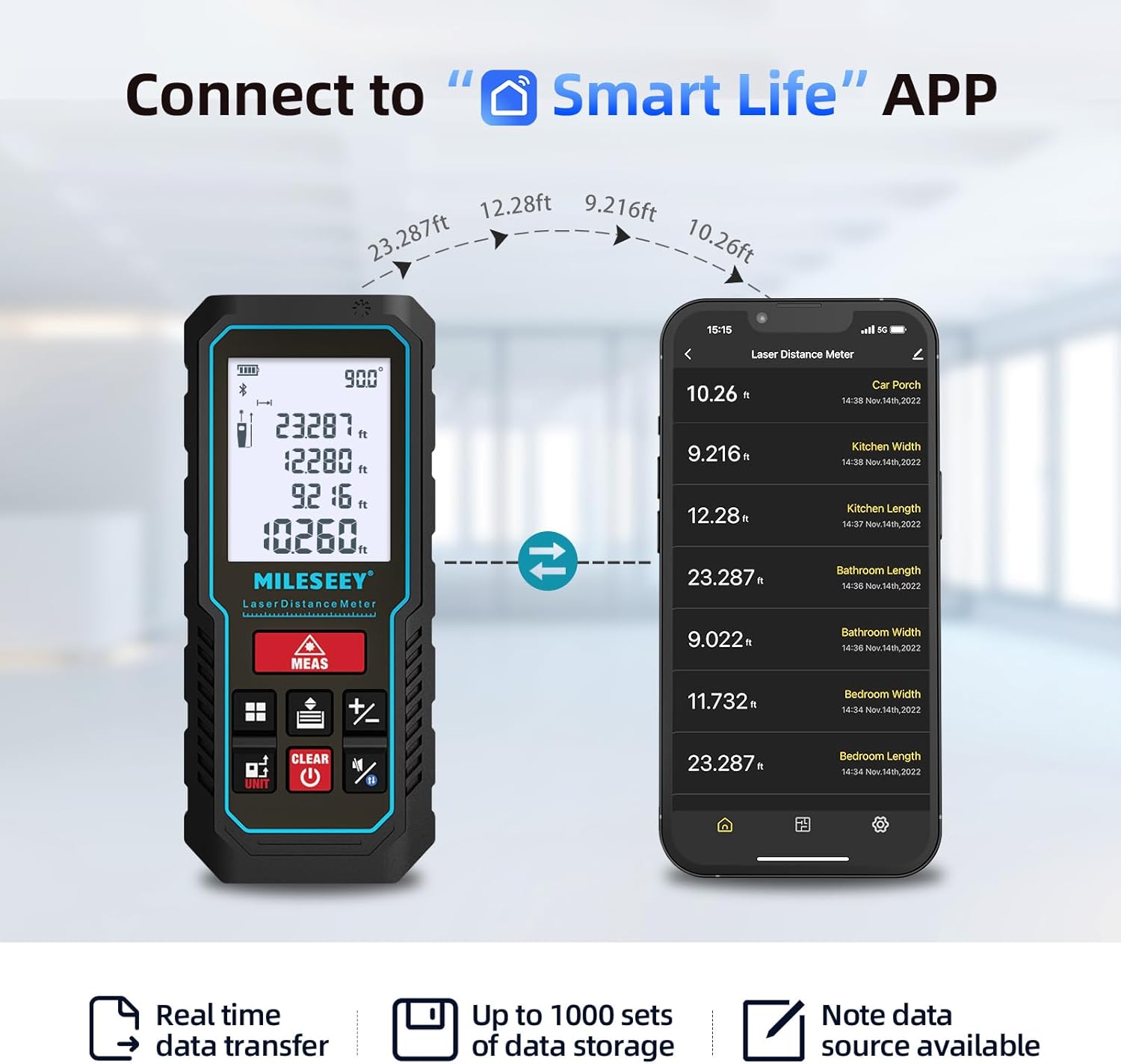
The MiLESEEY D5 70M-BT can connect wirelessly to your smartphone via the free "SMART LIFE" app, allowing for real-time data transfer, storage, and advanced functions.
- Download the "SMART LIFE" app from your device's app store (available on Google Play and Apple App Store).
- Enable Bluetooth on your smartphone and open the "SMART LIFE" app.
- Follow the in-app instructions to pair your MiLESEEY D5 device.
- Once connected, you can document measurements, create floor plans by drawing on photos or grids, and store up to 1000 sets of data.


Data Records and Mute Mode
- The device stores up to 30 data records, which can be recalled for review and calculation.
- A mute mode is available for quiet operation in sensitive environments.

Konserwacja
Właściwa konserwacja gwarantuje długowieczność i dokładność urządzenia.
- Czyszczenie: Przetrzyj urządzenie miękką, damp ściereczka. Nie należy używać środków czyszczących o właściwościach ściernych ani rozpuszczalników.
- Składowanie: Store the device in its portable pouch in a cool, dry place when not in use. Remove batteries if storing for extended periods.
- Ochrona: The device has an IP54 rating, making it splash-resistant and dust-proof. Avoid submerging it in water. It also features 1-meter drop resistance.

Rozwiązywanie problemów
If you encounter issues with your MiLESEEY D5, refer to the following common problems and solutions:
| Problem | Możliwa przyczyna | Rozwiązanie |
|---|---|---|
| Urządzenie nie włącza się | Niski poziom naładowania baterii lub rozładowane baterie; nieprawidłowa instalacja baterii. | Replace batteries with new 1.5V AAA alkaline batteries. Ensure correct polarity. |
| Niedokładne pomiary | Obstruction in laser path; unstable measuring surface; extreme temperature changes; dirty lens. | Ensure a clear path for the laser. Measure on a stable surface. Allow device to acclimate to ambient temperature. Clean the lens with a soft cloth. |
| Cannot connect to Smart Life App | Bluetooth is off; app not installed; device not in pairing mode. | Ensure Bluetooth is enabled on your phone. Download and install the "SMART LIFE" app. Follow app instructions for pairing. |
| Na wyświetlaczu pojawia się komunikat „Błąd” | Measurement out of range; strong light interference; target surface not reflective enough. | Ensure target is within 0.16m - 70m range. Avoid measuring in direct sunlight or strong light. Use a reflective target plate if necessary. |
Specyfikacje
| Funkcja | Szczegół |
|---|---|
| Marka | Mileseey |
| Numer modelu | D5 (70M-BT) |
| Zakres pomiaru | 0.16 m - 70 m |
| Dokładność | ±2 mm |
| Klasa laserowa | Klasa II |
| Typ lasera | 635nm <1mW |
| Wyświetlacz | 2-calowy wyświetlacz LCD z podświetleniem |
| Elektroniczny czujnik kąta | Yes, ±0.3° accuracy |
| Funkcje pomiarowe | Distance, Continuous, Area, Volume, Pythagorean (2/3-point), Addition/Subtraction, Auto Level, Auto Height |
| Jednostki | m / stopa / cal / stopa+cal |
| Rekordy danych | 30 (on device), up to 1000 (via app) |
| Łączność | Bluetooth (Smart Life App) |
| Zasilacz | 2 baterie alkaliczne AAA 1.5 V |
| Automatyczne wyłączanie | 180 sekund bezczynności |
| Stopień ochrony IP | IP54 (Splash-resistant, Dust-proof) |
| Odporność na upadki | 1 metr |
| Tworzywo | Akrylonitryl-butadien-styren (ABS) |
| Wymiary (dł. x szer. x wys.) | 15.2 dł. x 10.1 szer. x 4.8 wys. cm |
| Waga przedmiotu | 220 gram |
Gwarancja i wsparcie
MiLESEEY provides comprehensive support for its products.
- Gwarancja: The device comes with a 12-month warranty.
- Gwarancja zwrotu pieniędzy: Oferowana jest 90-dniowa gwarancja zwrotu pieniędzy.
- Rozszerzone wsparcie: 2 years of assistance after registration and lifetime technical support from MILESEEY.
- For technical assistance or warranty claims, please contact MILESEEY customer service through their official channels or the retailer where the product was purchased.