
1. Wprowadzenie
This manual provides essential instructions for the proper use, setup, maintenance, and troubleshooting of your IINE Nintendo Switch Hard Pouch, Model L517. Please read this manual thoroughly before using the product to ensure optimal performance and longevity.
2. Koniec produktuview
The IINE Nintendo Switch Hard Pouch (L517) is designed to protect your Nintendo Switch console and accessories during travel and storage. It features a durable exterior and a soft interior lining.
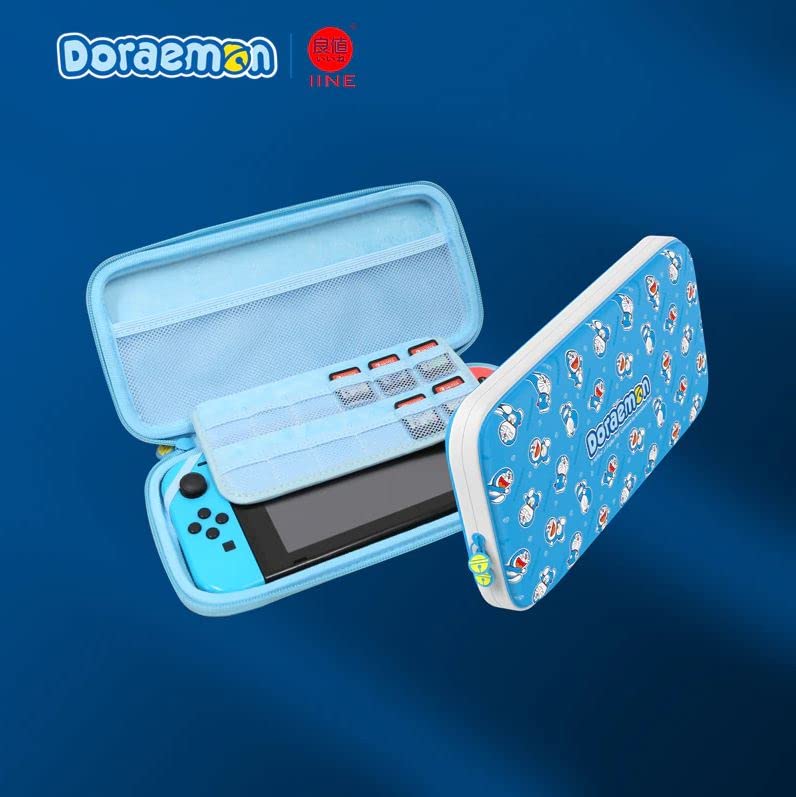
Rysunek 2.1: Przód view of the IINE Nintendo Switch Hard Pouch in Doraemon Blue, designed for console protection and portability.
3. Konfiguracja
- Open the Pouch: Unzip the main compartment of the hard pouch.
- Włóż konsolę: Carefully place your Nintendo Switch console into the designated slot within the pouch. Ensure it fits snugly to prevent movement.
- Sklep z akcesoriami: Utilize any mesh pockets or elastic straps provided for storing small accessories such as game cartridges, Joy-Con straps, or charging cables.
- Close the Pouch: Zip the main compartment securely to protect the contents.
4. Instrukcja obsługi
- Niosąc: Use the integrated handle or strap (if included) for convenient transportation.
- Ochrona: The hard shell exterior is designed to absorb impacts and protect against scratches and minor drops.
- Składowanie: When not in use, store the pouch in a cool, dry place away from direct sunlight and extreme temperatures.
5. Konserwacja
- Czyszczenie powierzchni zewnętrznej: Przetrzyj powierzchnię zewnętrzną miękką,amp płótno. Unikaj stosowania ostrych środków chemicznych lub ściernych środków czyszczących.
- Czyszczenie wnętrza: Gently dust the interior with a soft, dry cloth. If necessary, use a slightly damp cloth, ensuring the interior is completely dry before placing the console back inside.
- Pielęgnacja zamków błyskawicznych: Periodically check the zipper for any debris. If the zipper becomes stiff, apply a small amount of zipper lubricant.
- Unikaj przepełniania: Do not overfill the pouch, as this can stress the zippers and seams, potentially causing damage.
6. Rozwiązywanie Problemów
| Problem | Rozwiązanie |
|---|---|
| Zipper is stiff or stuck. | Check for any fabric caught in the zipper teeth. Apply a small amount of zipper lubricant or a graphite pencil lead to the teeth and gently work the zipper back and forth. |
| Pouch does not close properly. | Ensure the pouch is not overfilled. Rearrange contents to allow for proper closure. Check for any obstructions along the zipper path. |
| Minor scuffs or marks on exterior. | Delikatnie przetrzyj miękką, damp szmatką. W przypadku uporczywych plam można użyć łagodnego roztworu mydła, a następnie przetrzeć czystą,amp szmatką i suszenie na powietrzu. |
7. Specyfikacje
- Typ produktu: Hard Pouch for Nintendo Switch
- Model: L517
- Kolor: Doraemon Blue
- Marka: IINE
- ASIN: B0BLC5XST3
- Cechy: Durable exterior, soft interior lining, accessory storage.
8. Gwarancja i wsparcie
For warranty information or technical support, please refer to the documentation provided at the time of purchase or contact your retailer. You may also visit the official IINE webAby uzyskać dalszą pomoc, odwiedź naszą witrynę.


