
Andoer 111
Instrukcja obsługi kompaktowego aparatu cyfrowego Andoer 4K
Model: 111
Wstęp
Dziękujemy za zakupasing the Andoer 4K Compact Digital Camera. This camera is designed for ease of use, offering high-quality photo and video capture in a portable form factor. It features a 48-megapixel image resolution, 4K video recording capabilities, a 2.4-inch IPS screen, 16X digital zoom, anti-shake technology, and a built-in flash. This manual provides detailed instructions to help you get the most out of your new camera.

Obraz: Ponadview of the Andoer Digital Camera, highlighting features such as strong battery life, 4K video, micro size, 2.4-inch IPS screen, and 16X digital zoom.
Co jest w pudełku
Sprawdź zawartość paczki, aby upewnić się, że znajdują się w niej wszystkie elementy:
- Andoer 4K Compact Digital Camera
- Pasek na nadgarstek
- Torba transportowa
- Kabel USB
- Karta pamięci 32 GB (karta TF)
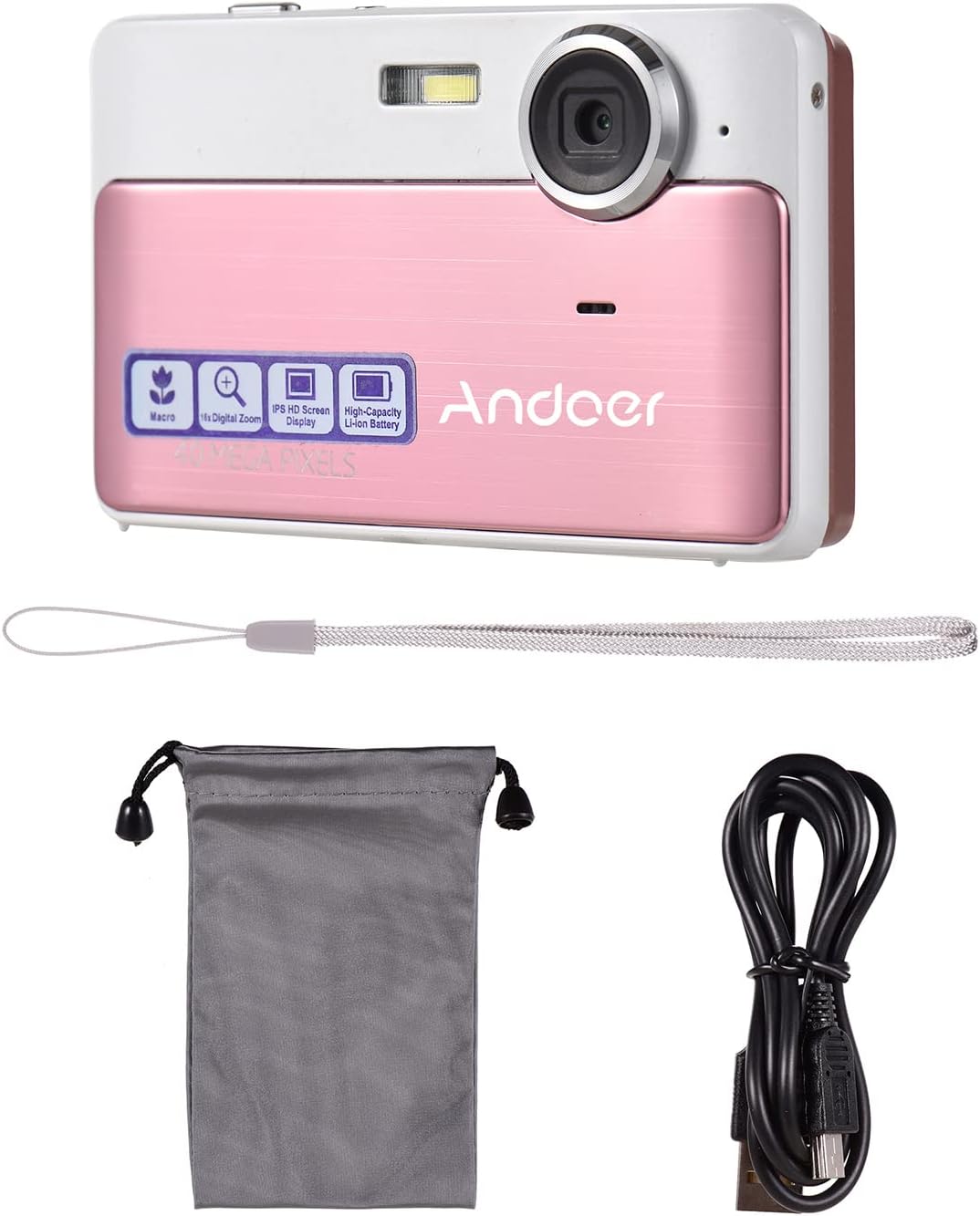
Image: The package contents including the pink digital camera, a grey carrying bag, a white wrist strap, a black USB cable, and a 32GB memory card.
Produkt ponadview
Familiarize yourself with the various parts and controls of your Andoer Digital Camera.

Image: Labeled diagrams of the camera's top, back, and bottom views, indicating buttons and ports such as ON/OFF, OK, indicator light, zoom, macro, mode, flash/up, delete/right, self-timer/down, scene/left, flash, lens, plastic cover, tripod nut, and card slot.
Kluczowe komponenty:
- Obiektyw: Przechwytuje obrazy i filmy.
- Błysk: Zapewnia oświetlenie w warunkach słabego oświetlenia.
- Ekran IPS 2.4 cala: Wyświetla na żywo view, menu i odtwarzanie.
- Przyciski sterujące: Navigate menus, adjust settings, and operate camera functions.
- Port USB: Do ładowania i przesyłania danych.
- Gniazdo na kartę: For inserting the TF (Micro SD) memory card.
- Tripod Nut: Do montażu kamery na statywie.
Organizować coś
1. Ładowanie akumulatora
The camera has a built-in 600mAh lithium battery. Before first use, ensure the battery is fully charged.
- Podłącz dołączony kabel USB do portu USB aparatu.
- Podłącz drugi koniec kabla USB do zasilacza USB (nie ma go w zestawie) lub do portu USB komputera.
- Kontrolka pokaże stan ładowania. Po pełnym naładowaniu kontrolka zmieni kolor lub zgaśnie.
2. Wkładanie karty pamięci
The camera requires a TF (Micro SD) memory card for storing photos and videos. A 32GB memory card is included.
- Locate the card slot on the side or bottom of the camera (refer to Product Overview diagram).
- Gently insert the TF card into the slot with the metal contacts facing the correct direction (usually towards the front of the camera or as indicated by a small icon).
- Wsuń kartę, aż zatrzaśnie się na miejscu. Aby ją wyjąć, wciśnij ją ponownie, aż wysunie się.
Notatka: Ensure the camera is turned off before inserting or removing the memory card to prevent data corruption.
Instrukcja obsługi
1. Włączanie/wyłączanie zasilania
- To turn on the camera, press and hold the WŁ./WYŁ. przycisk.
- Aby wyłączyć kamerę, naciśnij i przytrzymaj WŁ./WYŁ. naciśnij przycisk ponownie.
2. Robienie zdjęć
- Ensure the camera is in photo mode (indicated on the screen). If not, press the TRYB przycisk, aby przełączyć.
- Skadruj ujęcie korzystając z 2.4-calowego ekranu IPS.
- Użyj W/T buttons (Zoom In/Out) to adjust the 16X digital zoom.
- Naciśnij OK button (shutter button) to capture the photo.

Image: A visual representation of the 16X digital zoom function, showing how the camera can enlarge images to capture details.
3. Nagrywanie filmów
- Naciśnij TRYB button to switch to video recording mode.
- Naciśnij OK button to start recording. A timer or indicator will appear on the screen.
- Naciśnij OK ponownie, aby zatrzymać nagrywanie.
4. Korzystanie z Flasha
The camera has a built-in flash for low-light conditions.
- W trybie zdjęć naciśnij Flash/Up button to cycle through flash modes (e.g., Auto Flash, Fill-in Flash, Red-eye Reduction, Flash Off).
- Select the appropriate mode for your shooting environment.
5. Ustawienia sceny
Optimize your photos for different environments using scene settings.
- Naciśnij Scene/Left button to access scene modes.
- Available modes include: Auto, Landscape, Macro, Night Scenery, Portrait, Night Portrait, Beach, Sport, Dinner.
- Use the navigation buttons to select a mode and press OK aby potwierdzić.

Image: A graphic illustrating various scene settings available on the camera, including Auto, Landscape, Night Scenery, Portrait, Night Portrait, Beach, Sport, and Dinner, alongside an image showcasing maximum 48MP photo resolution.
6. Macro and Long Distance Switching
Adjust focus for close-up or distant subjects.
- Naciśnij Makro button (often integrated with other navigation buttons) to toggle between Macro mode (for close-up shots, typically within 10cm) and normal/long distance mode.
- When Macro mode is active, a macro icon will appear on the screen.

Image: A diagram showing how to switch between Macro and Long Distance focus modes. It explains that in Macro mode, objects within 10cm of the camera appear clearer.
7. Tryb odtwarzania
- Naciśnij TRYB button until you enter playback mode.
- Use the navigation buttons (Left/Right) to browse through your captured photos and videos.
- Naciskać OK Do view wideo.
8. Podłączanie do komputera
- Włącz kamerę.
- Podłącz aparat do komputera za pomocą dostarczonego kabla USB.
- The camera should appear as a removable disk drive on your computer, allowing you to transfer files.
Konserwacja
Czyszczenie aparatu
- Do czyszczenia korpusu aparatu należy używać miękkiej, suchej ściereczki.
- For the lens and screen, use a specialized lens cleaning cloth and solution if necessary. Avoid abrasive materials.
- Do not use organic solvents or strong chemicals to clean the camera.
Pielęgnacja baterii
- Recharge the battery regularly, even if the camera is not in use, to maintain battery health.
- Avoid exposing the camera to extreme temperatures, which can affect battery performance.
Obsługa kart pamięci
- Always format a new memory card in the camera before first use.
- Do not remove the memory card while the camera is writing data (e.g., during recording or saving).
- Trzymaj karty pamięci z dala od silnych pól magnetycznych.
Rozwiązywanie problemów
| Problem | Możliwa przyczyna / rozwiązanie |
|---|---|
| Kamera się nie włącza. | Akumulator jest rozładowany. Naładuj akumulator całkowicie. |
| Nie można robić zdjęć/nagrywać filmów. | Memory card is full or not inserted correctly. Insert/replace memory card or delete files. Ensure camera is in correct mode. |
| Obrazy są niewyraźne. | Lens is dirty. Clean the lens. Insufficient light (use flash). Camera shake (hold steady or use anti-shake feature). Incorrect focus mode (adjust Macro/Long Distance). |
| Kamera zawiesza się. | Remove and reinsert the memory card. If issue persists, turn off and on again. |
| Nie można połączyć się z komputerem. | Ensure USB cable is properly connected. Try a different USB port or cable. Ensure camera is powered on. |
Specyfikacje
| Funkcja | Szczegół |
|---|---|
| Nazwa modelu | 111 |
| Rozdzielczość obrazu | Up to 48 Megapixels (40MP, 30MP, 24MP, 18MP, 12MP, 8MP, 5MP) |
| Rozdzielczość wideo | 4K, 1080P, 720P |
| Ekran | Ekran IPS 2.4 cala |
| Zoom cyfrowy | 16X |
| Stabilizacja obrazu | Cyfrowy system przeciwwstrząsowy |
| Typ baterii | Wbudowana bateria litowa 600mAh |
| Składowanie | External, supports up to 32GB TF (Micro SD) Memory Card |
| Format zdjęcia | Plik JPG |
| Format wideo | Plik AVI |
| Port | USB 2.0 |
| Rozmiar przedmiotu | 9.5 * 5.8 * 2.2cm / 3.7 * 2.3 * 0.9inch |
| Waga przedmiotu | 90g / 3.2 uncji |
| Obsługiwane języki | English, French, Spanish, German, Italian, Portuguese, Japanese, Arabic, Simple Chinese, etc. |

Image: The physical dimensions of the camera, showing a length of 9.5cm, height of 5.8cm, and thickness of 2.2cm.
Gwarancja i wsparcie
Andoer products are manufactured to high quality standards. For any issues or support inquiries, please refer to the seller's return policy or contact Andoer customer service through their official channels. Please retain your proof of purchase for warranty claims.
Aby uzyskać dalszą pomoc, możesz odwiedzić stronę Sklep Andoer na Amazon.
Ask a question about this manual
Ask about setup, troubleshooting, compatibility, parts, safety, or missing instructions. Manuals+ will review the question and use this page’s manual context to help answer it.