
1. Wprowadzenie
The Audeze Filter Speakerphone is a portable conference device designed for clear voice communication. It features advanced Artificial Intelligence (A.I.) noise filtering and proprietary planar magnetic speaker technology to optimize speech clarity. This manual provides instructions for setting up, operating, maintaining, and troubleshooting your Audeze Filter Speakerphone.
2. Co znajduje się w pudełku
Upon unboxing your Audeze Filter Speakerphone, verify that all the following items are included:
- Audeze Filter Speakerphone Unit
- Kabel do ładowania z USB-C na USB-C
- Przejściówka USB-C na USB-A
- Quick Start Guide (Multi-language)
- Leatherette Magnetic Closure Carry Case
- Anti-slip Pad with Audeze Logo
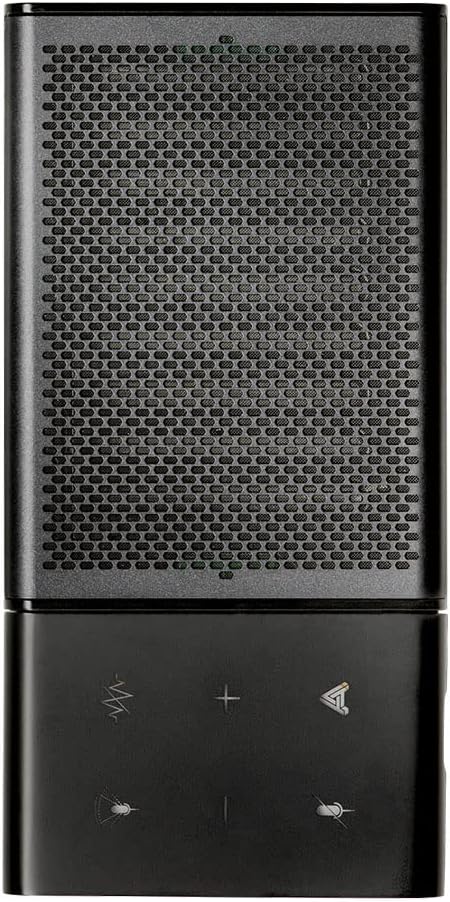
Image: All items included in the Audeze Filter Speakerphone package.
Wideo: Ponadview of the Audeze Filter Speakerphone, including unboxing and initial setup. This video demonstrates the physical components and accessories.
3. Koniec produktuview
The Audeze Filter is designed for portability and ease of use, featuring a sleek aluminum chassis. It is comparable in size to a large cellphone when folded.
3.1 Cechy fizyczne
- Sterownica: Touch-sensitive buttons for mute, AI filter, volume adjustment, and call management.
- Mikrofony: Intelligent beamforming microphone array.
- Głośnik: Patented Audeze Planar Magnetic Speaker optimized for speech clarity.
- Port USB-C: Do ładowania i przewodowego połączenia.
- Przycisk zasilania: Znajduje się z boku, aby zapewnić łatwy dostęp.
- Wskaźnik LED: Zapewnia informację zwrotną o statusie.
- Składana konstrukcja: Allows the speaker to stand upright for optimal sound direction or fold flat for portability.

Image: Close-up of the speakerphone's control panel and speaker grille.

Image: The Audeze Filter Speakerphone in its upright position, ready for use.

Image: Dimensions of the Audeze Filter Speakerphone.

Image: The Audeze Filter Speakerphone in its compact, folded state.

Image: The Audeze Filter Speakerphone neatly stored in its protective carry case.
4. Konfiguracja
4.1 Ładowanie urządzenia
The Audeze Filter has a built-in rechargeable Lithium Polymer battery, providing up to 15 hours of usage. To charge:
- Connect the provided USB-C cable to the USB-C port located on the inside of the speakerphone when it is unfolded.
- Connect the other end of the USB-C cable to a power source (e.g., computer, wall adapter). If your power source only has a USB-A port, use the included USB-C to USB-A adapter.
- Pełne naładowanie trwa około 2.5 godzin.
4.2 Włączanie/wyłączanie zasilania
To power on the device, press the singular power button located on the side. The LED indicator will illuminate. To power off, press and hold the power button.
4.3 parowanie Bluetooth
The Audeze Filter supports Bluetooth connectivity for wireless use with compatible devices.
- Power on the Audeze Filter. It will automatically enter pairing mode, indicated by a blinking LED.
- Na swoim urządzeniu (smartfonie, tablecie, laptopie) przejdź do ustawień Bluetooth.
- Select "Audeze Filter" from the list of available devices to connect.
- For Android devices, a prompt may appear for quick connection. For other operating systems like Windows or macOS, you may need to manually select it in Bluetooth settings.
4.4 Połączenie przewodowe USB
For a direct and stable connection, you can use the USB-C cable:
- Connect one end of the USB-C cable to the Audeze Filter's USB-C port.
- Connect the other end to your computer's USB-C port. Use the provided USB-C to USB-A adapter if necessary.
- The device will be recognized as an audio input/output device.
5. Operating the Speakerphone
5.1 Sterowanie
The Audeze Filter features intuitive touch controls on its surface:
- Przycisk wyciszenia: Located at the upper left, mutes/unmutes the microphone.
- AI Filter Button: Located to the right of the mute button, cycles through AI Noise Suppression settings (Off, Low, Medium, High).
- Przyciski głośności (+/-): Adjust speaker volume. Long-press to skip tracks (forward/reverse) when listening to media.
- Przycisk wielofunkcyjny: Located at the lower right, used for accepting and rejecting phone calls.
5.2 AI Noise Filtering
The Audeze Filter utilizes A.I. to identify and remove background noises, enhancing voice clarity. It is trained to recognize over 1000 different sounds, such as barking dogs, crying babies, fan noises, and car sounds.
- Adjust the level of noise suppression (Low, Medium, High) via the AI Filter button on the device or through the companion app.
5.3 mikrofonów kształtujących wiązkę
The intelligent beamforming microphone array allows you to adjust the microphone pickup pattern to suit your environment:
- 30°: Ideal for a single user directly in front of the speakerphone.
- 90°: Suitable for a small group or two people facing the speakerphone.
- 180°: For users on one side of a table.
- 360°: Best for multiple participants around the speakerphone in a conference setting.
5.4 Companion App (Audeze Hub)
The Audeze Hub app, available for iOS and Android, provides advanced control and customization options for your Audeze Filter Speakerphone.
- Wskaźnik żywotności baterii: View pozostały procent bateriitage.
- Speaker Boost: Increase speaker loudness by up to 15dB for larger rooms or louder environments.
- Odległość mikrofonu: Fine-tune the microphone pickup range from 0.5 meters to 5.5 meters to optimize for different room sizes and participant distances.
- Wyciszenie mikrofonu: One-tap microphone mute control.
- Automatyczne wyłączanie: Configure the device to automatically shut down after 30 minutes, 1 hour, 2 hours, 4 hours, or disable this feature.
- Komunikaty głosowe: Adjust the volume level of voice prompts from 0% to 100%.
- Aktualizacje oprogramowania układowego: Keep your device updated with the latest features and improvements by checking for and installing firmware updates directly through the app.
Video: This video provides a comprehensive demonstration of the Audeze Filter Speakerphone, including its unboxing, physical features, and a detailed walkthrough of the Audeze Hub companion app's functionalities, such as AI noise suppression, speaker boost, and microphone distance settings. It also includes a practical test of the AI noise filtering feature.
6. Konserwacja
To ensure the longevity and optimal performance of your Audeze Filter Speakerphone, follow these maintenance guidelines:
- Czyszczenie: Do czyszczenia zewnętrznej części urządzenia należy używać miękkiej, suchej ściereczki. Unikaj stosowania silnych środków chemicznych lub materiałów ściernych.
- Składowanie: When not in use, store the speakerphone in its provided leatherette carry case to protect it from scratches and dust.
- Temperatura: Unikaj wystawiania urządzenia na działanie ekstremalnych temperatur i bezpośredniego światła słonecznego przez dłuższy czas.
7. Rozwiązywanie Problemów
If you encounter issues with your Audeze Filter Speakerphone, refer to the following common solutions:
- Difficulty Hearing Others / Low Volume:
- Check the volume level on the device and your connected computer/smartphone.
- Use the Audeze Hub app to activate the Speaker Boost funkcja.
- Others Cannot Hear You Clearly / Background Noise:
- Upewnij się, że mikrofon nie jest wyciszony.
- Dostosuj Tłumienie szumów AI level (Low, Medium, High) via the device button or the Audeze Hub app.
- Dostosuj Formowanie wiązki setting to focus on the speaker(s) and minimize ambient noise.
- In the Audeze Hub app, verify the Odległość mikrofonu setting is appropriate for your position relative to the speakerphone.
- Problemy z łącznością Bluetooth:
- Ensure the speakerphone is powered on and in pairing mode (blinking LED).
- Turn off and on Bluetooth on your connecting device.
- Zapomnij urządzenie w ustawieniach Bluetooth i sparuj je ponownie.
- Try connecting via the USB-C cable as an alternative.
- Problemy z aktualizacją oprogramowania sprzętowego:
- Ensure the device has sufficient battery charge before attempting an update.
- Maintain a stable Bluetooth connection between the speakerphone and the device running the Audeze Hub app during the update process.
8. Specyfikacje
| Funkcja | Szczegół |
|---|---|
| Tworzywo | Aluminium |
| Nazwa modelu | Filter Speakerphone |
| Typ głośnika | Głośnik |
| Funkcja specjalna | A.I. Noise filtering |
| Zalecane zastosowania | For Computers, For Smartphones or Tablets, For Online Meetings, For Travel |
| Kompatybilne urządzenia | Android, Mac, Windows, iPhones |
| Zawarte komponenty | Kabel USB-C |
| Wymiary produktu | 0.3" gł. x 2.5" szer. x 6" wys. |
| Waga przedmiotu | 280 gramów (9.9 uncji) |
| Technologia komunikacji bezprzewodowej | Bluetooth |
| Źródło zasilania | Zasilany bateryjnie |
| Bateria | Wymagana 1 bateria litowo-polimerowa (w zestawie) |
| Typ sterownika audio | Planarny sterownik magnetyczny |
| Maksymalna moc wyjściowa głośnika | 10 watów |
| Technologia łączności | Bluetooth, USB |
| Tryb wyjścia audio | Stereofoniczny |
| Typ montażu | Uchwyt na blat |
| Czas ładowania | 2.5 godzin |
9. Gwarancja i wsparcie
The Audeze Filter Speakerphone comes with a Pełna gwarancja. For detailed warranty information, product support, or to contact customer service, please visit the official Audeze Store:
