
1. Wprowadzenie
This manual provides detailed instructions for the installation, operation, and maintenance of your SZSINOCAM QW5 2K PTZ Outdoor Solar WiFi Security Camera. Please read this manual thoroughly before using the product to ensure correct usage and optimal performance. Keep this manual for future reference.
2. Koniec produktuview
2.1 Główne cechy
- Wideo HD 2K/3 MP: Zapewnia wyraźny i szczegółowy obraz nadzorutage.
- Solar-Powered & Rechargeable Battery: Equipped with a 10000mAh battery and a high-efficiency solar panel for continuous power.
- Funkcjonalność PTZ: Zakres obrotu w poziomie 355° i pochylenie w pionie 110° zapewniają pokrycie dużego obszaru.
- Zaawansowane widzenie w nocy: Supports infrared, full-color, and sound & light alarm night vision modes.
- Detekcja ruchu PIR: Intelligent human recognition to reduce false alarms, with customizable detection zones and adjustable sensitivity.
- Dwukierunkowy dźwięk: Wbudowany mikrofon i głośnik umożliwiające komunikację w czasie rzeczywistym.
- Odporność na warunki atmosferyczne IP66: Przeznaczone do stosowania na zewnątrz w różnych warunkach pogodowych.
- Dual Wi-Fi Antennas: 5dBi antennas for stable wireless connection.
- Elastyczne przechowywanie: Supports local storage via Micro SD card (up to 256GB, not included) and cloud storage service.
- Udostępnianie wielu użytkownikom: Allows multiple users to access the camera feed simultaneously.
2.2 Diagram produktu
The image below illustrates the main components of the SZSINOCAM QW5 camera system.

Image: The SZSINOCAM QW5 camera unit, solar panel, and a smartphone displaying the camera's live view. The camera features dual antennas and a lens with integrated lights.
3. Instrukcja instalacji
3.1 przed instalacją
- Upewnij się, że wszystkie elementy są obecne i nieuszkodzone.
- Fully charge the camera battery using a USB cable before the first use. This ensures the camera has sufficient power to operate while the solar panel begins charging.
- Verify a stable 2.4GHz Wi-Fi signal at the intended installation location. The camera does not support 5GHz Wi-Fi.
3.2 Pobieranie aplikacji i konfiguracja konta
- Scan the QR code provided in the product packaging or visit veepai.com/veecam_download.html to download the 'O-KAM' application.
- Install the 'O-KAM' app on your smartphone.
- Zarejestruj nowe konto lub zaloguj się, jeśli już je posiadasz.
3.3 Parowanie kamery
- Open the 'O-KAM' app and follow the on-screen instructions to add a new device.
- Włącz kamerę. Kamera przejdzie w tryb parowania.
- Use the app to scan the QR code located on the camera or in the manual to initiate the connection process.
- Follow the prompts to connect the camera to your 2.4GHz Wi-Fi network.

Image: A visual guide showing three steps for camera setup: 1. Scan the QR code for the 'O-KAM' app, 2. Fully charge the camera and configure Wi-Fi, 3. Add the camera to your phone.
3.4 Montaż kamery i panelu słonecznego
Wybierz miejsce zapewniające optymalne nasłonecznienie panelu słonecznego i przejrzystą powierzchnię. view for the camera. Ensure the camera is within range of your Wi-Fi network.
- Za pomocą dołączonego uchwytu montażowego i śrub zamontuj kamerę pewnie na ścianie lub innej stabilnej powierzchni.
- Mount the solar panel in a location that receives direct sunlight for several hours daily.
- Podłącz kabel panelu słonecznego do portu ładowania kamery. Upewnij się, że połączenie jest stabilne i odporne na warunki atmosferyczne.

Image: The SZSINOCAM QW5 camera and its solar panel are mounted on an outdoor wooden wall, demonstrating a strong and stable Wi-Fi connection. The image highlights 2.4GHz Wi-Fi compatibility and dual 5dBi antennas.

Image: The camera is shown mounted with its solar panel, illustrating its solar-powered capability for 365 days of uninterrupted security. It emphasizes the rechargeable battery and the option for USB charging, with an initial full charge recommended for first use.
4. Instrukcja obsługi
4.1 Na żywo View i odtwarzanie
Access the 'O-KAM' app to view transmisję na żywo z kamery. Możesz również ponownieview nagrano footage from the SD card or cloud storage.
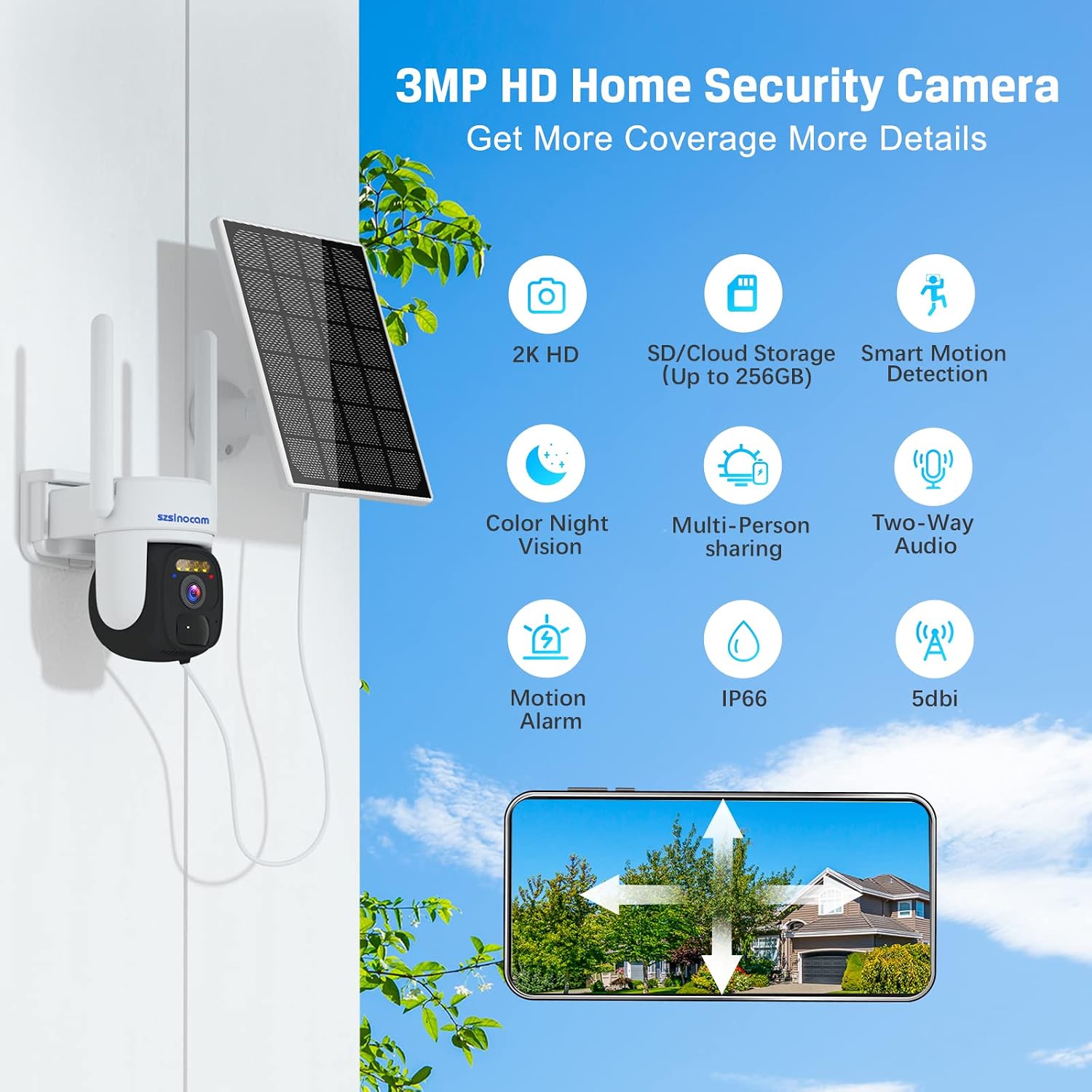
Image: A smartphone displaying the camera's live feed and options for local storage and remote playback, including calendar, screenshot, and record functions.
4.2 Sterowanie obrotem i pochyleniem
Within the 'O-KAM' app, use the on-screen controls to remotely adjust the camera's viewKąt obrotu. Kamera obsługuje obrót w poziomie o 355° i pochylenie w pionie o 110°.

Image: The camera is depicted with arrows indicating its 355° pan and 90° tilt capabilities, ensuring comprehensive coverage of the monitored area. It also mentions 4X digital zoom.
4.3 Tryby widzenia nocnego
Kamera oferuje wiele opcji widzenia nocnego:
- Nocna Nocna Wizja: Standardowy czarno-biały view przy słabym oświetleniu.
- Pełnokolorowa wizja nocna: Activates built-in spotlights to provide color images in the dark.
- Alarm dźwiękowy i świetlny, widzenie nocne: Combines full-color vision with an audible alarm and flashing lights upon motion detection.

Image: A visual comparison of the camera's night vision capabilities, including infrared night vision, full-color night vision, and sound and light alarm night vision, demonstrating enhanced visibility in low-light conditions.
4.4 Detekcja ruchu i alarmy
The camera utilizes PIR (Passive Infrared) motion detection with an AI algorithm to identify human shapes, minimizing false alarms. When motion is detected, the camera can trigger various alarms and send instant notifications to your phone.
- Konfigurowalne strefy alarmowe: Zdefiniuj określone obszary w obrębie kamery view do wykrywania ruchu.
- Adjustable Detection Distance: Set the range at which motion is detected.
- Tryby alarmowe: Choose between siren, voice, or combined sound and light alarms.
- Natychmiastowe powiadomienia: Receive alerts on your smartphone within seconds of detection.

Image: An illustration showing how to define custom alarm zones within the camera's field of view, highlighting a specific area like a garage entrance for monitoring.

Image: A screenshot from the app demonstrating the setting for PIR alarm detection distance, allowing users to adjust the range from near to far.

Image: A smartphone displaying an instant motion alarm message notification, indicating a visitor has been detected by the camera.
4.5 Dźwięk dwukierunkowy
Use the two-way audio feature in the 'O-KAM' app to speak through the camera's speaker and listen through its microphone. This allows for direct communication with individuals near the camera.

Image: A split image demonstrating color night vision capturing a child playing, and the two-way audio feature allowing a parent to speak to the child remotely via a smartphone.
4.6 Opcje przechowywania
Kamera obsługuje dwie metody przechowywania nagranych zdjęćtage:
- Karta micro sd: Włóż kartę Micro SD (do 256 GB, nie jest dołączona do zestawu) do przeznaczonego na to gniazda w aparacie, aby przechowywać dane lokalnie.
- Przechowywanie w chmurze: A 3-day free cloud storage service is available. Refer to the app for subscription options for extended cloud storage.

Image: A close-up of the camera showing the Micro SD card slot and an icon representing cloud storage, illustrating the dual storage options.
4.7 Udostępnianie wielu użytkownikom
You can share access to your camera's live feed and recordings with family members or trusted individuals through the 'O-KAM' app.

Obraz: Ilustracja przedstawiająca wielu użytkowników profiles around a globe, with a smartphone showing a camera feed, symbolizing the multi-user sharing capability for family members.
5. Konserwacja
5.1 Ładowanie akumulatora
The camera's 10000mAh battery is primarily charged by the solar panel. In periods of low sunlight or heavy usage, the battery can also be charged via a standard USB power adapter (not included).
- Aby uzyskać maksymalną wydajność ładowania, upewnij się, że panel słoneczny jest czysty i nie ma w nim żadnych przeszkód.
- If the battery level is critically low, remove the camera and charge it indoors using a USB cable until fully charged.
5.2 Ogólna opieka
- Regularnie czyść obiektyw aparatu i panel słoneczny miękką, miękką szmatką.amp ściereczka zapewniająca wyraźne obrazy i efektywne ładowanie.
- Unikaj stosowania silnych środków chemicznych i materiałów ściernych, które mogą uszkodzić powierzchnię aparatu lub obiektyw.
- Ensure all ports and covers are securely closed to maintain the IP66 weatherproof rating.
6. Rozwiązywanie Problemów
- Kamera nie łączy się z siecią Wi-Fi: Upewnij się, że Twoja sieć Wi-Fi działa w paśmie 2.4 GHz. Sprawdź siłę sygnału Wi-Fi w miejscu, w którym znajduje się kamera. Uruchom ponownie router i kamerę.
- Bateria nie ładuje się: Verify the solar panel is receiving direct sunlight and is clean. Check the connection between the solar panel and the camera. Charge the camera via USB if necessary.
- Słaba jakość obrazu: Wyczyść obiektyw aparatu. Upewnij się, że w polu widzenia aparatu nie ma żadnych przeszkód. viewSprawdź prędkość swojego połączenia internetowego.
- Częste fałszywe alarmy: Adjust the PIR detection sensitivity and customize alarm zones in the 'O-KAM' app to focus on relevant areas.
- No motion detection notifications: Ensure notifications are enabled in both the 'O-KAM' app and your smartphone's settings. Check the camera's motion detection settings.
For further assistance, refer to the 'O-KAM' app's help section or contact customer support.
7. Specyfikacje
| Funkcja | Specyfikacja |
|---|---|
| Numer modelu | QW5 |
| Marka | SZSINOCAM |
| Efektywna rozdzielczość wideo | 3 MP (2K) |
| Rozdzielczość nagrywania wideo | 1080p |
| Technologia komunikacji bezprzewodowej | Wi-Fi (2.4 GHz) |
| Zakres obrotu/pochylenia | 355° Pan / 110° Tilt |
| Cechy specjalne | Portable, Night Vision (Infrared, Full-Color, Alarm), PIR Motion Detection, Two-Way Audio |
| Środowisko użytkowania | Na zewnątrz (odporność na warunki atmosferyczne IP66) |
| Źródło zasilania | Battery Powered (10000mAh rechargeable battery) with Solar Panel |
| Pobór mocy | 10 watów |
| Kompatybilne urządzenia | Smartfon |
| Opcje przechowywania | Karta Micro SD (do 256 GB), przechowywanie w chmurze |
| Tworzywo | Plastikowy |
| Wymiary | Wymiary 21.8 x 15 x 14.3 cm |
| Waga | 920 gramów |
8. Gwarancja i wsparcie
For information regarding warranty coverage, technical support, or replacement parts, please refer to the product packaging or visit the official SZSINOCAM website. Contact details for customer service are typically provided with your purchase documentation.