
TENVIS IP602W
TENVIS IP602W Outdoor IP Camera User Manual
Model: IP602W
Marka: TENVIS
Wstęp
The TENVIS IP602W is a robust outdoor IP camera designed for reliable surveillance. It offers broad compatibility, supporting not only Windows OS but also Mac OS and other platforms accessible via an internet browser. Its design facilitates easy installation, allowing for wall mounting and wireless connectivity.
Equipped with a 1/4 CMOS image sensor and a 6mm lens, the IP602W delivers video at a maximum frame rate of 30 frames per second, with a resolution of up to 640 x 480 pixels. For low-light and nighttime environments, the camera features 30 infrared LEDs, providing high levels of invisible light for clear visibility. Mobile viewing is supported across multiple platforms via 3G networks, including iPhone, Android, Windows Mobile, and Java phones, enabling remote monitoring from any location with internet access.
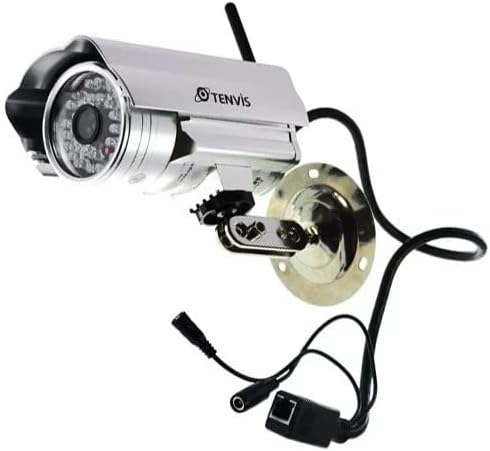
Image: The TENVIS IP602W Outdoor IP Camera, showcasing its durable build, integrated mounting bracket, and connectivity cables.
Co jest w pudełku
Po otwarciu opakowania należy sprawdzić, czy znajdują się w nim wszystkie poniższe elementy:
- 1 x IP602W WiFi IP Camera
- 1 x Power Adaptor (AU Plug)
- 1 x Antena WiFi
- 1 x wspornik montażowy
- 1 x płyta CD (zawierająca oprogramowanie/sterowniki)
- 1 x zestaw śrub do montażu
- 1 x Instrukcja obsługi

Image: All components included in the TENVIS IP602W package, laid out for verification.
Cechy produktu
The TENVIS IP602W camera is equipped with several key features to enhance its performance and usability:
- Night Version: Integrated infrared LEDs provide clear visibility in low-light and complete darkness.
- Wsparcie bezprzewodowe: Connects to your network via Wi-Fi for flexible placement.
- Metal and Waterproof Shell: Designed for outdoor use with a durable, weather-resistant casing.
- Wykrywanie ruchu: Configurable motion detection alerts for security monitoring.
- Zgodność międzyplatformowa: Wspiera viewing and control from various operating systems and browsers, including Windows, Mac OS, Firefox, Chrome, and Safari.
- Przenośny View: Access live feeds and controls from mobile devices via 3G network, supporting iPhone, Android, Windows Mobile, and Java phones.

Image: Visual representation of the TENVIS IP602W camera, emphasizing its key features such as night vision and wireless capabilities.
Konfiguracja i instalacja
Identyfikacja komponentów
Familiarize yourself with the camera's ports and components before installation:
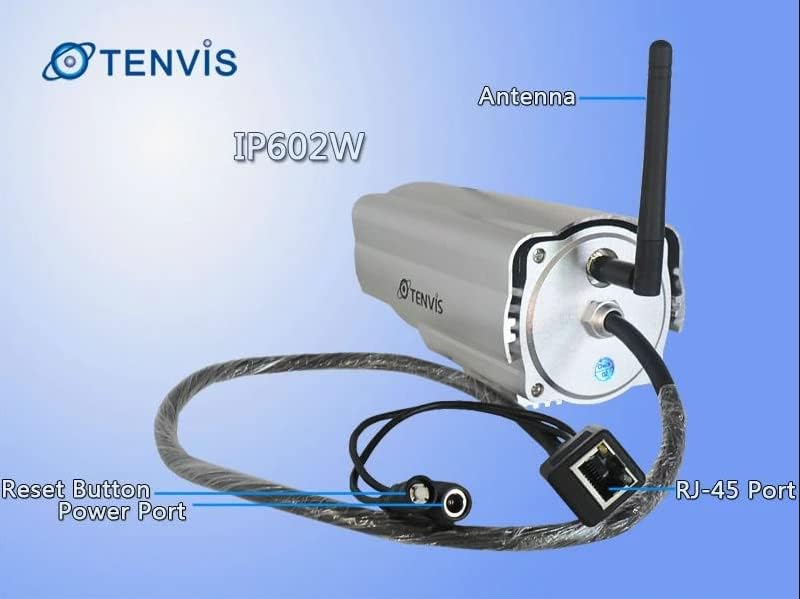
Obraz: Szczegółowy view of the TENVIS IP602W camera's rear, showing the antenna, RJ-45 Ethernet port, power input, and reset button.
- Antena: Do łączności z siecią bezprzewodową.
- Port RJ-45: For wired Ethernet connection to your router.
- Port zasilania: Tutaj podłącz dołączony zasilacz.
- Przycisk resetowania: Służy do przywracania ustawień fabrycznych.
Połączenie sieciowe
The IP602W can connect to your network wirelessly or via an Ethernet cable. For initial setup, a wired connection is often recommended for stability.

Image: Network diagram showing how the IP602W camera connects to a router, allowing access from a LAN PC, Internet PC, and 3G phone.
- Connect the camera to your router using an Ethernet cable (if using wired setup).
- Connect the power adapter to the camera and plug it into an electrical outlet.
- Allow the camera a few minutes to power on and initialize.
- Refer to the included CD or the TENVIS website for software installation and detailed network configuration instructions, especially for wireless setup.
Montowanie
The camera comes with a mounting bracket for easy installation on a wall or other suitable surface. Ensure the mounting location provides a clear view and is within range of your Wi-Fi signal or Ethernet cable.
- Choose a suitable outdoor location for mounting.
- Użyj uchwytu montażowego jako szablonu do zaznaczenia miejsc wywiercenia otworów.
- Wywierć niezbędne otwory i w razie potrzeby umieść w nich kotwy ścienne.
- Przymocuj uchwyt montażowy do powierzchni za pomocą dołączonych śrub.
- Zamontuj kamerę na uchwycie montażowym i dostosuj jej kąt, aby uzyskać optymalny kąt. viewing.
Działanie
Once the camera is set up and connected to your network, you can begin monitoring. The IP602W supports various viewmetody:
- PC/Mac Access: Use the provided software or a compatible web browser (Firefox, Chrome, Safari) to access the camera's live feed and settings from your computer.
- Mobile Device Access: Download the TENVIS mobile application (if available) or use a compatible mobile browser on your iPhone, Android, Windows Mobile, or Java phone to view the camera remotely via a 3G network connection.
- Jakość wideo: The camera streams video at up to 640x480 resolution with a frame rate of 30fps, providing clear and smooth surveillance footage.
- Detekcja ruchu: Configure motion detection settings through the camera's interface to receive alerts when movement is detected in the monitored area.
Konserwacja
Regular maintenance helps ensure the longevity and optimal performance of your TENVIS IP602W camera:
- Czyszczenie: Okresowo czyść obiektyw i obudowę aparatu miękką,amp szmatką. Unikaj środków czyszczących o działaniu ściernym i rozpuszczalników.
- Kontrola kabla: Check all cables (power, Ethernet) for any signs of wear, damage, or loose connections.
- Aktualizacje oprogramowania układowego: Check the TENVIS official webOdwiedzaj witrynę regularnie w celu sprawdzenia dostępności aktualizacji oprogramowania sprzętowego. Regularna aktualizacja oprogramowania sprzętowego może poprawić wydajność i bezpieczeństwo.
- Kontrole środowiskowe: Upewnij się, że montaż kamery jest bezpieczny i że żadne przeszkody nie blokują jej pola widzenia. view.
Rozwiązywanie problemów
If you encounter issues with your IP602W camera, try the following steps:
- Brak zasilania: Upewnij się, że zasilacz jest prawidłowo podłączony do aparatu i do sprawnego gniazdka elektrycznego.
- Brak połączenia sieciowego:
- W przypadku połączenia przewodowego sprawdź stan kabla Ethernet i routera.
- For wireless connection, ensure the Wi-Fi antenna is properly attached and the camera is within range of your router. Verify Wi-Fi settings in the camera's configuration.
- Brak dostępu do kamery: Verify the camera's IP address. Ensure your computer or mobile device is on the same network or has proper internet access for remote viewing. Check firewall settings on your computer.
- Słaba jakość wideo: Ensure the lens is clean. Check network bandwidth and signal strength.
- Resetowanie aparatu: If issues persist, use the reset button (refer to Component Identification) to restore factory default settings. You will need to reconfigure the camera after a reset.
Specyfikacje
| Funkcja | Szczegół |
|---|---|
| Nazwa modelu | IP602W |
| Marka | TENVIS |
| Zastosowanie wewnątrz/na zewnątrz | Plenerowy |
| Technologia łączności | Bezprzewodowy (Wi-Fi) |
| Typ kontrolera | Android (and other platforms) |
| Typ montażu | Montaż ścienny |
| Rozdzielczość przechwytywania wideo | 480p (640x480) |
| Szybkość klatek | 30 klatek na sekundę |
| Technologia czujnika fotograficznego | CMOS (1/4 cala) |
| Obiektyw | 6mm |
| Technologia słabego oświetlenia | Night Color (Infrared LEDs) |
| Tryb pracy | Tylko ruch |
| Wymiary produktu | 10 x 9.5 x 4 cala |
| GTIN | 06928446299816 |
Gwarancja i wsparcie
For warranty information, technical support, or further inquiries regarding your TENVIS IP602W camera, please refer to the official TENVIS website or contact their customer service directly. The included CD may also contain support contact details.
You can visit the official TENVIS store for more information: TENVIS Store on Amazon
Ask a question about this manual
Ask about setup, troubleshooting, compatibility, parts, safety, or missing instructions. Manuals+ will review the question and use this page’s manual context to help answer it.