
CAS CL3000-30KG-P
Instrukcja obsługi wagi do drukowania etykiet z kodem kreskowym CAS CL3000-P
Model: CL3000-30KG-P
1. Wprowadzenie
This manual provides detailed instructions for the setup, operation, maintenance, and troubleshooting of the CAS CL3000-P Networking Barcode Label Printing Scale. This device is designed for commercial use in environments such as grocery stores, butcher shops, and supermarkets, offering integrated weighing, price computing, and barcode label printing capabilities.
Główne cechy:
- Integrated Barcode Label Printer for item-specific labels.
- Networking Ready (LAN) for central price updates and data synchronization.
- High-Speed Printing with 202 dpi resolution.
- Dual LCD Display for operator and customer viewing.
- User-Friendly PLU Management, storing up to 10,000 PLUs.
- Durable Aluminum Body Construction.
2. Rozpakowanie i konfiguracja
Carefully unpack all components and ensure all items are present before proceeding with setup.
2.1. Zawartość opakowania
Sprawdź, czy w pakiecie znajdują się następujące elementy:
- CAS CL3000-P Scale Unit
- Kabel zasilający
- Label Roll Starter Pack
- Instrukcja obsługi (ten dokument)
2.2. Umieszczenie
Place the scale on a stable, level surface, away from direct sunlight, excessive heat, or strong vibrations. Ensure adequate space for operation and label printing.
2.3. Podłączenie zasilania
- Connect the power cable to the scale's power input port.
- Podłącz drugi koniec kabla zasilającego do uziemionego gniazdka elektrycznego.
- Turn on the scale using the power switch, typically located on the rear or side of the unit.
2.4. Network Connection (LAN)
For networking capabilities, connect an Ethernet cable from the scale's LAN port to your network router or switch. Refer to your network administrator for specific IP address configuration if required.
2.5. Label Roll Installation
Open the printer cover and carefully load the label roll according to the diagram inside the printer compartment. Ensure the labels feed smoothly and are correctly aligned for printing.
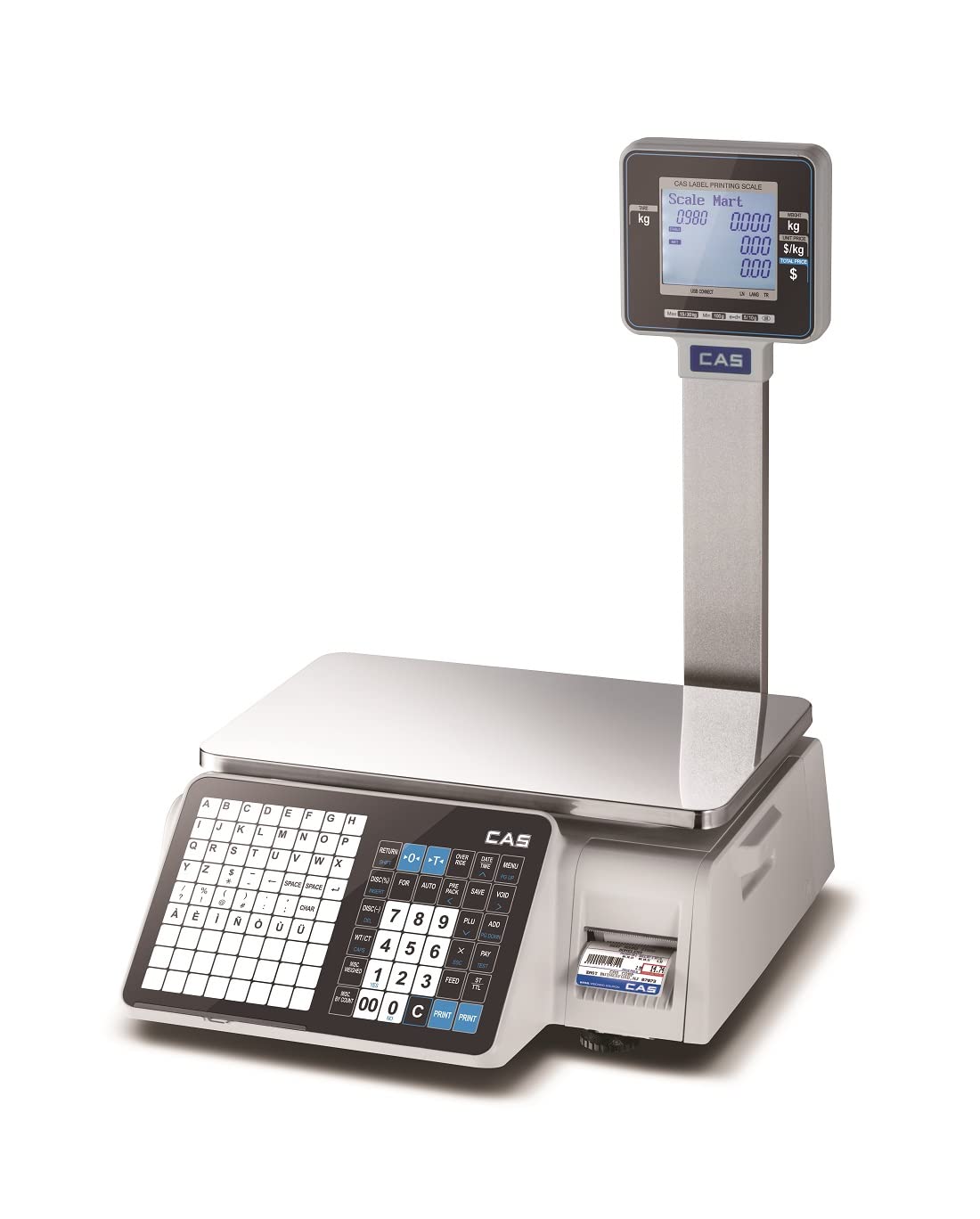
Figure 2.1: CAS CL3000-P Barcode Label Printing Scale with dual display and integrated printer.
3. Instrukcja obsługi
This section details the basic operation of the CAS CL3000-P scale for weighing, price computing, and label printing.
3.1. Ważenie podstawowe
- Ensure the scale displays "0.000 kg" before placing any item. If not, press the ZERO przycisk.
- Place the item to be weighed on the weighing platter.
- The weight will be displayed on both the operator and customer LCD screens.
3.2. Price Computing and Label Printing
The scale supports up to 10,000 PLUs (Price Look-Up units) for efficient operation.
- Połóż przedmiot na szalce ważącej.
- Enter the PLU code for the item using the numeric keypad.
- Alternatively, if a PLU is not set, enter the unit price directly using the numeric keypad.
- Naciśnij WYDRUKOWAĆ button to generate a barcode label. The label will include weight, unit price, total price, and barcode.

Figure 3.1: Close-up of the dual LCD display, featuring a scrolling message bar for enhanced communication.

Figure 3.2: Detail of the integrated printer, capable of linerless printing for efficiency.
3.3. PLU Management
The CL3000-P allows for easy management of up to 10,000 PLUs. Refer to the detailed programming guide (separate document or advanced settings menu) for adding, editing, or deleting PLUs.

Figure 3.3: The scale's internal memory supports storage for up to 10,000 product PLUs.
4. Konserwacja
Regular maintenance ensures the longevity and accuracy of your CAS CL3000-P scale.
4.1. Czyszczenie
- Odłącz zasilanie przed czyszczeniem.
- Wipe the scale's exterior and weighing platter with a soft, damp płótno.
- Nie należy używać środków czyszczących o właściwościach ściernych ani rozpuszczalników, ani zanurzać urządzenia w wodzie.
- Ensure no liquids enter the display or printer openings.
4.2. Konserwacja drukarki
- Regularly check the printer head for debris or adhesive residue. Clean gently with a lint-free cloth and isopropyl alcohol if necessary.
- Ensure label rolls are stored in a cool, dry place to prevent adhesive degradation.
4.3. Kalibracja
The scale is factory-calibrated. If you suspect accuracy issues, contact authorized CAS service personnel for re-calibration. Do not attempt to calibrate the scale yourself unless specifically instructed by a qualified technician.
5. Rozwiązywanie Problemów
This section provides solutions to common issues you might encounter with your CAS CL3000-P scale.
| Problem | Możliwa przyczyna | Rozwiązanie |
|---|---|---|
| Waga nie włącza się. | Odłączony kabel zasilający; uszkodzone gniazdko elektryczne; wyłączony wyłącznik zasilania. | Check power cable connection; Test power outlet; Ensure power switch is ON. |
| Niedokładne odczyty wagi. | Scale not level; Debris under platter; Needs calibration. | Ensure scale is on a level surface; Clean under platter; Contact service for calibration. |
| Labels not printing or printing blank. | Label roll empty or incorrectly loaded; Printer head dirty; Printer error. | Replace/re-load label roll correctly; Clean printer head; Restart scale. |
| Problemy z połączeniem sieciowym. | Ethernet cable disconnected; Network configuration error. | Check Ethernet cable; Verify network settings with IT support. |
If the problem persists after attempting these solutions, please contact CAS customer support.
6. Specyfikacje
| Funkcja | Szczegół |
|---|---|
| Model | CL3000-30KG-P |
| Marka | CAS |
| Ograniczenie wagowe | 30 kilograma |
| Dokładność odczytu | 10g |
| Rozmiar patelni | 380 x 250 mm (15 x 10 cala) |
| Typ wyświetlacza | LCD (podwójny wyświetlacz) |
| PLU Memory | Up to 10,000 PLUs |
| Rozdzielczość drukarki | 202 dpi |
| Łączność | LAN (Ethernet), USB port, RS-232C, RJ11, optional wireless |
| Tworzywo | Stainless Steel (platter), Aluminum Body Construction |
| Źródło zasilania | Prąd zmienny/stały |
| Waga przedmiotu | 3.5 kilogramów |
| Wymiary opakowania | Wymiary 30 x 20 x 10 cm |
| Kraj pochodzenia | Indie |
7. Gwarancja i wsparcie
7.1. Informacje o gwarancji
The CAS CL3000-P scale comes with a standard manufacturer's warranty. For specific warranty terms and conditions, please refer to the warranty card included with your product or contact CAS customer service. Extended warranty options may be available.
7.2. Obsługa klienta
For technical assistance, service requests, or any inquiries regarding your CAS CL3000-P scale, please contact CAS Weighing India Pvt Ltd. Their contact information can typically be found on the product packaging or their official webstrona.
Informacje kontaktowe:
- Manufacturer: CAS Corportaion
- Packer: CAS Weighing India Pvt Ltd
- Importer: CAS Corportation
- Telefon: 9212559707
Ask a question about this manual
Ask about setup, troubleshooting, compatibility, parts, safety, or missing instructions. Manuals+ will review the question and use this page’s manual context to help answer it.