
Wstęp
This manual provides comprehensive instructions for the IWEUKJLO 4K Digital Camera (Model DC101). Please read this guide carefully before use to ensure proper operation and to maximize your camera's potential. Keep this manual for future reference.

Figure 1: IWEUKJLO 4K Digital Camera and included accessories.
Co jest w pudełku
Sprawdź, czy w przesyłce znajdują się wszystkie elementy wymienione poniżej:
- 1 x 4K Digital Camera
- Karta SD 1 x 32GB
- 1 x podstawa ładowania
- 1 x Instrukcja obsługi
- 1 x ładowarka
- 1 x kabel USB Mini
- 1 x kabel HDMI
- 1 x obiektyw
- 1 x dekielek na obiektyw
- 2 x Akumulatory wielokrotnego ładowania
- 1 x torba na aparat
- 1 x pasek na nadgarstek
- 1 x ściereczka czyszcząca

Rysunek 2: Zawartość opakowania aparatu.
Organizować coś
1. Ładowanie akumulatora
Insert the rechargeable battery into the charging stand. Connect the charger to the charging stand and plug it into a power outlet. The indicator light on the charging stand will show the charging status. Ensure batteries are fully charged before first use.
2. Wkładanie baterii i karty SD
Open the battery compartment cover on the bottom of the camera. Insert the charged battery, ensuring correct polarity. Close the battery compartment. Insert the provided 32GB SD card into the SD card slot until it clicks into place. Ensure the card is inserted correctly to avoid damage.
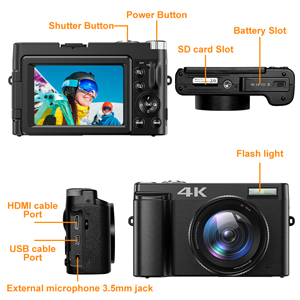
Figure 3: Location of battery and SD card slots.
Instrukcja obsługi
Włączanie/wyłączanie
Press and hold the Power button located on the top of the camera to turn it on or off.
Podstawy fotografii
In photo mode, lightly press the capture button to allow the camera to autofocus. The focus frame on the screen will change from yellow to green when focus is complete. Press the capture button firmly to take the photo.

Figure 4: Autofocus in action. Half-press the shutter button to focus.
Nagrywanie wideo
Switch the camera to video mode. Press the record button to start recording 4K video at 30fps. Press again to stop. The camera supports video pause, allowing you to pause and resume recording to save editing time.

Figure 5: UHD 4K and 16X Digital Zoom capabilities.
180° Flip Screen
The 3-inch touchscreen can be rotated 180 degrees, making it ideal for vlogging and self-portraits, allowing you to see yourself while recording or framing shots.
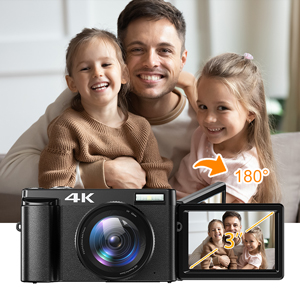
Figure 6: The 180° flip screen for easy self-recording.
Webcam and HDMI Output
Connect the camera to your computer using the USB cable and switch to "webcam" mode to use it for live streaming, video calls, or online teaching. For larger displays, connect the camera to a TV or projector via the HDMI cable.

Rysunek 7: Webcam functionality and HDMI output.
Additional Shooting Modes
The camera supports various modes including time-lapse, looping video, slow-motion video, anti-shake shooting, and continuous shooting. Explore these options through the camera's menu settings.

Figure 8: Diverse shooting functions for various scenarios.
Konserwacja
Czyszczenie aparatu
Use the provided cleaning cloth to gently wipe the camera body and lens. For stubborn smudges on the lens, use a specialized lens cleaning solution applied to the cloth, not directly to the lens. Avoid using abrasive materials or harsh chemicals.
Składowanie
When not in use, store the camera in its protective bag in a cool, dry place away from direct sunlight and extreme temperatures. Remove batteries if storing for extended periods to prevent leakage.
Rozwiązywanie problemów
| Problem | Możliwa przyczyna | Rozwiązanie |
|---|---|---|
| Kamera się nie włącza. | Bateria jest rozładowana lub nieprawidłowo włożona. | Naładuj akumulator do pełna. Włóż akumulator prawidłowo. |
| Obrazy są niewyraźne. | Autofocus failed or subject is too close/far. | Ensure autofocus engages (green frame). Maintain appropriate distance from subject. Clean the lens. |
| Błąd karty SD. | SD card is full, corrupted, or incorrectly inserted. | Usuń niepotrzebne files or use a new SD card. Reinsert the SD card. Format the SD card (this will erase all data). |
| Jakość wideo jest słaba. | Low light conditions or incorrect settings. | Ensure adequate lighting. Adjust video resolution settings. |
Jeśli problem nadal występuje, skontaktuj się z obsługą klienta.
Specyfikacje
- Nazwa modelu: DC101
- Rozdzielczość czujnika fotograficznego: 48 MP
- Rozdzielczość wideo: 4K (2160p), 4320p
- Zoom cyfrowy: 16x
- Rozmiar ekranu: 3 inches (180° Flip Screen)
- Typ wyświetlacza: LCD, pojemnościowy ekran dotykowy
- Autofokus: Yes (Contrast/Face/Smile Detection)
- Stabilizacja obrazu: Cyfrowy
- Utrzymany File Format: JPEG (Image), AVI (Audio)
- Łączność: Micro USB, HDMI
- Pamięć: Obsługuje karty SD o pojemności do 32 GB (w zestawie 32 GB)
- Typ baterii: Rechargeable Lithium Polymer (2 included)
- Waga przedmiotu: 239 gram
- Wymiary (w przybliżeniu): 11.5 x 7 x 4 cm (from image 71QwshWWUqL)
- Cechy szczególne: Webcam function, Time-lapse, Looping video, Slow-motion video, Video Pause, Anti-shake, Continuous Shooting, Self Timer (2s, 5s, 10s)
Gwarancja i wsparcie
Informacje o gwarancji
Produkt objęty jest 2-letnią gwarancją producenta. Prosimy zachować dowód zakupu na wypadek reklamacji.
Obsługa klienta
If you encounter any issues or have questions regarding your IWEUKJLO 4K Digital Camera, please feel free to contact us. We aim to reply within 24 hours.
For additional resources, you may refer to the official User Manual (PDF) available online: Instrukcja obsługi (PDF)