
1. Wprowadzenie
This manual provides comprehensive instructions for the installation, operation, and maintenance of your ASRock Intel Arc A380 Challenger ITX 6GB OC Graphics Card. Please read this manual thoroughly before using the product to ensure proper functionality and to prevent damage. Keep this manual for future reference.
2. Informacje dotyczące bezpieczeństwa
Always observe the following safety precautions when handling and installing your graphics card:
- Przed instalacją upewnij się, że komputer jest wyłączony i odłączony od gniazdka ściennego.
- Discharge any static electricity from your body by touching a grounded metal object (e.g., the computer chassis) before handling components.
- Avoid touching the gold-plated connector pins on the graphics card.
- Install the graphics card in a well-ventilated area to prevent overheating.
- Nie wystawiaj karty graficznej na działanie wilgoci i ekstremalnych temperatur.
3. Zawartość opakowania
Sprawdź, czy w opakowaniu produktu znajdują się wszystkie elementy:
- ASRock Intel Arc A380 Challenger ITX 6GB OC Graphics Card
- Szybki przewodnik instalacji
4. Koniec produktuview
The ASRock Intel Arc A380 Challenger ITX 6GB OC Graphics Card is designed for compact systems, offering capable graphics performance in a single-slot ITX form factor. It features Intel's Arc A380 GPU with 6GB of GDDR6 memory and a 2250 MHz clock speed. Key features include a striped axial fan, 0dB silent cooling, and support for modern display technologies.

Figure 4.1: ASRock Intel Arc A380 Challenger ITX 6GB OC Graphics Card
4.1. Wymiary
This graphics card features a compact design suitable for ITX systems.
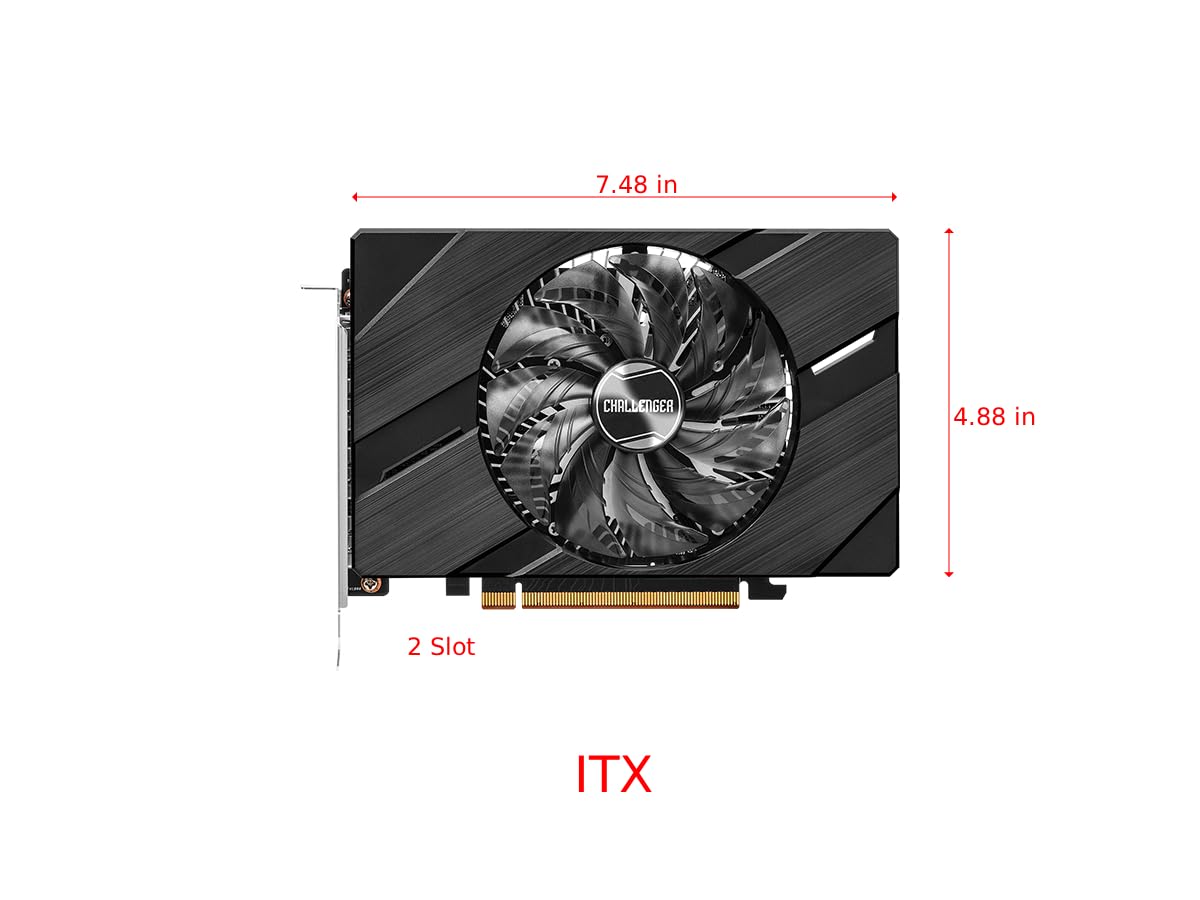
Figure 4.2: Graphics Card Dimensions (Approx. 7.48 in x 4.88 in, 2-slot)
4.2. Display Outputs
The card provides multiple display outputs for versatile connectivity.
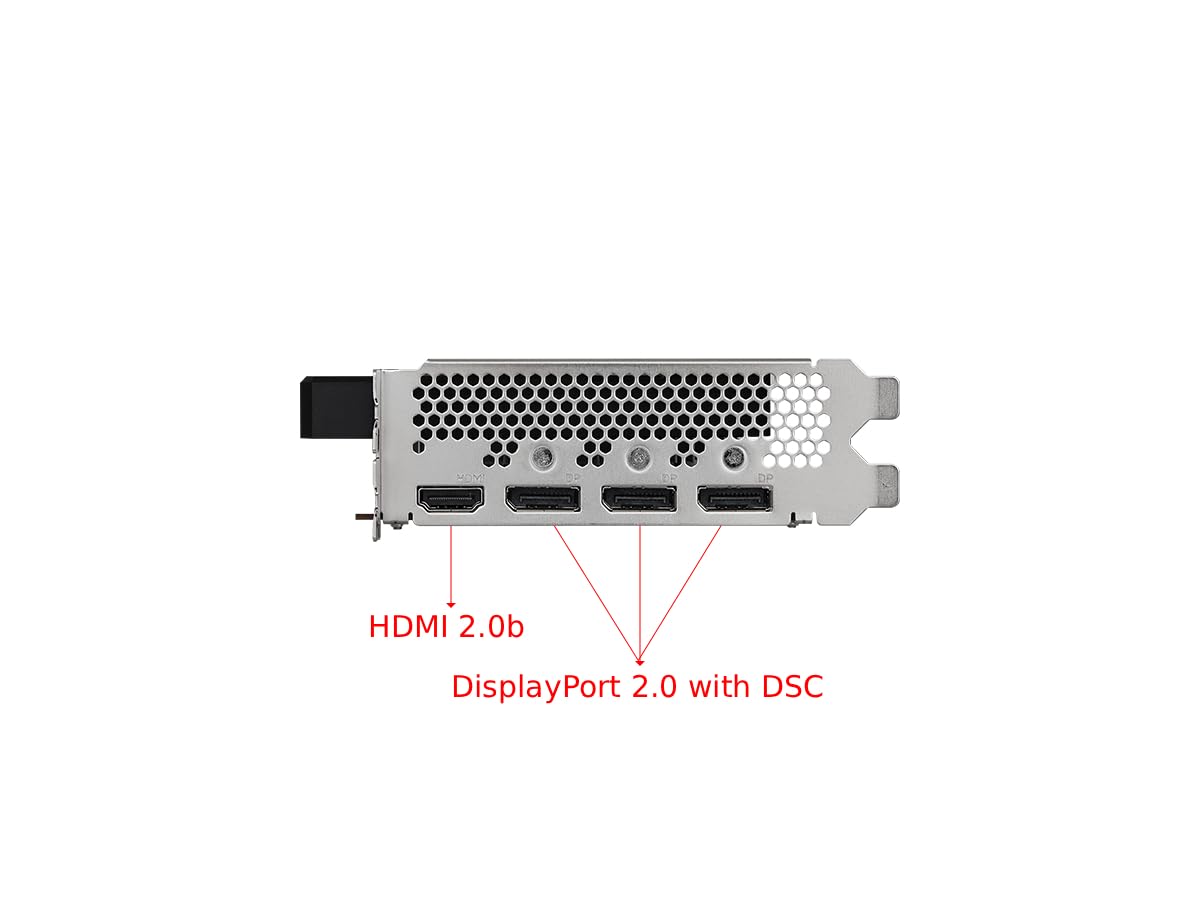
Figure 4.3: Display Outputs (1x HDMI 2.0b, 3x DisplayPort 2.0 with DSC)
4.3. Układ chłodzenia
The ASRock custom Striped Axial Fan design enhances airflow for optimal cooling. The 0dB Silent Cooling technology ensures the fans stop spinning under light workloads for quiet operation.

Figure 4.4: Striped Axial Fan for enhanced airflow

Figure 4.5: 0dB Silent Cooling: Fans stop under light workloads
4.4. Oficjalny film o produkcie
Wideo 4.1: Ponadview of Intel ARC Graphics Cards by ASRock USA. This video provides a general introduction to the Intel ARC graphics card series.
5. Konfiguracja
5.1. Instalacja fizyczna
- Przygotuj swój system: Wyłącz komputer i odłącz wszystkie kable. Otwórz obudowę komputera.
- Znajdź gniazdo PCIe: Znajdź dostępne gniazdo PCI Express 4.0 x16 na płycie głównej.
- Zdejmij osłonę gniazda: Remove the corresponding slot cover from your computer case.
- Włóż kartę graficzną: Ostrożnie dopasuj kartę graficzną do gniazda PCIe i mocno ją dociśnij, aż będzie pewnie osadzona. Upewnij się, że zatrzask mocujący na gnieździe PCIe jest zablokowany.
- Zabezpiecz kartę: Przymocuj kartę graficzną do obudowy komputera za pomocą śrubki.
- Podłącz zasilanie: Connect the single 8-pin PCIe power connector from your power supply to the graphics card. Ensure your power supply meets the recommended 500W minimum.
- Zamknij sprawę: Zamknij obudowę komputera i ponownie podłącz wszystkie kable.
5.2. Instalacja sterownika
After physical installation, you must install the latest drivers for your graphics card:
- Włącz komputer.
- Odwiedź oficjalną stronę ASRock website or Intel's support webstrona.
- Navigate to the support section and locate the drivers for the Intel Arc A380 series.
- Download the latest graphics drivers for your operating system.
- Uruchom instalator i postępuj zgodnie z instrukcjami wyświetlanymi na ekranie. Może być konieczne ponowne uruchomienie systemu.
6. Obsługa
Once drivers are installed, your ASRock Intel Arc A380 Challenger ITX graphics card is ready for use. Connect your display(s) to the available DisplayPort 2.0 or HDMI 2.0b ports. You can configure display settings, resolution, and refresh rates through your operating system's display settings or the Intel Arc Control software.
7. Konserwacja
Regularna konserwacja pomaga zapewnić długowieczność i optymalną wydajność karty graficznej:
- Usuwanie kurzu: Periodically clean dust from the fan and heatsink using compressed air. Ensure the system is powered off and unplugged before cleaning.
- Aktualizacje sterowników: Keep your graphics drivers updated to the latest version. New drivers often include performance improvements, bug fixes, and compatibility enhancements.
- Monitorowanie temperatury: Use monitoring software to keep an eye on the GPU temperature, especially during heavy workloads. While the 0dB cooling feature is efficient, ensuring good case airflow is crucial.
8. Rozwiązywanie Problemów
Jeśli masz problemy z kartą graficzną, rozważ poniższe kroki rozwiązywania problemów:
- Brak wyjścia wyświetlacza:
- Upewnij się, że karta graficzna jest całkowicie osadzona w gnieździe PCIe.
- Verify that the 8-pin power connector is securely attached.
- Check that your monitor cable is correctly connected to the graphics card and the monitor.
- Spróbuj użyć innego portu wyjściowego wyświetlacza lub innego kabla.
- Driver Issues/Instability:
- Perform a clean installation of the latest graphics drivers. Uninstall previous drivers completely before installing new ones.
- Ensure your motherboard BIOS/UEFI is updated to the latest version, as this can improve compatibility.
- Verify that Resizable BAR (ReBAR) is enabled in your system's BIOS/UEFI for optimal performance with Intel Arc GPUs.
- Przegrzanie:
- Zapewnij odpowiedni przepływ powietrza w obudowie komputera.
- Clean any dust buildup from the graphics card's fan and heatsink.
- Check that the fan is spinning correctly under load.
9. Specyfikacje
| Funkcja | Specyfikacja |
|---|---|
| Koprocesor graficzny | Intel Arc A380 |
| Pamięć wideo | 6 GB pamięci GDDR6 |
| Prędkość pamięci | 15.5 Gb/s |
| Zegar silnika | 2250MHz |
| Maksymalna rozdzielczość ekranu | 7680x4320 pikseli (8K) |
| Interfejs wyjścia wideo | 3x DisplayPort 2.0, 1x HDMI 2.0b |
| Numer modelu przedmiotu | 90-GA3KZZ-00UANF |
| Waga przedmiotu | 1.32 funta |
| Wymiary produktu | 1.1 x 9.7 x 0.04 cala |
| Zalecany zasilacz | 500 W |
10. Gwarancja i wsparcie
ASRock provides a manufacturer's warranty for this product. Please refer to the warranty card included in your package or visit the official ASRock website for detailed warranty terms and conditions. For technical support, driver downloads, and FAQs, please visit the ASRock support page at www.asrock.com/support.asp.
Optional protection plans are available for purchase, offering extended coverage beyond the standard manufacturer's warranty. These plans typically cover 3-year or 4-year durations, or monthly subscription options.