
Wstęp
The Dynatron U8 is a high-performance 1.5U CPU cooler designed to provide efficient thermal management for a wide range of processors. Featuring a copper base, aluminum fins, and an embedded heat pipe, this cooler is engineered to dissipate heat effectively. The integrated PWM fan ensures optimal cooling performance by adjusting fan speed based on CPU temperature, balancing noise levels and cooling efficiency. This manual provides essential information for the proper installation, operation, and maintenance of your Dynatron U8 CPU cooler.
It supports Intel LGA 1700, LGA 1200, and LGA 115X sockets, as well as AMD AM5 and AM4 sockets, making it a versatile solution for various desktop systems. With a thermal design power (TDP) support of up to 125W, it is suitable for many mainstream and performance-oriented CPUs.
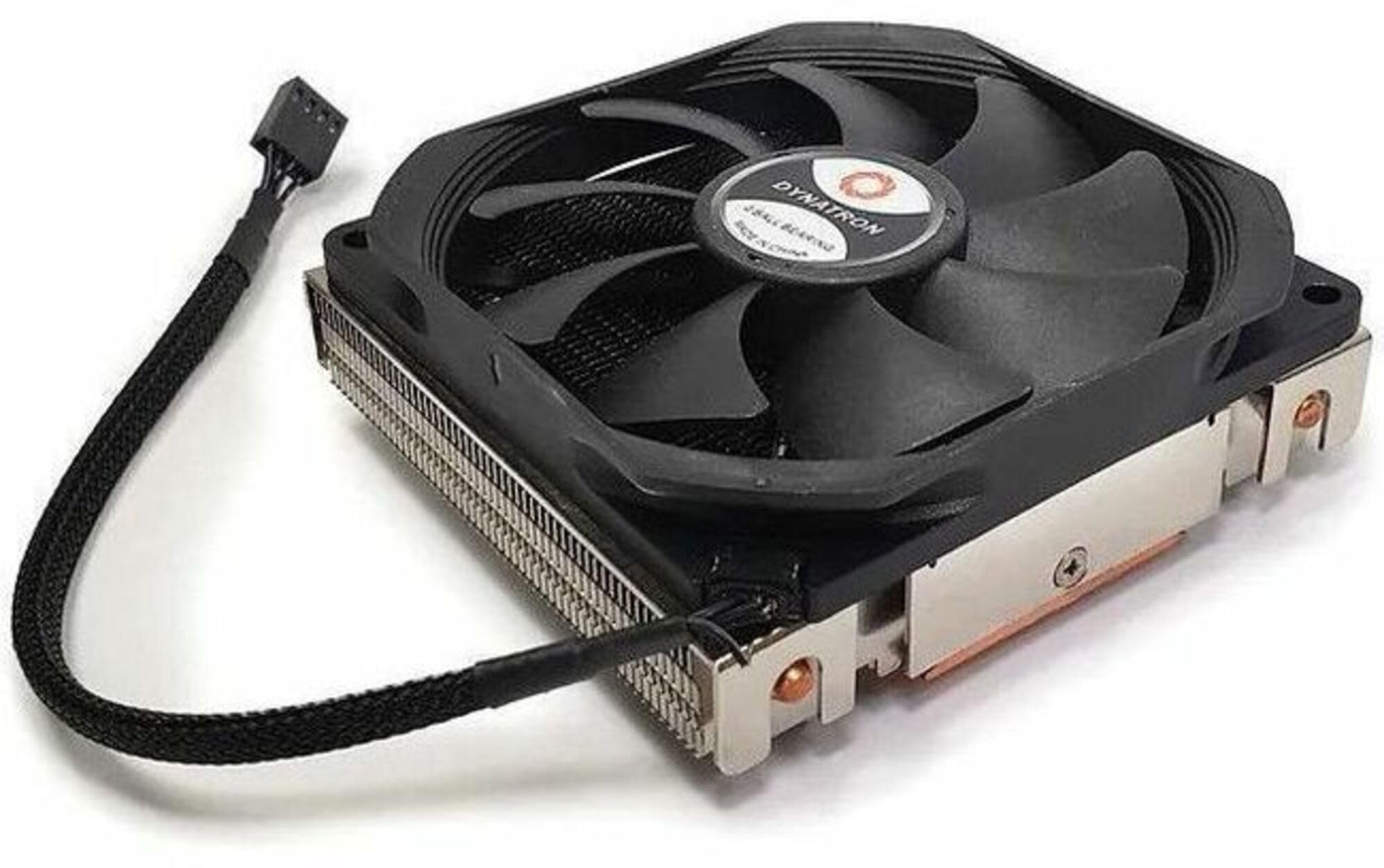
Image: The Dynatron U8 CPU Cooler, showcasing its copper base, aluminum fins, and integrated fan. This image illustrates the compact design suitable for 1.5U server chassis or small form factor desktop builds.
Zawartość opakowania
Please verify that all components are present before proceeding with the installation:
- Dynatron U8 CPU Cooler (Heatsink with integrated PWM Fan)
- Mounting Brackets (for Intel and AMD sockets)
- Thermal Paste (pre-applied or in a separate tube, depending on packaging)
- Instrukcja instalacji (ten dokument)
Konfiguracja i instalacja
Proper installation is crucial for optimal cooling performance. Follow these general steps carefully. Refer to your motherboard manual for specific socket mounting instructions if needed.
- Prepare the CPU and Motherboard: Ensure your CPU is correctly seated in its socket. Clean the CPU surface thoroughly with isopropyl alcohol to remove any dust or old thermal paste.
- Nałóż pastę termoprzewodzącą: If thermal paste is not pre-applied to the cooler's base, apply a small, pea-sized amount to the center of the CPU's integrated heat spreader (IHS). Do not spread it manually; the pressure from the cooler will distribute it evenly.
- Zamocuj wsporniki montażowe: Depending on your CPU socket (Intel LGA 1700/1200/115X or AMD AM5/AM4), attach the appropriate mounting brackets to the motherboard or cooler as instructed by the specific bracket design.
- Pozycja chłodnicy: Carefully align the Dynatron U8 cooler with the mounting holes or retention clips on the motherboard. Ensure the cooler's base makes full contact with the CPU's IHS.
- Zabezpiecz chłodziarkę: Gently press down on the cooler and secure it using the provided screws or clips. Tighten screws in a diagonal pattern (e.g., top-left, bottom-right, top-right, bottom-left) to ensure even pressure. Do not overtighten.
- Podłącz kabel wentylatora: Locate the 4-pin PWM fan header on your motherboard (usually labeled "CPU_FAN" or similar). Connect the Dynatron U8 fan cable to this header.
- Kontrola końcowa: Double-check all connections and ensure the cooler is securely mounted and does not wobble.
Operating Instructions (PWM Function)
The Dynatron U8 features a Pulse Width Modulation (PWM) fan, which allows your motherboard to dynamically control the fan speed based on the CPU's temperature. This ensures efficient cooling when needed and quieter operation during lighter loads.
- Sterowanie automatyczne: When connected to a 4-pin PWM fan header, the fan speed will be automatically regulated by your motherboard's BIOS/UEFI settings.
- Ustawienia BIOS/UEFI: You can access your motherboard's BIOS/UEFI setup during system startup (typically by pressing DEL or F2). Within the BIOS, navigate to the "Monitor," "Hardware Monitor," or "Fan Control" section. Here, you can often customize fan curves, setting minimum and maximum fan speeds at specific temperature thresholds.
- Kontrola oprogramowania: Some motherboard manufacturers provide utility software that allows for fan control directly from your operating system. Refer to your motherboard's documentation for available software.
- Optymalna wydajność: For best results, ensure the PWM function is enabled in your BIOS/UEFI and consider setting a fan curve that provides adequate cooling under load without excessive noise during idle or light tasks.
Konserwacja
Regularna konserwacja pomaga zapewnić długowieczność i optymalną wydajność chłodzenia procesora.
- Usuwanie kurzu: Periodically (e.g., every 3-6 months), power off your computer and disconnect it from the power source. Use compressed air to gently blow dust out of the heatsink fins and fan blades. Hold the fan blades to prevent them from spinning rapidly during cleaning, which can damage the fan motor.
- Kontrola wentylatora: Check the fan for any signs of wear, damage, or excessive noise. If the fan becomes noisy or stops spinning, it may need replacement.
- Kontrola pasty termoprzewodzącej: After several years, thermal paste can dry out and lose effectiveness. If you notice higher CPU temperatures, consider reapplying fresh thermal paste. This requires carefully removing the cooler, cleaning both surfaces, and applying new thermal paste.
- Bezpieczne mocowanie: Occasionally check that the cooler remains securely mounted to the motherboard. Loose mounting can lead to poor thermal contact and reduced cooling performance.
Rozwiązywanie problemów
If you encounter issues with your Dynatron U8 CPU cooler, refer to the following common problems and solutions:
- Przegrzanie procesora:
- Upewnij się, że chłodnica jest solidnie zamontowana i ma pełny kontakt z procesorem.
- Sprawdź, czy pasta termoprzewodząca została nałożona prawidłowo i nie wyschła.
- Sprawdź, czy wentylator się kręci. Jeśli nie, upewnij się, że jest prawidłowo podłączony do złącza CPU_FAN.
- Clean any dust buildup from the heatsink fins and fan.
- Check BIOS/UEFI fan settings to ensure the fan curve is aggressive enough for your CPU's thermal load.
- Wentylator nie kręci się:
- Confirm the 4-pin fan cable is securely connected to the motherboard's CPU_FAN header.
- Check BIOS/UEFI settings; some motherboards may have a "fan stop" feature at low temperatures.
- Inspect the fan for any obstructions or damage.
- Nadmierny hałas wentylatora:
- Clean the fan blades and heatsink to remove dust that might cause imbalance or obstruction.
- Adjust the fan curve in your BIOS/UEFI to reduce fan speed at lower temperatures.
- Upewnij się, że żadne kable nie kolidują z łopatkami wentylatora.
- If the noise persists and sounds like a grinding or rattling, the fan bearing may be failing, and the fan might need replacement.
Specyfikacje
| Funkcja | Szczegół |
|---|---|
| Model | U8 |
| Wymiary produktu (dł. x szer. x wys.) | 3.7" x 1.39" x 3.68" (94 mm x 35.3 mm x 93.5 mm) |
| Tworzywo | Copper Base, Aluminum Fins |
| Rura grzewcza | Embedded Heat Pipe |
| Typ wentylatora | Wentylator PWM |
| Złącze zasilania | 4-stykowy |
| Tomtage | 12 wolty |
| Cotage | 125 watts (TDP Support) |
| Maksymalna prędkość obrotowa | 2500 obr./min. |
| Metoda chłodzenia | Powietrze |
| Kompatybilne urządzenia | Pulpit |
| Zgodność z gniazdami | Intel LGA 1700/1200/115X, AMD AM5/AM4 |
| Waga przedmiotu | 392 gram |
Gwarancja i wsparcie
The Dynatron U8 CPU Cooler comes with a 1-roczna ograniczona gwarancja od daty zakupu. Niniejsza gwarancja obejmuje wady materiałowe i wykonawcze przy normalnym użytkowaniu.
For technical support, warranty claims, or further assistance, please contact Dynatron customer service. You can typically find contact information on the official Dynatron webna stronie internetowej lub u sprzedawcy.
Zachowaj dowód zakupu w celu potwierdzenia gwarancji.