
1. Wprowadzenie
This manual provides essential information for the installation, operation, and maintenance of your ARESGAME AGT 850W Power Supply. The AGT series is designed to deliver stable and reliable power to your computer system, featuring 80 PLUS Gold certification for high efficiency and a fully modular design for improved cable management.

Figure 1: ARESGAME AGT 850W Power Supply, showcasing its modular cable connections.
2. Zawartość opakowania
Sprawdź, czy w przesyłce znajdują się wszystkie elementy wymienione poniżej:
- 1 x ARESGAME AGT 850W Power Supply
- 1 x przewód zasilający
- 8 x Modular Cables (various types)
- 1 x Instrukcja obsługi (ten dokument)
- 1 x Instrukcja szybkiej instalacji
- 1 x PSU Tester
- 4 x Hook and Loop Fasteners
- 4 x śruby montażowe
- Opaski kablowe 8 x

Figure 2: Contents of the ARESGAME AGT 850W Power Supply package.
3. Główne cechy
- Certyfikat 80 PLUS Gold: Achieves 90% efficiency or higher under typical loads, reducing energy waste and heat generation.
- W pełni modułowa konstrukcja: Allows for connection of only necessary cables, improving airflow and simplifying cable management within the PC chassis.
- Stabilne wyjście: Utilizes APFC+LLC+DC-DC structure for reliable and consistent voltagdostawa elektroniczna.
- Ultra-Quiet 120mm FDB Fan: Features a fluid-dynamic bearing fan with intelligent speed control for quiet operation and extended durability.
- Kompaktowy rozmiar: Measures 150mm x 140mm x 86mm (5.9 x 5.5 x 3.3 inches), suitable for various PC case sizes.
- Kompleksowa ochrona: Obejmuje ponad objętośćtage Ochrona (OVP), Under Voltage Ochrona (UVP), ochrona przed nadmiernym napięciem (OPP), ochrona przed zwarciem (SCP), ochrona nadprądowa (OCP) i ochrona przed nadmierną temperaturą (OTP).
- Wysokiej jakości komponenty: Constructed with Japanese 105°C-rated capacitors for enhanced performance, reliability, and longevity.

Figure 3: 80 PLUS Gold certification and 10-year warranty details.
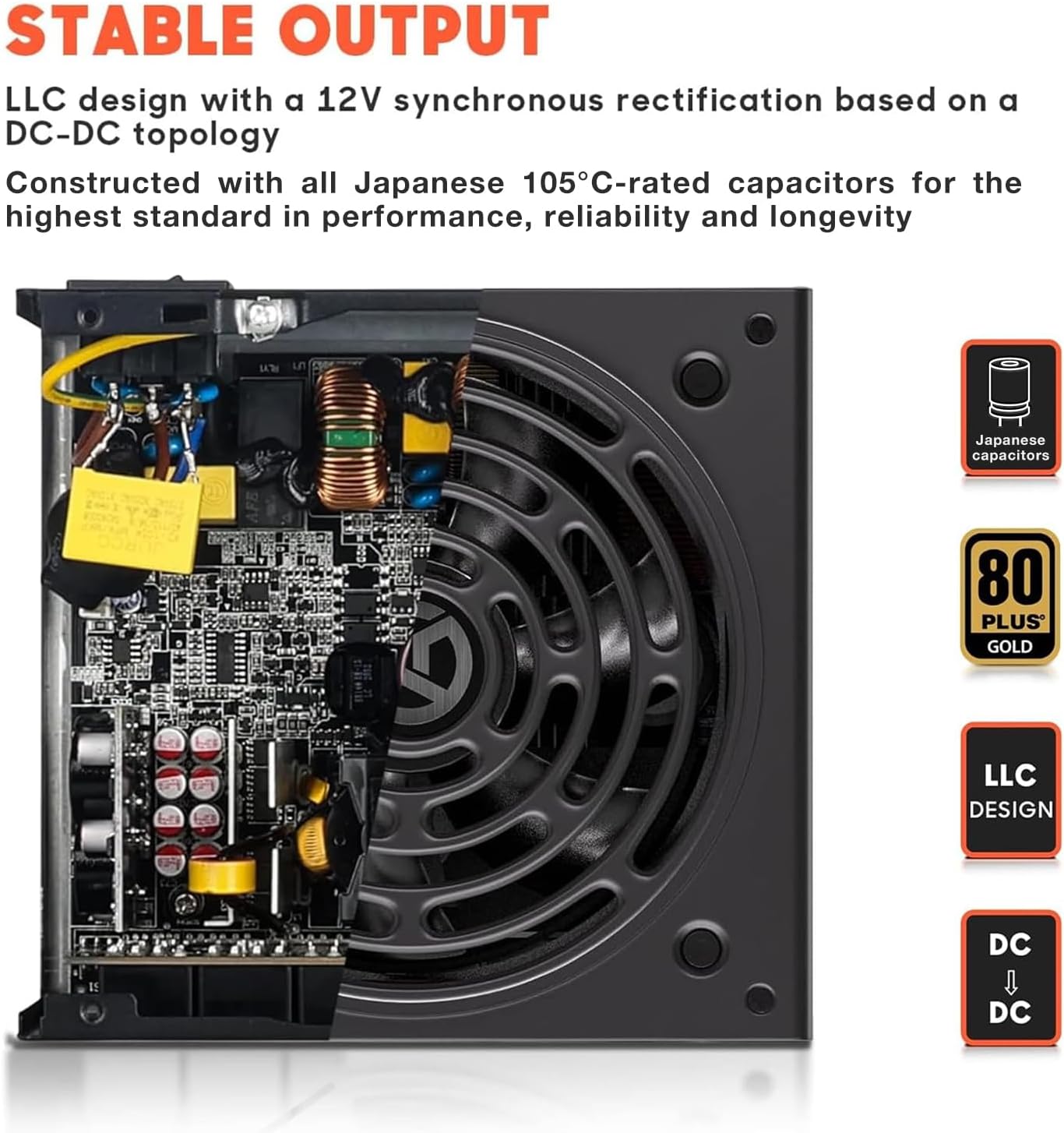
Figure 4: Stable output design with LLC topology and Japanese capacitors.

Figure 5: DC-DC Voltage Regulated Structure for precise power delivery.

Figure 6: The ultra-quiet 120mm Fluid-Dynamic Bearing (FDB) fan.
4. Informacje dotyczące bezpieczeństwa
Aby zapobiec uszkodzeniu produktu lub obrażeniom ciała, należy zapoznać się z poniższymi wytycznymi bezpieczeństwa i stosować się do nich:
- Nie otwierać zasilacza. Wysokie napięcietagy są obecne w środku, nawet po odłączeniu od zasilania.
- Install the power supply in a well-ventilated area. Ensure proper airflow to prevent overheating.
- Używaj wyłącznie kabli modułowych dostarczonych wraz z zasilaczem. Użycie niekompatybilnych kabli może spowodować uszkodzenie.
- Ensure the power supply is correctly installed and secured in the PC case before connecting to the AC power outlet.
- Unikaj narażania zasilacza na działanie wilgoci i ekstremalnych temperatur.
- The power supply is equipped with multiple protection circuits (OVP, UVP, OPP, SCP, OCP, OTP) to safeguard your system.
5. Konfiguracja i instalacja
5.1 Kontrola przed instalacją
Before installing the power supply into your computer, it is recommended to test its basic functionality using the included PSU tester.
- Connect the 24-pin mainboard cable to the power supply.
- Connect the other end of the 24-pin mainboard cable to the included PSU tester.
- Podłącz przewód zasilający do zasilacza, a następnie do gniazdka ściennego.
- Flip the power switch on the power supply to the 'ON' position. The fan should spin briefly, and the tester should indicate power. If not, refer to the Troubleshooting section.
- Turn off the power supply and disconnect the AC cord and tester.
5.2 Installation into PC Case
- Upewnij się, że komputer jest wyłączony i odłączony od gniazdka ściennego.
- Otwórz obudowę komputera, aby uzyskać dostęp do obszaru montażu zasilacza.
- Carefully place the ARESGAME AGT 850W Power Supply into the designated bay, ensuring the fan faces the correct direction (typically downwards for bottom-mounted PSUs, or as per case design for optimal airflow).
- Secure the power supply to the case using the four included mounting screws.
5.3 połączeń kablowych
Due to the fully modular design, connect only the cables required for your system components. Refer to your motherboard and component manuals for specific connection points.

Figure 7: Cable types, quantities, and lengths for the AGT 850W Power Supply.
- Mainboard Power (20+4 PIN): Podłącz do głównego złącza zasilania płyty głównej.
- CPU Power (8 PIN / 4+4 PIN): Connect to your motherboard's CPU power connector(s). The AGT 850W includes two such cables.
- PCI-E Power (6+2 PIN): Connect to your graphics card(s). The AGT 850W provides multiple PCI-E connectors.
- Moc SATA: Podłącz do urządzeń SATA, takich jak dyski SSD, dyski twarde i napędy optyczne.
- Molex Power: Connect to older peripherals or case fans that use Molex connectors.
- FDD Power (Floppy Disk Drive): If applicable, for legacy devices.
Use the included hook and loop fasteners and cable ties to manage cables neatly, improving airflow and aesthetics.
6. Instrukcja obsługi
Once all components are connected and secured, close your PC case. Connect the AC power cord to the power supply and then to a grounded wall outlet. Flip the power switch on the power supply to the 'ON' position. You can then power on your computer using the case's power button.
The 120mm FDB fan operates with intelligent speed control, adjusting its rotation based on the power supply's temperature and load. This ensures quiet operation during low loads and efficient cooling when under heavier demand.
7. Konserwacja
To ensure optimal performance and longevity of your ARESGAME AGT 850W Power Supply, consider the following maintenance tips:
- Usuwanie kurzu: Periodically clean dust from the power supply's fan and ventilation grilles using compressed air. Ensure the computer is powered off and unplugged before cleaning.
- Przepływ powietrza: Ensure that the power supply's intake and exhaust vents are not obstructed. Maintain good airflow within your PC case.
- Zarządzanie kablami: Regularly check that cables are not interfering with fan operation or blocking airflow.
8. Rozwiązywanie Problemów
If you encounter issues with your ARESGAME AGT 850W Power Supply, try the following steps:
- Brak zasilania:
- Upewnij się, że przewód zasilający jest prawidłowo podłączony do zasilacza i gniazdka ściennego.
- Verify the power switch on the back of the power supply is in the 'ON' position.
- Sprawdź, czy gniazdko ścienne ma zasilanie, podłączając do niego inne urządzenie.
- Use the included PSU tester to verify the power supply's basic functionality (refer to Section 5.1).
- Niestabilność/awarie systemu:
- Ensure all modular cables are securely connected to both the power supply and the components.
- Sprawdź, czy wymagania dotyczące mocy Twojego systemu nie przekraczają mocy zasilacza wynoszącej 850 W.
- Check for proper ventilation and ensure the power supply fan is spinning.
- Nietypowe dźwięki:
- Ensure no cables are obstructing the power supply fan.
- If the noise persists and is not related to fan operation, contact customer support.
If issues persist after performing these steps, please contact ARESGAME customer support for further assistance.
9. Specyfikacje
| Funkcja | Szczegół |
|---|---|
| Model | ARESZTOWA AGT850 |
| Cotage | 850 W |
| Certyfikacja efektywności | 80 PLUS złota |
| Modułowość | W pełni modułowy |
| Współczynnik kształtu | ATX |
| Wejście VAC | 100 V-240 V |
| Rozmiar wentylatora | 120mm (FDB Fan) |
| Wymiary produktu (dł. x szer. x wys.) | 150mm x 140mm x 86mm (5.9 x 5.5 x 3.3 cale) |
| Funkcje ochronne | OVP, UVP, OPP, SCP, OCP, OTP |
| Kompatybilne urządzenia | Komputer osobisty |
| Typ złącza | ATX |

Figure 8: Compact dimensions of the AGT 850W Power Supply.
10. Gwarancja i wsparcie
10.1 Informacje o gwarancji
The ARESGAME AGT 850W Power Supply comes with a 10-letnia gwarancja od daty zakupu. Niniejsza gwarancja obejmuje wady materiałowe i wykonawcze wynikające z normalnego użytkowania. Prosimy zachować dowód zakupu na wypadek roszczeń gwarancyjnych.
The warranty does not cover damage resulting from improper installation, accidents, abuse, misuse, natural disaster, insufficient or excessive electrical supply, abnormal mechanical or environmental conditions, or any unauthorized disassembly, repair, or modification.
10.2 Obsługa klienta
For technical assistance, troubleshooting, or warranty inquiries, please contact ARESGAME customer support. Refer to the ARESGAME official webAby uzyskać najaktualniejsze dane kontaktowe, odwiedź witrynę lub dokumentację zakupu.
When contacting support, please have your product model (AGT 850W) and proof of purchase readily available.