
1. Wprowadzenie
This manual provides detailed instructions for the operation and maintenance of your LFF DAB+/FM Digital Radio, Model YT81107. Please read this manual thoroughly before using the device to ensure proper function and to maximize your listening experience.

Obraz 1: Przód view of the LFF DAB+/FM Digital Radio, Model YT81107, featuring its speaker grille, color LCD display, and telescopic antenna.
2. Zawartość opakowania
Proszę sprawdzić, czy w paczce znajdują się następujące elementy:
- 1 x LFF DAB Digital Radio (Model YT81107)
- 1 x zasilacz sieciowy
- 1 x Skrócona instrukcja obsługi (niniejsza instrukcja)
Jeśli brakuje jakichkolwiek elementów lub są one uszkodzone, prosimy o natychmiastowy kontakt z działem obsługi klienta.
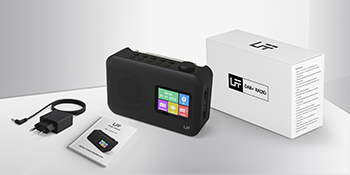
Image 2: The LFF DAB+/FM Digital Radio, AC power adapter, and quick start guide as included in the package.
3. Funkcje produktu
The LFF DAB+/FM Digital Radio YT81107 offers a range of features designed for versatile listening:
- DAB+ and FM Digital Radio: Supports ultra-wide signals in DAB+ (174.928 - 239.2 MHz) and FM (87.5 - 108 MHz) bands.
- Ustawienia stacji: Store up to 30 FM and 30 DAB+ stations for quick access.
- Przejrzysty wyświetlacz LCD: Large color LCD screen displays station information and time.
- Elastyczne opcje zasilania: Operates with the included AC adapter or 4 x 1.5V (LR6, AA) batteries (not included).
- Ulepszony odbiór: Features a 39 cm extendable antenna for improved signal strength.
- Wyłącznik czasowy: Programmable sleep timer (15/30/45/60/90/120 minutes).
- Podwójny budzik: Ustaw dwa niezależne alarmy.
- Łączność Bluetooth: Functions as a Bluetooth speaker for streaming audio from compatible devices.
- Gniazdo słuchawkowe: Gniazdo 3.5 mm do słuchania w prywatności.

Obraz 3: Koniecview of the radio's functions, including DAB+ radio, 60 presets, FM radio, sleep timer, headphone jack, Bluetooth, full-color screen, and dual alarm.

Image 4: Close-up of the radio's full-color LCD display, showing time and date.
4. Konfiguracja
4.1 Zasilanie urządzenia
Your radio can be powered by either the AC adapter or batteries.
- Zasilanie prądem zmiennym: Connect the included AC adapter to the DC 5V input port on the radio and plug the other end into a standard wall outlet.
- Moc baterii: Open the battery compartment on the back of the radio. Insert 4 x 1.5V AA (LR6) batteries, ensuring correct polarity. Close the compartment securely. (Batteries are not included.)
4.2 Regulacja anteny
Extend the telescopic antenna fully and adjust its angle for optimal reception. For DAB+ and FM radio, a fully extended antenna generally provides the best signal.

Image 5: Illustration of the radio's dimensions (16.1 x 10.9 x 5.6 cm), battery requirements (4 x 1.5V AA), AC adapter (5V/1000mA), and the 360° adjustable antenna.
4.3 Initial Scan for Stations
Upon first power-on, the radio will typically perform an automatic scan for available DAB+ and FM stations. This process may take a few minutes. Once complete, the radio will store the found stations.
5. Instrukcja obsługi
5.1 Włączanie/wyłączanie
Naciśnij Moc button (usually located on the top or front panel) to turn the radio on or off.
5.2 Wybór trybu
Naciśnij Tryb button to cycle through available modes: DAB+ Radio, FM Radio, and Bluetooth.
5.3 Tuning Radio Stations (DAB+/FM)
There are three primary ways to find and select radio stations:
- Automatyczne skanowanie: In DAB+ or FM mode, initiate an auto-scan. The radio will search for and list all available stations.
- Wyszukiwanie ręczne: Use the tuning knob or navigation buttons to manually adjust the frequency.
- Ustawienia wstępne: Store your favorite stations to preset numbers (1-30 for FM, 1-30 for DAB+). To save a station, tune to it, then press and hold a preset number button until the display confirms storage. To recall a station, simply press the corresponding preset number button.

Image 6: Visual representation of the three methods for selecting radio stations: Automatic Scan, Manual Search, and using Presets.
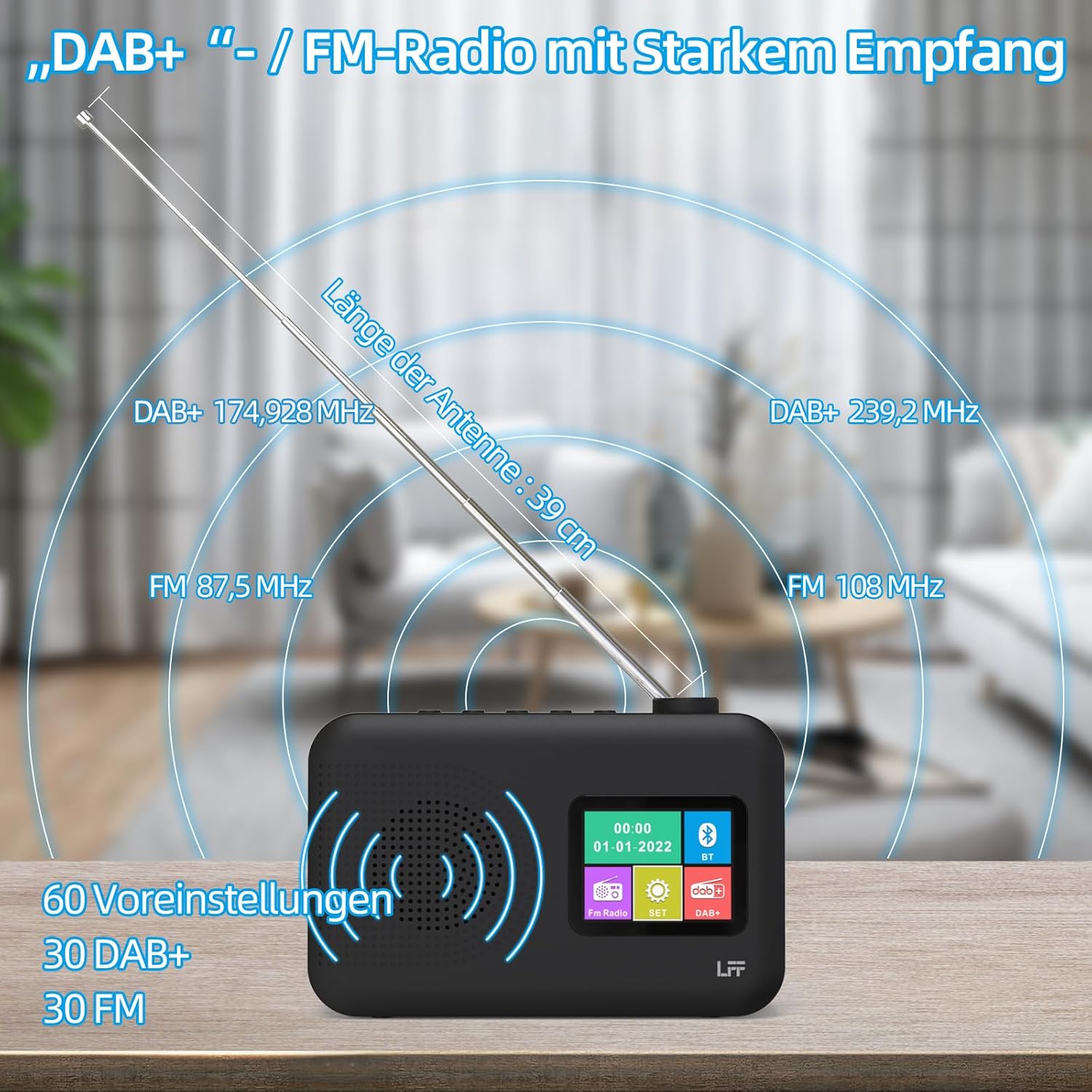
Image 7: Diagram showing the radio's reception capabilities for DAB+ (174.928 - 239.2 MHz) and FM (87.5 - 108 MHz) bands, highlighting the 39 cm antenna and 60 total presets.
5.4 Regulacja głośności
Adjust the volume using the dedicated volume knob or buttons, typically located on the top or side of the radio. The radio features 16 adjustable volume levels.
5.5 Wyłącznik czasowy
To activate the sleep timer:
- Naciśnij Timer snu przycisk.
- Cycle through the available durations: 15, 30, 45, 60, 90, or 120 minutes.
- Radio wyłączy się automatycznie po upływie wybranego czasu.

Image 8: Visual guide to setting the sleep timer, showing options for 15, 30, 45, 60, 90, and 120 minutes.
5.6 Podwójny budzik
Aby ustawić alarmy:
- Naciśnij Alarm przycisk umożliwiający dostęp do ustawień alarmu.
- Wybierz Alarm 1 lub Alarm 2.
- Set the desired alarm time, alarm source (e.g., buzzer, DAB+, FM), and volume.
- Potwierdź swoje ustawienia.

Image 9: Depiction of the dual alarm clock feature, allowing for two separate alarm settings (Alarm 1 and Alarm 2).
5.7 Łączność Bluetooth
Aby sparować urządzenie przez Bluetooth:
- Przełącz radio na Bluetooth mode. The display will indicate it is searching for devices.
- Na smartfonie lub innym urządzeniu z włączoną funkcją Bluetooth wyszukaj dostępne urządzenia Bluetooth.
- Select "LFF YT81107" (or similar name) from the list to pair.
- Po nawiązaniu połączenia możesz przesyłać strumieniowo dźwięk ze swojego urządzenia do radia.
Note: This radio acts as a Bluetooth receiver. It cannot connect to Bluetooth headphones.

Image 10: The radio's display showing a successful Bluetooth connection, indicating the paired device name.
5.8 Korzystanie ze słuchawek
Plug standard 3.5mm wired headphones into the headphone jack on the side of the radio for private listening. The internal speaker will automatically mute when headphones are connected.

Image 11: Close-up of the 3.5mm headphone jack located on the side of the radio.
6. Konserwacja
Aby zapewnić długowieczność i optymalną wydajność radia, należy przestrzegać poniższych wskazówek dotyczących konserwacji:
- Czyszczenie: Do czyszczenia obudowy radia należy używać miękkiej, suchej ściereczki. Nie należy używać środków ściernych, wosków ani rozpuszczalników.
- Składowanie: When not in use for extended periods, remove batteries and store the radio in a cool, dry place.
- Środowisko: Unikaj wystawiania radia na działanie ekstremalnych temperatur, bezpośredniego światła słonecznego, wysokiej wilgotności lub zakurzonego środowiska.
- Narażenie na działanie wody: This radio is not waterproof. Keep it away from water and liquids.
7. Rozwiązywanie Problemów
Jeśli masz problemy z radiem, zapoznaj się z poniższymi typowymi problemami i ich rozwiązaniami:
| Problem | Możliwa przyczyna | Rozwiązanie |
|---|---|---|
| Brak zasilania | AC adapter not connected, batteries depleted or incorrectly inserted. | Sprawdź, czy zasilacz sieciowy jest prawidłowo podłączony. Wymień baterie lub sprawdź biegunowość. |
| Słaby odbiór radia | Antena nie jest wysunięta, sygnał jest słaby, zakłócenia. | Fully extend and adjust the antenna. Move the radio to a different location. Avoid placing near other electronic devices. |
| Bluetooth nie łączy się | Radio not in Bluetooth mode, device not discoverable, already paired with another device. | Ensure radio is in Bluetooth mode. Make sure your device's Bluetooth is on and discoverable. Disconnect from other Bluetooth devices. |
| Alarm nie włącza się | Alarm not activated, volume too low, incorrect time setting. | Verify alarm is set and enabled. Increase alarm volume. Check alarm time. |
| Brak dźwięku z głośnika | Głośność jest za niska, słuchawki są podłączone. | Zwiększ głośność. Odłącz słuchawki. |
If the problem persists after trying these solutions, please contact LFF customer support.
8. Specyfikacje
| Funkcja | Szczegół |
|---|---|
| Marka | LFF |
| Numer modelu | YT81107 |
| Kolor | Czarny |
| Wymiary (dł. x szer. x wys.) | Wymiary 16.1 x 5.9 x 10.9 cm |
| Technologia strojenia | DAB+ |
| Obsługiwane pasma radiowe | DAB+ (174.928 - 239.2 MHz), FM (87.5 - 108 MHz) |
| Łączność | Bluetooth, 3.5mm Headphone Jack |
| Źródło zasilania | AC Adapter (5V/1000mA), 4 x 1.5V AA (LR6) Batteries |
| Cechy specjalne | Color LCD Display, Sleep Timer, Dual Alarm Clock, 60 Presets (30 DAB+, 30 FM) |
| Kompatybilne urządzenia | Smartphones (for Bluetooth audio), Wired Headphones |
9. Gwarancja i wsparcie
LFF is committed to providing quality products. If you experience any quality issues or require assistance with your LFF DAB+/FM Digital Radio, please contact our customer support directly. Refer to the contact information provided in your purchase documentation or on the official LFF webstrona.