
Baseus FMHY000001
Instrukcja obsługi detektora ukrytej kamery Baseus Heyo
Model: FMHY000001 | Brand: Baseus
1. Koniec produktuview
The Baseus Heyo Hidden Camera Detector is a compact and portable device designed to help protect your privacy by detecting hidden cameras. It utilizes infrared scanning and a specialized color filter to reveal the reflections of camera lenses, making them easy to spot.
Główne cechy:
- Accurate infrared hidden camera detection.
- Kompaktowa i przenośna konstrukcja, łatwa do przenoszenia.
- Quick detection with continuous operation mode and flash mode.
- Długa żywotność baterii umożliwiająca dłuższe użytkowanie.
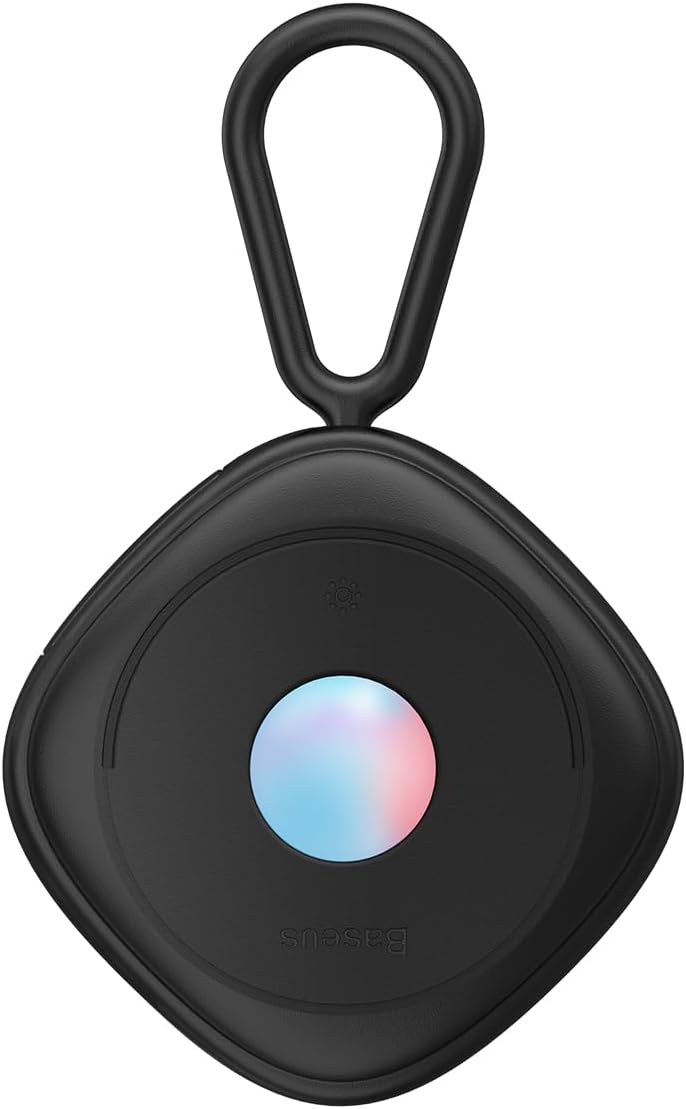
Rycina 1: Przód view of the Baseus Heyo Hidden Camera Detector.
2. Zawartość opakowania
Proszę sprawdzić zawartość opakowania po rozpakowaniu:
- 1 x Baseus Heyo Hidden Camera Detector (Black)
- 1 x Charging Cable (USB-C, typically)
- 1 x Instrukcja obsługi (ten dokument)
3. Konfiguracja
3.1 Ładowanie urządzenia
The device comes with a built-in Lithium-ion battery. Before first use, it is recommended to fully charge the detector.
- Locate the charging port on the device (usually USB-C).
- Connect the provided charging cable to the detector and a compatible USB power source (e.g., computer USB port, wall adapter).
- Kontrolka pokaże stan ładowania (np. czerwona oznacza ładowanie, zielona/wyłączona oznacza pełne naładowanie).
- Pełne naładowanie trwa zazwyczaj 1–2 godziny.

Figure 2: The detector connected to a charging cable, illustrating its long battery life.
3.2 Włączanie/wyłączanie
Press and hold the power button (refer to device diagram for location) for a few seconds to turn the device on or off.
4. Instrukcja obsługi
The Baseus Heyo Hidden Camera Detector offers two primary detection modes: Continuous Operation and Flash Mode.
4.1 Understanding Hidden Camera Detection
Hidden cameras often use lenses that reflect infrared light. The detector emits infrared light, and when you look through its special filter, these reflections appear as bright red dots, indicating a potential hidden camera.

Figure 3: Illustration of how the detector reveals hidden cameras by showing red reflections.
4.2 Tryb pracy ciągłej
This mode provides a steady infrared light emission for a thorough scan.
- Włącz urządzenie.
- Select the continuous operation mode (refer to button layout).
- Hold the detector at eye level and look through the red filter.
- Slowly scan the room, paying close attention to common hiding spots for cameras such as smoke detectors, air vents, power outlets, shower heads, books, and decorative items.
- Any hidden camera lenses will appear as bright red, reflective dots.
4.3 Flash Mode
Flash mode emits infrared light in pulses, which can make reflections more noticeable due to the blinking effect.
- Włącz urządzenie.
- Select the flash mode (refer to button layout).
- Hold the detector at eye level and look through the red filter.
- Scan the room slowly, observing for blinking red dots. This mode can be particularly effective for quickly identifying reflections.

Figure 4: The detector has a 5-meter detection radius, allowing for effective room scanning.
4.4 Effective Scanning Tips
- Scan from different angles and heights.
- Pay attention to objects that seem out of place or have small holes.
- Common hiding spots include: smoke alarms, air conditioner vents, power outlets, light fixtures, shower heads, clocks, picture frames, and soft furnishings like pillows.

Figure 5: The detector is effective against various types of hidden cameras found in common objects.
5. Konserwacja
5.1 Czyszczenie
To ensure optimal performance and longevity of your detector:
- Przetrzyj urządzenie miękką, suchą ściereczką.
- Nie należy używać środków czyszczących o właściwościach ściernych ani rozpuszczalników.
- Keep the infrared lens and viewing filter clean and free of dust or smudges.
5.2 Przechowywanie
Store the detector in a cool, dry place away from direct sunlight and extreme temperatures. Keep it away from liquids and corrosive materials.
5.3 Pielęgnacja baterii
Aby zmaksymalizować żywotność baterii:
- Unikaj częstego całkowitego rozładowywania akumulatora.
- Aby zachować sprawność baterii, ładuj urządzenie regularnie, nawet jeśli nie używasz go często.
6. Rozwiązywanie Problemów
| Problem | Możliwa przyczyna | Rozwiązanie |
|---|---|---|
| Urządzenie się nie włącza. | Niski poziom naładowania baterii. | Całkowicie naładuj urządzenie. |
| Cannot detect hidden cameras. | Incorrect usage; lens/filter dirty; camera not present. | Ensure you are looking through the red filter. Clean the lens and filter. Scan slowly and thoroughly. Try both continuous and flash modes. |
| Krótki czas pracy baterii. | Akumulator nie jest w pełni naładowany; akumulator się starzeje. | Ensure full charge before use. If battery life significantly degrades, contact customer support. |
7. Specyfikacje
| Funkcja | Szczegół |
|---|---|
| Marka | Baza |
| Nazwa modelu | Baseus Hej |
| Numer modelu przedmiotu | FMHY000001 |
| Typ źródła światła | Podczerwony |
| Moc | 1W |
| Pozycja Wymiary (dł. x szer. x wys.) | Wymiary 10 x 4 x 5 cm |
| Waga przedmiotu | 210g |
| Typ baterii | 1 bateria litowo-jonowa (w zestawie) |
| Zalecane zastosowania | Anti-spy detection |
| Kolor | Czarny |
| Zawarte komponenty | 1 x Baseus Heyo Hidden Camera Detector, Black |
8. Gwarancja i wsparcie
Aby uzyskać informacje o gwarancji i obsłudze klienta, zapoznaj się z kartą gwarancyjną dołączoną do produktu lub odwiedź oficjalną stronę internetową firmy Baseus webStrona. Zachowaj dowód zakupu na wypadek roszczeń gwarancyjnych.
Uwaga: Szczegółowe warunki gwarancji mogą się różnić w zależności od regionu.