
1. Wprowadzenie
The OWON OW18E is a high-precision 4½ digit digital multimeter designed for accurate electrical measurements. With a 20,000-count display and True RMS capability, it provides reliable readings for various waveforms. This device integrates Bluetooth 4.0 for wireless data transfer and logging, enhancing efficiency in diverse applications such as research, manufacturing, and maintenance. Its robust design, safety features, and user-friendly functions make it an essential tool for professionals and enthusiasts.
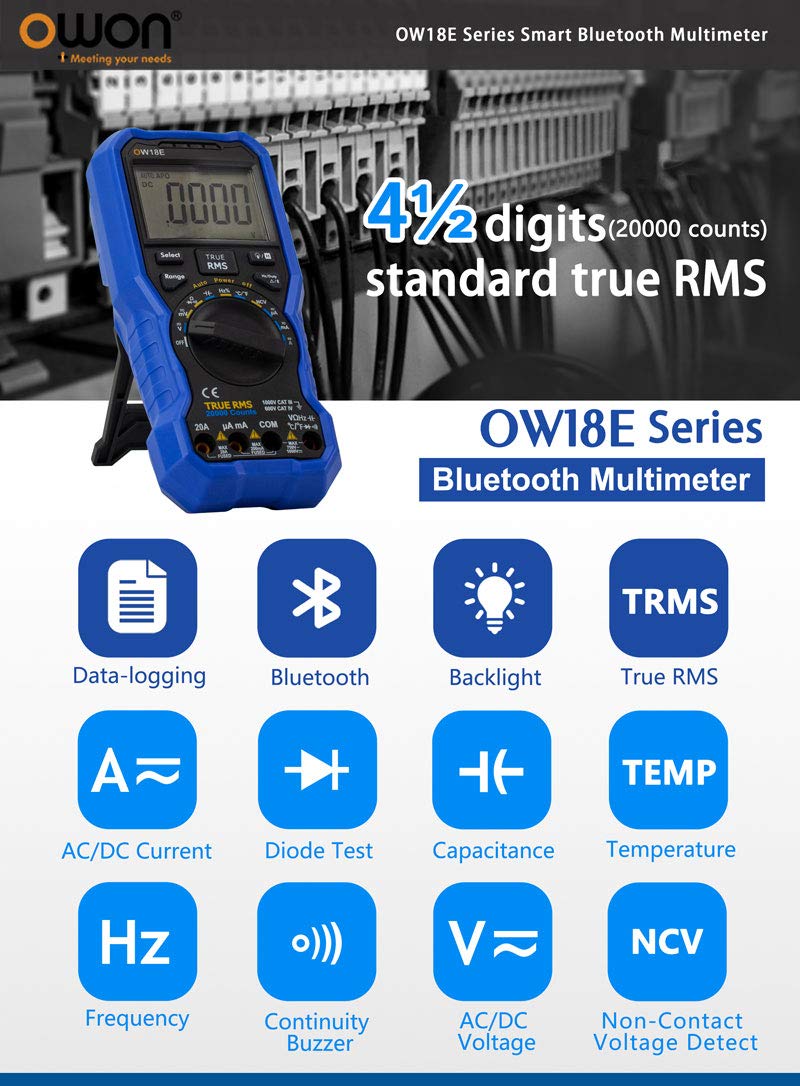
Image 1.1: OWON OW18E Multimeter highlighting its 4½ digit, 20000 counts, True RMS, Bluetooth, Data-logging, AC/DC Current, Diode Test, Capacitance, Temperature, Frequency, Continuity Buzzer, AC/DC Voltage, and Non-Contact Voltage Detect features.
2. Informacje dotyczące bezpieczeństwa
Always adhere to safety precautions when using the OWON OW18E Digital Multimeter to prevent electric shock or damage to the device. This multimeter is designed to meet safety standards, but improper use can still lead to hazards.
- Nie przekraczać maksymalnych limitów wejściowych for any measurement range.
- Ensure test leads are properly connected and in good condition before making measurements.
- Avoid touching exposed conductors or circuit components while power is applied.
- Użyj bezkontaktowego tomutage (NCV) function to detect live wires before making contact.
- Należy niezwłocznie wymienić baterie. when the low battery indicator appears to ensure accurate readings and proper operation.
- Do not operate the multimeter if it appears damaged or if the case is open.
- Refer to the complete safety guidelines in the detailed user manual available on the OWON official webstrona.
3. Koniec produktuview i komponenty
Familiarize yourself with the main components of your OWON OW18E Digital Multimeter.
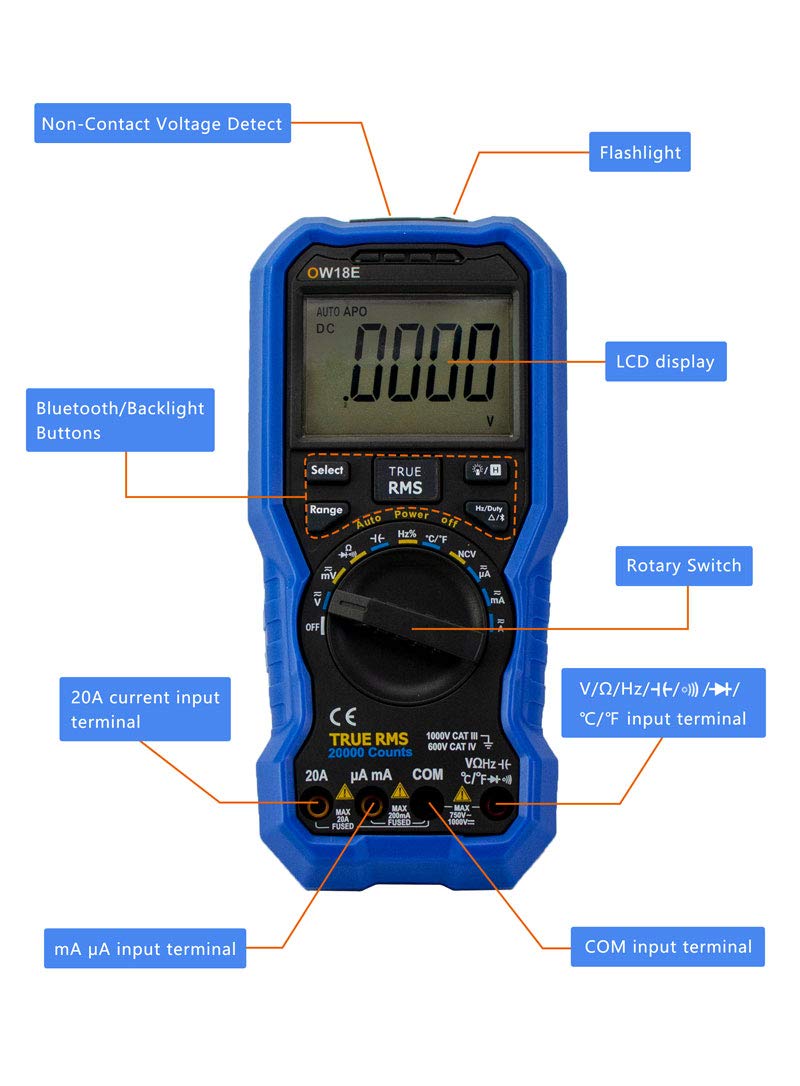
Obraz 3.1: Przód view of the OWON OW18E Multimeter, showing the LCD display, Rotary Switch, Bluetooth/Backlight Buttons, Non-Contact Voltage Detect area, Flashlight, 20A current input terminal, mA µA input terminal, V/Ω/Hz/(t)/°C input terminal, and COM input terminal.

Obraz 3.2: Tył view of the OWON OW18E Multimeter, illustrating the Insulated non-slip case, Test Lead Slot, Retractable Stand, Fuse and 1.5V battery compartment. Insets show the high definition backlit LCD, rotary switch with accurate scale, smooth and fastened sockets, Non-Contact Voltage Detect area, protective sleeve, and storage slot for test leads.
4. Konfiguracja
Before using your multimeter, ensure it is properly set up.
4.1 Instalacja baterii
- Upewnij się, że multimetr jest wyłączony.
- Locate the battery compartment on the back of the device (refer to Image 3.2).
- Użyj śrubokręta, aby otworzyć pokrywę baterii.
- Insert the required 1.5V batteries (or 9V battery if applicable, as shown in Image 8.1) according to the polarity markings.
- Dokładnie zamknij pokrywę baterii.
4.2 Podłączenie przewodu pomiarowego
- Connect the black test lead to the 'COM' input terminal.
- Connect the red test lead to the appropriate input terminal based on the measurement function:
- dla objtage, Resistance, Capacitance, Frequency, Diode, Continuity, and Temperature measurements, connect the red lead to the 'V/Ω/Hz/(t)/°C' terminal.
- For mA or µA current measurements, connect the red lead to the 'mA µA' terminal.
- For 20A current measurements, connect the red lead to the '20A' terminal.
- Sprawdź, czy wszystkie połączenia są solidne i bezpieczne.
5. Instrukcja obsługi
This section details how to perform various measurements and utilize the multimeter's functions.
5.1 Pomiary podstawowe
- Tomtage (AC/DC) Measurement:
Obróć przełącznik obrotowy na pozycję „V~” (objętość prądu przemiennego)tage) lub „V-” (tom DCtage) position. Connect the test leads in parallel to the circuit or component to be measured. The reading will appear on the LCD. - Current (AC/DC) Measurement:
Turn the rotary switch to the 'A~' (AC Current) or 'A-' (DC Current) position, selecting the appropriate range (µA, mA, or 20A). Connect the test leads in series with the circuit. - Pomiar rezystancji:
Turn the rotary switch to the 'Ω' position. Connect the test leads across the component. Ensure the circuit is de-energized before measuring resistance. - Pomiar pojemności:
Turn the rotary switch to the 'F' (Capacitance) position. Connect the test leads across the capacitor. Ensure the capacitor is discharged before measurement. - Pomiar temperatury:
Turn the rotary switch to the '°C/°F' position. Connect the K-type thermocouple (included) to the input terminals. The temperature will be displayed. - Pomiar częstotliwości (Hz):
Ustaw przełącznik obrotowy w pozycji „Hz”. Podłącz przewody pomiarowe do źródła sygnału. - Test diody:
Turn the rotary switch to the 'Diode' symbol position. Connect the red lead to the anode and the black lead to the cathode of the diode. The forward voltagZostanie wyświetlona kropla. - Test ciągłości:
Turn the rotary switch to the 'Continuity' symbol position. Connect the test leads across the circuit or component. A buzzer will sound if continuity is detected.
5.2 Funkcje specjalne
- Prawdziwa wartość skuteczna: The OW18E features True RMS measurement, providing accurate readings for both sinusoidal and non-sinusoidal AC waveforms.
- Objętość bezkontaktowatage (NCV) Wykrywanie: Activate the NCV function to detect the presence of AC voltage without direct contact. The strength indicator will illuminate, and an audible alarm will sound if voltage zostało wykryte.
- Podświetlenie: Press the backlight button to illuminate the LCD for improved visibility in low-light conditions.
- Przechowywanie danych: Naciśnij przycisk „HOLD”, aby zamrozić aktualny odczyt na wyświetlaczu. Naciśnij ponownie, aby zwolnić.
- Relative Value Measurement: This function allows you to measure the difference between a current reading and a stored reference value.
- Flesz: The built-in flashlight can be activated to illuminate the work area.
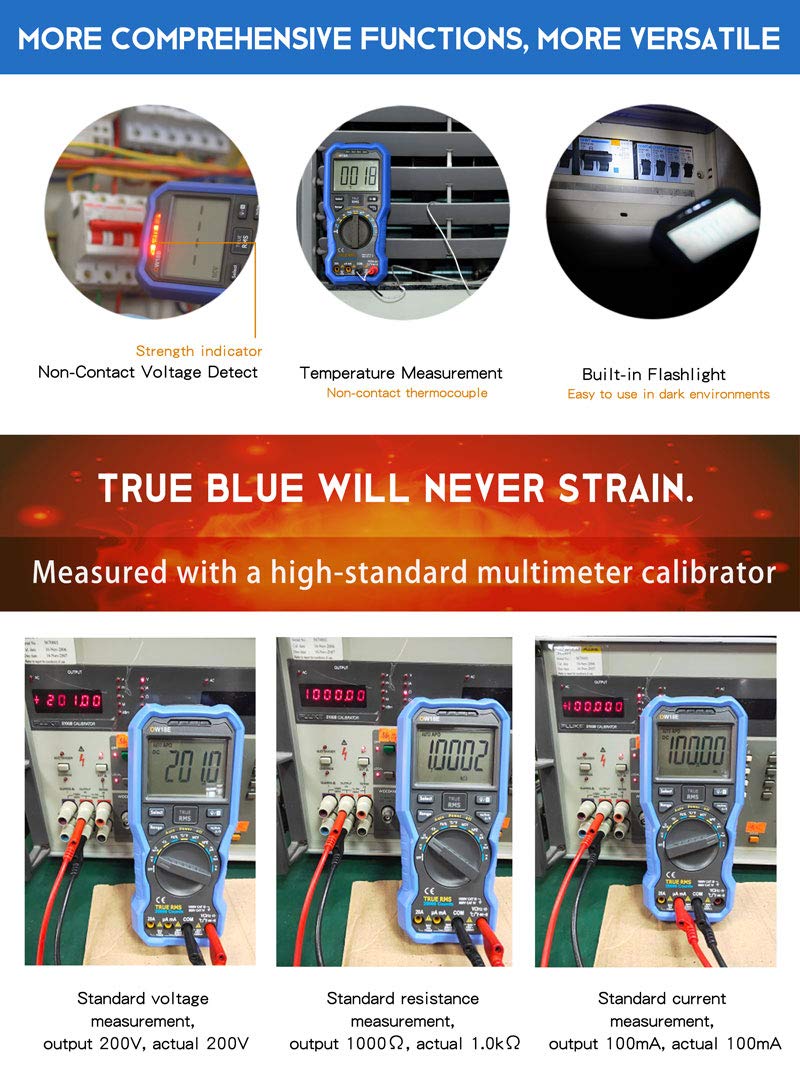
Image 5.1: The OWON OW18E demonstrating Non-Contact Voltage Detect, Temperature Measurement with non-contact thermocouple, and the built-in Flashlight. Also shown are calibration tests for standard voltagpomiary prądu, rezystancji i prądu.
5.3 Bluetooth Connectivity and Data Logging
The OW18E supports Bluetooth 4.0 for wireless communication with smartphones or PCs, enabling real-time data transfer and logging.

Image 5.2: Bluetooth function introduction, showing voice broadcast measurement support and stable Bluetooth 4.0 transmission for real-time display on mobile phones and PCs. A Bluetooth USB dongle (optional) may be required for PC connection.

Image 5.3: The OWON OW18E functioning as a data-logger, with its app interface displaying logged values in charts and tables. The record interval can be adjusted (default >0.5s). The image also illustrates simultaneous measurement of multiple data sets for analysis and comparison.
5.3.1 Offline Recording Function

Image 5.4: The app interface for the offline recording function. It shows how to set the sample interval (1 to 4,200,000 seconds) and the number of recording points (0 to 10,000 points). After recording, the data is saved in the multimeter's internal memory and can be downloaded to the mobile app for analysis. If the battery is low, the meter will shut down for data protection before the data is downloaded.
For detailed instructions on using the Bluetooth app, please refer to the App Installation Guide included with your product or download the full user manual from the OWON official webstrona: http://www.owon.com.hk/bluetooth4
6. Konserwacja
Właściwa konserwacja gwarantuje trwałość i dokładność multimetru.
- Czyszczenie: Użyj miękkiego, damp Do czyszczenia zewnętrznej części multimetru należy używać ściereczki. Nie należy używać środków czyszczących o właściwościach ściernych ani rozpuszczalników.
- Wymiana baterii: Replace batteries as soon as the low battery indicator appears to prevent inaccurate readings or device shutdown during critical measurements. Refer to Section 4.1 for battery installation.
- Wymiana bezpiecznika: If the current measurement function fails, the fuse may need replacement. Refer to the detailed manual for instructions on accessing and replacing the fuse. Always use a fuse of the specified type and rating.
- Składowanie: Jeśli multimetr nie będzie używany przez dłuższy czas, należy wyjąć baterie i przechowywać go w chłodnym, suchym miejscu, z dala od bezpośredniego światła słonecznego i ekstremalnych temperatur.
7. Rozwiązywanie Problemów
If you encounter issues with your OWON OW18E, try the following troubleshooting steps:
| Problem | Możliwa przyczyna | Rozwiązanie |
|---|---|---|
| Brak wyświetlacza lub słaby wyświetlacz | Low battery or no battery installed | Replace or install new batteries. |
| Błędne odczyty | Incorrect range selected, poor test lead connection, or damaged test leads | Ensure correct range, check test lead connections, or replace test leads. |
| Pomiar prądu nie działa | Przepalony bezpiecznik | Replace the fuse with the specified type and rating. |
| Problemy z połączeniem Bluetooth | Bluetooth not enabled, app not installed, or device out of range | Ensure Bluetooth is on, install the OWON app, and keep devices within range. For PC, ensure a Bluetooth dongle is used. |
Jeśli po wypróbowaniu tych rozwiązań problem nadal występuje, skontaktuj się z obsługą klienta OWON.
8. Specyfikacje
The OWON OW18E Digital Multimeter offers the following technical specifications:
| Funkcja | Specyfikacja |
|---|---|
| Wyświetl liczbę | 20,000 counts (4½ digits) |
| Prawdziwy RMS | Tak |
| Bluetooth | Bluetooth 4.0 |
| Rejestrowanie danych | Up to 10,000 points (offline recording) |
| AC/DC Objętośćtage | Measurement capability included |
| Prąd AC/DC | Measurement capability included (up to 20A) |
| Opór | Measurement capability included |
| Pojemność | Measurement capability included |
| Temperatura | Measurement capability included (K-type thermocouple) |
| Częstotliwość | Measurement capability included |
| Test Diody | Tak |
| Ciągły brzęczyk | Tak |
| Objętość bezkontaktowatage (NCV) | Tak |
| Podświetlenie | Tak |
| Flesz | Tak |
| Źródło zasilania | AC (implied by product description, typically battery-powered for handheld) |
| Wymiary produktu (dł. x szer. x wys.) | 196mm x 88.5mm x 56mm |
| Masa netto produktu | 0.32 kilogramów |
| Dołączone akcesoria | Multimeter leads, K-type thermocouple, screwdriver, alligator clips, instructions, app installation guide |

Image 8.1: Product contents and dimensions. Includes the OW18E multimeter, 9V battery (optional), screwdriver, K-type thermocouple, alligator clips, multimeter leads, instructions, and app installation guide. Product dimensions are 196mm x 88.5mm x 56mm, with a net weight of 0.32 kg.
9. Gwarancja i wsparcie
OWON is committed to providing high-quality products and reliable customer support.
9.1 Informacje o gwarancji
OWON products purchased through Amazon are covered by a standard warranty:
- Jednostka główna: 3-year manufacturer's warranty.
- Akcesoria: 1-year warranty for modules, probes, and batteries.
9.2 Obsługa klienta
For any inquiries, technical assistance, calibration services, repair requests, or other support needs, please contact OWON directly.
- Urzędnik Webstrona: User manuals and additional resources can be downloaded from the OWON official webstrona: owon.co.jp
- Kontakt w sprawie serwisu: For calibration, repair, or other service requests, please visit the OWON official website and use the contact form or provided contact information. When requesting repair, please provide your purchase route, purchase date, and model name.
- Bulk Purchases/Demo Units: For corporate customers interested in bulk purchases or borrowing demo units, please contact OWON via their official webstrona.