1. Wprowadzenie
The M8 Car HUD (Head-Up Display) is an advanced automotive electronic device designed to project essential driving information directly onto your car's windshield. This system utilizes the OBD2 II or EUOBD interface to display real-time data such as vehicle speed, water temperature, oil temperature, voltage, fuel consumption, RPM, mileage, driving time, and more. It enhances driving safety by allowing drivers to view critical information without diverting their eyes from the road. The M8 also includes various alarm functions for overspeed, high water temperature, low voltage, and engine faults.
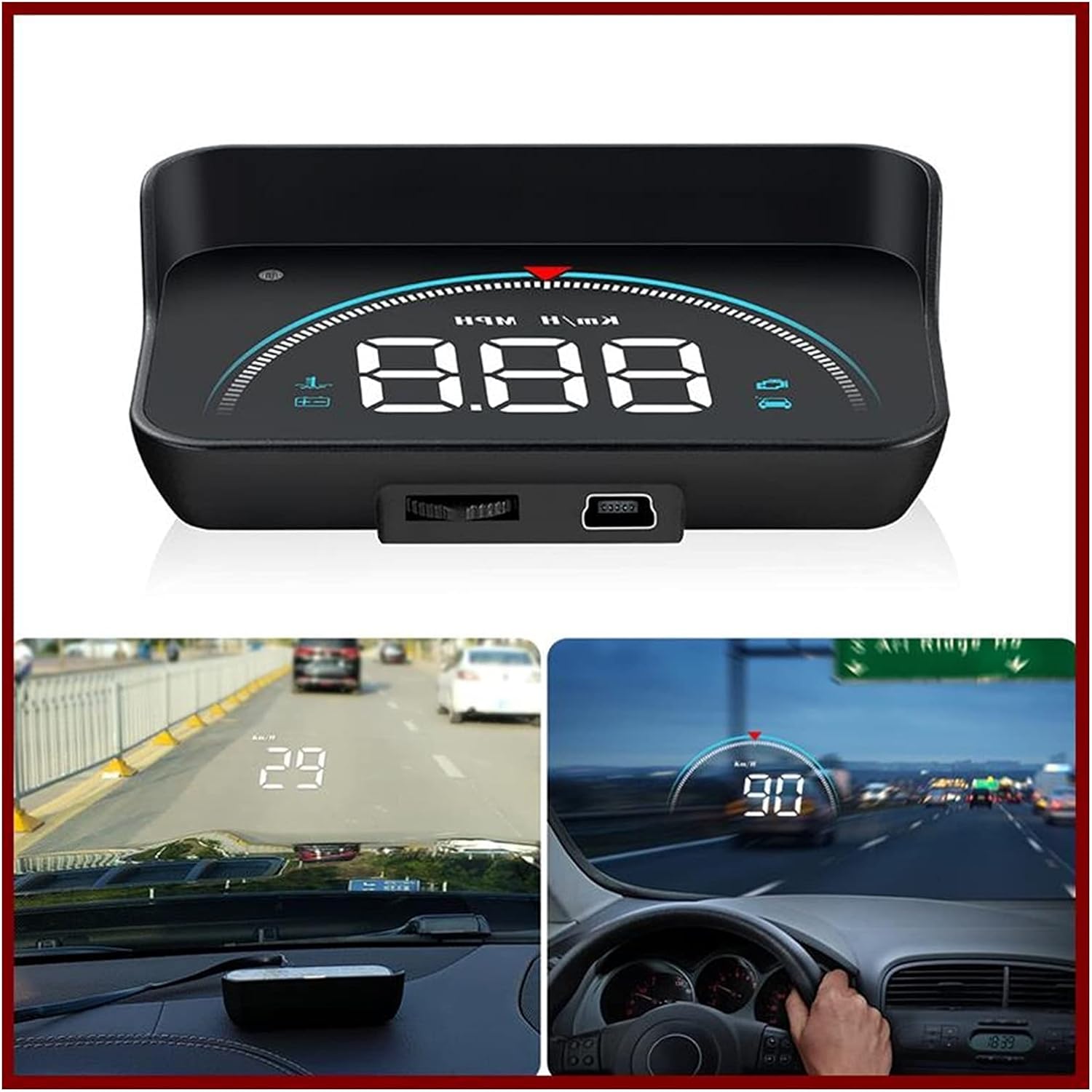
Figure 1.1: M8 Car HUD device and its projected display in a vehicle. The image shows the compact HUD unit, and two in-car views demonstrating how speed and other data are projected onto the windshield, visible to the driver.
2. Zawartość opakowania
Po otwarciu opakowania należy sprawdzić jego zawartość, aby upewnić się, że wszystkie elementy są obecne i nieuszkodzone:
- 1 x jednostka HUD M8
- 1 x OBD Cable
- 1 x folia odblaskowa
- 1 x Instrukcja obsługi
- 1 x mata antypoślizgowa

Figure 2.1: All components included in the M8 Car HUD package. This image displays the main HUD device, its connecting OBD cable, a reflective film for windshield projection, the instruction manual, and a non-slip mat to secure the device on the dashboard.
3. Funkcje
The M8 Car HUD offers a comprehensive set of features to enhance your driving experience:
- Displays real-time data from OBD2 Port: Car Speed, Water Temperature, Oil Temperature, Voltage, Fuel Consumption, RPM, Single Mileage, Total Cumulative Mileage, Driving Time, System Time, Intake Pressure, Air-Fuel Ratio, Pressure (if turbo function is present), Speed Up Test, Brake Test, Read Data Stream, Engine Faulty Number.
- Alarm functions for: Overspeed, High Water Temperature, Low Voltage, Engine Fault.
- Smart Functions: Clear fault codes, Switch between Kilometers and Miles, Switch between Celsius and Fahrenheit.
4. Konfiguracja i instalacja
Follow these steps to properly install your M8 Car HUD:
Locate the OBD Socket: Identify your vehicle's OBD2 socket, typically located under the steering wheel or near the driver's side dashboard.
Poprowadź kabel: Carefully route the OBD cable from the socket to the desired placement of the HUD unit on your dashboard. You can use a wire rod (not included, but common for cable routing) to tuck the cable into the A-column sealing strip for a neat installation.
Place the HUD Unit: Place the M8 HUD unit on the non-slip mat on your dashboard, ensuring it is in a position that does not obstruct your view of the road. Connect the OBD cable to the HUD unit.
Zastosuj folię odblaskową (opcjonalnie): For clearer projection, especially in bright conditions, apply the reflective film to the windshield directly above where the HUD unit is placed. Clean the windshield thoroughly before application.
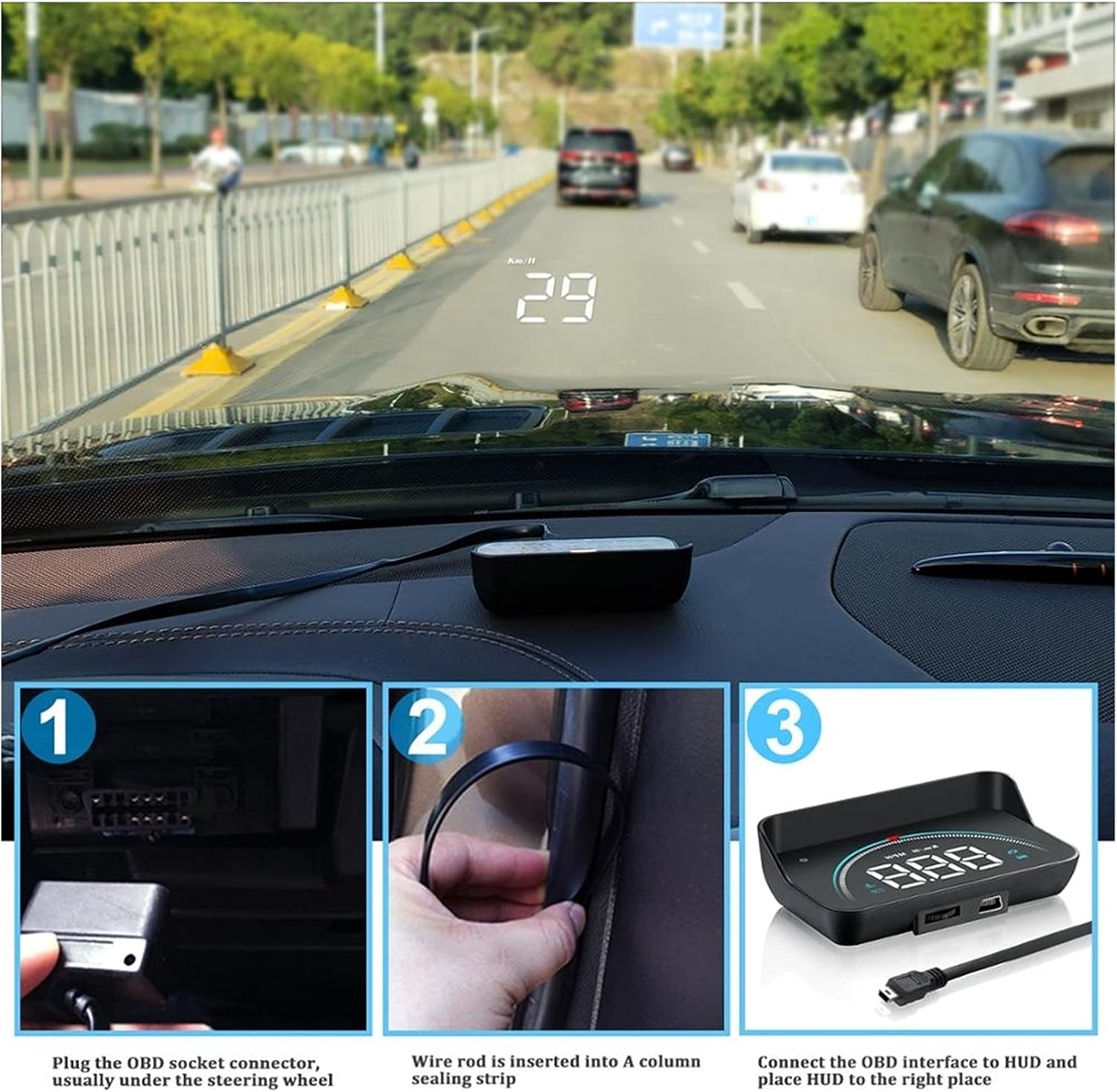
Figure 4.1: Step-by-step installation process. Image 1 shows plugging the OBD cable into the car's OBD socket. Image 2 illustrates routing the cable along the A-pillar. Image 3 depicts connecting the cable to the HUD unit and placing it on the dashboard.
5. Instrukcja obsługi
5.1 Włączanie/wyłączanie zasilania
The M8 HUD will automatically power on when the vehicle's ignition is turned on and power off when the ignition is turned off, provided it is correctly connected to the OBD2 port.
5.2 Tryby wyświetlania i dane
The M8 HUD offers various display modes and can show multiple types of driving data. Use the dial key on the device to switch between modes and adjust settings.

Rysunek 5.1: Koniecview of 16 distinct screen display modes. This graphic illustrates various combinations of speed, engine RPM, water temperature, and voltage, with some modes including decorative lighting or specific speed units, all accessible via a one-click switch.
The device supports 16 different display modes, allowing you to customize the information shown. These modes combine various data points such as speed, engine RPM, water temperature, and voltage, often with decorative lighting or specific unit displays. A single click on the dial key allows you to cycle through these modes.

Figure 5.2: Four practical driving data displays. This image showcases different display layouts: "Normal mode" with speed, RPM, and decorative lighting; "High speed mode" focusing on speed and RPM; "Mileage measurement" showing driving distance; and "Simple mode" displaying only speed.
Beyond the 16 modes, the HUD also provides four practical driving data views at a glance:
- Tryb normalny: Displays Speed, Engine RPM, and Decorative Lighting.
- Tryb dużej prędkości: Focuses on Speed and Engine RPM.
- Pomiar przebiegu: Shows driving mileage (e.g., 18.9 km from company to home).
- Prosty tryb: Displays only Speed.
5.3 funkcji alarmu
The M8 HUD is equipped with several alarm functions to alert the driver to potential issues:
- Alarm przekroczenia prędkości: Alerts when the vehicle exceeds a preset speed limit.
- Alarm wysokiej temperatury wody: Warns if the engine's water temperature becomes excessively high.
- Niska objętośćtagAlarm: Notifies the driver of low battery voltage.
- Alarm awarii silnika: Indicates an engine fault detected via the OBD system.
The alarm sound level is typically more than 30dB to ensure audibility.
5.4 Funkcje inteligentne
- Wyczyść kod błędu: Allows you to clear detected engine fault codes directly from the device.
- Przełączanie jednostek: Easily switch between Kilometers (km/h) and Miles (mph) for speed display, and between Celsius (°C) and Fahrenheit (°F) for temperature readings.
6. Rozwiązywanie Problemów
If you encounter issues with your M8 Car HUD, please refer to the following common troubleshooting steps:
- Brak wyświetlacza/zasilania:
- Ensure the OBD cable is securely connected to both the vehicle's OBD port and the HUD unit.
- Sprawdź, czy zapłon w Twoim pojeździe jest włączony.
- Check the vehicle's OBD port for power (consult your car's manual if unsure).
- Inaccurate Speed/Data:
- Ensure the correct unit (km/h or mph) is selected in the HUD settings.
- Some vehicles may require calibration. Refer to the detailed user manual (physical copy) for calibration procedures if available.
- Display Not Clear/Double Image:
- Adjust the angle of the HUD unit.
- Ensure the reflective film is properly applied to the windshield, if used. Clean the windshield thoroughly.
- Adjust the brightness setting on the HUD unit.
- HUD Does Not Turn Off:
- Ensure the vehicle's ignition is completely off and the car's electrical system has powered down. Some vehicles may keep the OBD port powered for a short period after ignition off.
- If the issue persists, disconnect the OBD cable when the vehicle is not in use to prevent battery drain.
7. Specyfikacje
| Specyfikacja | Szczegół |
|---|---|
| Model | M8hud head up display |
| Częstotliwość wyjściowa | OBD2 or EU OBD interface |
| Moc znamionowa | 12 V |
| Tworzywo | Plastik, elementy elektroniczne |
| Nazwa rozmiaru | 90*53*26cm (Note: This size seems unusually large for a HUD unit, please refer to product dimensions for accuracy if available.) |
| Poziom dźwięku alarmu | Ponad 30dB |
| Certyfikacja testów zewnętrznych | Rohs, CE, FCC |
| Język | angielski |
| Waga przedmiotu | 2.2 funta |
| Producent | Lifyn2 |
| Kraj pochodzenia | Chiny |
| Poziom hałasu | 30dB |
| Czy pilot zdalnego sterowania jest w zestawie? | NIE |
8. Important Notes and Compatibility
Uwaga: The OBD2 HUD is only suitable for cars that comply with the OBD II protocol. All Italian and some Japanese cars are not available. Please select the GPS model if your car is not OBD II compatible. OBDII models in Europe and the United States must be produced after 2004. Asian car brands OBDII models can be used after 2008.
9. Konserwacja
To ensure the longevity and optimal performance of your M8 Car HUD, follow these maintenance guidelines:
- Czyszczenie: Use a soft, dry cloth to clean the display screen and the unit's exterior. Avoid using abrasive cleaners or solvents, which can damage the surface.
- Składowanie: If the device will not be used for an extended period, disconnect it from the OBD port and store it in a cool, dry place away from direct sunlight and extreme temperatures.
- Pielęgnacja kabli: Do not bend or crimp the OBD cable excessively. Ensure it is not pinched by car doors or other components.
- Temperatura: Avoid exposing the device to extreme heat or cold, as this can affect its electronic components.
10. Gwarancja i wsparcie
For warranty information and technical support, please refer to the specific warranty card included with your product or contact the seller/manufacturer directly. Keep your purchase receipt as proof of purchase for any warranty claims.