
1. Wprowadzenie
Dziękujemy za zakupasing the Mediacom MCI SK22 Bluetooth Karaoke Speaker. This portable and rechargeable speaker system is designed to provide high-quality audio for music playback and karaoke performances. It comes equipped with two professional wireless microphones, offering a versatile entertainment experience for various occasions.
2. Informacje dotyczące bezpieczeństwa
- Przeczytaj uważnie wszystkie instrukcje przed użyciem produktu.
- Trzymaj głośnik z dala od wody, wilgoci i ekstremalnych temperatur.
- Nie próbuj samodzielnie demontować ani naprawiać urządzenia. Wszelkie prace serwisowe zleć wykwalifikowanemu personelowi.
- Do ładowania należy używać wyłącznie dołączonego zasilacza.
- Unikaj umieszczania ciężkich przedmiotów na głośniku.
- Podczas użytkowania głośnika należy zapewnić mu odpowiednią wentylację.
3. Zawartość opakowania
Proszę zaznaczyć pole dotyczące następujących elementów:
- Mediacom MCI SK22 Bluetooth Karaoke Speaker
- 2 x mikrofony bezprzewodowe
- Zdalne sterowanie
- Zasilacz
- Instrukcja obsługi
4. Koniec produktuview
Familiarize yourself with the various parts and controls of your MCI SK22 speaker.
4.1 Przód View z mikrofonami

Obraz: Przód view of the Mediacom MCI SK22 speaker, showcasing the main unit and the two accompanying wireless microphones.
4.2 Bok View

Obraz: Bok view of the Mediacom MCI SK22 speaker, highlighting its compact and portable design.
4.3 Tył View z portami

Obraz: Tył view of the Mediacom MCI SK22 speaker, displaying the various input and output ports for connectivity.
4.4 Speaker Dimensions
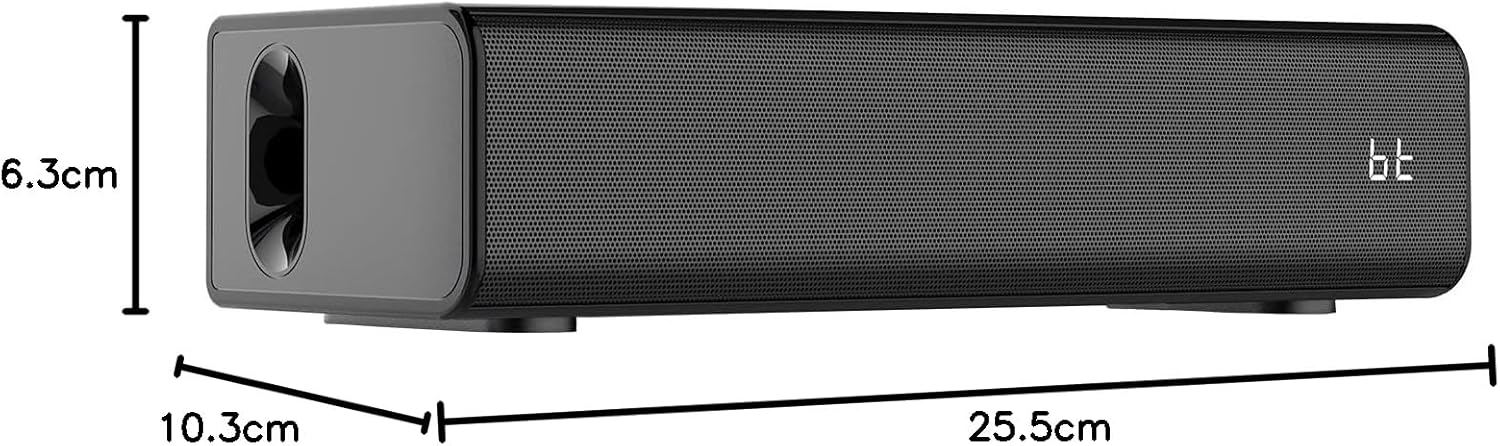
Image: A diagram illustrating the length, width, and height of the Mediacom MCI SK22 speaker.
5. Konfiguracja
5.1 Ładowanie głośnika
- Podłącz dołączony zasilacz do portu ładowania głośnika.
- Podłącz zasilacz do odpowiedniego gniazdka elektrycznego.
- The charging indicator light will illuminate. Allow the speaker to fully charge before first use (approximately X hours, refer to LED indicator for full charge).
5.2 Włączanie/wyłączanie
- To power on, press and hold the Power button on the speaker or remote control until the display illuminates.
- Aby wyłączyć urządzenie, naciśnij i przytrzymaj przycisk zasilania ponownie.
5.3 Konfiguracja mikrofonu
- Ensure the wireless microphones have fresh batteries installed.
- Turn on the microphones using their respective power switches. They should automatically connect to the speaker.
6. Instrukcja obsługi
6.1 parowanie Bluetooth
- Turn on the speaker. The Bluetooth indicator will flash, indicating it is in pairing mode.
- Włącz Bluetooth na swoim urządzeniu (smartfonie, tablecie itp.) i wyszukaj dostępne urządzenia.
- Select "MCI SK22" from the list. Once paired, the Bluetooth indicator will stop flashing and remain solid.
6.2 Odtwarzanie USB
- Włóż dysk flash USB zawierający dźwięk w formacie MP3 filedo portu USB w głośniku.
- The speaker will automatically switch to USB mode and begin playing music. Use the speaker's or remote's controls to navigate tracks.
6.3 Wejście AUX
- Connect an external audio device (e.g., TV, computer, music player) to the speaker's AUX input port using a 3.5mm audio cable (not included).
- The speaker will automatically switch to AUX mode. Adjust volume from both the speaker and the connected device.
6.4 Microphone Usage and Echo Effects
- Once connected, speak or sing into the wireless microphones.
- Use the dedicated controls on the speaker or remote to adjust microphone volume and apply echo effects for an enhanced karaoke experience.
6.5 Regulacja głośności
- Adjust the main speaker volume using the volume controls on the speaker or the remote control.
- Individual microphone volume can be adjusted separately.
7. Konserwacja
- Czyszczenie: Do czyszczenia powierzchni głośnika należy używać miękkiej, suchej ściereczki. Nie należy używać środków czyszczących ani rozpuszczalników o działaniu ściernym.
- Składowanie: Jeśli głośnik nie będzie używany przez dłuższy czas, należy przechowywać go w chłodnym i suchym miejscu, z dala od bezpośredniego światła słonecznego i ekstremalnych temperatur.
- Pielęgnacja baterii: To prolong battery life, fully charge the speaker before storing it for long periods and recharge it every few months.
8. Rozwiązywanie Problemów
| Problem | Możliwa przyczyna | Rozwiązanie |
|---|---|---|
| Brak zasilania | Battery is low or depleted. Power adapter not connected. | Charge the speaker using the provided power adapter. Ensure the power adapter is securely connected to both the speaker and the power outlet. |
| Brak dźwięku | Głośność jest zbyt niska. Wybrano niewłaściwy tryb wprowadzania. Urządzenie nie jest prawidłowo podłączone. | Increase the volume on the speaker and the connected device. Ensure the correct input mode (Bluetooth, USB, AUX) is selected. Check all cable connections. |
| Bluetooth nie łączy się | Głośnik nie jest w trybie parowania. Bluetooth urządzenia jest wyłączony. Zakłócenia. | Ensure the speaker's Bluetooth indicator is flashing. Turn off and on your device's Bluetooth. Move closer to the speaker and away from other wireless devices. |
| Mikrofony nie działają | Microphone batteries are low. Microphones are not turned on. | Wymień baterie w mikrofonie. Upewnij się, że mikrofony są włączone. |
9. Specyfikacje
| Funkcja | Szczegół |
|---|---|
| Marka | Mediacom |
| Numer modelu | MCI SK22 |
| Technologia łączności | Bluetooth, AUX, USB |
| Wejście audio | Bluetooth, AUX, USB |
| Cechy specjalne | Bass boost, USB port, Built-in microphone, Hi-Res Audio, Echo effects |
| Kompatybilne urządzenia | Mobile Phone, iPhone, Laptop, Smartphone, TV, Computer, Tablet, Music Player, DVD Player |
| Źródło zasilania | Zasilany bateryjnie |
| Tworzywo | Plastikowy |
| Kolor | Czarny |
| Pozycja Wymiary (dł. x szer. x wys.) | Wymiary 10.3 x 25.5 x 6.3 cm |
| Waga przedmiotu | 1.68 kilograma |
| Producent | Chiny |
10. Gwarancja i wsparcie
Mediacom products are designed for reliability and performance. For warranty information and technical support, please refer to the warranty card included in your package or visit the official Mediacom webZachowaj paragon jako dowód zakupu na wypadek ewentualnych roszczeń gwarancyjnych.