
Wstęp
Dziękujemy za zakupasing the RCA 32V-type FHD Tunerless Smart TV, model RCA-32D1. This television is designed for seamless access to online streaming content without the need for traditional terrestrial broadcast tuners. It features a Full HD display, built-in Wi-Fi, Chromecast functionality, and voice control for an enhanced viewing experience. This manual provides essential information for setting up, operating, maintaining, and troubleshooting your new TV.

Rycina 1: Przód view of the RCA 32V-type FHD Tunerless Smart TV.
Informacje dotyczące bezpieczeństwa
Przed użyciem produktu należy uważnie przeczytać wszystkie instrukcje bezpieczeństwa. Zachowaj tę instrukcję do wykorzystania w przyszłości.
- Aby uniknąć pożaru lub porażenia prądem, nie wystawiaj telewizora na działanie deszczu i wilgoci.
- Zapewnij odpowiednią wentylację. Nie blokuj otworów wentylacyjnych.
- Używaj wyłącznie przewodu zasilającego dołączonego do telewizora.
- Nie otwieraj telewizoraasing. Wszelkie prace serwisowe powierzaj wykwalifikowanemu personelowi.
- Trzymaj baterie poza zasięgiem dzieci. Zużyte baterie utylizuj w sposób odpowiedzialny.
- Unikaj ustawiania telewizora na niestabilnych powierzchniach.
Zawartość opakowania
Sprawdź, czy w opakowaniu znajdują się wszystkie elementy:
- RCA 32V-type FHD Tunerless Smart TV Unit
- Zdalne sterowanie
- Baterie AAA (x2)
- Stojak pod telewizor (podstawa i śruby)
- Kabel zasilający
- Instrukcja obsługi (ten dokument)
Organizować coś
1. Konfiguracja fizyczna
Attach the TV stand or mount the TV to a wall. For wall mounting, ensure you use a VESA-compatible bracket (40 x 40mm) and appropriate screws (M6 10mm x 2 for upper two points, screws for lower two points are included with the TV). Always ensure the TV is securely mounted to prevent accidents.

Figure 2: TV dimensions and connection terminal layout.
2. Połączenia
Connect the power cable to the TV and then to a power outlet. This TV requires only a power connection and Wi-Fi for internet streaming.

Figure 3: Power and Wi-Fi connectivity for the tunerless TV.
W przypadku urządzeń zewnętrznych należy korzystać z dostępnych portów:
- Porty HDMI (x3): Connect game consoles, Blu-ray players, or other HDMI-compatible devices.
- Porty USB 2.0 (x2): Podłącz urządzenia pamięci masowej USB w celu odtwarzania multimediów.
- Port LAN: For wired internet connection (optional, Wi-Fi is also available).
- Wyjście audio: Do podłączania zewnętrznych systemów audio.

Figure 4: Connecting external devices via HDMI ports.
3. Pierwsze włączenie zasilania
After connecting the power, press the power button on the remote control. Follow the on-screen instructions to complete the initial setup, including connecting to your Wi-Fi network and logging into your Google account to access smart TV features.
Operacyjny
1. Pilot zdalnego sterowania
The included remote control allows for easy navigation and features voice control capabilities. Dedicated buttons provide quick access to popular streaming services.
- Sterowanie głosowe: Press the voice assistant button and speak commands like "Play cat videos on YouTube" or "Increase volume."
- Dedykowane przyciski aplikacji: Quickly launch NETFLIX, YouTube, and Prime Video with a single press.
- Nawigacja: Use the directional pad and OK button to navigate menus and select options.
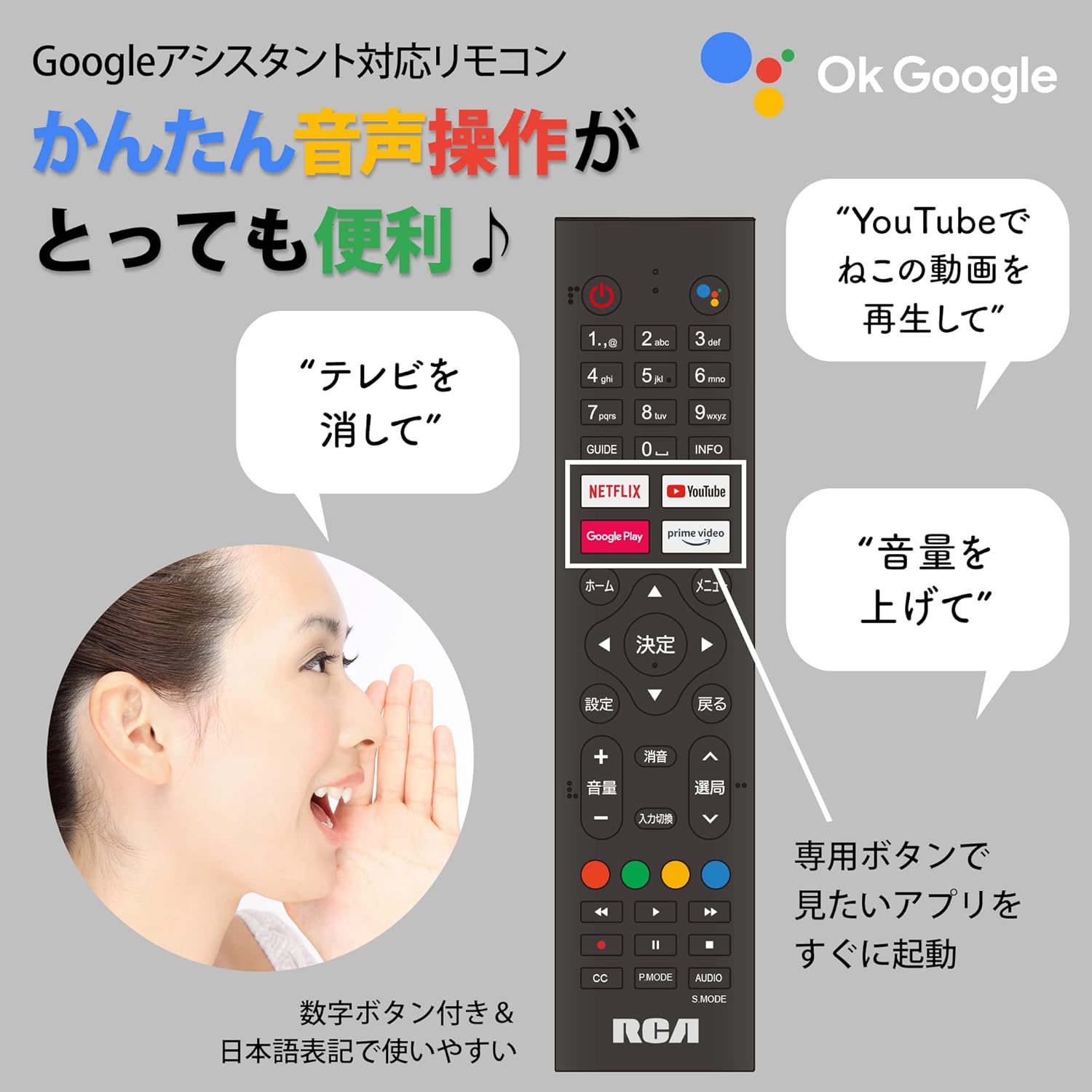
Figure 5: Remote control with voice command functionality and dedicated app buttons.
2. Funkcje Smart TV
This tunerless TV provides access to a wide range of online video distribution services and features:
- Usługi przesyłania strumieniowego: Enjoy content from NETFLIX, YouTube, Prime Video, Tver, U-NEXT, AbemaTV, and more.
- Wbudowany Chromecast: Cast content directly from your smartphone or tablet to the TV screen.
- System operacyjny Android: Access a variety of apps from the Google Play Store.

Figure 6: Using Chromecast to cast content from a smartphone to the TV.
Video 1: Demonstration of the Google TV interface and voice control for content discovery.
3. Podstawowe operacje
- Włączanie/wyłączanie: Naciśnij przycisk zasilania na pilocie.
- Regulacja głośności: Użyj przycisków zwiększania/zmniejszania głośności na pilocie.
- Wybór wejścia: Press the Input button to switch between HDMI and other connected sources.
Konserwacja
1. Czyszczenie
Aby wyczyścić ekran telewizora, delikatnie przetrzyj go miękką, niepozostawiającą włókien ściereczką. W przypadku uporczywych zabrudzeń delikatnie przetrzyj.ampen the cloth with water or a screen-cleaning solution. Do not spray liquid directly onto the screen. Clean the TV casinmiękką, suchą szmatką.
2. Przechowywanie
If storing the TV for an extended period, disconnect it from the power outlet and store it in a cool, dry place away from direct sunlight and extreme temperatures.
Rozwiązywanie problemów
Jeśli masz problemy z telewizorem, zapoznaj się z poniższymi typowymi problemami i ich rozwiązaniami:
| Problem | Rozwiązanie |
|---|---|
| Brak zasilania | Upewnij się, że kabel zasilający jest prawidłowo podłączony zarówno do telewizora, jak i do gniazdka elektrycznego. Spróbuj użyć innego gniazdka. |
| No picture/Sound but no picture | Sprawdź źródło sygnału wejściowego. Upewnij się, że urządzenia zewnętrzne są włączone i prawidłowo podłączone. |
| Pilot nie działa | Wymień baterie. Upewnij się, że między pilotem a czujnikiem podczerwieni telewizora nie ma żadnych przeszkód. |
| Nie można połączyć się z siecią Wi-Fi | Check your router and internet connection. Re-enter the Wi-Fi password. Move the TV closer to the router. |
| App is slow or freezes | Restart the TV. Clear the app's cache in the TV settings. Ensure your internet connection is stable. |
Jeśli problem będzie się powtarzał, skontaktuj się z obsługą klienta.
Specyfikacje
The following are the technical specifications for the RCA-32D1 Tunerless Smart TV:
| Funkcja | Szczegół |
|---|---|
| Numer modelu | RCA-32D1 |
| Rozmiar ekranu | 31.5 inches (32V-type) |
| Technologia wyświetlania | LCD, VA Panel, LED Backlight |
| Rezolucja | Pełna rozdzielczość HD (1920x1080) |
| Częstotliwość odświeżania | 60 Hz |
| Współczynnik kontrastu | 3000:1 |
| System operacyjny | Android |
| Łączność | Wi-Fi, HDMI (x3), USB 2.0 (x2), LAN, Audio Output |
| Cechy specjalne | Chromecast Built-in, Voice Control |
| Obsługiwane usługi przesyłania strumieniowego | Netflix, YouTube, Prime Video, Tver, U-NEXT, AbemaTV |
| Wymiary produktu (Gł. x Szer. x Wys.) | Wymiary 16.1 x 73.1 x 47 cm |
| Waga przedmiotu | 4.9 kilogramów |
| Standard mocowania VESA | 40 x 40mm |
| Dołączone baterie | 2 baterie AAA |

Figure 7: High-definition VA panel for vivid image quality.
Gwarancja i wsparcie
This product is covered by the manufacturer's warranty. Please refer to the warranty card included in your package for specific terms and conditions.
Obsługa klienta
For technical assistance or inquiries, please contact the KEIYO Support Center:
- Telefon: 050-8880-2812
- Godziny pracy recepcji: Weekdays 10:00-12:00, 13:00-17:00 (Excluding summer holidays, year-end/New Year holidays, Golden Week, and public holidays).