
Produkt ponadview
The MARVO 2.4G Ergonomic Wireless Keyboard and Silent Mouse Combo provides a reliable and comfortable input solution for your computer and smart devices. Featuring a full-size keyboard with a built-in phone/tablet holder and a silent 6-button mouse with adjustable DPI, this combo is designed for efficiency and quiet operation.

Image: MARVO 2.4G Ergonomic Wireless Keyboard and Silent Mouse Combo.
Instrukcje konfiguracji
1. Instalacja baterii
The keyboard and mouse require batteries (not included). Each device typically uses one AA battery. Locate the battery compartments on the underside of both the keyboard and the mouse. Insert the batteries, ensuring correct polarity.

Image: Underside of the wireless mouse, illustrating the battery slot and the storage for the USB receiver.
2. Podłączenie odbiornika USB
The combo uses a single 2-in-1 USB Nano Receiver for both the keyboard and mouse. The receiver is typically stored within the mouse's battery compartment for convenience. Remove the receiver and plug it into an available USB port on your computer.
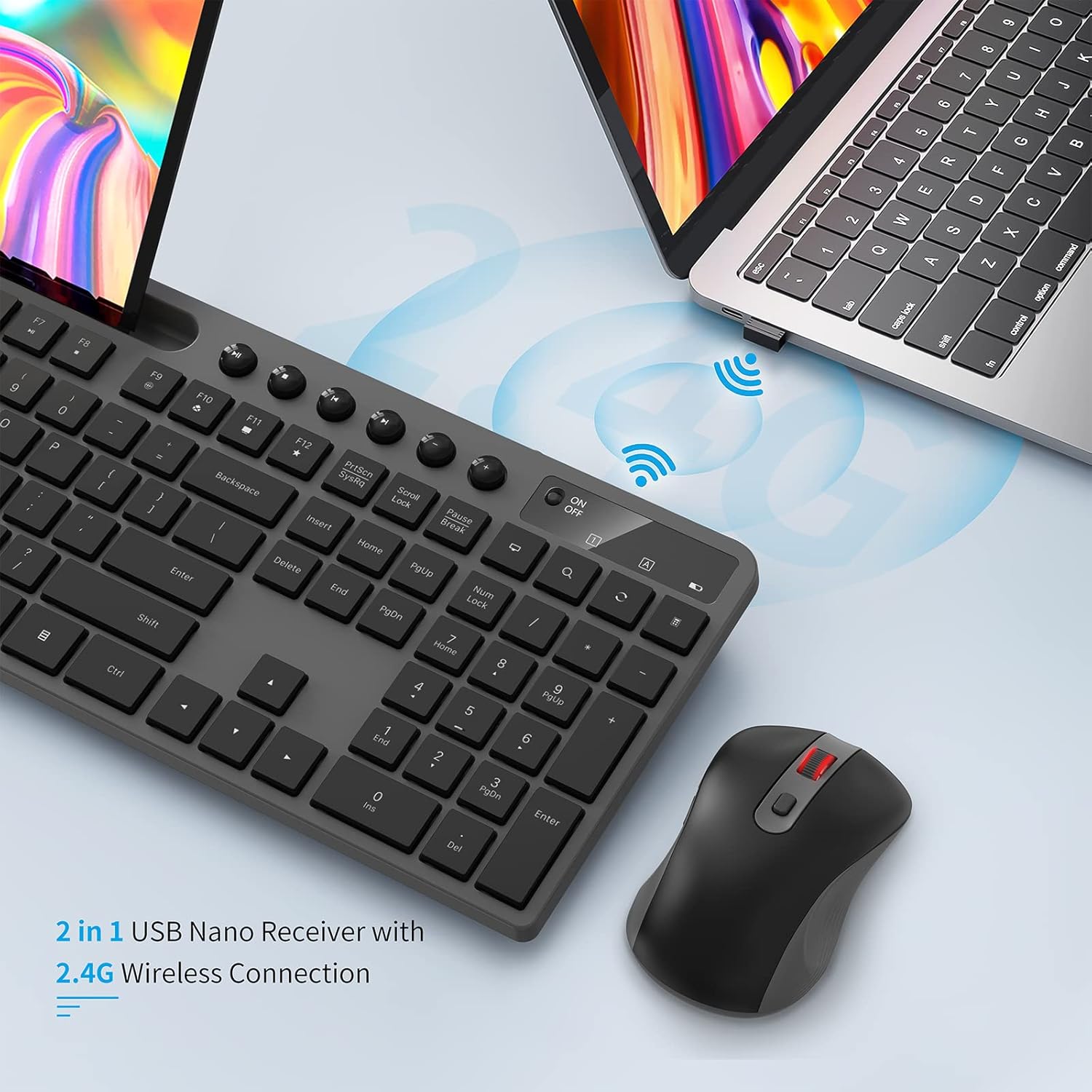
Image: The 2-in-1 USB Nano Receiver connected to a laptop, enabling wireless communication for the keyboard and mouse.
3. Włącz zasilanie
Turn on both the keyboard and the mouse using their respective On/Off switches. The keyboard's power light will blink for 5-8 seconds and then turn off, indicating a normal connection. If the red power light blinks when you press any key, it indicates a low battery state.
4. Zgodność systemu
The MARVO Wireless Keyboard and Mouse Combo is compatible with Windows XP, Vista, 7, 8, 10, and macOS operating systems. No additional drivers are typically required for basic functionality.
Instrukcja obsługi
Funkcje klawiatury
- Układ QWERTY: Standard keyboard layout for familiar typing.
- Klucze multimedialne: Dedicated keys for media control (play, pause, volume, etc.) located above the function keys.
- Zintegrowany uchwyt na telefon/tablet: A 9.84-inch slot is built into the keyboard to securely hold your smartphone or tablet, providing convenient access to your second screen.
- Ergonomiczna konstrukcja: Designed for comfortable typing during extended use.
- Regulowane nóżki z możliwością pochylenia: The keyboard features foldable legs on the underside, allowing you to adjust the typing angle for personalized comfort.

Image: The MARVO wireless keyboard featuring its integrated phone and tablet holder, showcasing a phone and tablet in use.
Funkcje myszy
- Ciche kliknięcia: Designed for quiet operation, minimizing click noise.
- 6 Przyciski: Includes standard left/right click, scroll wheel, DPI switch, and two side buttons (often for page up/down or forward/back).
- Regulowane DPI: Cycle through 800, 1200, and 1600 DPI settings using the dedicated DPI switch button to adjust cursor sensitivity.
- Kółko przewijania: For smooth navigation through documents and web stron.
- Przełącznik włączania/wyłączania: Located on the underside of the mouse to conserve battery life when not in use.
Konserwacja
- Wymiana baterii: Replace batteries when the low battery indicator appears or performance degrades. Ensure to use the correct battery type (AA).
- Czyszczenie: Do czyszczenia powierzchni klawiatury i myszy używaj miękkiej, suchej ściereczki. W przypadku uporczywych zabrudzeń, delikatnie przetrzyj powierzchnię.amp Można użyć ściereczki, aby mieć pewność, że do wnętrza podzespołów nie dostanie się wilgoć.
- Miejsce do przechowywania odbiornika USB: When transporting the mouse, store the USB receiver in its dedicated slot within the mouse's battery compartment to prevent loss.
Rozwiązywanie problemów
- Brak połączenia: Ensure both devices are powered on and the USB receiver is securely plugged into a working USB port. Try plugging the receiver into a different USB port.
- Mysz nie odpowiada: Check the mouse battery. If the mouse is unresponsive, try re-pairing it by pressing the ESC key on the keyboard and holding the right wheel and right button down simultaneously on the mouse.
- Keyboard Keys Not Working: Check the keyboard battery. Ensure the keyboard is powered on.
- Łączność przerywana: Ensure there are no obstructions between the devices and the USB receiver. Move the receiver closer to the keyboard and mouse if possible.
- Keyboard Wobbles: If the keyboard does not sit level, check the adjustable tilt legs on the underside. Gently adjust or apply slight pressure to the corners to correct any unevenness.
Specyfikacje
| Marka | MARVO |
| Model | KC-411W |
| Łączność | Częstotliwość radiowa 2.4G |
| Kompatybilne urządzenia | Komputer osobisty, smartfon |
| System operacyjny | Windows XP / Vista / 7 / 8 / 10, macOS |
| Układ klawiatury | QWERTY (92 keys) |
| DPI myszy | 800/1200/1600 DPI Adjustable |
| Przyciski myszy | 6 |
| Źródło zasilania | Battery Powered (1 AA per device, not included) |
| Waga przedmiotu | 0.75 kilograma |
| Zasięg bezprzewodowej | Do 33 stóp |
| Uchwyt na telefon / tablet | 9.84 cali |

Image: Detailed dimensions of the MARVO wireless keyboard and mouse for reference.
Gwarancja i wsparcie
MARVO provides a 12-month worry-free warranty for this product, ensuring peace of mind. Our friendly customer service team is available to assist with any questions or issues you may encounter.
For support, please visit the official MARVO website or contact our customer service department directly. Please have your model number (KC-411W) and purchase information ready when contacting support.


