
1. Wprowadzenie
The LocknCharge Carrier 40 Cart is designed for efficient charging, secure storage, and safe transportation of up to 40 mobile devices. This cart comes prewired with 45-watt USB-C cables, simplifying device deployment and management. Its robust construction and thoughtful design, including LocknCharge Baskets and a soft-closing lid, make it an ideal solution for educational and professional environments.
2. Informacje dotyczące bezpieczeństwa
Please read and understand all safety instructions before operating the Carrier 40 Cart. Failure to follow these instructions may result in injury or damage to the product.
- Ensure the cart is placed on a level, stable surface.
- Do not overload the cart beyond its specified capacity.
- Aby zapobiec przegrzaniu, utrzymuj wszystkie otwory wentylacyjne drożne.
- Only connect the cart to a grounded power outlet.
- Do not attempt to service the cart yourself. Refer all servicing to qualified personnel.
- Keep children away from the cart during operation and movement.
- Always engage the wheel brakes when the cart is stationary.
3. Konfiguracja
3.1 Rozpakowanie i kontrola
Carefully remove the Carrier 40 Cart from its packaging. Inspect the cart for any signs of damage that may have occurred during shipping. Report any damage to your supplier immediately.
3.2 Montaż kółek
The cart typically ships with casters unattached. Attach the four heavy-duty casters to the base of the cart using the provided hardware. Ensure all bolts are securely tightened. Two of the casters are usually locking casters and should be installed on the same side for easier access.

Obraz 3.2.1: The LocknCharge Carrier 40 Cart shown with devices in baskets and the lid partially open, illustrating its general appearance and functionality. This image provides an overview of the cart's design and how devices are stored.
3.3 Połączenie zasilania
Locate the main power inlet on the side or rear of the cart. Connect the provided power cord to the cart and then to a grounded electrical outlet. Ensure the power switch is in the OFF position before connecting to power.
3.4 Cable Management and Device Placement
The Carrier 40 Cart comes prewired with 45-watt USB-C cables. These cables are neatly routed and secured within the cart's cable management system. The cart includes LocknCharge Baskets designed to hold devices. Each basket can typically hold 5-6 devices, allowing for organized storage and quick deployment.

Obraz 3.4.1: Szczegółowy view of USB-C cables connected to multiple devices stored within the cart. This image highlights the prewired cable setup and how devices are connected for charging.

Obraz 3.4.2: A close-up showing the organized routing of USB-C cables within the cart, demonstrating the integrated cable management solution.

Obraz 3.4.3: Inny view of devices being charged inside the cart, emphasizing the ease of connecting and storing multiple devices simultaneously.
To place devices: Open the cart lid. Remove the LocknCharge Baskets. Place devices into the baskets, ensuring they fit securely. Connect the prewired USB-C cables to each device. Return the baskets with devices to their designated slots within the cart.
4. Instrukcja obsługi
4.1 Urządzenia ładujące
After devices are placed and connected, turn on the main power switch on the cart. The cart's charging system will automatically begin charging the connected devices. Charging status indicators (if present) will illuminate to show the charging progress.
4.2 Securing the Cart
The Carrier 40 Cart includes a high-quality combination padlock for securing the cart's contents. After all devices are stored and the lid is closed, use the padlock to secure the lid. Ensure the lid is fully closed and the padlock is correctly engaged to prevent unauthorized access.

Obraz 4.2.1: Zbliżenie view of the combination padlock attached to the cart, demonstrating the security feature for stored devices.
4.3 Transporting the Cart
To move the cart, ensure the lid is securely locked and all devices are properly seated in their baskets. Release the brakes on the locking casters. Use the integrated handles to push or pull the cart to its desired location. Always engage the caster brakes once the cart is stationary.

Obraz 4.3.1: The LocknCharge Carrier 40 Cart with its side shelves extended, illustrating its potential as a mobile workstation or presentation cart. This view also shows the casters for mobility.

Obraz 4.3.2: The cart with its lid open, revealing the internal structure and device baskets, ready for devices to be inserted or removed.
4.4 Using the Work Surface
The soft-closing top lid of the Carrier 40 Cart can double as a work surface when closed. Ensure no heavy objects are placed on the lid that could exceed its weight capacity or obstruct its opening mechanism.
5. Konserwacja
5.1 Czyszczenie
Clean the exterior surfaces of the cart with a soft, damp cloth. Avoid using abrasive cleaners or solvents that could damage the finish. Ensure the cart is unplugged from the power source before cleaning.
5.2 Cable Inspection
Periodically inspect all USB-C cables for signs of wear, fraying, or damage. Replace any damaged cables immediately to ensure safe and efficient charging. Only use LocknCharge approved replacement cables.
5.3 Kontrola kółek
Regularly check the casters for smooth operation and ensure the brakes are functioning correctly. Clean any debris from the wheels to maintain mobility.
6. Rozwiązywanie Problemów
6.1 Urządzenia nie ładują się
- Sprawdź połączenie zasilania: Ensure the cart is securely plugged into a live, grounded power outlet and the main power switch is ON.
- Sprawdź połączenia kablowe: Confirm that each USB-C cable is firmly connected to both the cart's internal port and the device.
- Sprawdź kable: Check for any visible damage to the USB-C cables. Replace if necessary.
- Zgodność urządzenia: Ensure the devices are compatible with USB-C charging and the 45-watt output.
6.2 Cart Difficult to Move
- Release Brakes: Upewnij się, że wszystkie hamulce kółek są zwolnione.
- Sprawdź kółka: Inspect casters for debris (e.g., hair, lint) that might be obstructing movement. Clean if necessary.
- Typ powierzchni: The cart is designed for smooth, hard surfaces. Movement on carpet or uneven terrain may be more difficult.
6.3 Lid Not Securing Properly
- Usuń przeszkody: Ensure no devices or cables are preventing the lid from closing completely.
- Padlock Alignment: Verify the combination padlock is correctly aligned and engaged with the locking mechanism.
7. Specyfikacje
| Funkcja | Szczegół |
|---|---|
| Wymiary produktu | 33.6 x 26.3 x 36.6 cali (dł. x szer. x wys.) |
| Waga przedmiotu | 222 funta |
| Pojemność urządzenia | Do 40 urządzeń |
| Typ ładowania | USB-C, 45-watt per port (prewired) |
| Bezpieczeństwo | Combination padlock included |
| Ruchliwość | Heavy-duty casters (2 locking) |
| Dodatkowe funkcje | Soft-closing top lid, LocknCharge Baskets, Integrated cable management |

Obraz 7.1: The LocknCharge Carrier 40 Cart with its lid closed, showcasing its sleek and compact design when not in use or during transport.
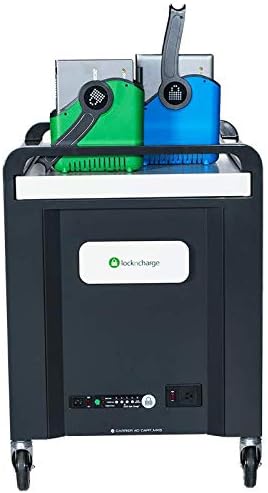
Obraz 7.2: Zwrócony do przodu view of the cart, detailing the power management panel, charging indicators, and the main power inlet.
Obraz 7.3: The LocknCharge Carrier 40 Cart with its side shelves extended, illustrating its potential as a mobile workstation or presentation cart. This view also shows the casters for mobility.
Obraz 7.4: The cart with its lid open, revealing the internal structure and device baskets, ready for devices to be inserted or removed.
Obraz 7.5: The LocknCharge Carrier 40 Cart shown with devices in baskets and the lid partially open, illustrating its general appearance and functionality. This image provides an overview of the cart's design and how devices are stored.
Obraz 7.6: Szczegółowy view of USB-C cables connected to multiple devices stored within the cart. This image highlights the prewired cable setup and how devices are connected for charging.
Obraz 7.7: A close-up showing the organized routing of USB-C cables within the cart, demonstrating the integrated cable management solution.
Obraz 7.8: Inny view of devices being charged inside the cart, emphasizing the ease of connecting and storing multiple devices simultaneously.
Obraz 7.9: Zbliżenie view of the combination padlock attached to the cart, demonstrating the security feature for stored devices.
8. Gwarancja i wsparcie
8.1 Gwarancja na produkt
LocknCharge products typically come with a manufacturer's warranty covering defects in materials and workmanship. Please refer to the warranty card included with your product or visit the official LocknCharge website for specific warranty terms and conditions applicable to the Carrier 40 Cart.
8.2 Obsługa klienta
For technical assistance, troubleshooting, or replacement parts, please contact LocknCharge customer support. You can find contact information on the LocknCharge official website or through your authorized reseller.
LocknCharge Official Webstrona: www.lockncharge.com