
Wstęp
Thank you for choosing the Varmilo MA Series V2 Summit R2 Mechanical Keyboard. This manual provides essential information for setting up, operating, maintaining, and troubleshooting your new keyboard. Please read this manual thoroughly to ensure optimal performance and longevity of your device.
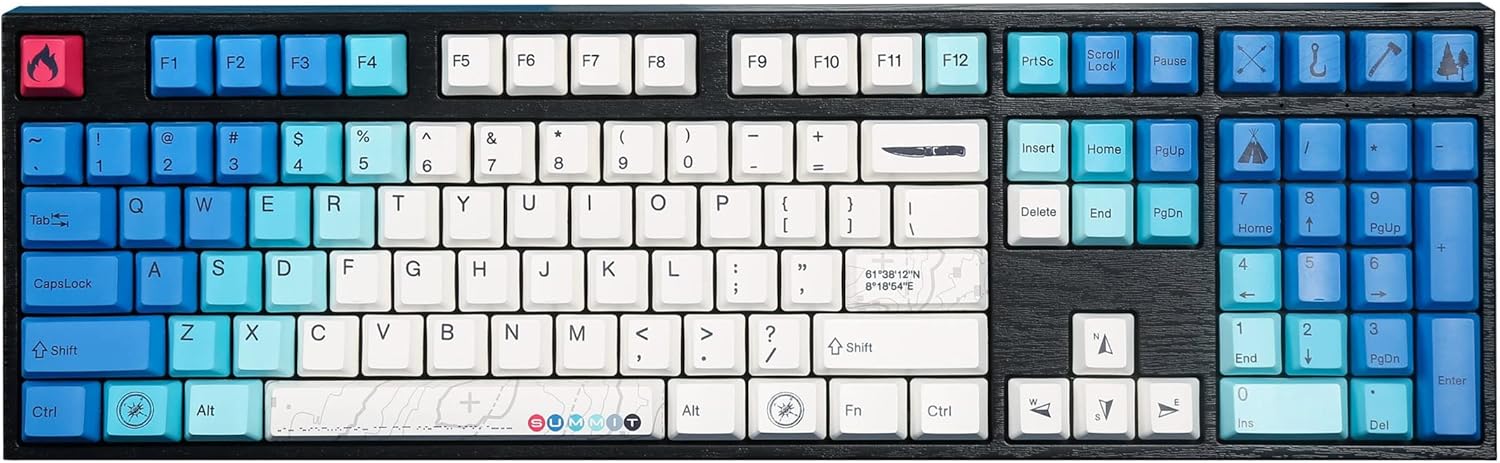
Image: The Varmilo MA Series V2 Summit R2 Mechanical Keyboard, showcasing its full layout and unique keycap design.
Organizować coś
1. Rozpakowanie
Carefully remove the keyboard and all accessories from the packaging. Ensure the following items are present:
- Varmilo MA Series V2 Summit R2 Mechanical Keyboard
- Kabel USB-C
- Narzędzie do zdejmowania nakładek klawiszy (jeśli dołączone)
- Instrukcja obsługi (ten dokument)
2. Podłączanie klawiatury
- Znajdź port USB-C z tyłu klawiatury.
- Podłącz jeden koniec dołączonego kabla USB-C do klawiatury.
- Podłącz drugi koniec kabla USB-C do wolnego portu USB w komputerze.
- Klawiatura jest typu plug-and-play i powinna zostać automatycznie rozpoznana przez system operacyjny.
3. Regulacja kąta klawiatury
The Varmilo MA Series V2 features a double-section kickstand, allowing for two different typing angles. Gently flip out the desired sections of the kickstand located on the underside of the keyboard to adjust its height and angle for ergonomic comfort.

Obraz: Profesjonalista z bokufile of the Varmilo keyboard, illustrating the adjustable kickstand in an extended position.
Instrukcja obsługi
1. Podstawowe funkcje klawiszy
The keyboard features a standard full-size (104-key) layout. All alphanumeric and standard function keys operate as expected. The Varmilo EC Ivy V2 switches provide a smooth and responsive typing experience.
2. Function (Fn) Key Combinations
The Fn key (typically located near the right Alt key) allows access to secondary functions printed on certain keycaps. Hold down the Fn key and press the desired function key simultaneously.
- Fn + F1-F12: Sterowanie multimediami (np. głośność, odtwarzanie/pauza, zatrzymywanie).
- Fn + klawisze strzałek: LED brightness or effect control (refer to specific keycap legends).
- Fn + Win: Klawisz blokowania/odblokowywania systemu Windows.

Obraz: Zbliżenie view of the right side of the Varmilo keyboard, highlighting the special function keys and their legends.
3. LED Backlighting Control
The keyboard features White LED backlighting. Use the Fn key combinations to adjust the brightness and switch between various lighting effects. Specific key legends will indicate the corresponding functions for LED control.
Konserwacja
1. Czyszczenie klawiatury
Aby zachować wygląd i funkcjonalność klawiatury:
- Przed czyszczeniem odłącz klawiaturę od komputera.
- Użyj miękkiej, niestrzępiącej się ściereczki, lekko wyczyśćampprzetrzeć klawisze wodą lub łagodnym środkiem czyszczącym i wyczyścićasing.
- Do usuwania kurzu i zanieczyszczeń spomiędzy klawiszy należy użyć sprężonego powietrza.
- Avoid using harsh chemicals, abrasives, or solvents, as these can damage the PBT keycaps and finish.
2. Zdejmowanie i wymiana nakładek klawiszy
The keyboard features durable Dye Sub PBT keycaps. If you need to remove keycaps for deep cleaning or customization:
- Use the provided keycap puller (if applicable) or a similar tool.
- Gently attach the keycap puller to the keycap and pull straight up to remove it. Avoid twisting or excessive force.
- Aby wymienić klawisz, należy dopasować go do trzpienia przełącznika i mocno docisnąć, aż zatrzaśnie się na swoim miejscu.

Image: A collection of individual Varmilo keycaps, including special design keycaps, demonstrating their PBT material and dye-sublimated legends.
Rozwiązywanie problemów
If you encounter issues with your Varmilo keyboard, please refer to the following common solutions:
- Klawiatura nie odpowiada:
- Sprawdź, czy kabel USB-C jest prawidłowo podłączony do klawiatury i komputera.
- Spróbuj podłączyć klawiaturę do innego portu USB w komputerze.
- Przetestuj klawiaturę na innym komputerze, aby wykluczyć problemy specyficzne dla systemu.
- Uruchom ponownie komputer.
- LEDs Not Working or Incorrect:
- Ensure the LED brightness is not set to the lowest level using Fn key combinations.
- Check if any specific lighting modes are active that might turn off certain LEDs.
- Klucze nie są rejestrowane:
- Remove the keycap and inspect the switch for any obstructions.
- Clean around the switch stem with compressed air.
Przywracanie ustawień fabrycznych
If issues persist, a factory reset may resolve them. Consult the Varmilo official website or support for specific reset procedures for your model, as these can vary.
Specyfikacje
The following are the technical specifications for the Varmilo MA Series V2 Summit R2 Mechanical Keyboard:
| Funkcja | Szczegół |
|---|---|
| Marka | Warmilo |
| Model | MA Series V2 Summit R2 |
| Układ | Full-size (104 + 4 keys) |
| Typ przełącznika | Varmilo EC Ivy V2 Mechanical Switches |
| Materiał nasadek klawiszy | Dye Sub PBT |
| Łączność | USB-C |
| Podświetlenie | Biała dioda LED |
| Tworzywo | Polybutylene Terephthalate, Silicone |
| Źródło zasilania | zasilana przez USB |
| Kompatybilne urządzenia | Komputer (przez USB-C) |
Gwarancja i wsparcie
Varmilo products are manufactured to high-quality standards. For information regarding warranty coverage, technical support, or service inquiries, please visit the official Varmilo webOdwiedź stronę internetową lub skontaktuj się bezpośrednio z działem obsługi klienta. Zachowaj paragon jako dowód zakupu na wypadek reklamacji.
Official Varmilo Store: Sklep Varmilo na Amazonie