
1. Wprowadzenie
This manual provides essential information for the proper handling, installation, and understanding of the Xiaomi L55M6-6AEU Main Board. This component is designed as a replacement or repair part for compatible electronic devices, typically smart televisions. Please read this manual thoroughly before attempting any installation or repair procedures.
2. Informacje dotyczące bezpieczeństwa
- Zalecana profesjonalna instalacja: Installation of this main board requires technical expertise and should ideally be performed by a qualified technician. Improper installation can lead to damage to the board, the device, or personal injury.
- Odłącz zasilanie: Always ensure the device is completely disconnected from the power source before beginning any installation or repair work.
- Środki ostrożności dotyczące wyładowań elektrostatycznych (ESD): Electronic components are sensitive to static electricity. Use an anti-static wrist strap and work on an anti-static mat to prevent ESD damage.
- Zachowaj ostrożność: Avoid touching the integrated circuits and connectors directly. Hold the board by its edges.
- Wentylacja: Ensure adequate ventilation around the device after installation to prevent overheating.
3. Koniec produktuview
The Xiaomi L55M6-6AEU Main Board serves as the central processing unit for compatible devices, managing all input/output operations, video processing, and system control. It integrates various components necessary for the device's functionality.
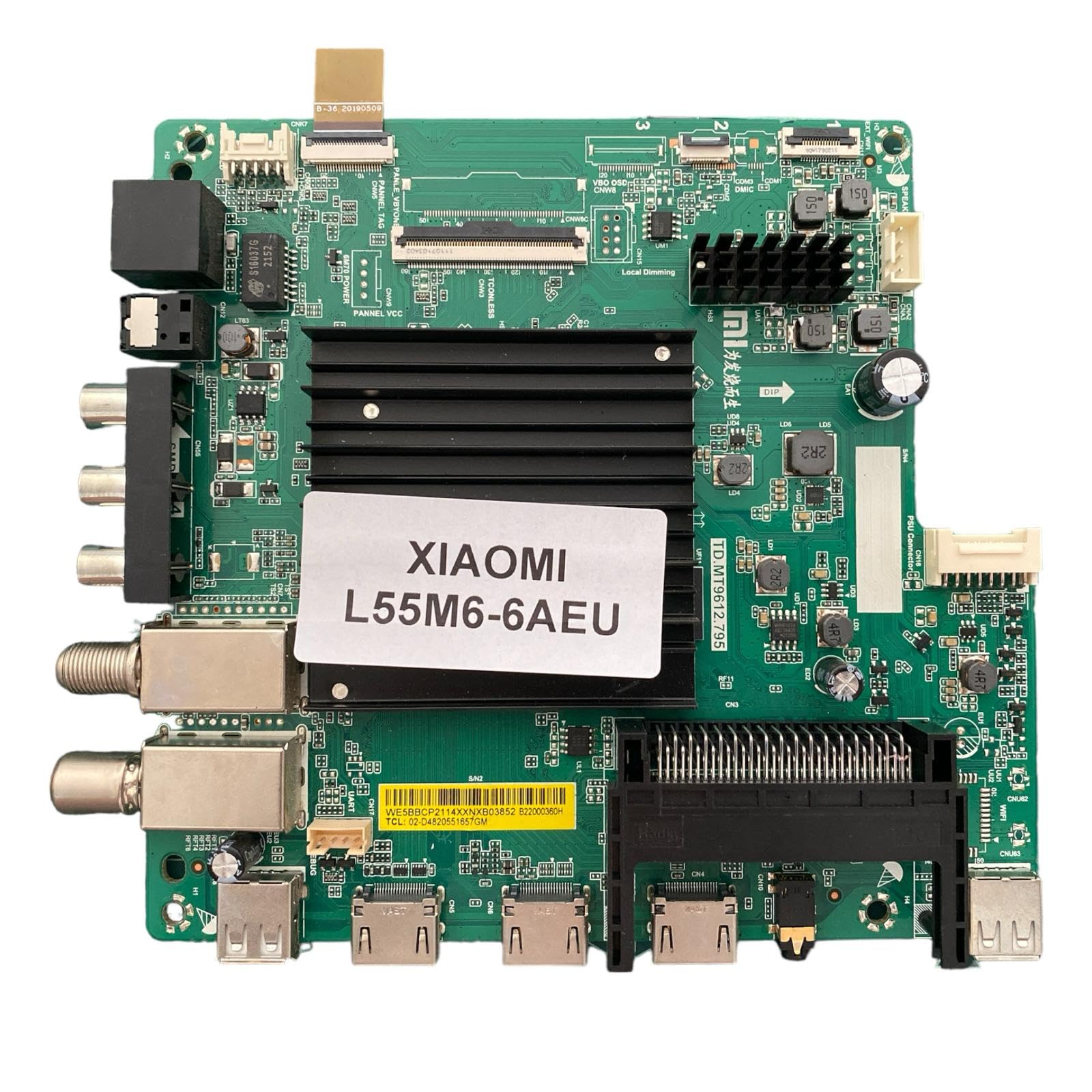
Image 3.1: Xiaomi L55M6-6AEU Main Board. This image displays the Xiaomi L55M6-6AEU main board, a critical component for compatible devices. It features multiple input/output ports, including HDMI, USB, and antenna connectors, along with various integrated circuits and heat sinks. A label clearly identifies it as 'XIAOMI L55M6-6AEU'.
Key features visible on the board include:
- Porty wejścia/wyjścia: Multiple HDMI ports, USB ports, and coaxial antenna inputs for connectivity.
- Processor Area: A large heatsink covers the main processor, indicating its role in high-performance operations.
- Złącza: Various connectors for internal components such as the display panel (VBYONE, PANNEL TAG), power supply (PSU Connector), and other modules (e.g., Wi-Fi, speakers).
- Układy scalone: Numerous smaller chips and components facilitate various functions, including power regulation and signal processing.
4. Konfiguracja i instalacja
This section outlines general steps for installing the main board. Specific procedures may vary depending on the device model. Always refer to the service manual of your specific device for detailed instructions.
- Przygotowanie: Ensure the device is unplugged from all power sources. Place the device on a clean, flat, anti-static surface.
- Dostęp do tablicy głównej: Carefully remove the back cover or casing of the device to gain access to the existing main board. Document cable connections with photos if necessary.
- Odłącz kable: Gently disconnect all cables connected to the old main board, including power, display, and input/output cables.
- Usuń starą tablicę: Unscrew any fasteners securing the old main board and carefully lift it out of the chassis.
- Zainstaluj nową płytę: Position the new Xiaomi L55M6-6AEU Main Board into the chassis, ensuring it aligns correctly with mounting points. Secure it with the appropriate screws.
- Podłącz ponownie kable: Reconnect all cables to their corresponding ports on the new main board. Double-check each connection for proper seating.
- Test wstępny: Before fully reassembling the device, connect it to power and perform a basic functional test to ensure the board is operating correctly.
- Ponowny montaż: Once functionality is confirmed, carefully reattach the device's casing and secure all screws.
5. Zasady działania
As an internal component, the Xiaomi L55M6-6AEU Main Board does not have direct user-operable controls. Its operation is integral to the functionality of the host device. Once installed and powered, the main board performs the following core functions:
- Przetwarzanie sygnału: Receives and processes audio and video signals from various input sources (HDMI, USB, antenna).
- Kontrola systemu: Manages the device's operating system, user interface, and application execution.
- Wyjście wyświetlacza: Generates and sends video signals to the display panel.
- Zarządzanie łącznością: Handles network connections (wired/wireless) and peripheral device communication.
6. Konserwacja
The Xiaomi L55M6-6AEU Main Board is designed for long-term reliability and typically requires no routine user maintenance. To ensure its longevity and optimal performance:
- Utrzymywać w suchości: Protect the device from moisture and liquids, which can cause short circuits and corrosion.
- Avoid Dust Accumulation: Excessive dust can impede heat dissipation and potentially lead to component failure. Ensure the device's ventilation openings are clear.
- Prawidłowa wentylacja: Operate the device in a well-ventilated area to prevent overheating of internal components.
- Brak części nadających się do samodzielnej naprawy przez użytkownika: The main board contains no user-serviceable parts. Do not attempt to repair or modify the board yourself.
7. Rozwiązywanie Problemów
If the device experiences issues after main board installation, consider the following general troubleshooting steps. For complex problems, professional diagnosis is recommended.
- Brak zasilania: Ensure all power cables are securely connected, both internally to the main board and externally to the power outlet. Verify the power supply unit is functioning.
- No Display/Picture: Check the display panel cable connection to the main board. Ensure the display panel itself is functional.
- Brak dźwięku: Verify speaker connections to the main board. Test with different audio sources.
- Input Issues: If specific inputs (e.g., HDMI, USB) are not working, check the physical connection and try different cables or devices.
- Problemy okresowe: Loose connections can cause intermittent issues. Recheck all internal cable connections.
- Błędy oprogramowania: If the device powers on but exhibits unusual behavior, a factory reset (if accessible) or firmware reinstallation might be necessary. Consult the device's specific manual for these procedures.
8. Specyfikacje
| Funkcja | Szczegół |
|---|---|
| Marka | Xiaomi |
| Numer modelu | L55M6-6AEU |
| Numer części | TD.MT9612.795 |
| Kompatybilne urządzenia | Devices requiring L55M6-6AEU main board, typically smart televisions |
| Technologia RAM | DDR4 |
| Interfejs karty graficznej | PCI Express |
| Total PCI E Ports | 16 |
| Producent | XIAOMI |
| ASIN | B0B7BJF46R |
| Date of Listing on Amazon.com.be | 27 sierpnia 2022 |
| Dostępność części zamiennych | Informacje niedostępne |
| Gwarantowane aktualizacje oprogramowania do | Informacje niedostępne |
9. Gwarancja i wsparcie
Specific warranty information for the Xiaomi L55M6-6AEU Main Board is not provided in the product details. For warranty claims, technical support, or inquiries regarding spare parts and software updates, please contact the original seller or the manufacturer directly. It is advisable to retain your proof of purchase for any support requests.