
ThruNite Catapult Pro & T1
ThruNite Catapult Pro & T1 EDC Flashlight Bundle User Manual
Brand: ThruNite | Models: Catapult Pro, T1
Wstęp
This user manual provides comprehensive instructions for the ThruNite Catapult Pro and T1 EDC Flashlight Bundle. The Catapult Pro is a powerful long-throw flashlight designed for maximum output and distance, while the T1 is a compact and versatile Everyday Carry (EDC) flashlight with a magnetic tailcap. Please read this manual thoroughly before using your flashlights to ensure proper operation, safety, and longevity of the products.

Image: The ThruNite Catapult Pro (larger) and T1 (smaller) flashlights, showcasing paczkę.
Informacje dotyczące bezpieczeństwa
- Bezpieczeństwo oczu: Do not shine the flashlight directly into eyes. The powerful beam can cause temporary vision impairment or permanent damage.
- Ciepło: The flashlight head may become hot during prolonged use, especially on high output modes. Handle with care to avoid burns.
- Bezpieczeństwo baterii: Use only recommended batteries. Do not mix old and new batteries, or different types of batteries. Do not dispose of batteries in fire. Keep batteries out of reach of children.
- Dzieci: Keep flashlights and accessories out of reach of children to prevent accidental injury or misuse.
- Demontaż: Nie należy podejmować prób demontażu głowicy latarki ani innych uszczelnionych elementów, gdyż może to spowodować uszkodzenie latarki i unieważnienie gwarancji.
Zawartość opakowania
Po otrzymaniu przesyłki sprawdź jej zawartość, aby upewnić się, że znajdują się w niej wszystkie elementy:
- ThruNite Catapult Pro Flashlight (with included battery)
- ThruNite T1 EDC Flashlight (with included battery)
- USB-C Charging Cable (for Catapult Pro)
- Holster (for Catapult Pro)
- Lanyard (for Catapult Pro)
- Zapasowe pierścienie uszczelniające
- Instrukcja obsługi
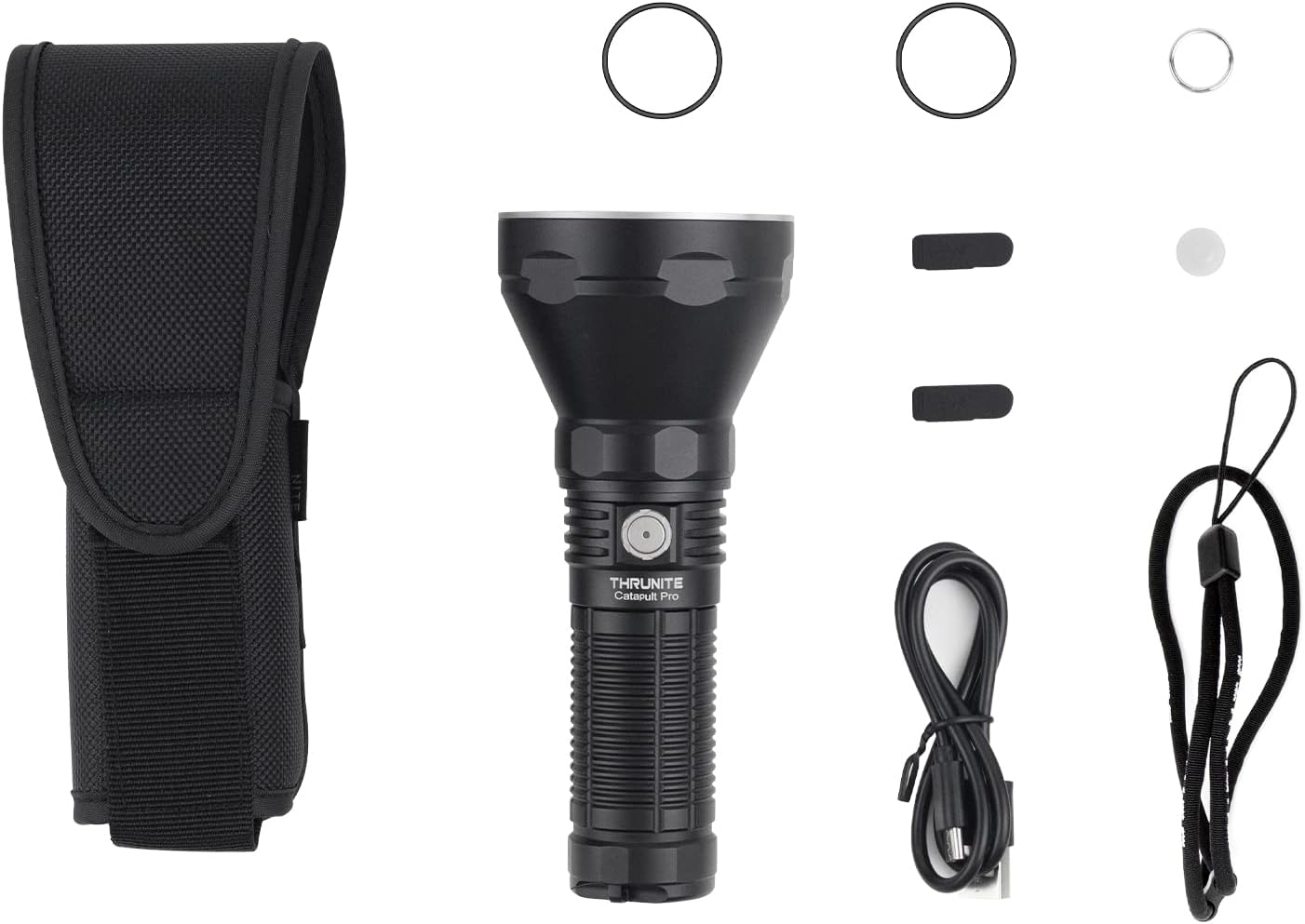
Image: The ThruNite Catapult Pro flashlight and its accompanying accessories, including the holster, charging cable, and spare parts.
Produkt ponadview
ThruNite Catapult Pro
The Catapult Pro is a high-performance, long-throw flashlight designed for outdoor activities, search and rescue, and tactical applications. It features a powerful SFT70 LED for an impressive beam distance and robust construction for durability.
- Wyłącznik główny: Located on the side for easy access to all functions.
- Port ładowania USB-C: Integrated for convenient and fast recharging.
- Aerospace Grade Aluminum Body: Ensures durability and heat dissipation.
- Knurling: Provides a firm and comfortable grip.

Obraz: szczegółowy view of the ThruNite Catapult Pro flashlight, highlighting its design and side switch.

Image: The ThruNite Catapult Pro held in a gloved hand, demonstrating its size and ergonomic design.

Image: The ThruNite Catapult Pro shown with its included lanyard and holster, illustrating portability options.
ThruNite T1 EDC Flashlight
The T1 is a compact and lightweight Everyday Carry (EDC) flashlight, perfect for daily tasks and emergencies. Its magnetic tailcap offers hands-free convenience, and the dual-direction clip provides versatile carrying options.
- Wyłącznik główny: Single side switch for all operations.
- Magnetyczna nasadka tylna: Allows attachment to metal surfaces for hands-free lighting.
- Dual-Direction Clip: For secure attachment to pockets, belts, or hats.
- Kompaktowa konstrukcja: Ultra-slim and lightweight for easy portability.

Image: The ThruNite T1 flashlight held to demonstrate its slim and compact profile.

Image: The ThruNite T1 flashlight resting in the palm of a hand, illustrating its small and portable size.
Organizować coś
Initial Use and Battery Preparation
Both the Catapult Pro and T1 come with pre-installed batteries. Before first use, please ensure the battery is properly seated and any insulating film is removed if present. For the Catapult Pro, ensure the tail cap is tightened securely to establish electrical contact.
Charging the Catapult Pro
The Catapult Pro features a built-in USB-C charging port. To charge:
- Locate the USB-C port cover on the flashlight body.
- Delikatnie podnieś gumową osłonę, aby odsłonić port.
- Connect the provided USB-C charging cable to the flashlight and plug the other end into a USB power source (e.g., wall adapter, computer USB port).
- Kontrolka na przełączniku pokaże stan ładowania:
- Czerwony: Trwa ładowanie.
- Niebieski: Ładowanie zakończone.
- Once charging is complete, securely close the USB-C port cover to maintain water resistance.
Note: The T1 typically uses a standard 16340 battery and may require an external charger, or it might have a built-in micro-USB port depending on the specific revision. Please refer to the T1's individual manual if included, or check the product specifications for charging details.
Instrukcja obsługi
General Operation (Both Models)
- Włącz/Wyłącz: Aby włączyć lub wyłączyć latarkę, kliknij raz boczny przełącznik.
- Zmień tryby: When the flashlight is on, press and hold the side switch to cycle through different brightness levels (e.g., Low, Medium, High). Release the switch to select the desired mode.
- Funkcja pamięci: Both flashlights typically remember the last used general mode (excluding special modes like Turbo or Strobe) and will turn on in that mode.
- Access Turbo/Max Output: Double-click the side switch from any mode (or from off) to instantly activate the highest output mode.
- Access Strobe: Triple-click the side switch from any mode (or from off) to activate the Strobe mode.
- Funkcja blokady: To prevent accidental activation, press and hold the side switch for several seconds from the OFF state until the light flashes briefly, indicating lockout mode. Repeat the process to unlock.
Catapult Pro Specifics
The Catapult Pro is optimized for long-distance illumination. Its powerful beam can reach over 1000 meters.

Image: The powerful beam of the ThruNite Catapult Pro cutting through the night sky, demonstrating its long-throw capability.
T1 EDC Specifics
The T1's compact size and magnetic tailcap make it ideal for close-range tasks and hands-free operation.
- Magnetyczna nasadka tylna: Attach the T1 to any ferrous metal surface (e.g., car hood, metal pipe) for convenient hands-free lighting.
- Klip kieszonkowy: The dual-direction clip allows for deep pocket carry or attachment to a hat brim for headlamp-like functionality.

Image: A person using a flashlight to illuminate a path in a dark, wooded area, demonstrating practical use.
Konserwacja
- Czyszczenie: Wyczyść korpus latarki miękką,amp ściereczka. Nie należy używać środków czyszczących o właściwościach ściernych ani rozpuszczalników.
- Gwinty i pierścienie uszczelniające: Okresowo smaruj gwinty i pierścienie uszczelniające smarem silikonowym, aby zachować wodoodporność i płynne działanie. Wymień zużyte pierścienie uszczelniające na dołączone części zamienne.
- Pielęgnacja baterii:
- Przechowuj baterie w chłodnym, suchym miejscu.
- Jeżeli latarka nie będzie używana przez dłuższy czas, należy wyjąć baterię, aby zapobiec jej wyciekowi.
- Charge rechargeable batteries regularly, even if not in use, to maintain their health.
- Pielęgnacja soczewek: Keep the lens clean and free of dust or debris. Use a lens cleaning cloth if necessary.
Rozwiązywanie problemów
| Problem | Możliwa przyczyna | Rozwiązanie |
|---|---|---|
| Latarka się nie włącza. |
|
|
| Światło migocze lub niespodziewanie gaśnie. |
|
|
| Cannot charge Catapult Pro. |
|
|
Specyfikacje
ThruNite Catapult Pro
| Funkcja | Szczegół |
|---|---|
| PROWADZONY | SFT70 |
| Maksymalna wydajność | 2,713 lumenów |
| Maksymalna odległość wiązki | 1005 metrów |
| Źródło zasilania | High capacity rechargeable battery (included) |
| Ładowanie | Akumulator USB-C |
| Tworzywo | Aluminium klasy lotniczej |
| Odporność na upadki | Do 1.5 metrów |
ThruNite T1 EDC Flashlight
| Funkcja | Szczegół |
|---|---|
| PROWADZONY | CREE XHP50 |
| Maksymalna wydajność | 1500 lumenów |
| Maksymalna odległość wiązki | 102 metrów (335 stóp) |
| Źródło zasilania | Battery Powered (typically 16340) |
| Cechy specjalne | Magnetic Tailcap, Dual-Direction Clip |
| Tworzywo | Aluminium |
| Waga | 1.59 oz / 45g (approx.) |
Gwarancja i wsparcie
Specific warranty details for this product bundle are not provided in the available information. ThruNite typically offers a warranty on their products. Please refer to the official ThruNite website or contact their customer support for detailed warranty information and service.
For technical support, troubleshooting assistance, or warranty claims, please contact ThruNite customer service through their official webwitrynę lub sprzedawcę, u którego kupiłeś produkt.
You can visit the ThruNite Store on Amazon for more information: ThruNite Store
Oficjalne filmy produktowe
No official product videos from the seller were found for this bundle to be embedded in this manual.
Ask a question about this manual
Ask about setup, troubleshooting, compatibility, parts, safety, or missing instructions. Manuals+ will review the question and use this page’s manual context to help answer it.