
Wstęp
This manual provides comprehensive instructions for the Allimity BN59-01199F replacement remote control. It is designed to be compatible with various Samsung LED LCD Smart TVs, offering a direct replacement for several original Samsung remote models. This guide covers initial setup, basic operation, maintenance, and troubleshooting to ensure optimal performance.
Organizować coś
Instalacja baterii
The Allimity BN59-01199F remote control requires two (2) AAA alkaline batteries for operation. No programming is required; simply insert the batteries, and the remote will be ready to use with your compatible Samsung TV.
- Znajdź komorę baterii z tyłu pilota.
- Aby otworzyć, przesuń pokrywę komory baterii w dół lub naciśnij zatrzask i unieś.
- Insert two (2) new AAA alkaline batteries, ensuring the positive (+) and negative (-) terminals match the diagrams inside the compartment.
- Załóż pokrywę komory baterii i wsuń ją z powrotem na miejsce, aż usłyszysz kliknięcie.
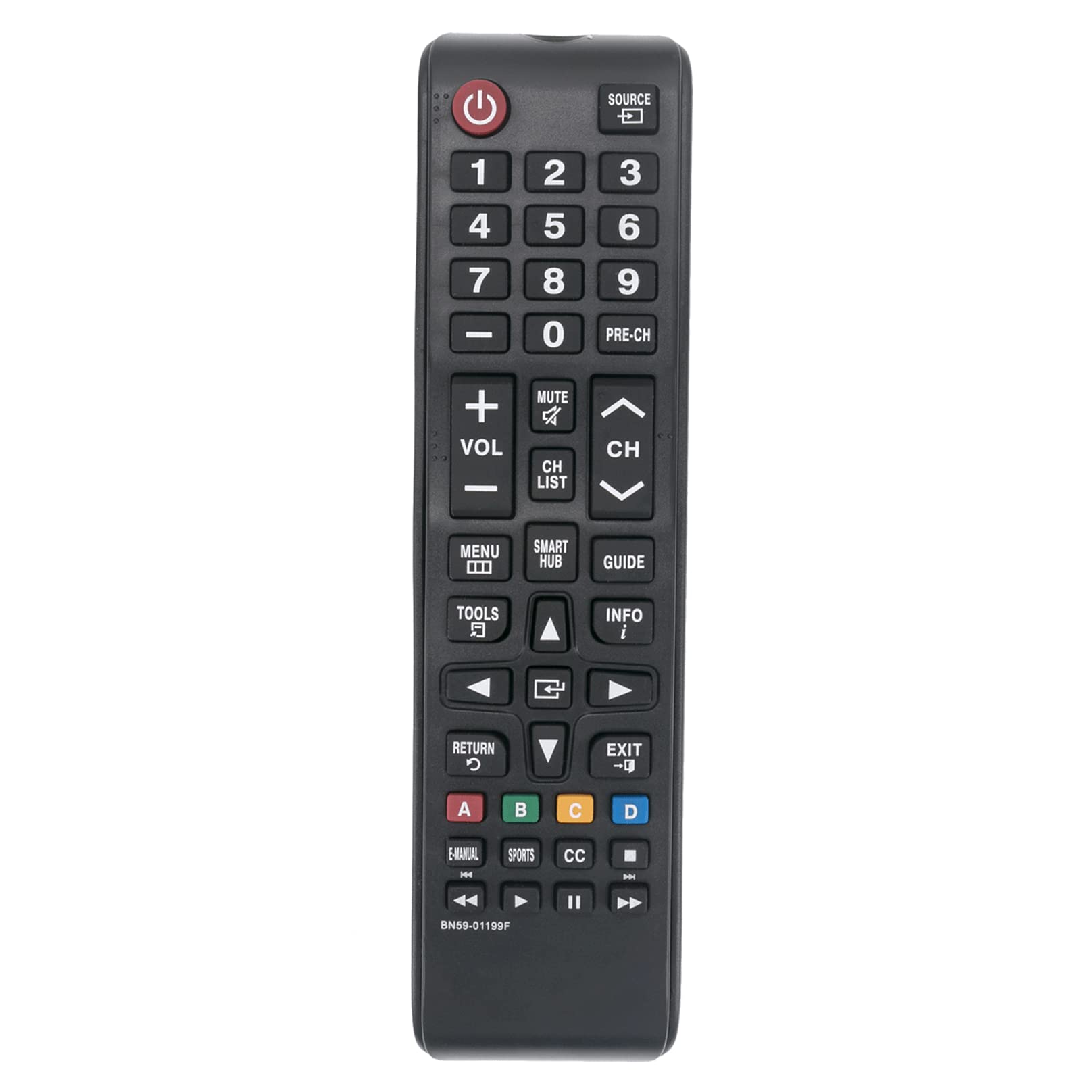
Rycina 1: Przód view of the Allimity BN59-01199F remote control. The battery compartment is located on the back.
Instrukcja obsługi
This remote control is designed for intuitive use with compatible Samsung LED LCD Smart TVs. Below are the functions of the primary buttons.

Figure 2: Detailed layout of the Allimity BN59-01199F remote control buttons.
Funkcje przycisków
- Moc (⏻): Włącza lub wyłącza telewizor.
- Źródło: Selects the input source (e.g., HDMI 1, AV, TV).
- Przyciski numeryczne (0-9): Directly selects TV channels or enters numerical input.
- PRZEDCH:Powrót do poprzedniego kanału.
- Głośność (+/-): Adjusts the TV volume up or down.
- Niemy: Wycisza lub włącza dźwięk telewizora.
- Kanał (CH ▲/▼): Changes TV channels up or down.
- LISTA KANAŁÓW: Wyświetla listę kanałów.
- MENU:Otwiera główne menu telewizora.
- INTELIGENTNE CENTRUM: Accesses the Samsung Smart Hub for apps and streaming services.
- PRZEWODNIK: Wyświetla elektroniczny przewodnik po programach.
- NARZĘDZIA: Accesses quick settings or context-sensitive options.
- INFORMACJE: Wyświetla informacje o bieżącym programie lub wejściu.
- Directional Pad (▲◀▼▶) & Enter: Porusza się po menu i potwierdza wybory.
- POWRÓT (↺): Powrót do poprzedniego ekranu lub menu.
- EXIT: Wychodzi z bieżącego menu lub aplikacji.
- Przyciski kolorów (A, B, C, D): Functions vary depending on the TV menu or application.
- E-INSTRUKCJA: Accesses the TV's electronic manual.
- LEKKOATLETYKA: Dedicated button for sports mode or content.
- CC: Activates or deactivates closed captions.
- Media Control Buttons (⏮, ▶, ⏸, ⏭): Control media playback (rewind, play, pause, fast forward).
Konserwacja
Czyszczenie
To maintain the remote control's appearance and functionality, clean it regularly. Use a soft, dry cloth to wipe the surface. For stubborn dirt, slightly dampPrzetrzyj ściereczkę wodą lub delikatnym, nieściernym środkiem czyszczącym. Unikaj stosowania silnych środków chemicznych, rozpuszczalników i materiałów ściernych, ponieważ mogą one uszkodzić wykończenie pilota lub jego wewnętrzne elementy.
Wymiana baterii
Replace batteries when the remote control's response becomes sluggish or stops working. Always replace both batteries at the same time with new AAA alkaline batteries. Do not mix old and new batteries, or different types of batteries, as this can lead to leakage or malfunction. Dispose of used batteries according to local regulations.
Składowanie
Jeśli pilot nie będzie używany przez dłuższy czas, wyjmij baterie, aby zapobiec wyciekowi i uszkodzeniom. Przechowuj pilota w chłodnym, suchym miejscu, z dala od bezpośredniego światła słonecznego i ekstremalnych temperatur.
Rozwiązywanie problemów
If you encounter issues with your remote control, refer to the table below for common problems and their solutions.
| Problem | Możliwa przyczyna | Rozwiązanie |
|---|---|---|
| Pilot zdalnego sterowania nie działa. | Baterie rozładowane lub nieprawidłowo włożone. | Wymień baterie na nowe baterie alkaliczne AAA, zwracając uwagę na prawidłową biegunowość. |
| Zasięg zdalnego sterowania jest ograniczony. | Słabe baterie lub przeszkoda pomiędzy pilotem a telewizorem. | Replace batteries. Ensure there are no objects blocking the line of sight between the remote's IR emitter and the TV's IR receiver. |
| Niektóre przyciski nie reagują. | Dirt or debris under the button, or internal malfunction. | Clean the remote surface. If the issue persists, the remote may require replacement. |
| Zdalne sterowanie działa w przypadku niektórych funkcji, ale nie wszystkich. | Compatibility issue with a specific TV model or function. | Verify your TV model is listed as compatible. Some advanced Smart TV functions might require the original Smart Remote. |
Specyfikacje
- Marka: ALLIMITY
- Nazwa modelu: BN59-01199F
- Technologia łączności: Podczerwień (IR)
- Źródło zasilania: 2 x 1.5V AAA Alkaline Batteries (not included)
- Maksymalny zasięg: Approximately 30 Feet (9 meters)
- Kompatybilne urządzenia: Samsung LED LCD HDTV Smart TVs (various models, refer to product description for full list)
- Funkcja specjalna: No Programming Required
- Waga przedmiotu: Approximately 2 Ounces (56 grams)
- Wymiary (dł. x szer. x wys.): 5" x 1" x 0.5" (12.7 cm x 2.54 cm x 1.27 cm)
Gwarancja i wsparcie
This Allimity remote control is designed for reliability and performance. For specific warranty details, please refer to the purchase documentation or contact your retailer. If you experience any issues that cannot be resolved using the troubleshooting guide, please contact the seller or manufacturer for assistance. Provide your product model number (BN59-01199F) and details of the issue for efficient support.
Note: The manufacturer reserves the right to make changes to product specifications without prior notice.