
FLAMMA FX200
Instrukcja obsługi procesora gitarowego FLAMMA FX200 Multi Effects
Model: FX200
1. Wprowadzenie
This manual provides detailed instructions for the operation and maintenance of your FLAMMA FX200 Multi Effects Guitar Processor. Please read this manual thoroughly to ensure proper usage and to maximize the potential of your device.
The FLAMMA FX200 is a versatile multi-effects processor designed for guitarists, featuring a 5-inch LCD touch screen, extensive input/output options, and a wide array of effects, amplifier models, and cabinet simulations.
2. Środki ostrożności
- Nie wystawiaj urządzenia na działanie deszczu, wilgoci ani ekstremalnych temperatur.
- Unikać umieszczania urządzenia w pobliżu źródeł ciepła lub w bezpośrednim świetle słonecznym.
- Używaj wyłącznie wskazanego zasilacza.
- Nie próbuj demontować ani modyfikować urządzenia. Wszelkie prace serwisowe zlecaj wykwalifikowanemu personelowi.
- Przechowywać w miejscu niedostępnym dla dzieci.
3. Zawartość opakowania
Sprawdź, czy w opakowaniu znajdują się wszystkie elementy:
- FLAMMA FX200 Multi Effects Guitar Processor
- Zasilacz
- Kabel USB-C
- Instrukcja obsługi (ten dokument)

Figure 3.1: Contents of the FLAMMA FX200 package.
4. Urządzenie ponadview
4.1 Panel przedni
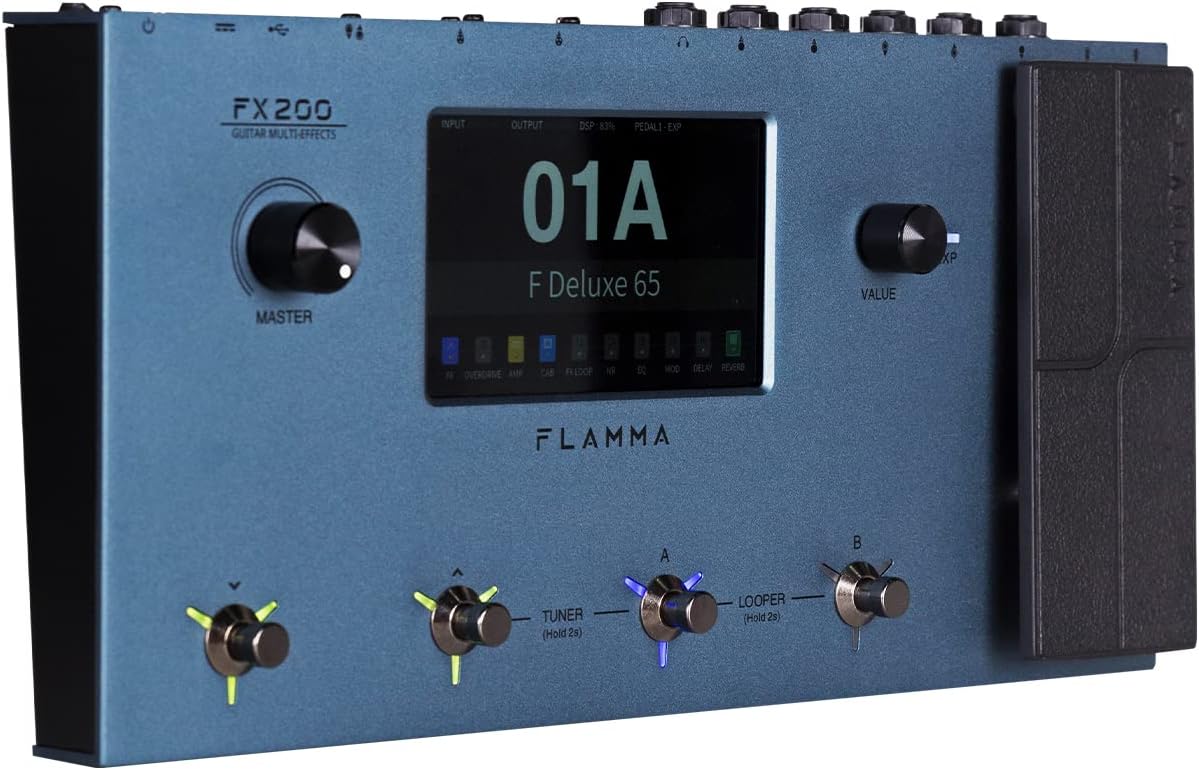
Figure 4.1: Front Panel Layout of the FX200.
- Pokrętło główne: Reguluje ogólną głośność wyjściową.
- Ekran dotykowy LCD: 5-inch display for navigation, parameter editing, and preset management.
- Pokrętło wartości: Used for data entry and parameter adjustments.
- Przełączniki nożne (A, B, C, D): Control presets, effects, looper, and tuner functions.
- Pedał ekspresji: Assignable for real-time control of various effects parameters.
4.2 Rear Panel (I/O)

Figure 4.2: Rear Panel Input/Output Connections.
- WEJŚCIE AUX: Wejście stereo 3.5 mm dla zewnętrznych urządzeń audio.
- TERMIN 2: External expression pedal input.
- WEJŚCIE: 1/4-inch mono input for guitar.
- WYŚLIJ/ZWRÓĆ: Stereo FX Loop for integrating external effects pedals.
- WYJŚCIE (L/MONO, R): 1/4-inch stereo outputs to ampmikser lub urządzenie spulchniające.
- TELEFONY: Wyjście słuchawkowe stereo 3.5 mm.
- MASA/WINDA: Ground lift switch to eliminate hum.
- XLR OUT (L, R): Balanced XLR stereo outputs for direct connection to PA systems or audio interfaces.
- WEJŚCIE/WYJŚCIE MIDI: 5-pin MIDI connectors for external MIDI control.
- USB DC IN: USB-C port for power and connection to a computer.
- Przycisk zasilania: Włącza/wyłącza urządzenie.
5. Konfiguracja
5.1 Początkowe włączenie zasilania
- Connect the provided power adapter to the USB DC IN port on the rear panel.
- Podłącz zasilacz do odpowiedniego gniazdka sieciowego.
- Flip the Power Switch to the ON position. The unit will power on and display the startup screen.
5.2 Podłączanie gitary i Ampżywsze
- Podłącz swoją gitarę do WEJŚCIE gniazdo za pomocą standardowego kabla instrumentalnego 1/4-calowego.
- Połącz WYJŚCIE L/MONO jack do twojej gitary amplifier's input using a 1/4-inch instrument cable. For stereo output, connect the WYJŚCIE R jack do drugiego ampwejście filtru lub miksera.
- Alternatively, for direct recording or PA system connection, use XLR cables from the XLR OUT L I XLR OUT R ports to your audio interface or mixer.
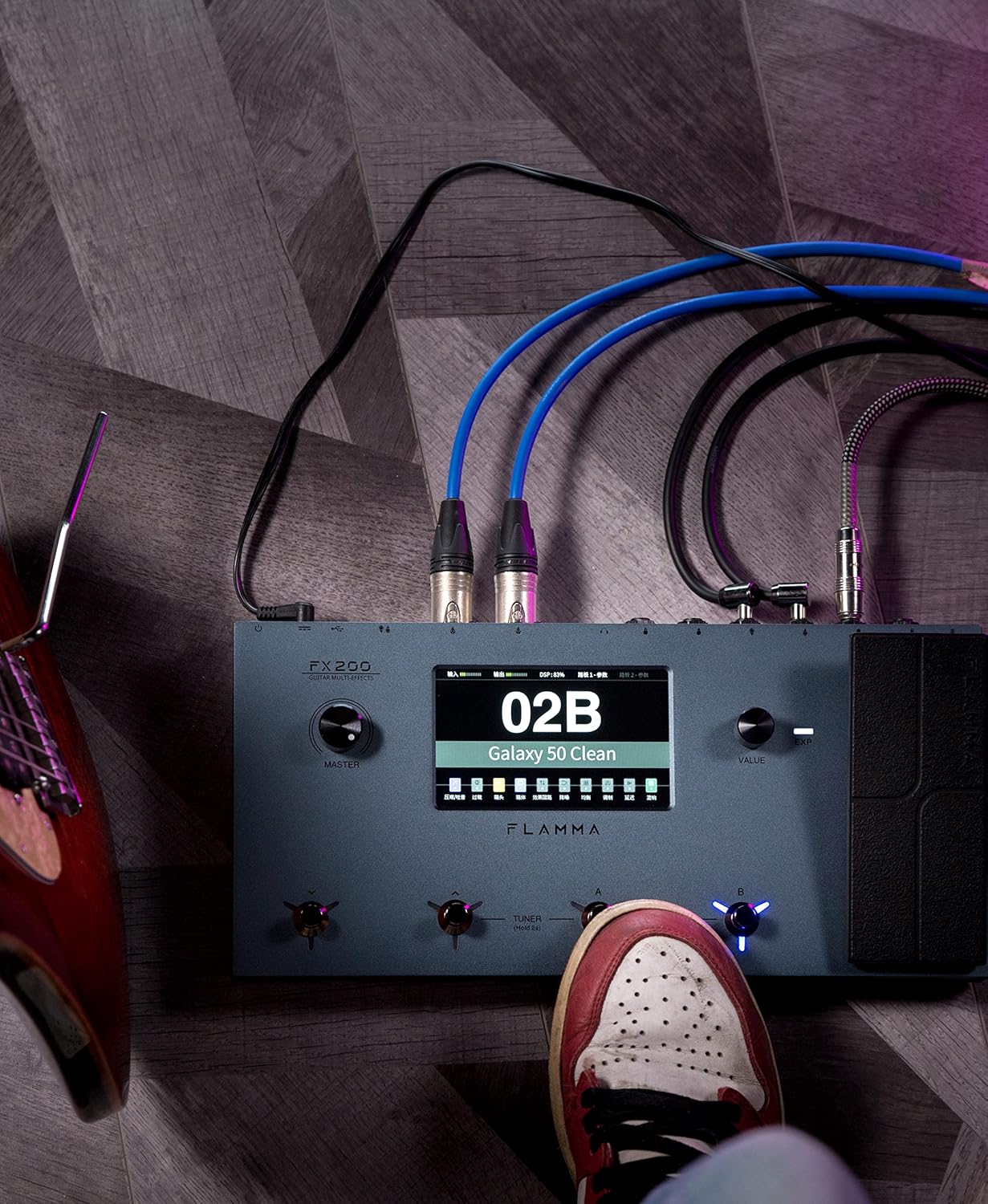
Figure 5.1: Typical connection setup for the FX200.
5.3 Podłączanie do komputera
The FX200 can be connected to a computer for editing presets, firmware updates, and USB audio recording.
- Download the specialized editing software from the official FLAMMA webstrona.
- Connect the FX200 to your computer using the provided USB-C cable.
- Launch the editing software. The software will detect the FX200, allowing you to manage presets, effects, and perform firmware updates.

Figure 5.2: FX200 connected to a computer for software editing.
6. Instrukcja obsługi
6.1 Nawigacja po ekranie dotykowym
The 5-inch LCD touch screen is the primary interface for controlling the FX200. Tap icons and parameters to select them, and use the Value Knob to adjust values.

Rysunek 6.1: Interakcja z interfejsem ekranu dotykowego.
6.2 Zarządzanie presetami
The FX200 features 200 editable user preset slots. Presets can be selected using the footswitches or by navigating the touch screen.
- Wybieranie ustawień wstępnych: In Play mode, press footswitches A or B to cycle through presets within a bank. Press footswitches C or D to change banks.
- Edycja ustawień wstępnych: Tap on an effect module icon on the touch screen to access its parameters. Adjust settings using the Value Knob.
- Zapisywanie ustawień wstępnych: After editing, tap the 'Save' icon on the touch screen and follow the prompts to store your changes to a user preset slot.
6.3 Effect Modules and Chain
The FX200 includes 10 effect modules with over 160 different effect types, 58 preamp models, and 30 cabinet simulations. The effects chain can be customized.
- Module Order: Drag and drop effect module icons on the touch screen to change their order in the signal chain.
- Activating/Deactivating Modules: Tap an effect module icon to toggle it on or off within a preset.
- Third-Party IRs: The unit supports third-party impulse response files (up to 1024 sampling points) with 50 empty slots for custom cabinet simulations. Use the editing software to load IRs.

Figure 6.2: Customizable effects chain on the FX200.
6.4 Looper i automat perkusyjny
The FX200 includes an integrated 52-second looper and 80 drum machine variations with 10 metronome styles.
- Zapętlacz: Access the looper function via a dedicated footswitch or the touch screen. Record, overdub, play, and stop loops.
- Maszyna perkusyjna: Select drum patterns and metronome styles from the touch screen interface. Adjust tempo and volume.
6.5 USB Audio Recording
The FX200 supports USB audio recording, allowing you to record directly to your computer.
- Connect the FX200 to your computer via USB-C.
- Select the FX200 as your audio input device in your Digital Audio Workstation (DAW) software.
- Adjust input levels on both the FX200 and your DAW for optimal recording.
7. Konserwacja
- Czyszczenie: Do czyszczenia urządzenia należy używać miękkiej, suchej ściereczki. Nie należy używać środków czyszczących o właściwościach ściernych ani rozpuszczalników.
- Składowanie: When not in use for extended periods, store the unit in a dry, cool place away from direct sunlight.
- Aktualizacje oprogramowania układowego: Regularly check the FLAMMA website for firmware updates to ensure optimal performance and access to new features. Updates are performed via the USB-C connection and editing software.
8. Rozwiązywanie Problemów
| Problem | Możliwa przyczyna | Rozwiązanie |
|---|---|---|
| Brak zasilania | Zasilacz nie jest podłączony lub jest uszkodzony; Wyłącz zasilanie. | Upewnij się, że zasilacz jest prawidłowo podłączony i podłączony do sprawnego gniazdka. Sprawdź włącznik zasilania. |
| Brak dźwięku | Incorrect cable connections; Master volume too low; Amplifier off; Effect module bypassed. | Verify all audio cables are correctly connected. Increase Master volume. Check amplifier power. Ensure desired effect modules are active. |
| Humming or noise | Ground loop; Faulty cables; Interference. | Engage the GND/LIFT switch. Try different cables. Ensure power supply is stable and away from other electronics. |
| Ekran dotykowy nie reaguje | Tymczasowy błąd oprogramowania. | Restart the unit by cycling the power switch. If the issue persists, contact customer support. |
| Nie można połączyć się z komputerem | USB-C cable issue; Driver not installed; Software not running. | Ensure USB-C cable is functional. Install necessary drivers. Launch the FLAMMA editing software. |
9. Specyfikacje
| Funkcja | Szczegół |
|---|---|
| Wyświetlacz | 5-calowy ekran dotykowy LCD |
| Moduły efektów | 10 modules, 160+ effect types |
| Przedamp Modele | 58 |
| Cabinet Simulations | 30 (IR-based, 1024pts), 50 user IR slots |
| Ustawienia użytkownika | 200 edytowalnych slotów |
| Pętla | 52 sekund |
| Maszyna perkusyjna | 80 variations, 10 metronome styles |
| Łączność | AUX IN, EXP2, INPUT, SEND/RETURN, OUTPUT (L/MONO, R), PHONES, XLR OUT (L, R), MIDI IN/OUT, USB-C |
| USB Audio Recording | Utrzymany |
| Wymiary (dł. x szer. x wys.) | 13.5 x 6.6 x 2 cala (34.3 x 16.8 x 5.1 cm) |
| Waga | 3.9 funtów (1.77 kg) |
| Zasilacz | 9V DC (via USB-C) |
| Materiał korpusu | Metal |
10. Gwarancja i wsparcie
FLAMMA products are covered by a limited warranty. For detailed warranty information, product registration, and technical support, please visit the official FLAMMA webwitryny lub skontaktuj się z obsługą klienta.
Official FLAMMA Webstrona: www.flamma.com
For any issues not covered in this manual, please refer to the online resources or contact FLAMMA customer support directly.
Powiązane dokumenty - FX200
 |
Instrukcja obsługi inteligentnego pedału efektów FLAMMA FG200 This owner's manual provides comprehensive information on the FLAMMA FG200 Intelligent Combined Effects Pedal, covering safety precautions, performance features, panel layout, connection guides, effect module details, operation modes, additional functions like drum machine and tuner, tone descriptions, and technical specifications. |
 |
Instrukcja obsługi multiefektu gitarowego Flamma FX100 Kompleksowa instrukcja obsługi pedału multiefektowego do gitary Flamma FX100, zawierająca szczegółowe informacje na temat funkcji, elementów sterujących, połączeń, oprogramowania, listy efektów i specyfikacji. |
 |
Instrukcja obsługi multiefektu gitarowego Flamma FX100 Comprehensive owner's manual for the Flamma FX100 Guitar Multi-Effects pedal, covering setup, operation, effects lists, and technical specifications. |
 |
Flamma FX10 przenośne słuchawki modelujące Amps Instrukcja obsługi Instrukcja obsługi Flamma FX10, przenośnych słuchawek modelujących amplifier z 14 amp models, 14 effects, Bluetooth audio playback, USB audio recording/playback, and a built-in drum machine. Includes instructions, effect lists, and specifications. |
 |
Instrukcja obsługi inteligentnego pedału efektów Flamma FB200 Kompleksowa instrukcja obsługi inteligentnego pedału efektów Flamma FB200, obejmująca ważne uwagi, instrukcje bezpieczeństwa, wydajność iview, panel description, device connections, effect modules, operation modes, additional functions, tone descriptions, and technical specifications. |
 |
Flamma FB200 Intelligent Combined Effects Pedal Owner's Manual Comprehensive owner's manual for the Flamma FB200 Intelligent Combined Effects Pedal, detailing its features, operation, connections, and technical specifications. |
Ask a question about this manual
Ask about setup, troubleshooting, compatibility, parts, safety, or missing instructions. Manuals+ will review the question and use this page’s manual context to help answer it.