
Wstęp
This manual provides comprehensive instructions for the operation and maintenance of your Andoer Portable Digital Camera. Designed for ease of use, this compact camera features a 48MP image sensor, 2.7K video recording capabilities, and a 2.88-inch IPS display. It includes advanced functions such as 16X digital zoom, auto focus, self-timer, face detection, and anti-shaking technology, making it ideal for capturing high-quality photos and videos.

Figure 1: Andoer Portable Digital Camera (Pink)
This image displays the front and back of the pink Andoer Portable Digital Camera. The front shows the lens, flash, and "Andoer" branding, along with "48.0 MEGA PIXELS" and "2.7K". The back features the 2.88-inch IPS screen, which is displaying a vibrant image of a person. Also visible are the control buttons and a 32GB SD card and two batteries, indicating included accessories.
Główne cechy obejmują:
- 48 megapiksela still image resolution
- 2.7 tys. nagrywanie wideo
- 16-krotny zoom cyfrowy for capturing distant subjects
- Ekran IPS 2.88 cala for clear viewwchodzenie
- Autofokus for sharp images
- Wykrywanie twarzy I Przechwytywanie uśmiechu for intelligent photography
- Support for up to 128GB Extended Memory (SD/MMC card)
- Wbudowany Antywstrząsowy funkcjonować

Rysunek 2: Najważniejsze cechyview
This image visually summarizes the main features of the camera using icons and text: 48 Mega Pixel, 2.7K Video, 16X Powerful Zoom, Anti-shaking, 2s/5s/10s Self-timer, 2.88in IPS Screen, 128GB Extended Memory, and Face Detection. The camera is shown in the foreground with a group of smiling people in the background, suggesting its use for social photography.
Organizować coś
Before using your camera, please ensure it is properly set up. The package includes the digital camera, USB cable, strap, carrying pouch, two batteries, and a user manual.
1. Montaż i ładowanie akumulatora
The camera is powered by a rechargeable lithium battery. Two batteries are included for extended use.
- Otwórz pokrywę komory baterii znajdującą się na spodzie aparatu.
- Insert the lithium battery, ensuring the correct polarity as indicated inside the compartment.
- Dokładnie zamknij pokrywę komory baterii.
- To charge the battery, connect the camera to a computer or a power adapter (not included) using the provided USB cable. The charging indicator light will illuminate.
- Charging typically takes a few hours. The indicator light will change or turn off once charging is complete.
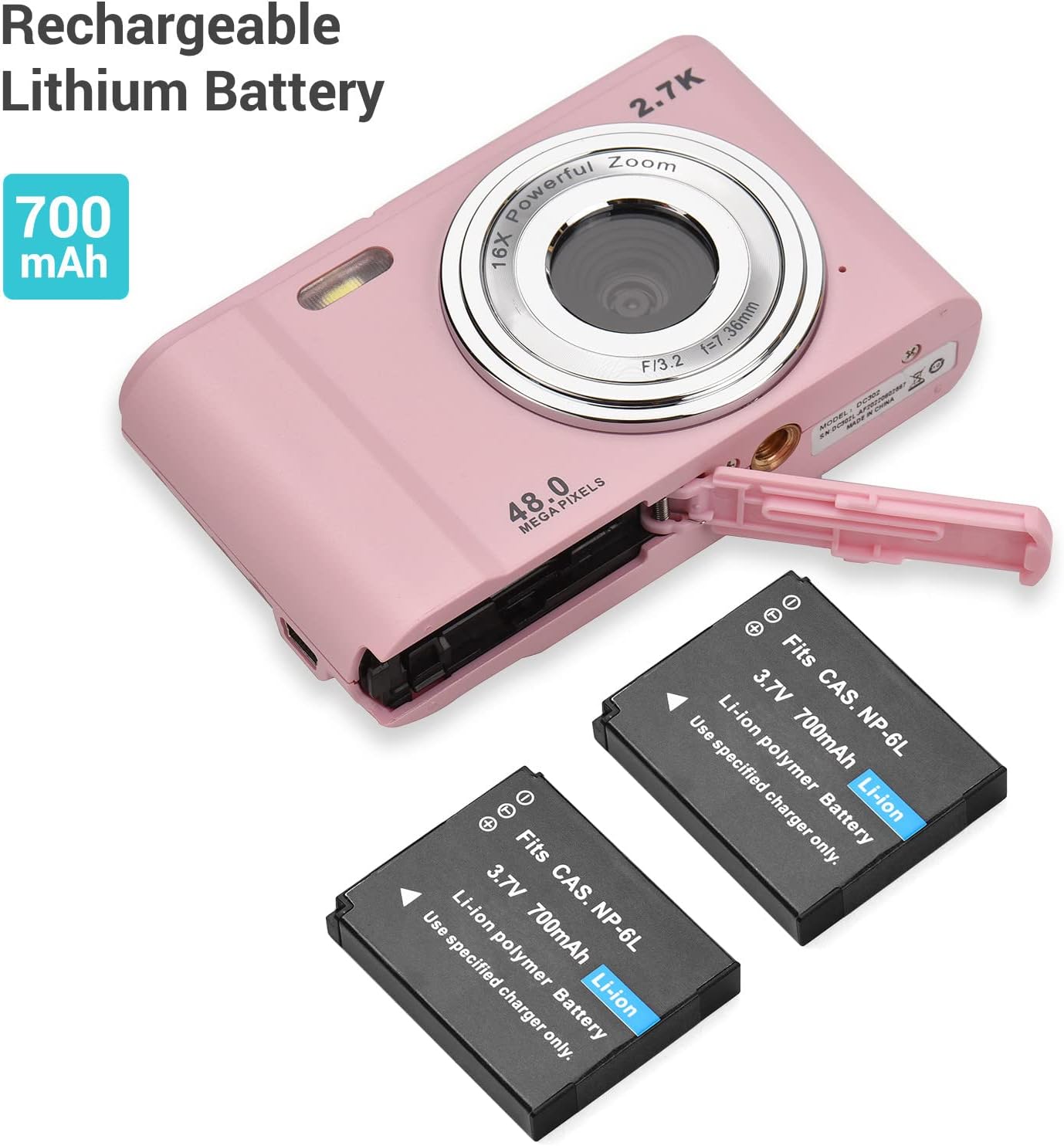
Rysunek 3: Instalacja baterii
This image shows the Andoer Digital Camera with its battery compartment open, revealing the slot for the rechargeable lithium battery. Two 700mAh Li-ion batteries are displayed next to the camera, illustrating the power source and its capacity.
2. Instalacja karty pamięci
The camera supports SD memory cards and MMC cards from 4GB to 128GB. A memory card is required to save photos and videos.
- Locate the memory card slot, usually next to the battery compartment or on the side of the camera.
- Insert the SD/MMC card into the slot with the metal contacts facing the correct direction (refer to the diagram near the slot). Push until it clicks into place.
- To remove the card, gently push it in again until it clicks, and it will spring out.
Figure 4: Memory Card and Accessories
This image highlights the camera's accessories, specifically a 32GB SD memory card and two rechargeable batteries, indicating their importance for camera operation and storage.
Instrukcja obsługi
1. Włączanie/wyłączanie zasilania
- Aby włączyć urządzenie, naciśnij i przytrzymaj przycisk zasilania.
- To power off, press and hold the Power button again. The camera also features an auto-off function (1min/3min/5min/No Shutdown) to conserve battery.
2. Robienie zdjęć
- Włącz kamerę.
- Skadruj ujęcie korzystając z 2.88-calowego ekranu IPS.
- Press the Shutter button halfway down to allow the camera to auto-focus.
- Aby zrobić zdjęcie, naciśnij przycisk migawki do końca.
3. Nagrywanie filmów
- Switch to video mode (if applicable, usually a dedicated button or menu option).
- Press the Shutter button to start recording. A timer will appear on the screen.
- Naciśnij ponownie przycisk migawki, aby zatrzymać nagrywanie.

Figure 5: Photo and Video Capabilities
This image illustrates the camera's dual capabilities: 2.7K video recording and 48-megapixel still photography. It shows a person skiing (representing video) and a woman posing (representing photos), with the camera positioned below, emphasizing its versatility.
4. Funkcja powiększania
Use the W (Wide) and T (Telephoto) buttons, typically located near the top right of the camera, to adjust the 16X digital zoom.
- Naciskać T to zoom in (telephoto).
- Naciskać W to zoom out (wide-angle).

Figure 6: 16X Powerful Zoom
This image demonstrates the camera's 16X powerful digital zoom capability. It shows a close-up shot of an insect on a leaf, contrasted with a wider view of the same scene as seen on the camera's screen, highlighting the zoom's effectiveness.
5. Samowyzwalacz
The camera offers 2s, 5s, and 10s self-timer options for delayed shooting.
- Access the self-timer setting through the camera's menu.
- Select your desired delay (2s, 5s, or 10s).
- Press the Shutter button. The camera will count down before taking the photo.
6. Smart Detection (Face Detection & Smile Capture)
The camera can automatically detect faces and capture photos when a smile is detected.
- Enable Face Detection and Smile Capture in the camera settings.
- When enabled, the camera will automatically focus on faces and trigger the shutter when a smile is detected, ensuring well-composed and joyful portraits.

Rysunek 7: Funkcje inteligentnego wykrywania
This image illustrates the camera's "Smart Detection" capabilities, specifically Face Detection and Smile Capture. The camera's screen displays a family photo, and icons below represent these intelligent features, indicating the camera's ability to automatically optimize shots for portraits.
7. Podłączanie do komputera
You can transfer photos and videos to your computer using the provided USB cable.
- Upewnij się, że kamera jest włączona.
- Podłącz jeden koniec kabla USB do portu USB aparatu, a drugi koniec do komputera.
- The camera will appear as a removable disk drive on your computer. You can then access and transfer your files.
Konserwacja
Proper care and maintenance will extend the life of your Andoer Digital Camera.
- Czyszczenie obiektywu i ekranu: Use a soft, lint-free cloth specifically designed for optics. Do not use abrasive cleaners or solvents.
- Składowanie: Jeśli aparat nie będzie używany przez dłuższy czas, należy wyjąć baterię i przechowywać go w chłodnym, suchym miejscu, z dala od bezpośredniego światła słonecznego i ekstremalnych temperatur.
- Woda i kurz: This camera is not waterproof or dustproof. Avoid exposure to water, high humidity, and dusty environments.
- Pielęgnacja baterii: Fully charge batteries before first use. Do not expose batteries to high temperatures or dispose of them in fire. Recycle used batteries according to local regulations.
Rozwiązywanie problemów
Jeśli masz problemy z aparatem, zapoznaj się z poniższymi, często występującymi problemami i ich rozwiązaniami:
| Problem | Możliwa przyczyna | Rozwiązanie |
|---|---|---|
| Kamera się nie włącza. | Bateria jest rozładowana lub nieprawidłowo włożona. | Sprawdź, czy akumulator jest całkowicie naładowany i włożony z zachowaniem prawidłowej biegunowości. |
| Nie można robić zdjęć/kręcić filmów. | Karta pamięci jest pełna, nie została włożona lub jest uszkodzona. | Włóż kartę pamięci, usuń niepotrzebne files lub sformatuj kartę (spowoduje to usunięcie wszystkich danych). |
| Obrazy są niewyraźne. | Obiektyw jest brudny, światło jest niewystarczające lub aparat się trzęsie. | Clean the lens, use flash if needed, or enable anti-shaking function. Hold the camera steady. |
| Kamera zawiesza się. | Błąd oprogramowania lub niski poziom naładowania baterii. | Remove and reinsert the battery to reset. Ensure battery is charged. |
| Komputer nie rozpoznaje kamery. | Problem z kablem USB lub sterownikiem. | Try a different USB port or cable. Ensure camera is powered on when connected. |
Specyfikacje
Detailed technical specifications for the Andoer Portable Digital Camera:
| Funkcja | Specyfikacja |
|---|---|
| Wyświetlacz | 2.88 inches IPS LCD screen (4:3) |
| Czujnik obrazu | Czujnik obrazu CMOS 8MP |
| Współczynnik rozdzielczości obrazu | Maks. 48MP |
| Rozmiar filmu | 2688*1520 2.7K, 1920*1080 HD, 1280*720 HD, 640*480 |
| Odległość ogniskowa | f=7.36 mm |
| Otwór | F/3.2 |
| Zoom cyfrowy | 16X |
| Obsługa kart pamięci | SD memory card and MMC card (4GB to 128GB) |
| File Format | JPG, AVI |
| Samowyzwalacz | 2 / 5 / 10 |
| Balans bieli | Auto/ Światło dzienne/ Zachmurzenie/ Fluorescencyjne/ Żarowe |
| Kompensacja ekspozycji | -3.0~+3.0 |
| Port USB | USB 2.0 |
| Automatyczne wyłączanie | 1min/ 3min/ 5min/ No Shutdown |
| Moc | Akumulator litowy 700 mAh |
| Wymagania dotyczące systemu operacyjnego | Compatible with Windows XP/ Vista/ 7/ 8/ 10; Mac10.2 (Include and later) |
| Wymiary | 9.6 * 5.6 * 2.5 cm / 3.78 * 2.2 * 0.98 cala |
| Masa netto | 93g / 3.28oz (with Battery) |
| Montowanie | 1/4 inch thread at the bottom for tripod/monopod |
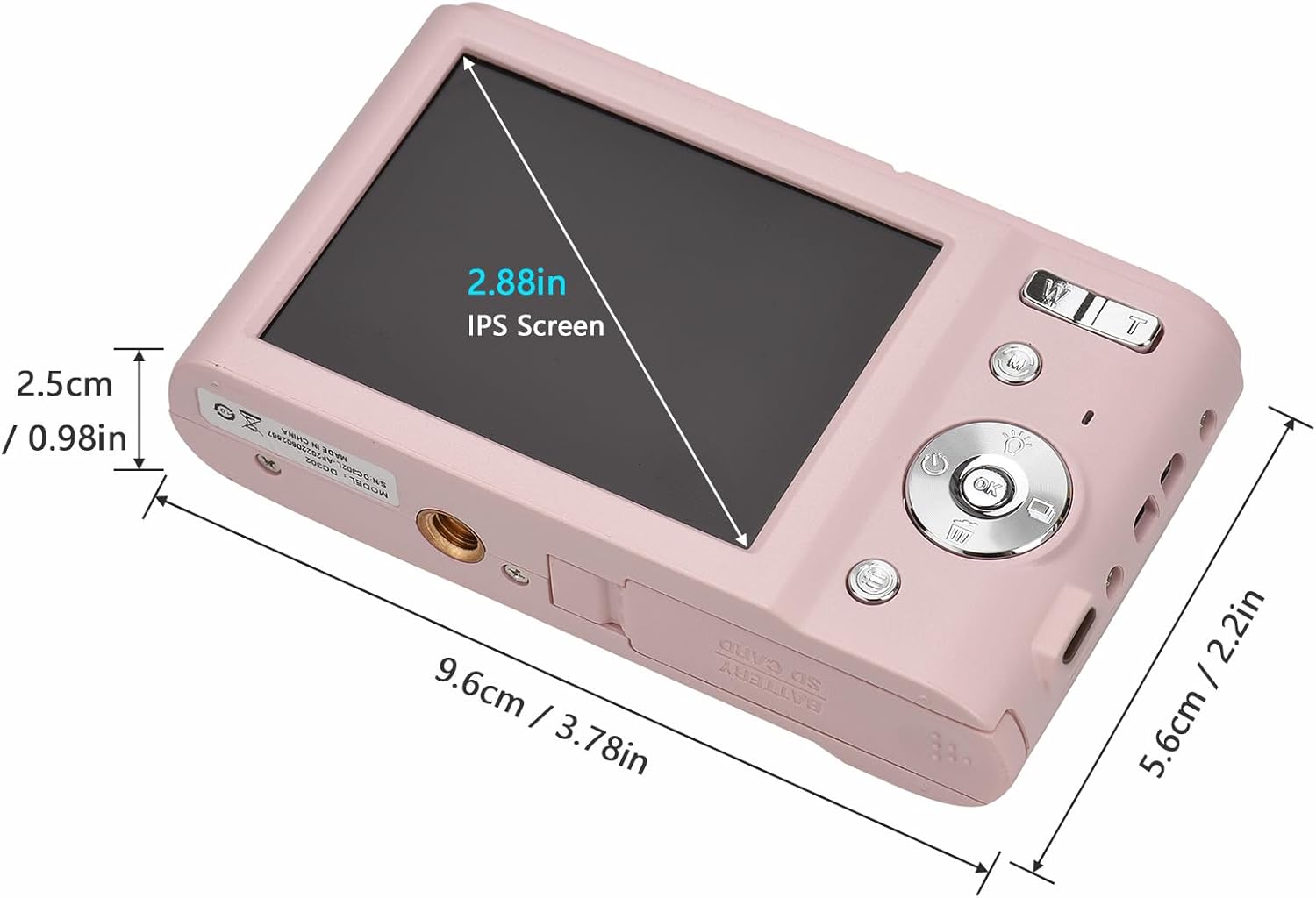
Rysunek 8: Wymiary produktu
Na tym obrazie przedstawiono szczegółowo view of the Andoer Digital Camera's dimensions, including its length (9.6cm / 3.78in), width (5.6cm / 2.2in), and thickness (2.5cm / 0.98in). It also highlights the 2.88-inch IPS screen, offering a clear understanding of the camera's compact size.

Figure 9: Universal 1/4 Thread Mounting
This image illustrates the camera's universal 1/4 inch thread mounting point located at its bottom, allowing it to be easily attached to tripods or monopods for stable shooting. The camera is shown mounted on a small tripod, with a close-up inset of the mounting screw hole.
Wsparcie
For further assistance, technical support, or warranty information, please visit the official Andoer store or contact customer service.
Official Andoer Store: Sklep Andoer na Amazon


