
1. Wprowadzenie
The ciciglow DC 0-60V Digital Power Meter (100A) is a versatile device designed for measuring voltage, current, power, and other electrical parameters in various DC systems. It features a large, easy-to-read display with adjustable backlight settings and a simple interface for switching between different statistical functions. This meter is suitable for applications in solar energy systems, industrial assembly lines, and automotive environments.

Image 1.1: The ciciglow DC Power Meter demonstrating its wide range of applications in solar energy, recreational vehicles, and industrial settings.
2. Informacje dotyczące bezpieczeństwa
Przed użyciem tego urządzenia należy przeczytać i zrozumieć wszystkie instrukcje bezpieczeństwa. Nieprzestrzeganie tych instrukcji może spowodować porażenie prądem, pożar lub uszkodzenie produktu.
- Upewnij się, że głośność wejściowatage and current do not exceed the specified limits of 0-60V DC and 100A.
- Nie próbuj demontować ani modyfikować urządzenia.
- Trzymaj urządzenie z dala od wody, wilgoci i ekstremalnych temperatur.
- Use appropriate wiring and connectors for the current and voltage levels involved.
- Zawsze odłączaj zasilanie przed wykonywaniem lub rozłączaniem połączeń.
3. Zawartość opakowania
Sprawdź, czy w opakowaniu znajdują się wszystkie elementy:
- 1 x ciciglow DC Digital Power Meter (100A)
- 1 x Instrukcja obsługi w języku angielskim
4. Konfiguracja i połączenie
The power meter is designed for inline measurement. Connect it according to the following instructions:
- Identify the 'IN' and 'OUT' terminals on the meter. The 'IN' side connects to the power source (e.g., battery, solar panel output). The 'OUT' side connects to the load (e.g., inverter, device being powered).
- Connect the positive (+) wire from your power source to the red 'IN' wire of the meter.
- Connect the negative (-) wire from your power source to the black 'IN' wire of the meter.
- Connect the red 'OUT' wire of the meter to the positive (+) input of your load.
- Connect the black 'OUT' wire of the meter to the negative (-) input of your load.
- Sprawdź, czy wszystkie połączenia są solidne i właściwie zaizolowane.

Obraz 4.1: Pod kątem view of the ciciglow DC Power Meter, illustrating the 'IN' and 'OUT' connection points for power source and load.
5. Instrukcja obsługi
Once connected and power is applied, the meter will automatically display real-time measurements.
5.1 Funkcje wyświetlacza
The large screen displays voltage (V), current (A), and power (W). The lower right section of the display shows additional statistical data.
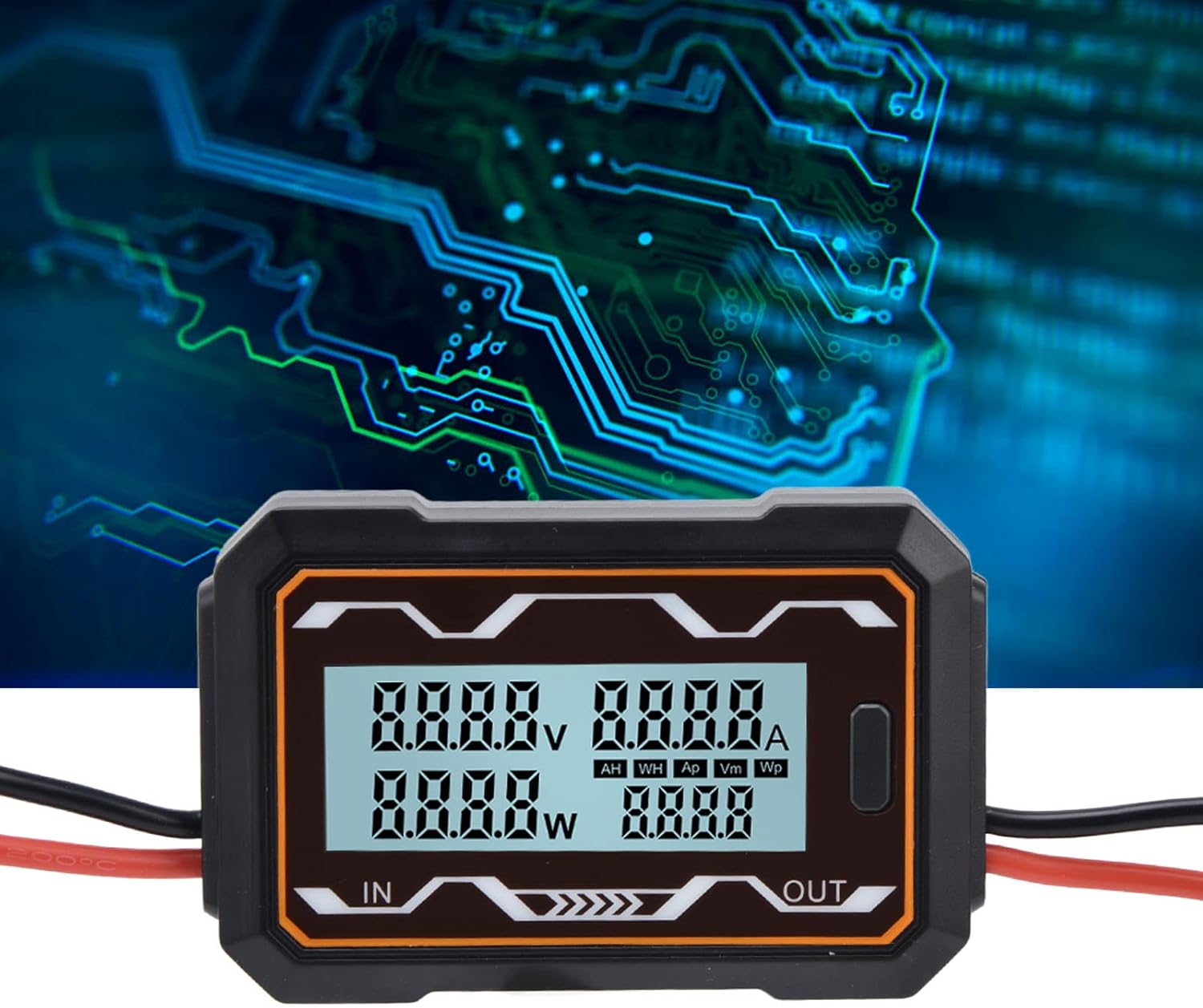
Obraz 5.1: Zbliżenie view of the meter's digital display, highlighting the readouts for voltage, current, power, and the statistical data section.
5.2 Switching Statistical Data
A button located on the side of the meter allows you to cycle through different statistical measurements in the lower right display area. Press the button to switch between the following categories:
- AH: Ampere-hours (accumulated charge)
- WH: Watt-hours (accumulated energy)
- Ap: Szczyt Amps (maximum current recorded)
- Vm: Minimum Volts (minimum voltage recorded)
- Wp: Peak Watts (maximum power recorded)

Obraz 5.2: Pod kątem view of the ciciglow DC Power Meter, clearly showing the function button used to cycle through display modes.
5.3 Ustawienia podświetlenia
The meter's backlight can be configured. Settings for the backlight are saved even when the power is turned off, ensuring your preferences are retained.
6. Konserwacja
To ensure the longevity and accurate operation of your ciciglow DC Power Meter, follow these maintenance guidelines:
- Czyszczenie: Do czyszczenia urządzenia należy używać miękkiej, suchej ściereczki. Nie należy używać środków czyszczących o właściwościach ściernych ani rozpuszczalników.
- Składowanie: Przechowuj miernik w chłodnym, suchym miejscu, z dala od bezpośredniego światła słonecznego i ekstremalnych temperatur, gdy nie jest używany.
- Kontrola: Periodically check the wiring and connections for any signs of wear, corrosion, or damage.
7. Rozwiązywanie Problemów
If you encounter issues with your ciciglow DC Power Meter, refer to the following common troubleshooting steps:
- Brak wyświetlacza: Check all power connections to ensure they are secure and that the power source is active and within the specified voltagZakres (0-60V DC).
- Nieprawidłowe odczyty: Verify that the meter is connected correctly (IN to source, OUT to load) and that the wires are properly seated. Ensure the load is drawing current for accurate current and power readings.
- Przycisk nie reaguje: Ensure the device is powered on. If the button still does not respond, try disconnecting and reconnecting power.
- Odczyty przerywane: Check for loose connections or damaged wiring. Ensure the operating environment is stable and free from excessive electrical noise.
Jeśli problemy będą się powtarzać, skontaktuj się z obsługą klienta.
8. Specyfikacje
| Funkcja | Specyfikacja |
|---|---|
| Marka | ciciglow |
| Model | 100A |
| Wejście Voltage Zakres | 0-60 V DC |
| Zakres prądu | 100 A |
| Tworzywo | ABS |
| Waga produktu | Około 92 gramów |
| Wymiary produktu | Około 9.3 x 6 x 2 cm (3.7 x 2.4 x 0.8 cala) |
| Źródło zasilania | Solar (Self-powered from DC circuit) |
| Typ pomiaru | Multimeter (Voltage, Current, Power, Energy, Charge) |
| Operating Temperature (Upper) | 85 stopni Celsjusza |
| Zgodność | IEC 61010-1 |

Image 8.1: The ciciglow DC Power Meter with its approximate dimensions labeled for reference.

Obraz 8.2: Tył view of the ciciglow DC Power Meter, displaying the voltage and current range specifications.
9. Gwarancja i wsparcie
Specific warranty information for this product is not provided in this manual. For details regarding warranty coverage, technical support, or service, please refer to the product packaging, the seller's website, or contact ciciglow customer service directly.
You can visit the ciciglow store for more information: ciciglow Store