
1. Wprowadzenie
Thank you for choosing the Addtam Wall Outlet Extender with Shelf. This multi-functional device is designed to expand your power options, providing 12 AC outlets, 2 USB-A ports, and 1 USB-C port, along with a convenient removable shelf. It features built-in surge protection to safeguard your electronic devices. This manual provides essential information for the safe and efficient use of your new outlet extender.
2. Funkcje produktu
- Multi-Plug Outlet Extender: Equipped with 12 AC outlets (15A/125V/1875W) for simultaneous charging of multiple devices.
- Porty ładowania USB: Includes 1 USB-C port (3A Max) and 2 USB-A ports (2.4A Max), with a total output of DC 5V/3.1A, compatible with most USB devices.
- Space-Saving Removable Shelf: A 6.3 x 4.8 inch shelf provides extra space for small items like phones, razors, or speakers, and can be easily removed.
- Zwiększona stabilność: Designed with a mounting screw and a plastic stability prong for secure attachment to duplex wall outlets.
- Superior Safety & Surge Protection: Features 3 complementary surge protection circuits (TVS MOV GDT) with 490 Joules energy absorption, along with overload, short-circuit, over-current, over-voltage, oraz zabezpieczenie przed przegrzaniem.

Obraz 1: Przód view of the Addtam Wall Outlet Extender with the removable shelf, showing a device charging on top and cables plugged into the side outlets.

Image 2: Diagram illustrating the dimensions of the removable shelf (6.3 x 4.8 inches) and highlighting the 1 USB-C port, 2 USB-A ports, and 12 AC outlets.

Image 3: Illustration demonstrating the USB charging capabilities, showing devices like a phone, tablet, and earbuds connected to the USB-A and USB-C ports.
3. Zawartość opakowania
Po rozpakowaniu należy sprawdzić zawartość opakowania, aby upewnić się, że znajdują się w nim wszystkie elementy:
- 1 x Addtam Wall Outlet Extender
- 1 x wyjmowana półka
- 1 x wkręt mocujący
4. Konfiguracja i instalacja
Follow these steps to properly install your Addtam Wall Outlet Extender:
- Przygotuj wylot: Ensure the wall outlet you intend to use is a standard duplex outlet and is free from obstructions.
- Attach the Shelf (Optional): If you wish to use the removable shelf, slide it into the designated slots on the top of the outlet extender until it clicks securely into place. The shelf is designed to be stable and can hold small items.
- Włączać do kontaktu: Align the prongs of the outlet extender with the top receptacle of your duplex wall outlet. Gently push the extender firmly into the outlet until it is flush with the wall.
- Zabezpiecz śrubą: For enhanced stability, use the provided mounting screw to secure the extender to the wall outlet's center screw hole. Turn the screw clockwise until it is snug. Do not overtighten.
- Stability Rod: The extender also features a plastic prong at the back for additional stability. If this prong interferes with installation on certain outlets, it can be carefully cut off.
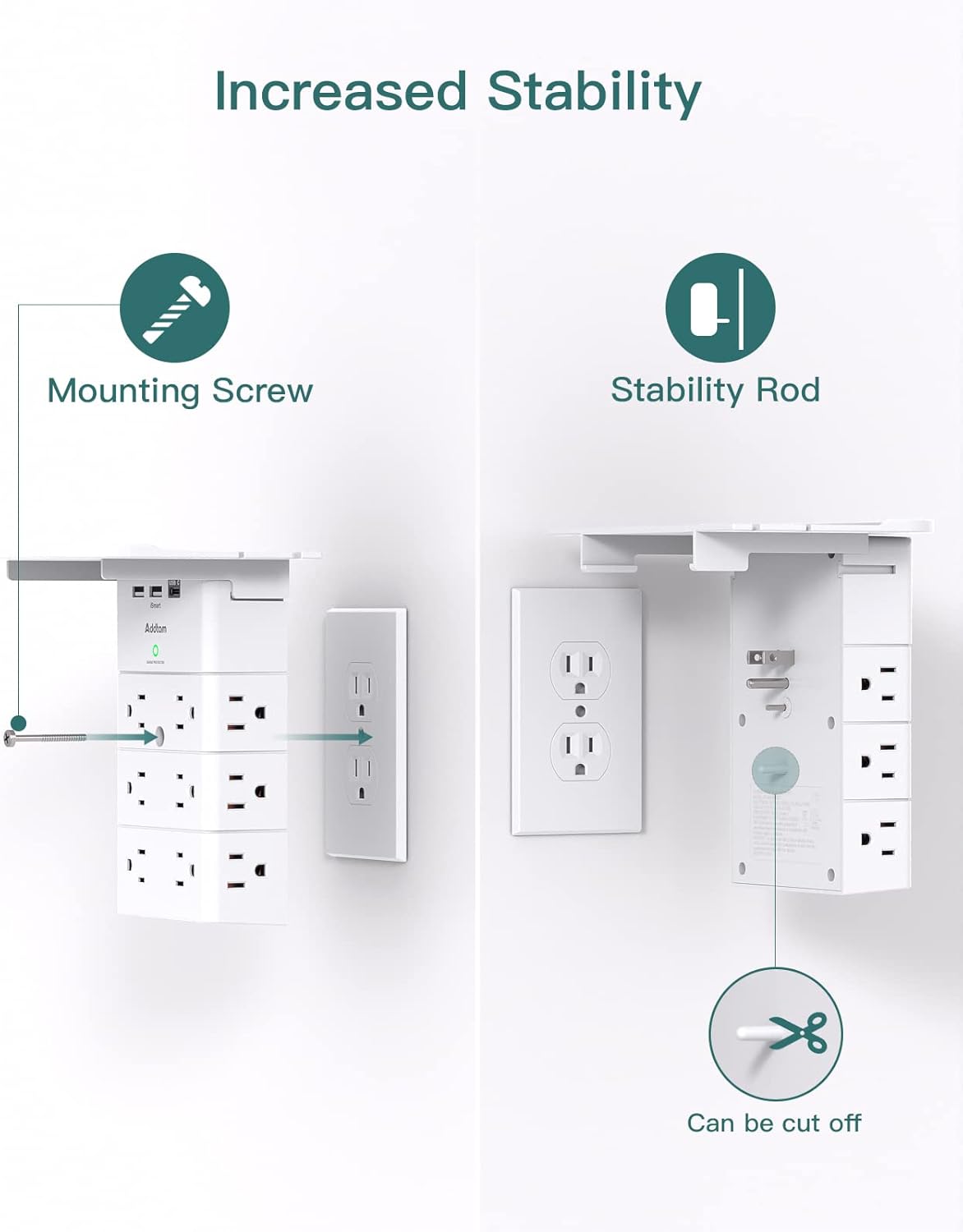
Image 4: Visual guide for installation, showing how to plug the extender into a wall outlet and secure it using the mounting screw and the optional stability rod.
5. Instrukcja obsługi
Once installed, your Addtam Wall Outlet Extender is ready for use:
- Gniazdka AC: Plug your AC-powered devices into any of the 12 available three-prong outlets. These outlets are distributed on the front and sides of the unit for convenient access.
- Ładowanie przez USB: Connect your USB-powered devices (smartphones, tablets, smartwatches, etc.) to the USB-A or USB-C ports located on the top of the unit. The intelligent charging technology will deliver the optimal current for your device.
- Wskaźnik ochrony przeciwprzepięciowej: A "SURGE PROTECTED" indicator light (typically green) on the front of the unit will illuminate when the surge protection feature is active and functioning correctly. If this light is off, the surge protection may have been compromised, and the unit should be replaced.

Image 5: The outlet extender in use, showing the "SURGE PROTECTED" indicator light and a phone charging on the shelf.
6. Informacje dotyczące bezpieczeństwa
To ensure safe operation and prevent damage to the unit or connected devices, please observe the following safety precautions:
- Tylko do użytku wewnątrz pomieszczeń: This product is designed for indoor use in dry locations. Do not use it outdoors or in wet environments.
- Unikaj przeciążania: Do not exceed the maximum power rating of 1875W (15A/125V). Overloading can cause overheating and fire hazards.
- Prawidłowe uziemienie: Ensure the wall outlet is properly grounded. Do not use with ungrounded outlets or adapters.
- Trzymać z dala od wody: Nie wystawiaj urządzenia na działanie wody lub innych płynów.
- Dzieci i zwierzęta: Przechowywać w miejscu niedostępnym dla dzieci i zwierząt domowych.
- Wentylacja: Nie blokuj otworów wentylacyjnych urządzenia.
- Szkoda: Do not use if the unit or its cord is damaged. Contact customer support for assistance.
- Demontaż: Do not attempt to disassemble or modify the unit. This will void the warranty and may pose a safety risk.
7. Konserwacja
The Addtam Wall Outlet Extender requires minimal maintenance:
- Czyszczenie: Disconnect the unit from the wall outlet before cleaning. Use a soft, dry cloth to wipe the surface. Do not use liquid cleaners or abrasive chemicals.
- Składowanie: Jeśli urządzenie będzie przechowywane przez dłuższy czas, należy odłączyć je od źródła zasilania i przechowywać w chłodnym, suchym miejscu.
8. Rozwiązywanie Problemów
If you encounter issues with your Addtam Wall Outlet Extender, refer to the following common problems and solutions:
9. Specyfikacje
10. Gwarancja i wsparcie
Addtam is committed to providing high-quality products. For specific warranty details, please refer to the warranty card included with your product packaging or visit the official Addtam website. If you have any questions, require technical assistance, or need to report an issue, please contact Addtam customer support.
Informacje kontaktowe: Please refer to the contact details provided on the product packaging or the official Addtam webwitryna zawierająca najbardziej aktualne informacje dotyczące pomocy technicznej.