
Wstęp
This manual provides detailed instructions for the setup, operation, and maintenance of your Amazon Basics Projection Alarm Clock. Please read this manual thoroughly before using the product to ensure proper function and to prevent damage.

Image: The Amazon Basics Projection Alarm Clock, showing its digital display and projection lens.
Instrukcje bezpieczeństwa
- Nie wystawiaj urządzenia na działanie ekstremalnych temperatur, bezpośredniego światła słonecznego, kurzu lub wilgoci.
- Upewnij się, że zasilacz jest kompatybilny z lokalną siecią energetyczną.
- Trzymaj urządzenie z dala od wody i innych płynów.
- Nie należy podejmować prób demontażu ani modyfikacji urządzenia. Spowoduje to unieważnienie gwarancji.
- Czyść urządzenie wyłącznie miękką, suchą ściereczką. Nie używaj płynnych środków czyszczących.
- Baterie należy utylizować zgodnie z lokalnymi przepisami.
Zawartość opakowania
- Amazon Basics Projection Alarm Clock
- Zasilacz sieciowy
- Instrukcja obsługi
Cechy produktu
- Projection of time onto a wall or ceiling.
- FM Radio with automatic/manual scan and up to 15 preset stations.
- USB port for charging mobile phones or tablets.
- 7-inch high-definition LED display with adjustable brightness.
- Dual alarms for separate wake-up times.
- Snooze function with adjustable duration (2 to 60 minutes).
- Sleep timer for automatic radio shut-off (5 to 90 minutes).
- DST button for Daylight Saving Time adjustment.
- Battery backup (requires 2 AAA batteries, not included) to maintain time settings during power outagt.j.

Obraz: Ponadview of key features including sleep timer, radio presets, and snooze function.
Sterowanie i wyświetlacz
Familiarize yourself with the buttons and ports on your alarm clock for optimal use.

Obraz: Bok view illustrating the location of controls, USB charging port, and projection lens.
- Przycisk ustawiania czasu: Służy do ustawiania aktualnego czasu.
- Przyciski alarmu 1/2: Służy do ustawiania i aktywowania Alarmu 1 i Alarmu 2.
- Przycisk drzemki/ściemniania: Activates snooze during an alarm; adjusts display brightness when not alarming.
- Radio/Sleep Button: Turns FM radio on/off; sets sleep timer.
- Volume/Tune Dial: Adjusts radio volume and tunes FM frequencies.
- Projection On/Off/Flip Button: Controls the projection feature and flips the projected time.
- Projection Focus Wheel: Dostosowuje przejrzystość wyświetlanego czasu.
- Projection Angle Adjuster: Changes the angle of the projected time.
- Port ładowania USB: Do ładowania urządzeń zewnętrznych.
- Przycisk DST: Toggles Daylight Saving Time.
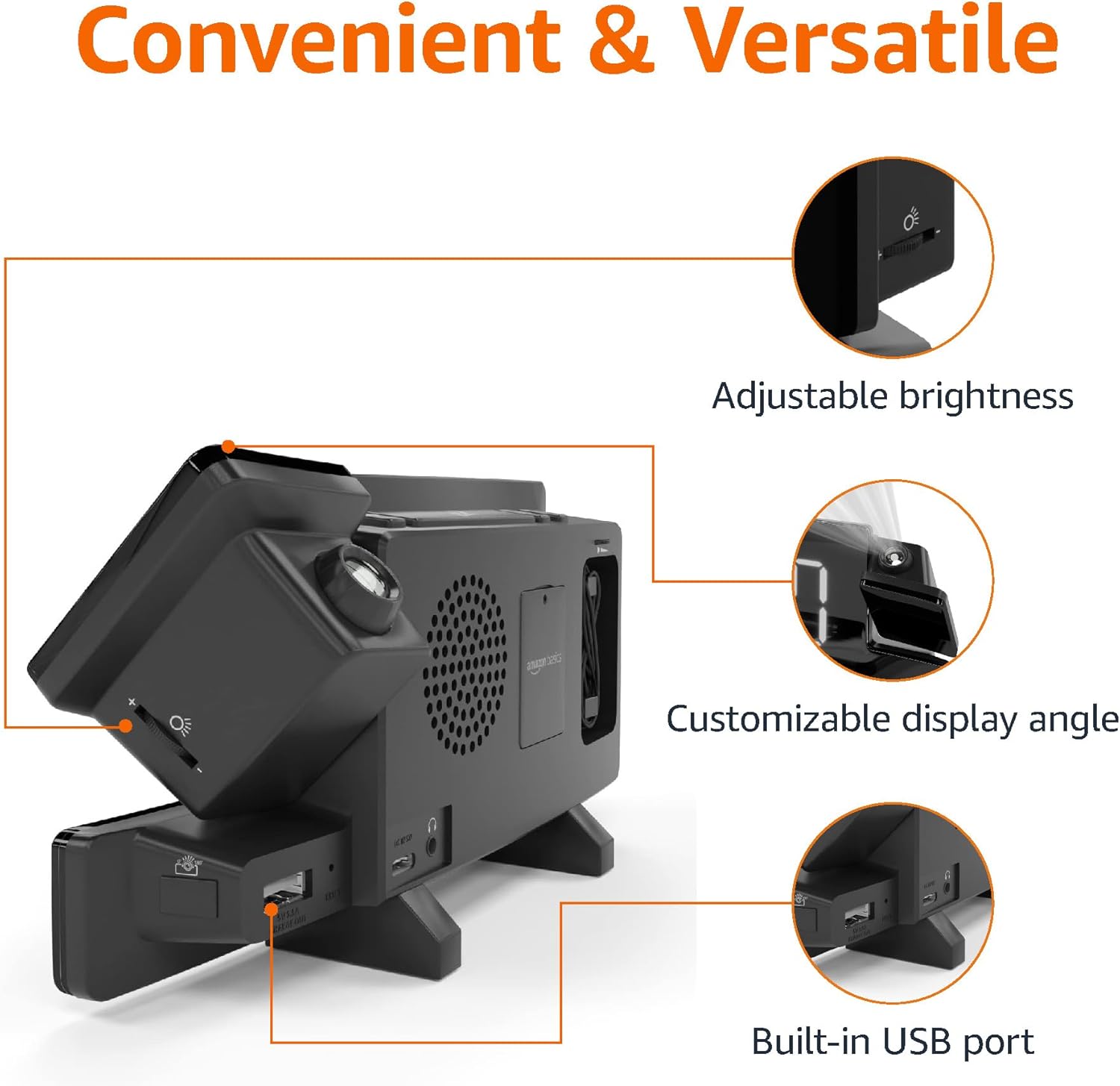
Image: Diagram highlighting the adjustable brightness, customizable projection angle, and USB charging port.
Organizować coś
1. Podłączenie zasilania
Connect the AC power adapter to the DC IN port on the back of the alarm clock and plug it into a standard wall outlet. The display will light up.
2. Instalacja baterii zapasowej
For battery backup, open the battery compartment on the bottom of the unit. Insert 2 AAA batteries (not included), ensuring correct polarity (+/-). Close the compartment. The battery backup maintains time settings during power outages but does not power the display or alarm functions.
3. Ustawienie czasu początkowego
- Naciśnij i przytrzymaj Ustawiono czas przycisk. Cyfry godziny zaczną migać.
- Użyj Volume/Tune Dial aby ustawić godzinę. naciśnij Ustawiono czas jeszcze raz, aby potwierdzić.
- The minute digits will flash. Use the Volume/Tune Dial ustawić minuty. naciśnij Ustawiono czas jeszcze raz, aby potwierdzić.
- The time format (12H/24H) will flash. Use the Volume/Tune Dial to select your preferred format. Press Ustawiono czas aby potwierdzić i wyjść z trybu ustawiania czasu.
4. Czas letni (DST)
Naciśnij Czas letni button to toggle Daylight Saving Time on or off. The DST indicator will appear or disappear on the display.
Instrukcja obsługi
1. Ustawianie alarmów (Alarm 1 i Alarm 2)
- Naciśnij i przytrzymaj Budzik 1 or Budzik 2 przycisk. Cyfry godziny alarmu zaczną migać.
- Użyj Volume/Tune Dial to adjust the alarm hour. Press the respective Alarm Naciśnij przycisk ponownie, aby potwierdzić.
- The alarm minute digits will flash. Use the Volume/Tune Dial to adjust the alarm minutes. Press the respective Alarm Naciśnij przycisk ponownie, aby potwierdzić.
- The alarm source (FM radio or buzzer) will flash. Use the Volume/Tune Dial to select your preference. Press the respective Alarm button to confirm and activate the alarm. An alarm icon will appear on the display.
- To deactivate an alarm, press the respective Alarm Naciśnij przycisk raz. Ikona alarmu zniknie.
2. Using Snooze
Gdy zabrzmi alarm, naciśnij przycisk Drzemka/Ściemniacz button to temporarily silence the alarm. The alarm will sound again after the set snooze duration. The default snooze duration is 9 minutes. To adjust the snooze duration, press and hold the Drzemka/Ściemniacz przycisk, a następnie użyj Volume/Tune Dial to select a duration between 2 and 60 minutes. Press Drzemka/Ściemniacz jeszcze raz, aby potwierdzić.
3. Obsługa radia FM
- Włącz/Wyłącz: Naciśnij Radio/Sleep przycisk do włączania i wyłączania radia FM.
- Stacje dostrajające: Użyj Volume/Tune Dial to manually tune to a desired FM frequency.
- Automatyczne skanowanie: Naciśnij i przytrzymaj Radio/Sleep button to automatically scan and save available FM stations as presets.
- Wybierz ustawienia wstępne: Once stations are saved, short press the Radio/Sleep button to cycle through the preset stations.
- Dostosuj głośność: Obróć Volume/Tune Dial aby dostosować głośność radia.
4. Wyłącznik czasowy
Podczas odtwarzania radia FM naciśnij przycisk Radio/Sleep button repeatedly to set the sleep timer. Options typically range from 5 to 90 minutes. The radio will automatically turn off after the selected duration.
5. Funkcja projekcji

Image: The alarm clock projecting the time onto a bedroom ceiling.
- Aktywuj/Dezaktywuj: Naciśnij Projection On/Off/Flip przycisk umożliwiający włączenie lub wyłączenie projekcji czasu.
- Dostosuj kąt: Manually adjust the projection arm to direct the time onto your desired surface (wall or ceiling).
- Centrum: Obróć Projection Focus Wheel to achieve a clear image.
- Flip Display: Naciśnij Projection On/Off/Flip button repeatedly to rotate the projected time 180 degrees, ensuring correct orientation.

Image: The alarm clock on a nightstand, projecting the time onto a wall, demonstrating its use in a bedroom setting.
6. Ładowanie przez USB
Connect your mobile phone or tablet's USB charging cable to the Port ładowania USB on the back of the alarm clock. The device will begin charging. This port is for charging only and does not support data transfer.
7. Regulacja jasności wyświetlacza
Naciśnij Drzemka/Ściemniacz button (when no alarm is sounding) to cycle through different brightness levels for the main LED display.
Konserwacja
1. Czyszczenie
Wipe the unit with a soft, dry, lint-free cloth. Do not use abrasive cleaners, waxes, or solvents as they may damage the surface.
2. Wymiana baterii
If the battery backup is not functioning correctly (e.g., time resets after a power outage), replace the 2 AAA batteries in the battery compartment, ensuring correct polarity.
Rozwiązywanie problemów
| Problem | Możliwa przyczyna | Rozwiązanie |
|---|---|---|
| Wyświetlacz jest pusty. | Brak podłączenia zasilania. | Sprawdź, czy zasilacz sieciowy jest prawidłowo podłączony do urządzenia i do sprawnego gniazdka ściennego. |
| Alarm nie włącza się. | Alarm nie jest włączony lub głośność jest zbyt niska. | Check if the alarm icon is visible on the display. Re-set the alarm if necessary. Increase radio volume if FM is selected as alarm source. |
| Przewidywany czas jest niewyraźny. | Projection focus is not adjusted. | Obróć Projection Focus Wheel aż obraz będzie wyraźny. |
| Przewidywany czas nie jest widoczny. | Projection is off or room is too bright. | Naciśnij Projection On/Off/Flip button to activate. The projection is best viewed in a dark room. |
| Odbiór radia jest słaby. | Antenna position or interference. | Adjust the position of the FM antenna wire. Move the unit away from other electronic devices that may cause interference. |
| Ładowanie przez USB nie działa. | Problem z kablem lub niezgodność urządzenia. | Ensure the USB cable is functional and properly connected. Try a different cable or device. |
Specyfikacje
- Model: MET8831-USA
- Pobór mocy: Zasilacz sieciowy (w zestawie)
- Zapas baterii: 2 baterie AAA (brak w zestawie)
- Wyświetlacz: 7-calowa dioda LED
- Częstotliwość radiowa: FM
- Wyjście USB: 5V, 1A (for charging)
- Wymiary (dł. x szer. x wys.): 7.1 x 1.6 x 3.7 cala (18.03 x 4.06 x 9.4 cm)
- Waga: Około 0.59 funta (267.62 g)

Image: Product dimensions for the Amazon Basics Projection Alarm Clock.
Informacje o gwarancji
This product is covered by the Amazon Basics warranty. For detailed information regarding warranty terms and conditions, please refer to the official Amazon Basics webodwiedź witrynę lub skontaktuj się z działem obsługi klienta.
Obsługa klienta
For further assistance, troubleshooting, or product inquiries, please contact Amazon Basics customer support through the Amazon website or your purchase platform. Have your product model number (MET8831-US) and purchase details ready.