
Maxxima MEW-DM680
Maxxima Digital Dimmer Wall Light Switch User Manual
Model: MEW-DM680
1. Wprowadzenie
Produkt ponadview
The Maxxima 3-Way/Single Pole Digital Dimmer Wall Light Switch is designed to provide versatile lighting control for your home or commercial space. It features a button-controlled dimmer with green LED indicator lights to display brightness levels. This switch is compatible with incandescent, halogen, and dimmable LED/CFL bulbs, offering a flexible solution for various lighting needs.
- Wszechstronna kompatybilność: Supports both 3-way and single-pole wiring configurations.
- Wskaźniki jasności: Green LED lights clearly show the current dimming level.
- Duża pojemność: Handles up to 600W for incandescent/halogen and 150W for dimmable LED/CFL.
- Przewód neutralny nie jest wymagany: Simplifies installation in many existing setups.
- Precyzyjna kontrola: Independent on/off button and dedicated dimming buttons for fine-tuning light levels.
- Regulowana czułość: Trim buttons allow for fine-tuning compatibility with various LED lamps.
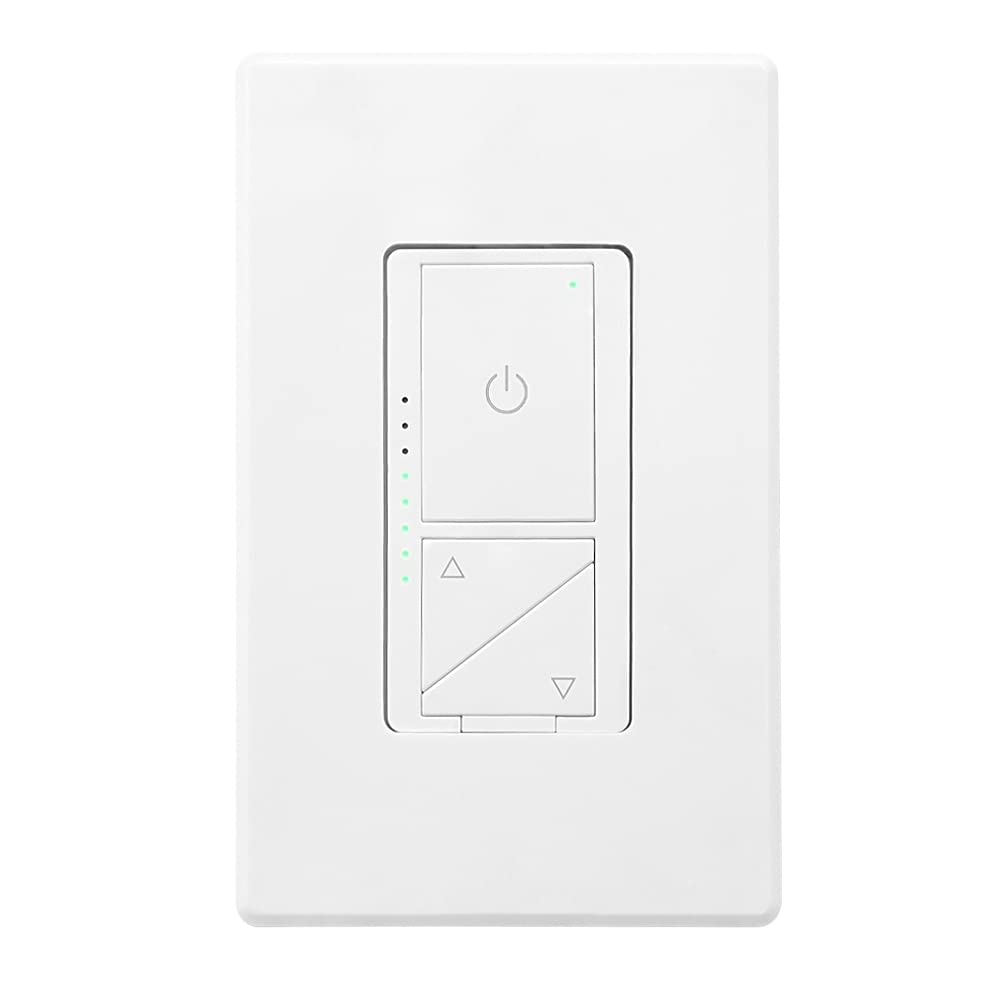
Rycina 1: Przód view of the Maxxima Digital Dimmer Wall Light Switch.
2. Konfiguracja i instalacja
Zanim zaczniesz
OSTRZEŻENIE: To avoid fire, shock, or death, turn off power at the circuit breaker or fuse box and test that the power is off before wiring. Installation should be performed by a qualified electrician or a person with a thorough understanding of electrical wiring.
- Ensure the power is OFF at the circuit breaker before beginning installation.
- This dimmer is designed for use with 120VAC, 60Hz.
- Do NOT use with non-dimmable lighting or ceiling fans.
Wymagane narzędzia
- Śrubokręt (krzyżakowy i płaski)
- Ściągacze izolacji
- Taśma izolacyjna
- TomtagTester
Schemat okablowania
The Maxxima Digital Dimmer is compatible with both single-pole and 3-way wiring configurations. Refer to the detailed wiring instructions provided in the official installation manual for specific diagrams. The switch operates at 120VAC and does not require a neutral wire.

Rysunek 2: Tył view of the dimmer switch with wiring details.
Kroki instalacji
- Wyłącz zasilanie: Zlokalizuj wyłącznik sterujący położeniem przełącznika i wyłącz go. Sprawdź, czy zasilanie jest wyłączone za pomocą przełącznika.tagtester.
- Usuń stary przełącznik: Ostrożnie wyjmij istniejącą płytkę ścienną i przełącznik z puszki ściennej. Odłącz przewody.
- Wire the New Dimmer: Connect the wires from the wall box to the dimmer switch according to the wiring diagram in the full manual. Ensure all connections are secure.
- Montaż ściemniacza: Gently push the wired dimmer into the wall box. Secure it with the provided screws.
- Zamontuj płytę ścienną: Snap the screwless wall plate onto the dimmer for a clean finish.
- Przywróć zasilanie: Włącz ponownie zasilanie za pomocą wyłącznika.

Figure 3: Maxxima Digital Dimmer Switch installed on a wall.
3. Działanie
Podstawowe sterowanie
The Maxxima Digital Dimmer features intuitive controls for easy light management:
- Przycisk włączania/wyłączania: The large button with the power symbol (⏻) at the top controls the main power to the lights. Press once to turn lights ON or OFF.
- Przyciski przyciemniania: The two triangular buttons below the power button control the brightness. The top triangle increases brightness, and the bottom triangle decreases brightness.
Figure 4: Controls of the Maxxima Digital Dimmer Switch.
Regulacja jasności
Aby dostosować poziom jasności:
- Ciągłe ściemnianie: Press and hold the up (▲) or down (▼) arrow button to smoothly increase or decrease the light intensity. Release the button when the desired brightness is reached.
- Preset Levels: Short-click the up (▲) or down (▼) arrow button to cycle through preset brightness levels.
- Kontrolki: The green LED lights on the left side of the switch illuminate to indicate the current brightness level. More lights mean brighter illumination.
Regulacja czułości
For optimal performance with various LED lamps, the dimmer includes sensitivity adjustment trim buttons located below the cover plate. These allow you to fine-tune the dimmer's response to prevent flickering or ensure proper dimming range.

Figure 5: Trim buttons for sensitivity adjustment located under the cover plate.
4. Konserwacja
The Maxxima Digital Dimmer Wall Light Switch requires minimal maintenance. Follow these guidelines to ensure its longevity and proper function:
- Czyszczenie: Aby wyczyścić przełącznik i płytkę ścienną, delikatnie przetrzyj miękką szmatką.amp cloth. Do NOT use abrasive cleaners, solvents, or chemical sprays, as these can damage the finish or internal components.
- Kontrola: Periodically inspect the switch for any signs of damage, loose connections, or unusual operation. If any issues are observed, turn off power at the circuit breaker and consult a qualified electrician.
- Brak części nadających się do samodzielnej naprawy przez użytkownika: There are no user-serviceable parts inside the dimmer. Do not attempt to open or repair the unit yourself.
5. Rozwiązywanie Problemów
If you experience issues with your Maxxima Digital Dimmer, refer to the table below for common problems and their solutions.
| Problem | Możliwa przyczyna | Rozwiązanie |
|---|---|---|
| Światła się nie włączają. | No power to the switch; Loose wiring connection; Burnt-out bulb. | Check circuit breaker; Verify wiring connections are secure; Replace bulb. |
| Światła nie przygasają i nie migoczą. | Non-dimmable bulbs; Incompatible LED/CFL bulbs; Sensitivity not adjusted. | Ensure dimmable bulbs are used; Adjust sensitivity using trim buttons (refer to Section 3); Try different brand/type of dimmable LED/CFL. |
| Ściemniacz jest ciepły w dotyku. | Normal operation; Overload. | Slight warmth is normal. If excessively hot, turn off power and check total wattage of connected bulbs. Do not exceed maximum capacity. |
| LED indicator lights are not working. | Błąd wewnętrzny. | Contact Maxxima customer support for assistance. |
If the problem persists after attempting these solutions, please contact Maxxima customer support or a qualified electrician.
6. Specyfikacje
| Specyfikacja | Szczegół |
|---|---|
| Numer modelu | MEW-DM680 |
| Wymiary produktu | 1.74” W x 4.14” L x 1.28” D (4 x 2 x 1 inches) |
| Waga | 5.29 uncji |
| Wejście Voltage | 120VAC, 60Hz |
| Maksymalne obciążenie żarowe/halogenowe | 600 W |
| Maksymalne obciążenie ściemnialnych diod LED/CFL | 150 W |
| Typ okablowania | Jednobiegunowy lub trójdrożny |
| Wymagany przewód neutralny | NIE |
| Tryb działania | Podręcznik |
| Certyfikaty | Wpisany na listę ETL |
| Dołączone akcesoria | Bezśrubowa płyta ścienna |
7. Gwarancja i wsparcie
Informacje o gwarancji
The Maxxima Digital Dimmer Wall Light Switch (Model: MEW-DM680) comes with a 2-letnia gwarancja from the date of purchase. This warranty covers defects in materials and workmanship under normal use. It does not cover damage resulting from improper installation, misuse, abuse, or unauthorized modifications.
Obsługa klienta
For technical assistance, troubleshooting, or warranty claims, please contact Maxxima customer support:
- Webstrona: Visit the official Maxxima webwitryna zawierająca zasoby pomocy technicznej i informacje kontaktowe.
- E-mail: Refer to your product packaging or the Maxxima webwitryna poczty e-mail służącej do obsługi klienta.
- Telefon: Refer to your product packaging or the Maxxima webstrona z numerem telefonu obsługi klienta.
You can also find the official Installation Manual (PDF) for this product Tutaj.
Ask a question about this manual
Ask about setup, troubleshooting, compatibility, parts, safety, or missing instructions. Manuals+ will review the question and use this page’s manual context to help answer it.