
1. Koniec produktuview
The Baseus Metal Gleam Series 8-in-1 USB-C Hub is a versatile docking station designed to expand the connectivity of your USB-C enabled devices. It integrates multiple essential ports, including USB 3.0, HDMI, USB-C Power Delivery (PD), and microSD/SD card readers, into a single compact unit. This hub is ideal for enhancing productivity by connecting various peripherals, external displays, and charging your device simultaneously.

The Baseus Metal Gleam Series 8-in-1 USB-C Hub is presented in its retail box, showcasing the product and its key features on the packaging.
2. Główne cechy
- Łączność 8 w 1: Provides comprehensive port expansion for modern USB-C devices.
- Triple USB 3.0 Ports: Offers high-speed data transfer up to 5Gbps for peripherals like external hard drives, keyboards, and mice.
- Dwa wyjścia HDMI: Supports dual-display ultra-clear expansion, enabling connection to two external monitors for enhanced multitasking.
- Dostarczanie zasilania przez USB-C (PD): Allows for fast charging of your host device with up to 100W power pass-through.
- MicroSD/SD Card Readers: Facilitates quick access to photos and videos from memory cards.
- Kompaktowa i przenośna konstrukcja: Metal gleam series design ensures durability and easy portability.
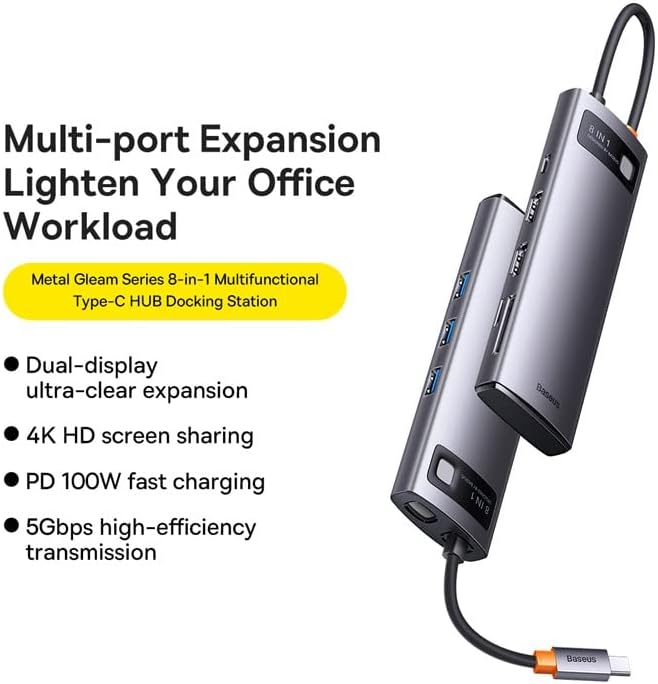
This graphic highlights the multi-port expansion capabilities of the Baseus Metal Gleam Series 8-in-1 USB-C Hub, emphasizing its ability to lighten office workload with features like dual-display, 4K HD screen sharing, PD 100W fast charging, and 5Gbps high-efficiency transmission.
3. Zawartość opakowania
- 1 x Baseus Metal Gleam Series 8-in-1 USB-C Hub
- 1 x Instrukcja obsługi
4. Instrukcje konfiguracji
- Połącz z urządzeniem hosta: Plug the USB-C connector of the hub into the USB-C port of your laptop, tablet, or smartphone. Ensure the connection is secure.
- Podłącz urządzenia peryferyjne: Connect your USB devices (e.g., mouse, keyboard, external hard drive) to the USB 3.0 ports on the hub.
- Podłącz wyświetlacze: Use HDMI cables to connect your external monitors to the HDMI ports on the hub.
- Dostarczanie mocy (opcjonalnie): If your host device requires charging, connect your original USB-C power adapter to the USB-C PD port on the hub. This will charge your device while using the hub.
- Włóż karty pamięci: Insert your microSD or SD cards into the corresponding slots for data access.

This image provides an angled perspective of the Baseus Metal Gleam Series 8-in-1 USB-C Hub, highlighting its sleek design and the three accessible USB 3.0 ports on its side.
5. Instrukcja obsługi
5.1. Przesyłanie danych przez USB 3.0
Connect USB devices such as flash drives, external hard drives, or other USB peripherals to the USB 3.0 ports. The hub supports data transfer speeds of up to 5Gbps.
5.2. Wyjście wyświetlacza HDMI
Connect your monitors using HDMI cables. The hub supports dual HDMI output. For optimal performance, ensure your display settings on your computer are configured correctly for extended or mirrored displays.
- Systemy Windows: Supports triple-display (A+B+C) at 1080P@60Hz in expansion mode, and (A+A+A) at 1080P@60Hz in mirroring mode.
- Apple OS Systems: Supports dual-display (A+B+B) at 4K@30Hz in expansion mode, and (A+A+A) at 4K@30Hz in mirroring mode.

This visual guide demonstrates the dual-display functionality of the Baseus Metal Gleam Series 8-in-1 USB-C Hub, showing both expansion and mirroring modes for Windows systems (1080P@60Hz) and Apple OS systems (4K@30Hz).
5.3. USB-C Power Delivery
The USB-C PD port allows you to charge your host device (laptop, tablet) while simultaneously using the hub's other functions. Connect your device's original USB-C power adapter to this port. The hub supports up to 100W power pass-through.
5.4. SD/MicroSD Card Reader
Insert your SD or microSD cards into the designated slots. The hub will allow your device to read and write data to these cards.
6. Konserwacja
- Czyszczenie: Do czyszczenia powierzchni piasty należy używać miękkiej, suchej ściereczki. Unikaj stosowania płynnych środków czyszczących i materiałów ściernych.
- Składowanie: Przechowuj piastę w chłodnym, suchym miejscu, z dala od bezpośredniego światła słonecznego i ekstremalnych temperatur.
- Obsługiwanie: Unikaj upuszczania piasty i narażania jej na silne uderzenia. Nie próbuj demontować urządzenia.

An exploded diagram of the Baseus Metal Gleam Series 8-in-1 USB-C Hub illustrates its internal electronic components and sophisticated circuit board design.
7. Rozwiązywanie Problemów
- Brak wyjścia wyświetlacza:
- Ensure the HDMI cables are securely connected to both the hub and the monitor.
- Verify that your monitor input source is set to the correct HDMI port.
- Check your computer's display settings to ensure the external monitor is detected and configured.
- Spróbuj ponownie uruchomić komputer.
- Devices Not Recognized (USB/SD/MicroSD):
- Ensure the hub's USB-C connector is fully inserted into your host device.
- Spróbuj podłączyć urządzenie bezpośrednio do portu USB komputera, aby sprawdzić, czy działa niezależnie.
- Uruchom ponownie komputer i podłącz ponownie koncentrator.
- Brak zasilania/ładowania:
- Sprawdź, czy zasilacz USB-C jest podłączony do portu PD koncentratora i działa prawidłowo.
- Sprawdź, czy Twoje urządzenie hosta obsługuje technologię USB-C Power Delivery.
- Połączenie przerywane:
- Sprawdź, czy wszystkie połączenia są solidne i stabilne.
- Unikaj umieszczania koncentratora w pobliżu silnych źródeł zakłóceń elektromagnetycznych.
8. Specyfikacje
| Atrybut | Wartość |
|---|---|
| Wymiary produktu | 3.94 x 1.97 x 1.18 cala |
| Waga przedmiotu | 5.3 uncji |
| Numer modelu przedmiotu | WKWG050113 |
| Interfejs sprzętowy | USB 3.0, HDMI, USB-C, SD, MicroSD |
| Funkcja specjalna | Przenośny |
| Kompatybilne urządzenia | Urządzenia z portem USB-C |
| Łączna liczba portów USB | 8 (3x USB 3.0, 2x HDMI, 1x USB-C PD, 1x MicroSD, 1x SD) |
| Rozdzielczość HDMI | Up to 4K@30Hz (Apple OS), 1080P@60Hz (Windows) |
| Wejście USB-C PD | Do 100 W |
| Prędkość przesyłu danych | Do 5 Gb/s (USB 3.0) |
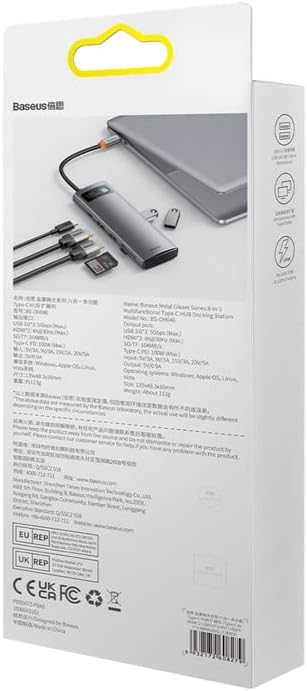
Tył view of the product packaging displays detailed technical specifications and compliance information for the Baseus Metal Gleam Series 8-in-1 USB-C Hub.
9. Gwarancja i wsparcie
For warranty information, technical support, or further inquiries, please visit the official Baseus weblub skontaktuj się z działem obsługi klienta. Zachowaj paragon zakupu na potrzeby roszczeń gwarancyjnych.
Oficjalny Baseus Webstrona: www.baseus.pl